Chinese-Language Desktop Automation Script Tool: Build Workflows with Zero Programming

A zero-programming Chinese visual desktop automation script generation tool
This is a fully Chinese-interface desktop automation tool that uses block-based drag-and-drop operations to create automation scripts without writing code. Core features include image recognition with auto-clicking, scheduled task scheduling, OCR text and CAPTCHA recognition, and mouse/keyboard simulation. It's suitable for office automation, data collection, game scripting, and more, reducing the programming barrier to virtually zero.
A Powerful Desktop Automation Tool That Requires No Programming
Many non-technical users face a common frustration: they have countless repetitive computer tasks they'd love to automate, but programming languages create an insurmountable barrier. The tool introduced today is a fully Chinese-interface desktop automation script generator that transforms complex programming logic into visual, block-based building, enabling anyone to quickly create their own automated workflows.
The core concept is simple: anything you can do manually on your computer, this tool can automate for you. Whether it's repetitive clicking, scheduled logins, image recognition, or CAPTCHA handling — everything can be achieved by dragging and dropping functional modules, with results identical to what you'd get from writing code directly.
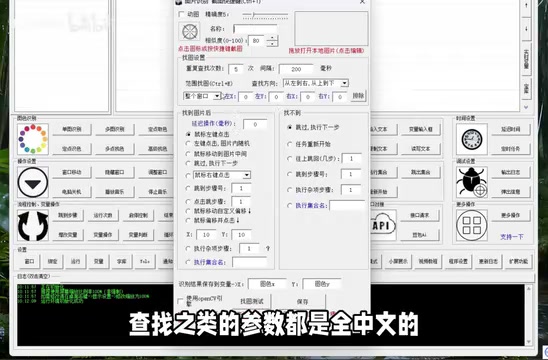
Core Feature Modules Explained
Image Recognition & Automated Clicking
Image recognition is one of the most practical features of this automation tool, with a very intuitive workflow:
- Set target image: Place a screenshot of the screen element you need to identify into the parameters
- Configure trigger actions: Define what happens when the image is found — left-click, right-click, double-click, or even random clicking within the image area
- Fine-grained control: Choose from multiple methods such as moving the mouse to the image center or clicking at random positions within the image boundaries
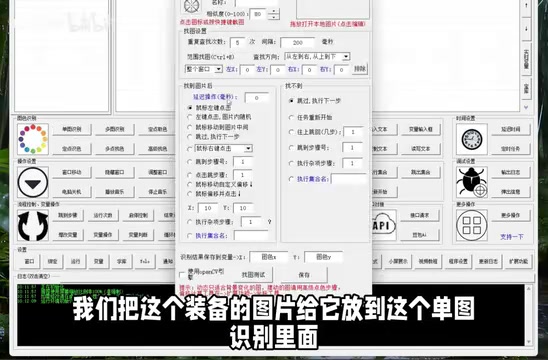
All parameter settings are fully labeled in Chinese, with no English code or technical jargon whatsoever, making the barrier to entry extremely low. For example, if you want to automatically click a button, you simply capture a screenshot of the button, then select "After finding image → Left-click random position on image" to complete the configuration.

Scheduled Task Automation
For scenarios requiring timed execution, the tool includes a built-in scheduled task module that allows you to precisely specify the date and time for scripts to automatically start running.
Common use cases include:
- Daily automated login for check-in/attendance
- Periodic automatic file backup or screenshot archiving
- Batch data processing operations on a set schedule
For users with frequent repetitive login or check-in needs, a one-time setup enables long-term automatic execution, eliminating the hassle of daily manual operations.
OCR Text Recognition & Automated CAPTCHA Handling
The tool also integrates OCR (Optical Character Recognition) functionality, capable of automatically recognizing text content on screen. Even more practical is its support for automated CAPTCHA recognition and input — when the automation workflow encounters a CAPTCHA, the tool can automatically identify the CAPTCHA content and fill it into the input field, achieving truly unattended end-to-end automation.
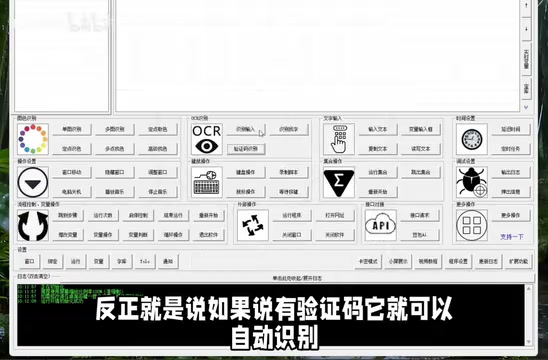
Note that the CAPTCHA recognition feature requires additional configuration, and users need to adjust settings according to the actual CAPTCHA type (numbers, letters, sliders, etc.).
Mouse & Keyboard Simulation
Beyond the advanced features above, the tool also provides comprehensive basic operation modules:
- Move mouse to specified coordinate positions
- Simulate single-click, double-click, and right-click
- Keyboard text input and shortcut key combinations
- Wait, delay, and other flow control commands
When combined with the advanced features, these basic modules can cover the vast majority of everyday computer automation needs.
How to Use: Create Automation Scripts Like Building Blocks
The biggest highlight of this tool is its block-based operation logic. Users don't need to write a single line of code — just follow these steps:
- Clearly outline the workflow you want to automate
- Select the corresponding modules from the feature module list
- Add them to the script in execution order
- Configure specific parameters for each module (all in Chinese interface)
- Click run, and the script executes immediately
The entire process is like building with blocks — whatever functionality you need, just drag the corresponding module in. Every module's parameters are clearly labeled in Chinese, completely eliminating the burden of learning a programming language.
Applicable Scenarios & Usage Recommendations
This zero-code automation tool is suitable for the following types of users:
- Office automation: Workers who need to repeatedly execute fixed operational processes, such as batch form-filling or scheduled report submission
- Data collection & processing: Users who need to periodically extract information from specific interfaces
- Game scripting: Players who need to automate repetitive game operations
- System administration: Administrators who need to execute scheduled maintenance tasks
Overall, this is a desktop automation tool that reduces the programming barrier to virtually zero. Its feature coverage ranges from basic mouse and keyboard simulation to advanced image recognition and OCR text recognition, essentially meeting various everyday computer automation needs. If you can't program but have automation requirements, this tool is worth a try.
Related articles
 Tech Frontiers
A Rare Quiet Day in AI: Recursive Self-Improvement Stirs Beneath the Surface
A rare quiet day in AI sees multiple sources go silent simultaneously. Behind the calm, Recursive Self-Improvement (RSI) research continues. What this means for the industry.
 Tech Frontiers
Reve 2 vs. Ideogram 4: A Deep Dive into Layout Control in AI Image Generation
A deep comparison of Reve 2 and Ideogram 4's layout control capabilities, covering technical approaches, real-world use cases, and industry trends for designers and creators.
 Tech Frontiers
In the Weights: Check Your Influence Score in the AI World
In the Weights is an AI influence search engine that quantifies your presence in the AI world with a score. Explore how it evaluates practitioners and what it means for digital identity.