Choosing AI for Customer Support: A Practical Guide to Real-Time Assist, Automation, and Full QA Coverage

Five core criteria for evaluating customer service AI — from real-time call assist to QA closed loops.
A 250-agent US ISP support team's AI search reveals a fundamental industry shift: enterprises no longer want AI to replace agents, but to augment them in real time during live calls. Key requirements include proactively surfacing sourced internal knowledge, distilling top-performer expertise into team-wide coaching, preserving full context during bot-to-human handoffs, providing transparent and contestable AI QA scoring, and deep Salesforce integration with proper IT governance. Together, these form a practical selection framework — with agent adoption rate and real-world usability as the ultimate success metrics.
A Real Customer Support Operations Challenge
A support operations manager at a regional U.S. internet service provider recently raised a question many in the industry are wrestling with: how do you actually use AI to help frontline agents? Their team has roughly 250 agents across phone and live chat, handling a heavy volume of billing inquiries and troubleshooting calls.
The pain points are concrete: new agents scramble to look up answers while customers wait on hold, and senior agents end up becoming a "help desk for the help desk," constantly interrupted by colleagues asking for guidance. This isn't an abstract efficiency problem — it's a real daily drag on team productivity.
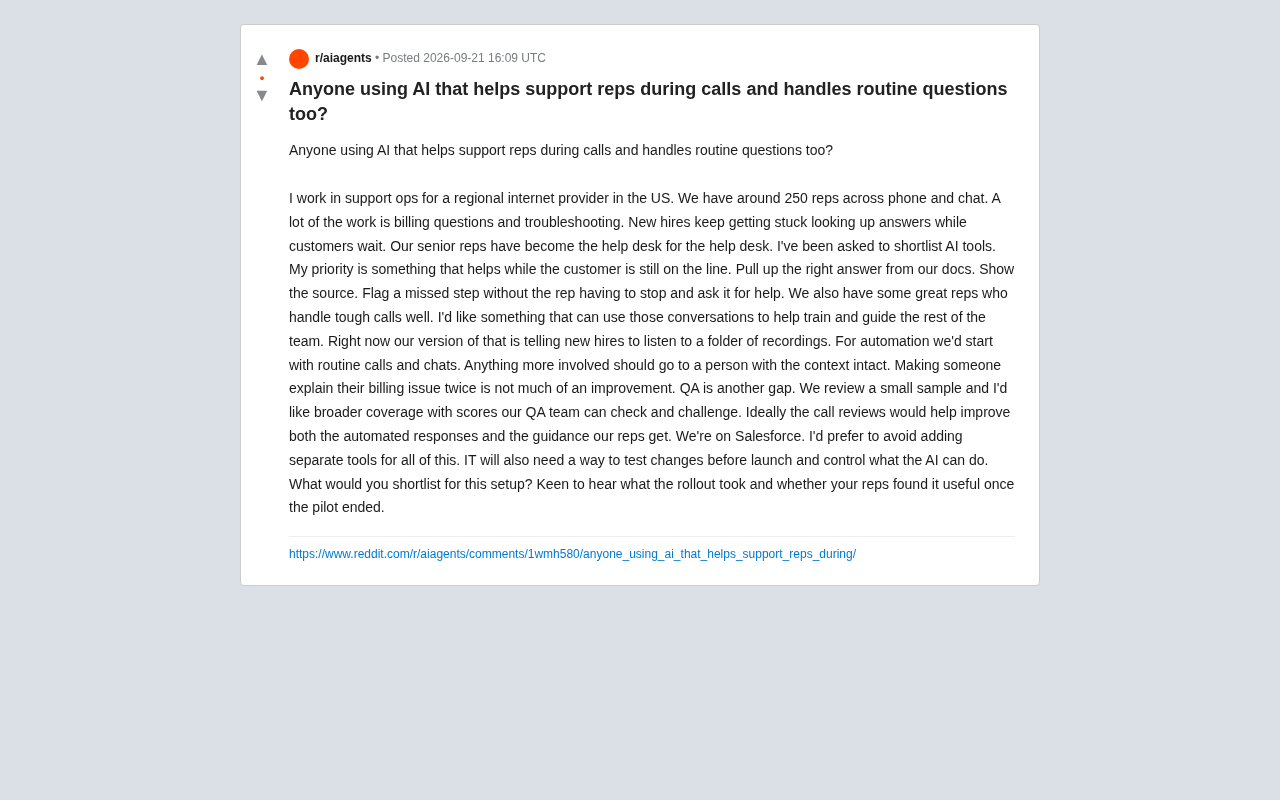
This kind of need is highly representative of the customer service industry. It signals a critical shift — enterprises no longer expect AI to replace human agents, but to augment them in real time.
Real-Time Assist During the Call Is the Core Need
The original poster's top priority, repeated throughout the thread, is getting help "while the customer is still on the line." This translates into several concrete capability requirements:
- Retrieve the right answers from internal documentation, so agents don't have to go searching themselves
- Show the source of the answer, so agents can verify its credibility
- Proactively flag missed steps, without requiring agents to stop and explicitly "ask" the AI
That last point is worth highlighting. It draws a clear line between a "passive Q&A bot" and an "active assist system." The passive model requires agents to interrupt the conversation to type a question; the active model listens to the call context in the background and automatically surfaces relevant knowledge and process prompts. For a new agent trying to calm down a frustrated customer, the latter is far more valuable.
This capability typically relies on Retrieval-Augmented Generation (RAG) — vectorizing enterprise knowledge base documents and semantically matching them against real-time conversation content. "Showing the source" isn't just a trust feature; it's also a necessary safeguard against AI hallucinations.
RAG (Retrieval-Augmented Generation) is currently the dominant technical approach for enterprise knowledge base Q&A. The basic mechanism: internal documents (operating manuals, product specs, troubleshooting guides) are chunked into small segments, converted into high-dimensional vectors via an embedding model, and stored in a vector database. When a user asks a question or has a conversation, that input is also converted to a vector and matched against the database using similarity search. The most relevant document chunks are retrieved and passed as context to a large language model, which then generates a response. The key advantage: answers have a traceable "source document," significantly reducing the risk of fabricated facts ("hallucinations"). In customer service contexts, showing the answer source helps agents quickly assess reliability — and provides an audit trail when something goes wrong. The limitation: retrieval quality depends heavily on how well-structured and up-to-date the knowledge base is. Poorly formatted or stale documentation leads to significantly lower recall accuracy.
Turning Top Performers' Experience into Team Assets
One particularly insightful request in the thread: the team has agents who are exceptionally good at handling difficult calls, and the manager wants to use those high-quality conversations to train and coach others.
The current approach is having new hires "listen to a folder of recordings" — arguably the most primitive form of knowledge transfer in any contact center, inefficient and impossible to scale.
This is where AI has enormous potential: by analyzing the conversation patterns, language structures, and resolution flows of high-performing agents, the system can distill reusable response strategies and feed them back into real-time assist prompts. In other words, the best agent expertise no longer stays locked in a recordings folder — it gets converted into dynamic guidance that the entire team can access on demand.
Automation Needs Boundaries — and Seamless Handoffs
On automation, the poster's thinking is notably mature. He advocates starting with routine calls and chats, while routing more complex issues to humans — but critically, with "full context preserved."
He put it well: "Making a customer explain their billing issue twice isn't an improvement."
This gets at the core reason many AI customer service deployments fail — the gap between the bot and the human agent. Information customers provide during the self-service phase is often completely lost when the call is transferred, forcing them to start over and leaving them with a worse experience than before. The right architecture has AI handling simple scenarios, escalating when it detects it's out of its depth, and passing along the collected information, customer sentiment, and issue context to the live agent.
QA Coverage and Closed-Loop Improvement
Quality assurance (QA) is another gap the poster specifically names. Currently, the team can only manually review a small sample of conversations, leaving most interactions unexamined.
What he wants instead:
- Broader coverage, ideally reviewing all conversations
- Scores that QA teams can examine and challenge
- Review outcomes that improve both automated responses and coaching for human agents
The "challengeable scoring" point deserves emphasis. It shows the poster doesn't blindly trust AI scoring — he wants scores that are transparent, traceable, and open to appeal. That's exactly the right posture for responsibly introducing AI QA. He's also describing a closed loop: issues surfaced by QA feed back into optimizing automation and real-time assist, creating continuous improvement.
Traditional contact center QA relies on manual sampling — industry average spot-check rates typically fall between 1% and 5%, meaning the vast majority of conversations are never reviewed. AI-driven automated QA, by transcribing and scoring all conversations, can push coverage rates close to 100%. Common scoring dimensions include: compliance (did the agent follow script guidelines?), resolution rate (was the issue addressed?), tone management (was the agent's manner appropriate?), and process adherence (were standard procedures followed?). However, fully automated scoring introduces new governance challenges: whether the scoring rubric itself is sound, and whether the model's judgments are fair in edge cases, both require human review mechanisms to validate. The "contestable scoring" design philosophy is a direct response to this — agents or team supervisors can dispute specific scores and trigger human review. This mechanism both prevents AI misjudgments from affecting performance evaluations and continuously accumulates labeled data to improve the scoring model, creating a genuine feedback loop.
Tech Stack and Governance Requirements
Finally, there are hard constraints on the implementation side — and these often determine whether a deployment succeeds or fails:
- Deep Salesforce integration: the team is already using it and wants to avoid introducing separate tools for each feature, reducing system fragmentation
- Change testing capability: IT needs to test changes before they go live
- Permission controls: IT needs to be able to define what the AI can and cannot do
These requirements reflect the reality of enterprise deployment: no matter how capable the AI is, if it can't fit into existing workflows or be governed by IT, it won't actually get adopted. For a 250-person team, the operational simplicity and data consistency that comes from a unified platform may matter more than peak performance on any single feature.
Salesforce Service Cloud is one of the most widely used CRM platforms in the customer service industry. Its ecosystem includes native AI capabilities like Einstein AI, and it exposes rich APIs for third-party integrations. For teams that are deeply invested in Salesforce, the key benefit of choosing a native integration is that customer data, ticket history, and AI assist content all share the same data model — no cross-system state synchronization needed. The existing IT permission framework (field-level security, user role management) can be reused directly, reducing redundant setup. In contrast, a standalone AI tool bridged via middleware requires maintaining data sync logic, managing field mapping differences, and absorbing the risk of information inconsistencies caused by sync delays. For a 250-person operations team, these hidden operational costs are often underestimated in initial evaluations, but consistently drain IT and ops resources after go-live.
A Selection Framework for Similar Teams
While this started as a help post, it's effectively a high-quality requirements document. If you're evaluating AI tools for a customer service team, this framework is a solid starting point:
- Real-time assist capability: Does it proactively push knowledge with sources, or just answer when asked?
- Knowledge capture capability: Can it turn top-performer expertise into team-wide coaching?
- Automation and handoff: Does it preserve full context when escalating to a human?
- QA closed loop: Is scoring transparent and contestable? Does it drive continuous improvement?
- Integration and governance: Does it fit into the existing CRM? Does IT have enough room to test and control it?
The poster's final concern is equally critical: how much effort did onboarding actually take, and did agents genuinely find it useful after the pilot ended? This is a reminder to every decision-maker that beyond technical benchmarks, adoption rate and frontline experience are the ultimate measures of project success.
Related articles

Chain of Thought Isn't Just for AI: How Humans Can Use CoT to Improve Thinking Quality
Chain of Thought isn't just a prompt trick for large models. Starting from a Hacker News discussion, this article analyzes why CoT works for human thinking too, breaks down actionable ways to transfer it, and highlights the key differences between human CoT and machine CoT.
Cloudflare Teams Up with OpenAI: Closi…
Cloudflare Teams Up with OpenAI: Closing the Loop from Vulnerability Discovery to Defense with AI
Cloudflare uses OpenAI Daybreak to investigate security vulnerabilities and generate reviewable remediation plans, while developers use Codex to boost coding efficiency and quality.

Orca Multi-Agent Orchestration in Practice: A Guide to Parallel Collaboration with Claude and Codex
Orca is Stable AI's free open-source agent workbench supporting 34 agents like Claude Code and Codex in parallel. Learn its Git worktree isolation, multi-model orchestration, and mobile management.