Choosing from 11,000+ Models: A Practical Guide to Microsoft Foundry Model Selection

A systematic methodology for selecting the right model from Microsoft Foundry's 11,000+ options.
With over 11,000 models in Microsoft Foundry, this guide presents a structured selection methodology. Start by narrowing candidates using source, task type, deployment mode (Serverless API vs. Managed Compute), and lifecycle status. Then compare models using quality index, latency, attack rate, cost, and throughput benchmarks. Validate with real-world testing — a side-by-side comparison of GPT-5.6 Luna and DeepSeek Flash on the same agent task shows Luna wins on latency while DeepSeek wins on cost, with near-identical output quality. Finally, plan quotas and guardrails before going to production.
With over 11,000 models available in the Microsoft Foundry model catalog, any AI developer can quickly feel overwhelmed. How do you zero in on the right model for your specific use case? This article draws from a hands-on Microsoft Foundry walkthrough to lay out a complete methodology — from filtering and benchmark evaluation to quota management.
From 11,000 Models to a Focused Shortlist
In Microsoft Foundry, the model catalog lives under the Models section of the Discover tab. In the demonstration, the presenter notes that based on their region and subscription, 254 models are available — while the full catalog contains over 11,000. With that many options, trial and error becomes prohibitively expensive. The first step must be systematically narrowing the field.
The first question to ask: where does the model come from? Foundry's model sources fall into two main camps — Foundry Labs (Microsoft's own AI models) and Azure (which aggregates not only Microsoft's models but also third-party publishers including Azure OpenAI, DeepSeekAd, Grok, Kimi, Cohere, and Mistral). Different publishers have different capability strengths. If you have no hard requirement for a specific vendor, you can skip this filter entirely and go straight to capability-based selection.
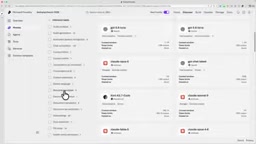
The more practical filtering dimension is task type. Beyond basic agent invocation, you need to determine whether a model supports multimodal inputs, audio processing, document analysis, or embeddings. Clarifying your task type eliminates a large portion of irrelevant options in one pass. If you're planning to fine-tune, you can also add "fine-tuning support" as a filter condition.
Deployment Options and Model Lifecycle: The Details You Can't Afford to Ignore
Model selection isn't just about the model itself — deployment options directly affect cost and operational overhead. The walkthrough draws a clear distinction between two deployment modes: Serverless API and Managed Compute. The core difference comes down to who manages the infrastructure. With Serverless, you don't need to think about underlying resources at all. With Managed Compute, you're responsible for infrastructure details like GPU capacity.
Deployment location is another decision point. Global deployment makes a model accessible worldwide and is the most common choice. But if your data is highly sensitive and must remain within a specific country or region, you should opt for a Region/Locale-specific deployment.

On the cost side, Developer Tier is the most economical option — well-suited for low-cost experimentation. Worth noting: some models in the catalog are at different lifecycle stages. Some are already deprecated, some are approaching deprecation, and some are still in preview. The demo mentions that certain mini models, though deprecated, are still usable for fine-tuning. These legacy models can be great for cheap experimentation, but using them in production requires careful assessment of lifecycle risk.
If you plan to fine-tune, confirm which fine-tuning methods the model supports — supervised fine-tuning, or reinforcement learning with a grader. Different models support different fine-tuning paths, which directly determines whether you can achieve your optimization goals.
A note on deployment pricing models: Serverless API billing is typically token-based — you pay for what you consume, with no need to reserve resources. This suits projects with variable traffic or those in early validation stages. Managed Compute requires pre-allocating and continuously holding compute resources (e.g., GPU instances), making it better suited for production workloads with stable, predictable traffic and strict latency requirements. The choice between them directly shapes your overall cost structure: Serverless is more economical at low concurrency, but at high concurrency its per-unit cost may exceed the amortized fixed cost of Managed Compute.
Using Benchmark Data for Side-by-Side Comparisons
Once you've narrowed the candidate list, it's time to make decisions with hard metrics. Using GPT-5.6 Luna as an example, the presenter highlights several key benchmarks: a quality index of approximately 0.7875, latency of around 24 seconds, and an attack rate of 2.8 on the safety dimension.
Looking at one model's numbers in isolation is limited. Foundry supports side-by-side comparisons within the same category. In the demo, GPT-5.6 Luna, Grok 4, and DeepSeek Flash are compared directly — with a telling conclusion: Luna wins on quality and safety, while DeepSeek comes out ahead on cost and throughput. You also need to check feature compatibility — does the model support the Responses API, does it support Agents, and so on.

This comparison clearly illustrates the fundamental truth of model selection: almost no single model wins on every dimension. Higher quality typically means higher cost and lower throughput. Lower cost may come with slightly higher latency. The key is getting clear on your scenario's actual priorities.
Understanding the metrics: The quality index is typically a weighted composite of multiple sub-evaluations, covering model performance on standard Q&A, reasoning, code generation, and similar tasks. The attack rate is a core safety metric, measuring the probability that a model is successfully manipulated into producing harmful output under adversarial prompts — jailbreaks, prompt injections, and similar attack vectors. A lower number indicates a more robust safety boundary. For public-facing agent applications, safety metrics often carry as much weight as quality, since a single successful attack can bring compliance and reputational risks far exceeding the model's cost. Throughput measures the number of requests a model can handle per unit time, directly determining how the system holds up under high-concurrency scenarios.
Real-World Testing: The Cost vs. Latency Tradeoff
To validate the paper benchmarks, the presenter runs the same "Cupcake Agent" scenario against both DeepSeek Flash and GPT-5.6 Luna, observing real-world performance. Evaluation dimensions include response latency, token consumption (which maps directly to cost), and answer quality — specifically, whether the right tools were called and whether token usage was efficient.

The results are instructive: GPT-5.6 Luna delivered the lowest latency, but at higher token consumption. DeepSeek was slightly slower on tool invocation and response, but the difference in answer quality was minimal — both correctly completed the order-placement task. This means that for this particular scenario, the decision largely comes down to cost vs. latency, not quality — because quality is close enough to be a non-factor.
The cost breakdown makes this concrete: DeepSeek handled 24 requests on the day of deployment, consuming roughly 37,000 tokens — averaging about 1,500 tokens per conversation — at a total cost of approximately $0.0376. GPT-5.6 Luna, by contrast, is far more token-hungry: just 7 requests consumed roughly 47,000 tokens, making it a token-intensive model. These numbers vividly illustrate why small-scale load testing in real scenarios is essential before scaling to production.
Don't Overlook Quotas and Rate Limiting
The last factor that's easy to underestimate is quota and rate limiting. In the demo, DeepSeek's in-project quota allocation is 10K, with 5,000 already consumed during testing. When the team needs more quota, they can file a request directly. During deployment, you can also configure custom quota limits, per-minute token caps, deployment region, and guardrails parameters.
For any agent application heading to production, quota planning is fundamental to service stability. If traffic spikes and quota runs out, rate limiting kicks in and directly degrades the user experience.
A note on quota complexity: Quota management gets particularly complicated in multi-tenant or multi-project scenarios sharing a single subscription. Azure's quota system typically measures in Tokens Per Minute (TPM) or Requests Per Minute (RPM), and quota is a subscription-level total — meaning different deployments compete for the same pool. The guardrails parameter lets developers layer content filtering rules at the model level — for example, blocking specific categories of inputs or outputs. In regulated industries like finance and healthcare, this is often a compliance requirement rather than an optional feature. Planning quota ceilings in advance and setting up alerts is basic engineering practice to prevent traffic spikes from triggering cascading failures.
Closing Thoughts: The Model Is the Most Replaceable Component in Your Agent
When building AI agents, the model is actually one of the most replaceable components. Precisely because it's replaceable, choosing the right one matters more — not less. The methodology outlined here can be summarized in a few steps: first, narrow the candidates by source, task type, deployment mode, and lifecycle status. Then use benchmarks — quality, latency, safety, cost, throughput — for side-by-side comparisons. Finally, run small-scale real-world tests and plan your quota accordingly. If no off-the-shelf model meets your specific requirements, fine-tuning is the next step for further customization.
Rather than guessing your way through 11,000 models on intuition, build a decision pipeline — from filtering to validation — and let the data make the case.
Related articles

Chain of Thought Isn't Just for AI: How Humans Can Use CoT to Improve Thinking Quality
Chain of Thought isn't just a prompt trick for large models. Starting from a Hacker News discussion, this article analyzes why CoT works for human thinking too, breaks down actionable ways to transfer it, and highlights the key differences between human CoT and machine CoT.
Cloudflare Teams Up with OpenAI: Closi…
Cloudflare Teams Up with OpenAI: Closing the Loop from Vulnerability Discovery to Defense with AI
Cloudflare uses OpenAI Daybreak to investigate security vulnerabilities and generate reviewable remediation plans, while developers use Codex to boost coding efficiency and quality.

Orca Multi-Agent Orchestration in Practice: A Guide to Parallel Collaboration with Claude and Codex
Orca is Stable AI's free open-source agent workbench supporting 34 agents like Claude Code and Codex in parallel. Learn its Git worktree isolation, multi-model orchestration, and mobile management.