ChordViz Review: A Real-Time Visualization Workbench for MIDI and Audio

ChordViz turns real-time MIDI and audio into chord visuals, notation, and audio-reactive graphics for educators and performers.
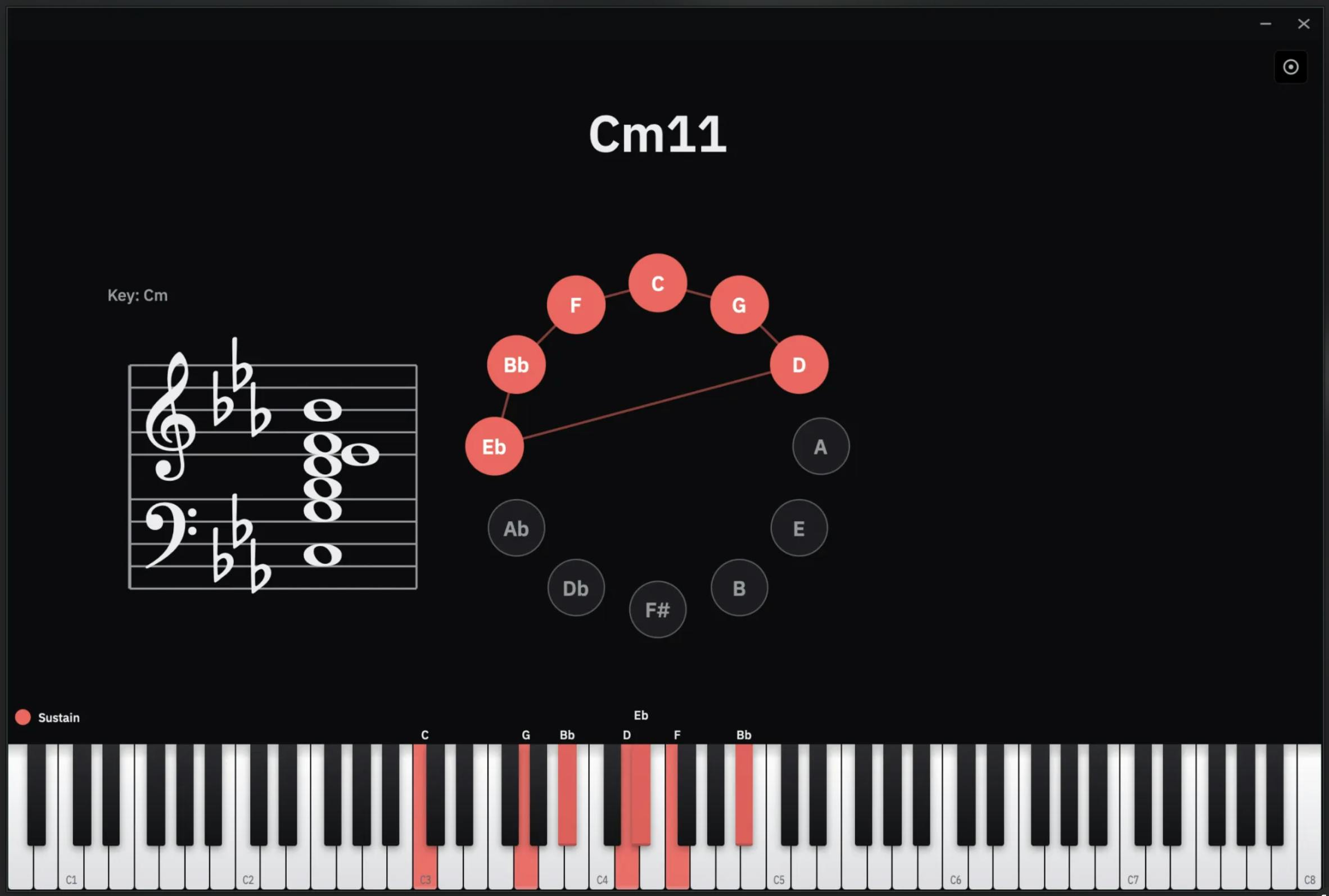
ChordViz is a music visualization workbench that transforms real-time MIDI and audio signals into three visual modes: chord visualization, standard notation, and audio-reactive graphics. With native video/audio/MIDI recording and integration with OBS, TouchDesigner, and Resolume, it targets music educators seeking interactive teaching tools and performers needing live visual content synchronized to their music.
When Music Meets Visualization
Music education and creation have long faced a shared challenge: how to transform abstract sounds, chords, and rhythms into intuitive visual language. For music teachers, students struggle to grasp the inner logic of chord progressions; for performers, live shows lack visual presentations that sync with the music. ChordViz, which recently launched on Product Hunt, was built precisely to address this pain point as a music visualization workbench.
Created by Charles-Antoine Pouliot, the product positions itself as a "visual workspace for music teachers and creators." After launch, it received 68 upvotes, ranking 17th on that day's leaderboard, categorized under music, education, and data visualization.
The exploration of music visualization actually has a long history. As early as the 1720s, French mathematician Louis-Bertrand Castel proposed the concept of a "color harpsichord," attempting to map different pitches to different colors. In the digital age, this field has evolved from entertainment novelties to professional tools—from the spectrum animations built into Windows Media Player to today's professional toolchains. In the current market, Synthesia focuses on waterfall-style visualization for piano learning, tools like iZotope provide professional spectrum analysis, and programming frameworks like Processing/p5.js serve creative coders with technical backgrounds. ChordViz attempts to find a balance between ease of use and professionalism among these solutions.
ChordViz Core Features: Real-Time Transformation from Sound to Image
Real-Time MIDI and Audio Input Processing
ChordViz's core capability lies in transforming real-time MIDI and audio signals into multiple visual forms. Whether it's MIDI output from a digital piano or raw audio captured by a microphone, the system can instantly parse the input and generate corresponding visualizations.
Understanding the difference between these two input methods helps grasp the product's technical architecture. MIDI (Musical Instrument Digital Interface) is a communication protocol for music devices established in 1983. It transmits not sound itself, but performance instructions—including parameters like note onset/offset, velocity, and pitch. This characteristic makes MIDI signals naturally suited for visualization: the system can precisely know which note was triggered at what time and with what force, without needing complex audio analysis algorithms to extract performance information.
Raw audio input is another matter entirely. Unlike MIDI's structured data, audio signals require analysis through signal processing algorithms. Common techniques include Fast Fourier Transform (FFT) for spectrum analysis, Chroma Feature extraction for identifying pitch classes, and template-matching-based chord recognition algorithms. Real-time audio chord detection has been a research hotspot in the Music Information Retrieval (MIR) field, with the key challenge being how to ensure recognition accuracy under low-latency conditions—especially when facing complex harmonies and overtone-rich real instrument timbres. ChordViz's support for both input types means it needs to integrate two fundamentally different data processing pipelines at the backend.
This real-time capability is especially critical for teaching scenarios. When a teacher plays a chord on the keyboard, students can immediately see the chord's composition, note positions, and harmonic relationships on screen, rather than relying solely on their ears to figure things out. This "see what you hear" feedback mechanism significantly lowers the cognitive barrier to music theory learning.
Three Visualization Output Modes
According to the official description, ChordViz supports three main visualization forms:
- Chord Visualization: Intuitively displays chord composition and progressions
- Notation: Converts performance content into standard musical notation
- Audio-reactive Visuals: Dynamic visual effects that respond to audio, suitable for creating live performance atmospheres
This multi-form design means ChordViz is not a single-purpose tool but rather attempts to cover the full spectrum from serious education to stage performance.
Native Recording and Professional Software Integration
Three-in-One Recording: Video, Audio, and MIDI
One major highlight of ChordViz is its native recording capability. Users can not only record the generated video visuals but also simultaneously save audio and MIDI data. This multi-track recording approach is extremely valuable for creators—they can separately access visual, audio, and performance data for secondary editing in post-production, without relying on multiple standalone software tools to piece together a workflow.
Deep Integration for Live Streaming and Performance
More notably, ChordViz supports signal output to professional tools like OBS, TouchDesigner, and Resolume. This design reveals the product's emphasis on real-time performance and live streaming scenarios:
-
OBS (Open Broadcaster Software) is an open-source, free streaming and screen recording software supporting Windows, macOS, and Linux platforms. It has become the de facto standard in live streaming and screen recording. Its plugin architecture and virtual camera functionality make it a core component of content creation infrastructure. Typical ways ChordViz might connect to OBS include NDI protocol transmission, Spout/Syphon frame sharing, or browser source embedding—each approach involving different trade-offs in latency, image quality, and configuration complexity. Integration with OBS means ChordViz can seamlessly embed into online teaching or live performance streaming scenarios.
-
TouchDesigner, developed by Derivative, is a node-based visual programming environment widely used in interactive installations, immersive experiences, real-time visual performances, and other new media art scenarios. Its core advantage lies in the ability to map multiple data sources (sensors, audio, network data, etc.) to visual output in real time, with GPU-accelerated rendering support. Many large-scale immersive exhibitions worldwide (such as some teamLab projects) and music festival visual performances rely on TouchDesigner. ChordViz's ability to output data to it means artists can use chord information as parameters to drive more complex visual generation systems, achieving creative expression far beyond preset templates.
-
Resolume Arena/Avenue is the benchmark software in the VJ (Video Jockey) field, supporting multi-screen output, projection mapping, and real-time video effects processing. VJ culture originated in the nightclub and rave party scenes of the 1980s and has since expanded to music festivals, concerts, corporate events, and more. VJs need to synchronize visual content with a DJ's music in real time, and the chord and rhythm data provided by ChordViz can offer richer musical semantic information than simple volume response—knowing not just "how loud" the music is, but "what harmony it's expressing."
Through integration with these mature ecosystems, ChordViz positions itself as one link in a workflow rather than a closed system trying to replace all tools. This open integration strategy is typically more readily accepted by professional users.
Who Needs ChordViz? Target User Analysis
Based on its product positioning, ChordViz primarily targets two groups:
Music Educators — Piano and music theory teachers who need to transform abstract music theory into visual teaching materials. Real-time chord and notation display can significantly improve classroom interaction efficiency, while the recording function facilitates creating tutorial videos. Research shows that multi-sensory (visual + auditory) learning methods significantly enhance understanding and retention of musical concepts, especially for visual learners—seeing a graphical representation of chord structures is far more efficient than pure aural identification.
Content Creators and Performers — Including online music bloggers, live streaming musicians, and VJs for live shows. Audio-reactive visuals and professional software integration allow them to quickly build expressive visual performance setups. In the current trend of highly visual short-form video and live streaming content, pure audio content is increasingly difficult to attract attention, making tools that can convert performance into visual content an essential need for music creators.
Market Observations and Competitive Analysis
The space ChordViz occupies isn't entirely new—music visualization tools have existed for a while, but most are either too specialized (requiring programming or complex configuration) or too simple (limited to entertainment-level dynamic waveforms). ChordViz's differentiation lies in simultaneously addressing the rigor of music theory education (chords and notation) and the expressiveness of performance creation (audio-reactive visuals), while embracing existing professional ecosystems through open integration.
From a technical positioning standpoint, ChordViz fills a specific gap: it offers more visual creative capability than pure teaching tools (like Synthesia's waterfall note display), is more plug-and-play than pure creative tools (like building a music visualization system from scratch in TouchDesigner), and places more emphasis on accurate music theory representation than pure entertainment visualizations (like Spotify's Canvas or music player spectrums). This "middle ground" positioning is both an opportunity and a challenge—it needs to simultaneously meet the different expectations of two user groups.
Of course, as a newly launched product, its actual performance remains to be verified: visual generation quality, latency control, and the stability of various software integrations are all critical factors determining whether it can truly enter professional workflows. The latency issue is particularly important—for live performance and teaching scenarios, the time difference between visual feedback and audio needs to be controlled below the human perceptible threshold (generally considered to be under 20-30 milliseconds), otherwise "real-time" becomes a false promise. The product currently has few reviews and limited community feedback, so prospective users would be wise to try it out before committing.
Overall, ChordViz represents a pragmatic exploration at the intersection of music and visualization. Rather than chasing flashy gimmicks, it returns to the real needs of teachers and creators—making sound visible, teachable, and performable. For practitioners in this niche, it's worth a try.
Related articles

Python 3.15 New Feature: Is the sentinel Type Better Than None?
Python 3.15 adds the sentinel type, using named unique sentinel objects to replace None and bare object(), resolving confusion among missing values, explicit emptiness, and invalid input while avoiding type hint failures.

Deep Learning's Three Architectures and the Universal Approximation Theorem: A Complete Guide to MLPs, CNNs, and Transformers
Explaining the inductive bias differences among MLP, CNN, and Transformer, the existence meaning of the Universal Approximation Theorem (UAT), and the role of Taylor expansion in approximation analysis, while clearing up common misconceptions.

GitLab Emergency Patch Release: Analysis of Critical Security Fixes
GitLab releases critical patch 19.5.1, sparking 355 points of discussion on Hacker News. This article analyzes the background, upgrade steps for self-hosted instances, and verification points to help DevOps teams respond quickly to security updates.