ChromePing: A Real-Time Phone Interpreter in Your Browser — Make International Calls Without Installing an App
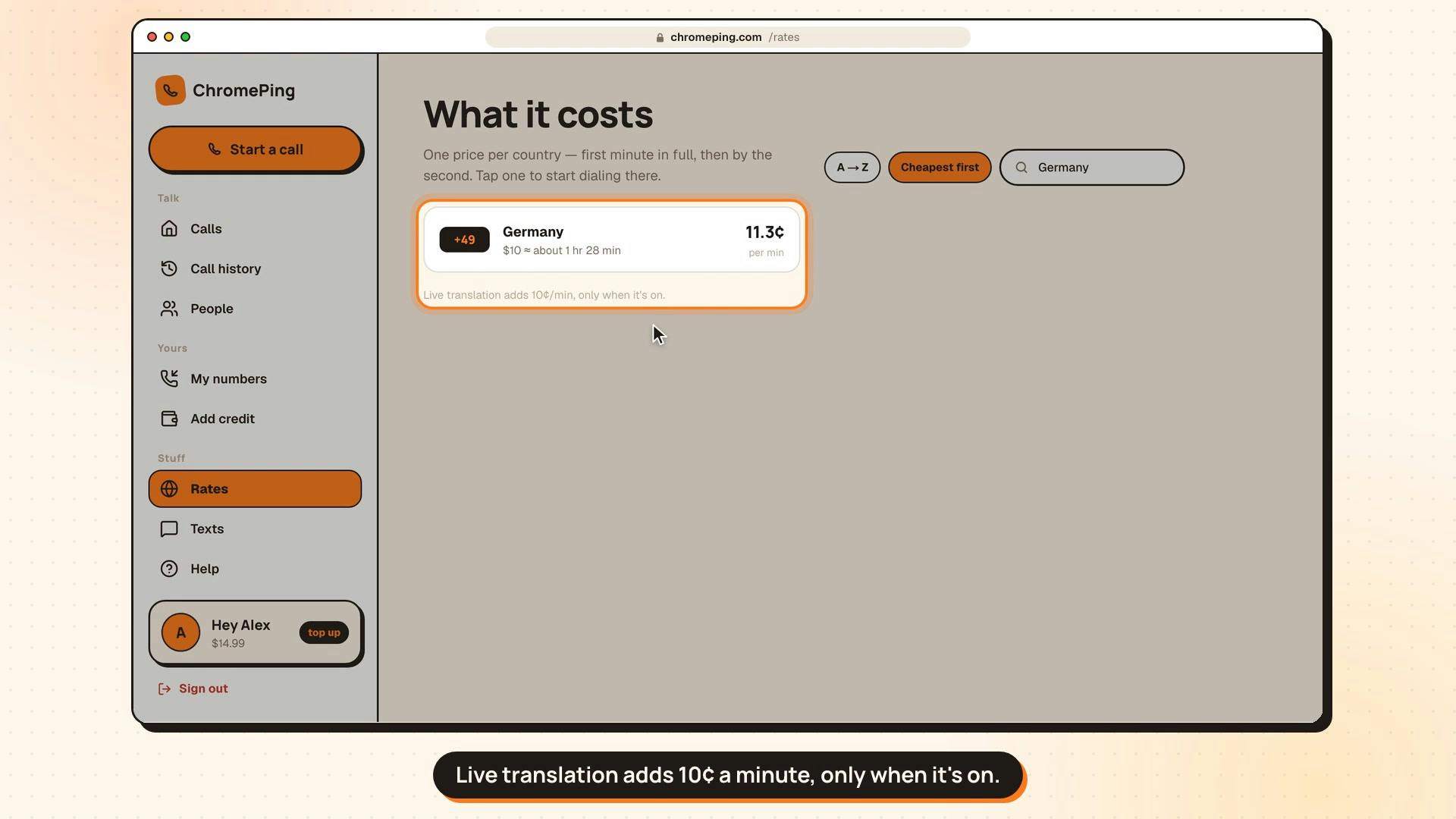
ChromePing lets users call any phone from their browser with two-way real-time translation, no app installation for either party, pay-per-use.
ChromePing is a browser-based call translation tool launched on Product Hunt that lets users call any real phone number directly, with neither party needing to install an app, providing two-way real-time translation and subtitles during the call. Its technical approach is presumed to involve browser-based speech capture, processing through a translation engine, and connection to the traditional telephone network via a VoIP gateway. The product uses a pay-per-use, no-subscription model that fits the occasional nature of phone communication across language barriers. Core use cases include essential phone scenarios such as contacting immigration offices, banks, landlords, and clinics. Main limitations include translation latency, speech recognition accuracy, and data privacy risks for sensitive information. It received 77 upvotes and ranked 10th on Product Hunt; the product is at an early stage with limited discussion.
Why Phone Calls Became the Last Wall Against Language Barriers
Moving to a country where you don't know anyone or speak the language, the phone is often the hardest obstacle to overcome. Immigration offices, banks, landlords, clinics — even just ordering food — all require you to pick up the phone and communicate in a language you're not fluent in. The common solution is to find a human interpreter — assuming you can find one. ChromePing, newly launched on Product Hunt, tries to solve this problem directly from the browser: you can call any real phone number from your browser — mobile or landline, any region — and neither party needs to install any app. During the call, two-way real-time translation is displayed as subtitles, and the person on the other end simply answers the phone as usual. Pay-per-use, no subscription.
The product received 77 upvotes on Product Hunt, ranking 10th, and is categorized under customer communication, digital nomads, and travel. From its positioning, it's not targeting the generic "translation tool" market, but rather specific scenarios where phone communication is essential yet language is a barrier.
The Core Product: Layering Translation on Top of the Ordinary Phone Network
The cleverness of ChromePing lies in the fact that it doesn't try to change any habits of either party on the call. The other person doesn't need to register an account, download software, or understand any technical steps. Based on the technical approach, it most likely captures and recognizes speech in the browser, routes the audio stream through a translation engine, and then connects to the traditional telephone network (PSTN) via a VoIP gateway. For the user, the experience is simply "making a call in the browser, with real-time subtitles appearing on screen."
This design choice brings several direct benefits. First, coverage is not limited by the other party's device — as long as they can answer a phone, it works. Second, it eliminates the coordination cost of both parties installing an app, which is especially critical in emergencies or unfamiliar communication scenarios. Third, the browser as a delivery vehicle means cross-platform availability, with no need to develop separately for different operating systems.
Of course, this also means call quality depends heavily on network conditions and the real-time performance of the translation engine. Two-way translation means latency is additive, and the pace of conversation will be slower than a natural call. For information exchange such as appointments, asking for directions, or simple inquiries, this latency is acceptable; for scenarios requiring rapid back-and-forth debate or emotionally charged communication, the experience will suffer.
PSTN (Public Switched Telephone Network) is the collective term for the traditional telephone system — the global telecommunications network we actually rely on when calling landlines or mobile phones. It is based on circuit-switching technology, where a dedicated physical or logical channel is established between both parties during a call, ensuring voice continuity and low latency. Unlike internet-based VoIP, PSTN does not depend on broadband connections, which gives it extremely wide coverage, including remote areas and emergency calls. Services like ChromePing need to use a VoIP gateway to convert internet audio streams into PSTN signals in order to reach ordinary phone numbers. This conversion step introduces additional latency and is one reason call quality is affected by network conditions. Understanding the difference between PSTN and VoIP helps assess the performance boundaries of such translation call services.
VoIP (Voice over IP) is the technology of compressing voice signals into data packets and transmitting them over internet protocols. Unlike PSTN's circuit switching, VoIP uses packet switching, offering high bandwidth utilization and low cost, but voice quality is noticeably affected by network jitter, packet loss, and latency. ChromePing captures speech in the browser, processes it through a translation engine, and must then connect to the traditional telephone network via a VoIP gateway to "call real phone numbers." This architecture determines that the two-way latency of a call comes not only from the translation engine but also from VoIP transmission and gateway conversion. For real-time conversation, end-to-end latency exceeding 300 milliseconds noticeably affects the rhythm of communication, and two-way translation adds two rounds of processing delay — this is the core bottleneck in the experience of such products.
The Product Logic Behind Pay-Per-Use
ChromePing explicitly adopts a pay-per-use, no-subscription model. This pricing strategy aligns closely with its use cases: phone communication across language barriers is typically occasional, not a daily necessity. A new immigrant may frequently need this kind of help in the first few months, after which usage naturally declines as language skills improve. Subscription models are not friendly to such intermittent needs, and pay-per-use lowers the barrier to trying it out.
From a business perspective, this also shifts cost pressure upstream — real-time translation and phone gateways both have marginal costs, and pay-per-use makes the unit economics clearer. However, the product has not disclosed specific billing methods or rates, so whether the actual cost is more economical than finding your own interpreter is something users need to evaluate themselves.
Applicable Scenarios and Known Limitations
ChromePing's most direct value is reflected in several high-frequency essential scenarios: phone communication with immigration offices or government agencies, contacting banks to handle account issues, negotiating leases with landlords, booking clinic appointments, and ordering food by phone. What these scenarios have in common is that the other party typically only offers a phone channel, and the communication involves specific information rather than casual chat.
Its limitations are equally obvious. Real-time two-way translation places high demands on speech recognition accuracy — accents, background noise, and technical terminology can all cause mistranslation. The subtitle format means users need to listen while watching the screen, which can be distracting during calls that require multitasking. Additionally, when sensitive personal information is involved (such as bank accounts or medical information), the data privacy issue of transmitting audio through a third-party translation service is a factor users need to weigh for themselves. The product page does not explain data processing and storage policies, which is worth confirming before正式 use.
The Competitive Landscape of Browser-Based Translation Calls
Bringing real-time translation into phone calls is not an entirely new concept, but most solutions require both parties to use the same app or rely on the translation features of conferencing software. ChromePing's differentiation lies in the combination of "calling real phone numbers" and "zero installation." For groups such as digital nomads, new immigrants, and cross-border business professionals, this combination addresses a real pain point.
A score of 77 upvotes and 10th place on Product Hunt shows it has attracted some attention, but 2 comments also reflect limited discussion for an early-stage product. Whether the product can find a balance between translation accuracy, call latency, and pricing will determine whether it becomes a practical tool or remains at the concept-demo stage. For users who need cross-border phone communication, it's worth keeping an eye on and trying out on a small scale.
One-line Summary
ChromePing lets users call any phone number from their browser with two-way real-time translation, no app installation required for either party, pay-per-use.
Paragraph Summary
ChromePing is a browser-based call translation tool launched on Product Hunt that allows users to directly call any real phone number, with neither party needing to install an app, providing two-way real-time translation and subtitles during the call. Its technical approach is presumed to be browser-based speech capture, processing through a translation engine, and connection to the traditional telephone network via a VoIP gateway. The product uses a pay-per-use, no-subscription model that fits the occasional nature of phone communication across language barriers. Core use cases include essential phone scenarios such as contacting immigration offices, banks, landlords, and clinics. Main limitations include translation latency, speech recognition accuracy, and data privacy risks for sensitive information. It received 77 upvotes and ranked 10th on Product Hunt; the product is at an early stage with limited discussion.
Related articles
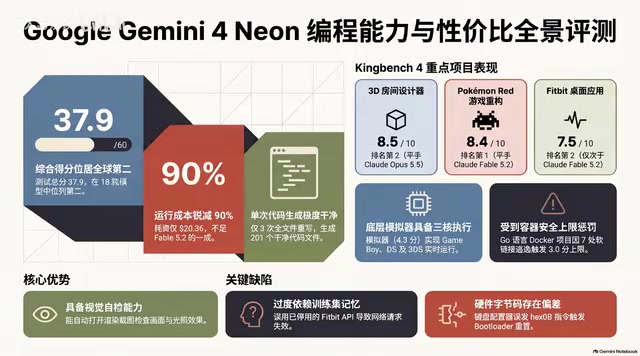
Gemini 4 Neon Hands-On: Value King or Confident Catastrophe?
Gemini 4 Neon review: 1M-token context, four thinking levels, 201 files in one KingBench4 pass at one-tenth Fable 5.2's cost—but it hallucinates fake data, leaves 7 symlink escapes, and bricks keyboards.

Google Gemini 4 Neon Hands-On: 6 3D Works That Impress and Fail
Hands-on with Google Gemini 4 Neon on a 3060 laptop: 6 3D works tested. Sunshower Fishing Harbor and mechanical keyboard impress; soft-body physics and faces fall short.
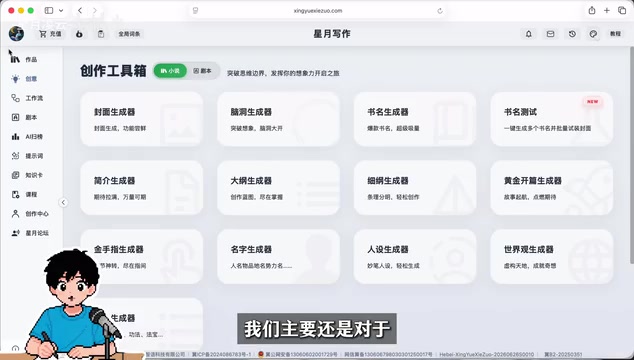
Gemini 4 Neo Web Novel Writing Test: Faint AI Flavor, Textured Dialogue
Bilibili creator's first-look review of Gemini 4 Neo for Chinese web novel writing: testing a Three Kingdoms transmigration opening with faint AI flavor, emotionally textured dialogue, and strong crisis building, plus comparison of 4A/4H/4C models and full workflow demos.