Claude Code Agent Teams Deep Dive: The AI Team That Actually Talks to Itself

Claude Code Agent Teams lets AI agents talk to each other, but single sub-agents or Skills are more practical for most tasks.
This article clarifies the core difference between Sub-agents and Agent Teams in Claude Code: Sub-agents run in isolation with no cross-communication, making parallel file writes prone to merge conflicts; Agent Teams enables genuine peer-to-peer communication around a shared task list, spun up on demand with a single prompt. For validation, plan mode and a confirmed task list replace infinite verification nesting. For QA workflows, Skills paired with the lightweight Haiku model are more cost-effective than a full team. The overall verdict: Agent Teams are impressive but token-heavy — a single well-configured sub-agent handles most tasks just fine.
From Sub-agents to Agent Teams: Two Fundamentally Different Collaboration Models
When people first hear about Claude Code's Agent Teams feature, it's easy to conflate it with the existing Sub-agents. They look similar on the surface — a primary agent spawning other agents to get work done — but the underlying mental model is completely different.
In Sub-agents mode, the main thread spawns one or more child agents that run independently, with no communication between them. The only thing the main thread ever sees is the final result each sub-agent returns. If you're running multiple sub-agents in parallel, they operate in silence — none of them knows what the others are doing.
This creates a classic problem: when multiple sub-agents write to the same file in parallel, merge conflicts become almost inevitable. There's no coordination mechanism — every agent is flying blind.
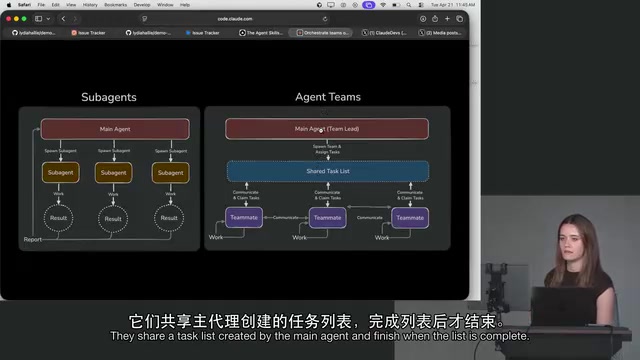
Sub-agents are typically implemented via the tool use mechanism: the main model packages a subtask as a function call, the sub-agent executes it in an isolated context window, and returns a result string. Because each sub-agent has a fully isolated context, they can neither see each other's intermediate state nor write to shared memory. This design is highly efficient for single, well-scoped tasks — but as soon as the work requires cross-agent coordination (such as multiple agents modifying the same codebase simultaneously), the lack of a communication channel becomes the bottleneck. Merge conflicts are just the most visible symptom.
The Core Difference in Agent Teams: They Actually "Talk"
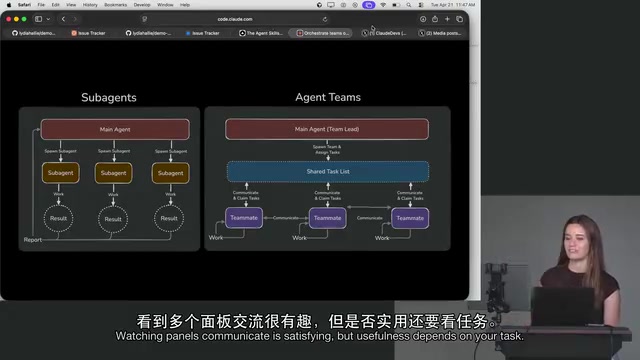
Agent Teams changes everything. On the surface, it still looks like a primary agent running alongside a bunch of "teammates" — but these teammates aren't spawned and left to their own devices. They actually talk to each other.
Here's a concrete example: you could have a code reviewer agent paired with an implementer agent. The reviewer might say "I'm waiting on the implementer's output," and then the two actually communicate and coordinate progress. That kind of interaction simply doesn't exist in the original sub-agent model.
The entire team operates around a shared task list created by the primary agent. Teammates check back against this list repeatedly, and the team only wraps up once every task is marked complete. The primary agent here acts more like a project manager (PM) — responsible for orchestration, not execution.
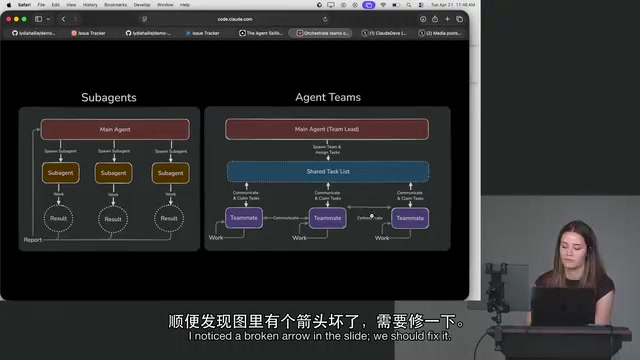
It's a bit like Promise.all, but fundamentally different. Promises can't communicate with each other — and the value of Agent Teams comes precisely from the fact that they can. Watching multiple panels call out to each other, coordinate, and converge on a result really does produce a kind of "AGI moment" illusion. It's genuinely impressive to experience.
Creation: Teammates Are Spun Up On-the-Fly
There's another important engineering-level distinction between the two modes.
Sub-agents require a specific Markdown file defined somewhere in the codebase — they're part of the project's file structure. Teammates, on the other hand, are created on the fly. You simply tell Claude Code: "Use five agents to form a team for this task," and it automatically generates them — say, a PR agent, an implementer agent, and a UI/designer agent — with the system inferring the appropriate system prompt for each teammate.
In other words, there's virtually no barrier to enabling Agent Teams. A single sentence is all it takes to spin up a temporary crew.
Validation and Quality Control: Avoid the Ouroboros Trap
A natural question arises: if teammates are checking each other's work, who actually validates the output? Doesn't this become an Ouroboros — a snake eating its own tail? Do you just add another agent to verify? Does that spiral into infinite nesting until you've burned through all your tokens?
The answer isn't to stack more agents. It lies in plan mode.
The key is making sure your plan is accurate, then keeping close tabs on that shared task list. Whether you actually agree with the list is the most critical checkpoint — because every teammate will operate within it. As for output quality, it's really no different from any other sub-agent or task: it depends heavily on:
- How much context you provided before kicking off the task
- How many verification steps you've built into the loop
For UI work, did you provide reference images? Did you have it run against existing test cases? Verification is still largely a manual step — but the more validation you bake into the loop, the higher your success rate, especially when cross-referenced against the shared task list.
Also worth noting: if a teammate goes off the rails, you can stop it individually at any time. Interestingly, the team lead sometimes seems to "panic" — it notices when a teammate's process exits, even though they're not running in the same process. In some cases, it'll proactively "let go" of a teammate that isn't pulling its weight. Watching this mechanism play out really does feel like observing a real team.
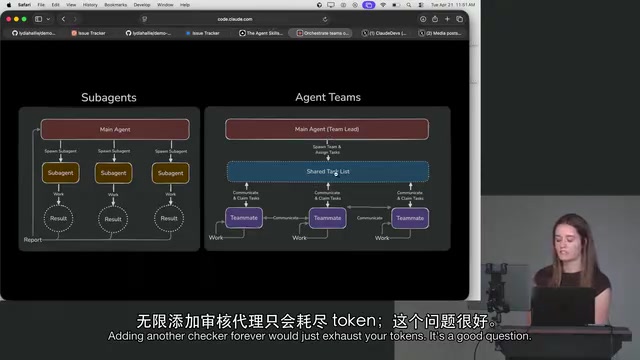
Plan mode is a workflow state in Claude Code where the model outputs an execution plan without immediately taking action. Users can review, revise, or reject the plan before triggering execution — similar to the ReAct (Reasoning + Acting) paradigm of "think before you act." Its core value is inserting human judgment before irreversible operations. For Agent Teams, confirming the shared task list at startup is essentially a human-in-the-loop validation at the highest level. All subsequent teammate work unfolds within that confirmed framework, avoiding the infinite recursion of "verification agent validating verification agent."
QA Scenarios: Skills Are More Practical Than Teams
On the topic of real-world applications, many developers wonder whether they can create a dedicated QA teammate — one that confirms everything still works after every change, especially with frameworks like Next.js where fixing one thing quietly breaks another.
Here's a more pragmatic take: QA is actually one of the most common use cases people solve with Skills, not a full team. That's because QA workflows are inherently step-based — you need to run this step, then that step, in sequence. Building a QA skill and ensuring it gets invoked after every change works extremely well. If the workflow is structured enough, you can even run it with the lighter-weight Haiku model — saving costs without sacrificing effectiveness.
Skills in Claude Code are reusable, predefined behavior templates, typically stored as Markdown files in the codebase describing standard operating steps for a category of task. Unlike the dynamic generation of Agent Teams, Skills are statically configured and can be called on demand by the primary agent. Haiku is the lowest-cost, fastest model in Anthropic's family, well-suited for structured, repetitive tasks. Encapsulating a fixed QA workflow as a Skill and running it with Haiku reduces context overhead and avoids the token cost of re-interpreting task intent from scratch each time.
Should You Actually Use Agent Teams?
The conclusion is refreshingly pragmatic: Agent Teams are cool, but overkill for most situations.
They consume a significant number of tokens, and in the vast majority of tasks, a well-configured sub-agent is more than sufficient. Their real appeal lies in the "ritual of teamwork" — watching multiple panels talk to each other and converge on a result is a genuinely compelling experience.
But as the takeaway goes: sometimes you don't need a whole team. You just need one good developer — and that can be a single sub-agent. Agent Teams is a clever little feature, but it's only worth reaching for when the scenario actually calls for it.
Related articles

ChatGPT Space Launches: Team Collaboration and New Pages Features Explained
ChatGPT Space is OpenAI's new team collaboration feature with Pages, real-time collaboration, and Slack/Google Drive sync. We break down its privacy design, multi-platform integration, and the full workflow from conversation to document.

Migrating Apache Spark UDFs to GPU Acceleration with AI Agents
NVIDIA developer blog explains how AI Agents rewrite Apache Spark UDFs for GPU acceleration, covering migration criteria, agent rewriting and verification workflows, plus pitfalls like result consistency and CPU-GPU transfer overhead.

Zed Editor v0.40.4-rc2 Released: Usage Credits Now Available Without Upgrading
Zed editor releases v0.40.4-rc2, allowing users to use usage credits for AI features without upgrading to a paid plan, lowering the trial barrier.