Claude Code Background Task Mechanism: How Slow Commands Avoid Blocking the Agent

Claude Code's Harness uses background tasks to keep slow commands from blocking the main loop, enabling agent concurrency.
The article breaks down how Claude Code's Harness layer solves the engineering challenge of "slow commands blocking the main loop." Since multi-turn tool calling requires strict pairing of tool_use and tool_result, synchronous execution stalls the entire agent on a single pytest command. The Harness solution adds a `run_in_background` parameter to the bash tool, letting the model decide whether to move independent commands to the background: the main loop immediately returns a placeholder tool_result akin to HTTP 202 Accepted with an ID like bg0001, the background thread keeps running, and on completion enqueues the result into a completion queue that the main loop collects at the start of each round and packages as a task notification merged into messages. The article also explains why the GIL doesn't affect such "waiting on subprocess" scenarios, the necessity of locking around queue reads and writes, and BackgroundManager's start/run/collect methods. It concludes by noting the remaining gap: the main loop only spins after you speak, and scheduled tasks can't yet wake themselves autonomously.
In the construction of AI coding agents, an easily overlooked yet critically important engineering question is: when a command takes a long time to run, must the entire agent sit idle waiting for it? In episode 11 of the "Claude Code Teardown" series, Bilibili creator Cogent provides an in-depth analysis of how the Harness layer solves this blocking problem through a background task mechanism.
The Nature of the Problem: Synchronous Execution Stalls the Main Loop
Imagine this scenario: the model is writing test code, and once done, it needs to run pytest to verify. This command might take several minutes. Meanwhile, a documentation-writing task nearby only depends on an already-completed key-table interface — it was unlocked long ago and can start at any time. But the main loop is stuck at the pytest step — the Harness executes tools synchronously, and until the command returns, the main loop keeps waiting.
During this time, the model isn't called even once. It's not that it's thinking — it's that nobody is calling it. The entire agent grinds to a halt alongside a single command.
So can't we just skip waiting and move to the next round? No. Every tool the model named in the previous round must be paired with a corresponding tool result on the next call. Miss one, and the API rejects the call. The test hasn't finished, there's no result — what do you deliver for this round?
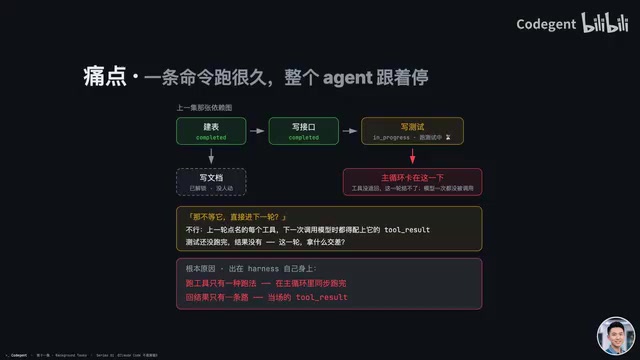
The root cause lies with the Harness itself: up to this episode, the Harness has only one way to run tools — synchronously within the main loop. However long it takes, the main loop waits. And there's only one path for returning results — the immediate tool result. If a result arrives late, there's no route back to the model.
The pairing constraint between tool_result and tool_use is the prerequisite for understanding this problem. In multi-turn tool calling with large models, the API imposes strict pairing requirements on message sequences: every tool_use the model returned in the previous round (the tools and parameters it named) must have a corresponding tool_result (tool execution result) in the immediately following message. This constraint isn't set by the Harness itself — it's a hard validation rule from vendors like Anthropic and OpenAI. Miss one or scramble the order, and the entire request is rejected outright with an error.
This constraint is precisely why synchronous execution can't be bypassed. If the model names both pytest and documentation-writing tools at once, the Harness must wait for pytest to actually finish and get its result before it can hand over both tool_results together. It can't return one first and save the other for later, nor can it fudge things with placeholder text like "running" (except for the 202-style placeholder result discussed later). So as long as tool execution is synchronous and results can only be returned on the spot, a slow command will inevitably drag the entire round of calls into waiting with it.
The Solution: One More Way to Run, One More Path
The Harness's approach is straightforward: move slow commands to the background, and let the main loop keep spinning.
Specifically, when the model names the bash tool, it can include an extra parameter run_in_background set to true. Whether to enable this parameter is the model's own decision. The system prompt states one rule: only independent commands go to the background — later work doesn't wait for their results.
When the Harness sees this parameter, it spins up a background thread, hands the command over, assigns it an ID like bg0001, and doesn't wait. The main loop immediately returns a placeholder tool result — "Background task bg0001 has started."
Developers who've written web backends will find this familiar: it's the same pattern as HTTP's 202 Accepted. The work has been accepted, not yet done — here's an ID for you. The tool_use is paired with a tool_result, and the next round proceeds as normal. The main loop keeps spinning, the model goes off to write documentation, and the test is still running on that background thread — two things advancing in parallel.
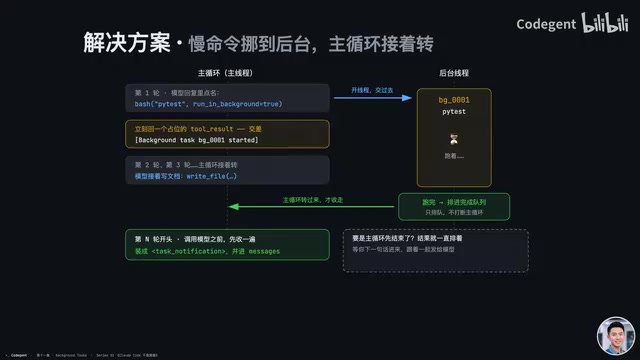
When the test finishes, the background thread doesn't interrupt the main loop — it just places the result into a completion queue to wait. Before the main loop reaches the Nth round and calls the model, the Harness first collects any results from the queue, packages them as a task notification, and merges them into messages, which are then delivered to the model on that call. That tool_use already had its placeholder pairing, and one tool_use pairs with only one tool_result — so the result comes back under a different identity: a notification.
What if the test hasn't finished yet, but the model's other work is done first? The model stops naming tools, the main loop ends, and control returns to you. The background thread keeps running and queues its result when done. But with the main loop not spinning, nobody comes to collect it, so the result just sits in the queue until your next message. When you speak up, the main loop starts spinning, collects it right at the beginning, and sends it to the model along with your message. If you exit directly, unfinished commands get cleaned up along with everything else.
HTTP 202 Accepted is the only 202-class status code to be formally adopted, with the semantics "the server has accepted the request but has not yet completed processing it." It makes no promise about when the work will finish — typically it returns a URL or task ID in the response body for subsequent queries, which the client uses to check back later. This differs fundamentally from the synchronous "200 OK (returned only after completion)" and "201 Created (a resource was created)": 202 is an active "asynchronous receipt."
The article's analogy to the placeholder tool_result of background tasks is apt. After receiving run_in_background=true, the Harness immediately returns "Task bg0001 has started" — essentially issuing a receipt to the model. The actual result doesn't travel through this channel; it comes back independently later as a task notification. This design lets the same tool_use complete its pairing loop with just one placeholder result — satisfying the API constraint while allowing the main loop to keep advancing.
Threading 101: Waiting Can Be Done by a Different Actor
Readers familiar with Python might ask about the GIL. The GIL (Global Interpreter Lock) is a lock inside the CPython interpreter used to protect its internal data. The side effect is that only one thread runs Python code at a time.
That's not a problem here. The background thread spends most of its time waiting on a subprocess — pytest actually runs in a subprocess, and the background thread just waits for it to finish. While waiting, it releases the GIL, and the main thread keeps spinning as usual.
The real concern is inter-thread communication. Two threads share memory within the same process; the background thread writes results by ID and enqueues them into the ready completion queue. Without locking, the main loop might be counting the queue without having emptied it yet, and a background thread just happens to enqueue a result — clearing the queue would lose that result.
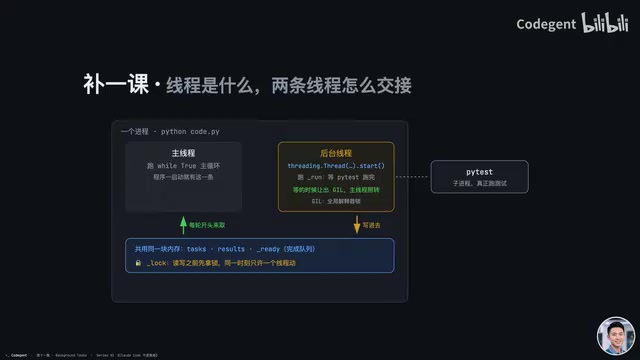
So reads and writes acquire the lock before touching the code — only one thread may modify at a time. One more thing to note: this only has sharing and locking, no notification mechanism. The background thread drops the result and leaves — it doesn't go wake the main thread. The main thread only checks for itself at the beginning of each round. That's exactly why, in the earlier scenario, once the main loop ends, results can only sit in the queue.
Daemon threads are a thread attribute in Python's threading module, set via thread.daemon = True or Thread(daemon=True). Their special behavior only matters at program exit: when the main thread ends, all non-daemon threads must finish on their own or be explicitly joined before the interpreter actually exits; whereas daemon threads are forcibly terminated and won't hold things up.
This is precisely why the article emphasizes daemon=true. A background task might be a pytest run that takes minutes or a hung network request. If it were a non-daemon thread, the user wanting to exit the program would have to wait for it — a poor experience. Set it as daemon, and the moment the user hits exit, the main thread ends, and the background thread is discarded along with it. The cost is that unfinished background commands get cleaned up and their results permanently lost — exactly matching the article's description that "if you exit directly, unfinished commands get cleaned up along with everything else." That's the other side of daemon semantics.
Code Landing Points: BackgroundManager's Three Methods
This background machinery lands in two places in the Harness: one line at the top of the main loop, and one fork when executing tools.
The main loop is still that while true, with just one line added: before each round of calling the model, first collect whatever the background has finished. For the tools the model names in its reply, the main loop hands each one to the execute fork for processing. First thing on entry is the same pre-tool use full checkline — commands going to the background must pass it too; going to the background isn't a way to bypass checks.
Then comes the fork condition: the tool is bash, and run_in_background is explicitly true. The Harness doesn't guess — it doesn't look for words like install or test in the command. The model decides. Going to the background means spinning up a thread, getting an ID, and replying: "Background task has started; results will be collected in some later round."
The core is BackgroundManager's three methods:
- start: Register the ID, spin up a
daemon=truethread to run it. Daemon ensures the program won't be held up by this thread at exit. - run: Run the command in the background thread, using the same function as when not backgrounded, and the same timeout rules. Backgrounding is about not blocking the path, not about running longer. Exit code 0 means completed; non-zero or timeout means failed. When done, register the status and result under the lock, and enqueue the ID into the ready queue.
- collect: Called at the top of the main loop; under the lock, takes everything queued and clears the queue. Each entry is packaged as a task notification — ID, status, command, plus the first 500 characters of output — and handed to that line at the top of the main loop to merge into messages.
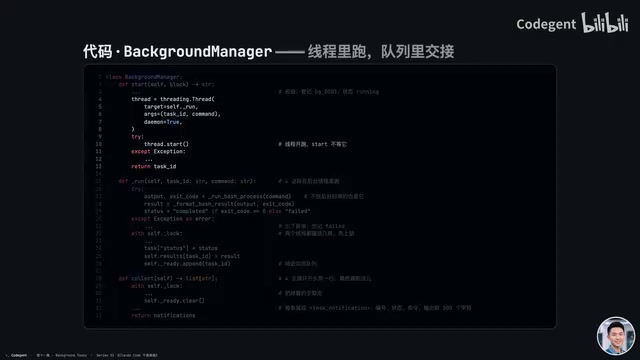
Non-backgrounded commands still run synchronously to completion, exactly as before. Both paths ultimately pass through post-tool use, returning output to the main loop, and this tool_use gets its tool_result paired on the spot.
What's involved here is a variant of the producer–consumer pattern. The background thread is the producer, enqueuing completed results into the ready queue; the main loop plays consumer at the start of each round, emptying the queue in one go. The article highlights two details worth noting.
First, the queue's "read–clear" operation must hold the lock as a whole. If you do it step by step — check length, then take one by one, then clear — without locking, a background thread could slip in a write in the middle, and clearing would wipe out the newly written entry too, losing the result. That's why collect wraps the queue operation in a single critical section.
Second, this implementation deliberately omits any notification mechanism, keeping only sharing and locking. The background thread drops its result and leaves — it won't notify or set an event to wake the main loop; nor does the main loop block waiting on the queue, instead actively checking at a fixed point each round. The benefit is that the main loop is never "unexpectedly awakened" by a background thread — all timing stays under the main loop's own rhythm, making behavior predictable. The cost is that when results get collected depends on when the main loop starts its next round — which is exactly the root of the article's closing remark that "with the main loop not spinning, results just sit in the queue," setting up the next episode's scheduler with autonomous wakeup.
What Gap This Design Leaves Behind
Background tasks are up and running — no command is too slow to block the path. But when to start still requires someone to speak up. For example, if you say "run the tests every morning at 9 from now on," 9 o'clock arrives, but the main loop only spins after you send a message. If you're not at the computer, it sits motionless — nobody calls the test to run, and nobody collects this episode's background results either.
This is exactly the problem the next episode in the series tackles: when the time comes and nobody speaks up, how can the agent move on its own? Cogent's teased Crown Scheduler will handle the challenges of scheduled dispatch and autonomous agent wakeup — worth keeping an eye on.
For developers building AI agents, the core takeaway from this episode is that Harness-layer engineering details determine whether an agent can truly operate efficiently in parallel. Moving "waiting" from the main thread to a background thread may look like a simple architectural tweak, but it's actually a key step in the agent's evolution from a "single-threaded executor" to a "concurrent task coordinator."
Related articles

Chain of Thought Isn't Just for AI: How Humans Can Use CoT to Improve Thinking Quality
Chain of Thought isn't just a prompt trick for large models. Starting from a Hacker News discussion, this article analyzes why CoT works for human thinking too, breaks down actionable ways to transfer it, and highlights the key differences between human CoT and machine CoT.
Cloudflare Teams Up with OpenAI: Closi…
Cloudflare Teams Up with OpenAI: Closing the Loop from Vulnerability Discovery to Defense with AI
Cloudflare uses OpenAI Daybreak to investigate security vulnerabilities and generate reviewable remediation plans, while developers use Codex to boost coding efficiency and quality.

Orca Multi-Agent Orchestration in Practice: A Guide to Parallel Collaboration with Claude and Codex
Orca is Stable AI's free open-source agent workbench supporting 34 agents like Claude Code and Codex in parallel. Learn its Git worktree isolation, multi-model orchestration, and mobile management.