Claude Code Complete Beginner's Guide: From Installation to Real-World Usage

A step-by-step Claude Code setup guide for developers in China, including domestic model integration.
This guide covers Claude Code — an AI programming assistant that works directly on your local project files — from installation through real-world use. It addresses three key pain points for developers in China: configuring environment variables, bypassing official verification, and connecting to Alibaba Cloud Bailian as a free alternative to the paid official service. A hands-on demo shows generating a polished webpage from a single natural language prompt, and explains when to use Claude Code's three working modes: default, auto, and plan.
What Is Claude Code: An AI Programming Assistant That Actually Does the Work
Claude Code has been making waves in developer communities recently. At its core, it's an AI programming assistant — but what sets it apart from ordinary chat-based AI is that it can work directly on your computer. You simply tell it what you want in plain language, and it understands your entire project and takes action automatically.
To clarify how it differs from web-based AI tools like GPT, DeepSeekAd, or Doubao, here's a comparison across five dimensions:
- Interaction: With regular AI, you constantly copy code into the chat box and paste responses back into your editor. Claude Code operates directly inside your project — no back-and-forth copying needed.
- Context: Regular AI only knows what you tell it. Claude Code can automatically read your entire codebase and search through files.
- Execution: Regular AI gives you suggestions or code snippets. Claude Code can actually create files, modify code, run commands, and execute tests.
- Memory: Regular AI forgets everything when you close the window. Claude Code remembers project rules and your coding preferences through configuration files.
- Tool Integration: Regular AI struggles to call external tools. Claude Code can connect directly to browsers, databases, GitHub, and other external services via MCP.
A useful analogy: using regular AI is like calling a remote consultant — knowledgeable, but you still have to do everything yourself. Claude Code is like having an assistant sitting right next to you, digging through folders and editing code on their own.
As for choosing between Claude Code and Cursor, the two are functionally similar and either works fine once you're comfortable with it. That said, many developers have recently leaned toward Claude Code for two reasons: lower token consumption, and a sense that it produces better front-end results.
MCP (Model Context Protocol) is an open protocol standard from Anthropic that enables AI models to communicate with external tools and data sources in a standardized way. Think of it as the "USB port" of the AI world — as long as a tool implements the MCP protocol, Claude Code can plug into browsers, databases, GitHub, Slack, and more without requiring custom integrations for each service. This is fundamentally different from traditional AI assistants that are limited to the chat window: through MCP, Claude Code can actually read live data from a database, submit Pull Requests to GitHub, or even control browser automation testing. The MCP ecosystem is growing rapidly, with hundreds of community-contributed server implementations covering everything from file systems to cloud services.
Installing Claude Code: Start with Git and Node
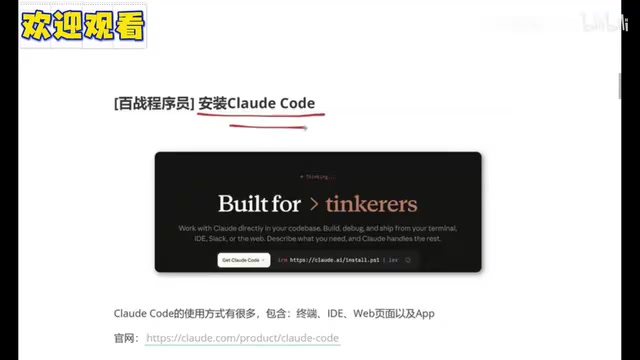
Claude Code can be used in multiple ways: terminal, integrated into an IDE (like VS Code), a web interface, or an app (though the app can be tricky in China). This guide focuses on the terminal approach, which is the simplest and most natural for developers.
Before installing Claude Code, you'll need two prerequisite tools: Git and Node.js.
Installing Git: Go to the official Git website, find "Install for Windows," download the installer, and click Next through the entire setup. To verify, open a command prompt and type git — if you don't get a "not recognized as an internal or external command" error, you're good.
Installing Node.js: Go to the official Node.js website and download the Windows installer. Again, click Next all the way through. It's recommended to keep the default installation path on the C drive (as long as you have a few gigabytes free, you're fine). To verify, run node -v — if you see a version number (like the 24.x shown in the tutorial), the installation was successful.
Installing Claude Code itself: Open Windows PowerShell (as a regular user or administrator), copy the installation command from the top of the official website, paste it in, and wait a few minutes. When you see a version number (2.1.104 in the tutorial), the installation is complete.
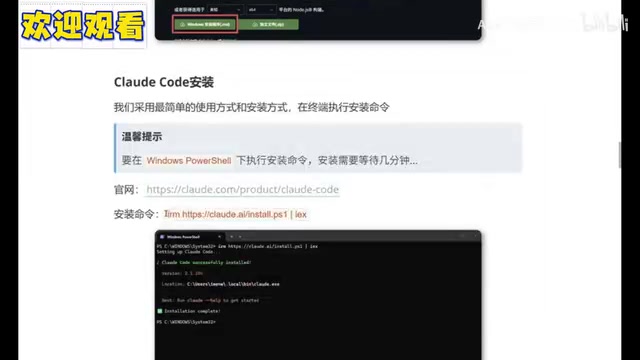
One important detail: take note of the installation path. It's located at C drive > Users > your username > .local > bin. You should see a claude.exe executable there — that confirms the installation went through properly.
Three Configuration Challenges: Environment Variables, Bypassing Verification, and Connecting to a Domestic Model
Installation alone isn't enough to get Claude Code running. There are three problems you'll need to solve in sequence — and these are the most common sticking points for developers in China.
Problem 1: Configuring Environment Variables
Some users get an error when running claude because the installation path hasn't been added to the system's environment variables. To fix this: search for "environment variables" in Windows, open "Edit System Environment Variables," find the Path entry under User Variables, double-click it, click "New," paste in the bin directory path mentioned earlier, and save. Close and reopen your terminal, then run claude again — it should now be recognized.
Problem 2: Bypassing Verification
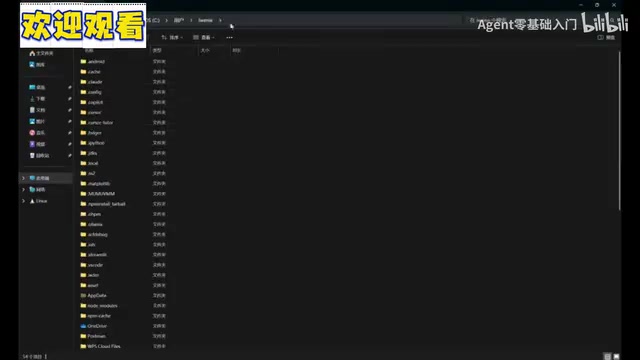
After setting up environment variables, you might encounter an authorization connection failure when running Claude. This happens because the official service isn't directly accessible in China (even with a VPN, things can go wrong). The fix is to edit a configuration file: find .claude.json under C drive > Users > your username, open it with a text editor, add the bypass code provided in the tutorial (make sure to add an English comma before it), and save. Claude should now start normally.
Problem 3: Connecting to a Domestic Large Language Model
Claude's built-in model requires a paid subscription. If you're not a paying user, you can connect to a domestic model instead. The recommended option is Alibaba Cloud Bailian, which offers a generous free tier.
The setup involves three steps:
- Create an API Key: Log in to the Alibaba Cloud Bailian platform, find "API-KEY" in the left sidebar, and click to create one with a name of your choice. You can check your free quota under "Model Usage" — the tutorial demo uses models from the GLM series.
- Set three environment variables: Use the command line to set your API Key, Base URL (the public base API address for Alibaba Cloud Bailian), and model name (such as GLM-5 or a Qwen series model, depending on your needs).
- Verify the configuration: Run a command to print out these three values and confirm they match what you entered.
Once you've completed all three steps, Claude Code should be fully functional.
Alibaba Cloud Bailian is Alibaba Cloud's large model service platform. Its key advantage is providing a unified OpenAI-compatible API interface, which means tools originally designed for OpenAI GPT (including Claude Code) can switch to domestic models on Bailian with almost no code changes. The platform aggregates models from multiple vendors, including the Qwen series (Alibaba's own) and the GLM series (Zhipu AI), all accessible through the same API key and base URL. New users get millions of tokens in free credits for most major models — more than enough for learning and personal projects. It's worth noting that model capability directly affects Claude Code's code generation quality; coding-specialized models like Qwen2.5-Coder generally outperform general-purpose chat models on code completion and understanding tasks.
Hands-On Demo and Three Working Modes
With everything configured, the tutorial walks through a real example. First, create a dedicated workspace: in the terminal, navigate to the F drive, use mkdir to create a directory called claude-code-demo, enter it, run claude, and trust the folder.

Then enter a natural language prompt: "Help me create a webpage to promote programming languages." What's notable is that when details are missing, Claude Code repeatedly asks clarifying questions — about the site's features, style preferences (like a tech-forward aesthetic), and so on — making sure it fully understands the requirements before doing anything. The final output is a webpage with animations and a sleek, futuristic look. As the tutorial notes, a front-end developer doing this by hand might spend an entire day — and the result only needs minor tweaks to logos and text before it's production-ready.
During the generation process, Claude Code prompts you to choose an authorization level. This corresponds to its three working modes (toggled with Shift+Tab):
- Default mode: Asks for user approval before creating or modifying any file. The most cautious option.
- Auto mode: After a single approval, all operations in the current session run automatically without further interruptions. The most efficient option.
- Plan mode: Discussion only — no files are modified. Ideal for complex business logic, where you use multiple rounds of conversation to ensure the AI fully understands the requirements before any execution begins.
The logic behind these three modes is clear: use auto mode to speed through simple tasks, and use plan mode for complex tasks to communicate thoroughly upfront — preventing the AI from diving into code changes before it truly understands what's needed.
The core value of Plan Mode is solving the "misunderstanding" problem. In complex business scenarios, natural language descriptions often contain ambiguity. If the AI starts modifying code before it fully understands the requirements, the result can be a lot of rework. Plan Mode forces a two-phase workflow: in the first phase, the AI can only ask questions and produce a plan; users can correct misunderstandings and add constraints during this phase. Once the plan is confirmed, execution begins. This mirrors the software engineering best practice of "design review before coding" and is especially well-suited for tasks involving database schema changes, API interface design, or modifications that span multiple modules — significantly reducing the risk of the AI inadvertently breaking existing logic.
Summary
This guide is aimed at complete beginners, walking through Claude Code from concept to installation, configuration, and real-world use — with a particular focus on the pain points specific to developers in China (environment variables, bypassing verification, and connecting to domestic models). For anyone who wants to experience "AI that writes code hands-on," plugging into Alibaba Cloud Bailian's free tier is a low-cost way to get started. Overall, Claude Code's performance in rapid front-end prototyping, project-level code understanding, and automated operations offers genuine, tangible productivity gains for everyday development.
Related articles

Unknowingly Breaking the PHP RCE Embargo: Lessons from a Vulnerability Disclosure
A developer mistakenly believed there was "no embargo" and prematurely disclosed PHP RCE vulnerabilities CVE-2026-109618 and CVE-2026-109619, disrupting coordinated disclosure and apologizing on Hacker News. This article analyzes the incident, the causes of information chain distortion, and key verification points before vulnerability disclosure.

How LLMs Are Making Formal Software Verification Viable at Scale
Hacker News discussion suggests LLMs are lowering the cost barrier of formal software verification. This article analyzes where LLMs enter—spec generation, proof script drafting, invariant discovery—and stresses the trust boundary must stay clear: models propose, provers adjudicate.

Zuckerberg May Use New Stock Class to Pay California Wealth Tax
Zuckerberg may use a new Meta stock class to pay California's wealth tax while retaining company control. An analysis of this creative plan's background, mechanics, and industry implications.