Claude Code Complete Setup Guide: Connecting to Chinese AI Models Step by Step

Complete Claude Code setup guide for China: bypass login, connect DeepSeek, and improve AI code quality.
This hands-on tutorial walks Chinese users through the full Claude Code setup process — from installing Node.js and Claude Code itself, to bypassing official login restrictions by editing `claude.json`, to connecting domestic models like DeepSeek via the CCSwitch tool. It also introduces the Superpowers plugin, which enforces a TDD workflow (clarify requirements, decompose tasks, write tests before code) to significantly improve AI-generated code reliability. The guide directly addresses two major obstacles for users in China — inaccessible Anthropic accounts and restricted model access — while noting the compliance risks of unofficial configurations.
Claude Code is widely regarded by developers as one of the most powerful AI agent tools available today — and its capabilities go far beyond writing code. This tutorial is based on a hands-on walkthrough shared by a Bilibili creator, covering the full workflow: environment setup, installation, bypassing login verification, and connecting to Chinese large language models. It's specifically designed to address the pain points faced by users in China who can't access Claude Code directly.
What Can Claude Code Do?
Most people's first impression of Claude Code is "a tool for writing code," but its scope is much broader. Beyond programming, it excels at creating presentations, writing copy, generating images, and more — essentially, it can assist with nearly any task you'd perform on your computer. The creator noted that the core engine powering some of the most viral AI applications is very likely this type of AI agent.
In terms of positioning, Claude Code is a command-line-driven AI Agent, not a traditional code completion plugin. This means it can understand context, break down tasks, and autonomously execute multi-step operations — which is exactly why it's repeatedly called "the best."
The fundamental difference between an AI Agent and a regular AI chat tool lies in autonomous action capability. Traditional LLM chat tools only output text, leaving users to manually translate suggestions into actions. An agent, by contrast, can directly invoke tools, read and write files, execute terminal commands, and even control a browser. As a command-line agent, Claude Code has direct access to the local file system and can complete the entire loop of "analyze requirements → break down tasks → write code → run tests → fix errors" within a single conversation, without human intervention at each step. This "perceive-plan-execute" cycle is precisely what classifies it as an agent rather than a simple coding assistant.
Environment Setup and Installation
The first step in installing Claude Code is setting up the Node.js runtime environment. Download the official installer and follow the default options, clicking "Next" through the process — no special configuration is required.
Once Node.js is installed, use a single command-line instruction to install Claude Code. After installation, run the version query command; if the terminal correctly returns a version number, the installation was successful.
When you run the claude command for the first time, the system may prompt you to install an additional dependency (such as Git or other environment dependencies). Download the corresponding Windows installer, double-click to install, then return to the command line and run claude again — it should launch without issues.
Bypassing Login Verification
Once inside Claude Code, it will ask you to log in with an official account — the first hurdle for users in China. The tutorial's solution is to edit a configuration file: navigate to your user directory, find the claude.json file, and add a configuration parameter (be sure to separate entries with English commas and save correctly). After saving, re-run the claude command to skip the official login verification and enter the interface directly.

When Claude Code starts, it reads the claude.json configuration file in the user directory to determine the authentication method. The official flow requires logging in with an Anthropic account, but such accounts cannot be registered or used normally in mainland China. By adding specific parameters to the configuration file — typically setting the authentication mode to skip official verification, or specifying a custom API endpoint — the program bypasses login requests to Anthropic's servers and instead uses the locally configured model interface. This essentially leverages Claude Code's built-in support for custom API Base URLs, allowing it to connect to any third-party LLM service that's compatible with the OpenAI API specification. When editing the config file, be careful about valid JSON formatting — extra or missing commas and quotation marks will prevent the program from reading the configuration and cause errors.
Connecting to Chinese Large Language Models
After bypassing the login, you still need to configure a usable model for Claude Code. Since official accounts are restricted in China, connecting to domestic models is the more practical choice. The tutorial covers two configuration approaches: manually editing Claude Code's configuration file, or using the CCSwitch tool for automated configuration. Additionally, if you have a Google Pro account, you can also connect Google's Gemini model series to Claude Code.
Configuring DeepSeek with CCSwitch
For beginners, CCSwitch is the easier path. Download the appropriate version (the tutorial demonstrates v3.10.3 for Windows) and install it. In the software, click "Add Provider" and select DeepSeekAd. The entire configuration process requires just one API Key.
Getting an API Key is straightforward: go to DeepSeek's official API platform, navigate to the "API Keys" page, create a new key, give it a name, and confirm to generate it.
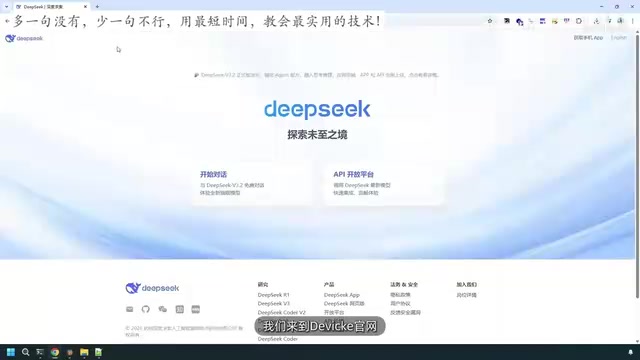
Copy the generated key, paste it into the corresponding input field in CCSwitch, and click Add to enable the model. Then re-enter claude, use the /model command to switch models, and you'll see the DeepSeek V3.2 option in the list. Once selected, Claude Code is successfully connected to a Chinese large language model, and the login prompt will no longer appear.
Superpowers Plugin: Getting Reliable Code from AI
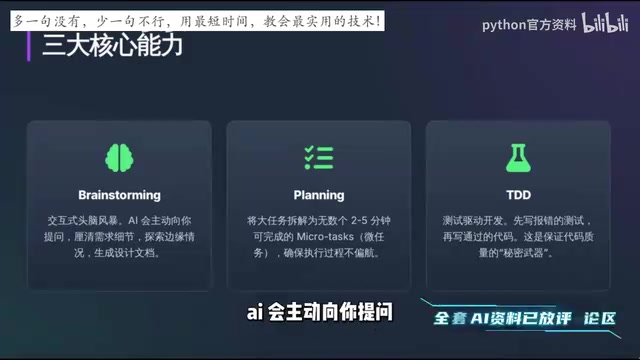
After setting up Claude Code, the tutorial strongly recommends installing the Superpowers plugin. It addresses a classic pain point in AI-assisted programming: in the rush to deliver quickly, AI often jumps straight to writing code upon receiving a requirement, resulting in logic flaws and even a vicious cycle of "fix one bug, introduce three more."
Superpowers enforces code quality through Test-Driven Development (TDD), with a three-step workflow:
- Proactive requirement clarification: When you submit a requirement, the AI first asks clarifying questions to iron out details, explore edge cases, and generate a design document.
- Task decomposition: Large tasks are broken into small subtasks that can each be completed in 2–5 minutes, keeping execution on track.
- Tests before implementation: Write failing test cases first, then write the code that makes them pass — ensuring every line of code is verifiably working.
This workflow transforms "fast delivery" into "reliable delivery," making it especially valuable for developers who prioritize code correctness.
Test-Driven Development (TDD) is a classic software engineering practice built around the "Red-Green-Refactor" cycle: first write a test that's guaranteed to fail (red), then write the minimum amount of code to make it pass (green), and finally refactor the code structure without breaking the tests. The advantage is that test cases themselves are a precise expression of requirements — every implementation step has a clear acceptance criterion, fundamentally eliminating the problem of "finishing the code only to realize you misunderstood the requirements." By introducing TDD into AI programming, the AI is no longer generating large chunks of code on intuition. Instead, it's constrained to move forward in small, verifiable steps, with every commit backed by tests. This is the underlying logic behind Superpowers' approach to solving the "AI code reliability" problem.
Summary
The entire workflow can be summarized as: Install Node.js → Install Claude Code → Modify config to bypass login → Use CCSwitch to connect DeepSeek and other Chinese models → Install Superpowers to improve code quality. For users in China, the two core obstacles — official login restrictions and model availability — are both resolved through configuration file modifications and third-party tools.
A word of caution: bypassing official login verification and connecting to third-party models are unofficial use cases. Please be mindful of compliance and account security in practice. If circumstances allow, an official Anthropic account remains the most stable option.
Related articles

Chain of Thought Isn't Just for AI: How Humans Can Use CoT to Improve Thinking Quality
Chain of Thought isn't just a prompt trick for large models. Starting from a Hacker News discussion, this article analyzes why CoT works for human thinking too, breaks down actionable ways to transfer it, and highlights the key differences between human CoT and machine CoT.
Cloudflare Teams Up with OpenAI: Closi…
Cloudflare Teams Up with OpenAI: Closing the Loop from Vulnerability Discovery to Defense with AI
Cloudflare uses OpenAI Daybreak to investigate security vulnerabilities and generate reviewable remediation plans, while developers use Codex to boost coding efficiency and quality.

Orca Multi-Agent Orchestration in Practice: A Guide to Parallel Collaboration with Claude and Codex
Orca is Stable AI's free open-source agent workbench supporting 34 agents like Claude Code and Codex in parallel. Learn its Git worktree isolation, multi-model orchestration, and mobile management.