Claude Code + DeepSeek Configuration Guide: Low-Cost AI Programming in Practice

Connect Claude Code to DeepSeek via 7 environment variables for low-cost terminal AI programming.
The article explains how to connect Anthropic's terminal programming assistant Claude Code to DeepSeek for lower-cost use in China. The core method requires no code changes—just set 7 environment variables including ANTHROPIC_BASE_URL, ANTHROPIC_AUTH_TOKEN, and ANTHROPIC_MODEL to redirect requests to DeepSeek's Anthropic-compatible interface. It covers concrete operations for Windows PowerShell using `$env:` and macOS/Linux using `export`, the difference between temporary and permanent settings, and verifying configuration with `/status`. For models, V4 Pro handles complex architecture and deep review, while V4 Flash handles fast lightweight tasks. Security note: never commit the API Key to a code repository.
Claude Code is Anthropic's terminal-based AI programming assistant, calling official models by default—but direct access isn't convenient for users in China. Fortunately, DeepSeek provides an interface compatible with the Anthropic protocol, so with just a few environment variables, you can connect Claude Code to DeepSeek and get powerful AI programming capabilities at a lower cost.
The core formula is simple: Claude Code + DeepSeekAd = terminal AI programming assistant + high cost-performance LLM, and the bridge in between is environment variables.
Preparation: Installation and Environment Cleanup
Two preparation steps are needed before configuration.
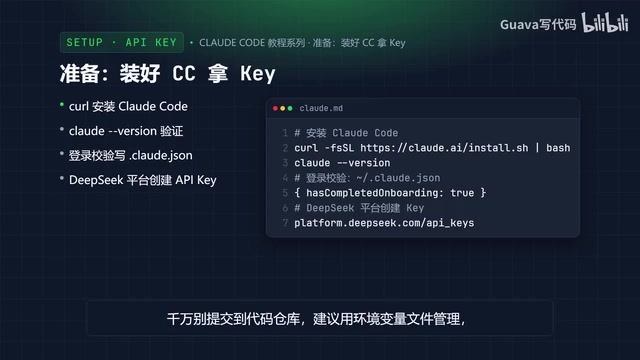
Confirm that Claude Code is installed. If not, run the official installation script in your terminal, then run claude --version to verify the version number. If you get stuck on the login verification, you can find the .claude.json file in your user directory, write hasCompletedOnboarding: true into it, save, and restart the terminal to skip the onboarding.
Then head to the DeepSeek open platform, log in, create an API Key, and store it safely. One security reminder: the API Key has account operation permissions, never commit it to a code repository, and it's best to manage it centrally through an environment variable file.
What is the Anthropic-compatible protocol?
Claude Code by default only communicates with the official Anthropic API, and the communication format is defined by Anthropic itself. The so-called "Anthropic-compatible protocol" means that a third-party service provider (here, DeepSeek) has implemented the same request/response structure and authentication method as the Anthropic Messages API on the server side, so that the client can send requests over without any changes.
Claude Code reads ANTHROPIC_BASE_URL to decide which domain to send requests to, and reads ANTHROPIC_AUTH_TOKEN as the authentication credential. As long as the target service can correctly parse this request format, Claude Code "thinks" it's talking to the official API. This is exactly the fundamental reason why the entire solution requires no code changes and no proxy—it leverages the design of a client-configurable base URL, rather than reverse engineering or cracking.
Core Configuration: 7 Environment Variables Build the Whole Bridge
The entire configuration revolves around a set of environment variables:
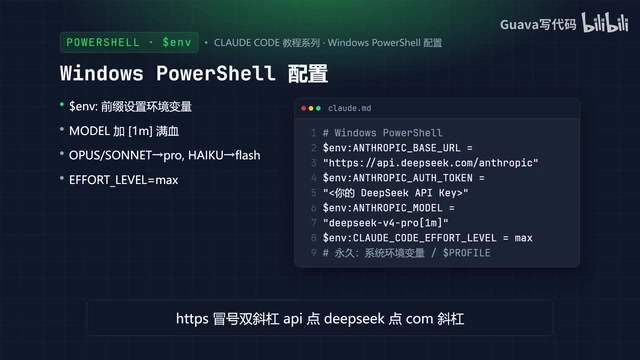
ANTHROPIC_BASE_URL: points to DeepSeek's Anthropic-compatible interface addressANTHROPIC_AUTH_TOKEN: fill in your DeepSeek API KeyANTHROPIC_MODEL: set the default model- Model mapping: Opus for complex reasoning tasks, Sonnet for everyday programming, Haiku for fast lightweight tasks, and a faster model is recommended for Agent
CLAUDE_CODE_EFFORT_LEVEL: thinking depth, can be Low, Medium, or Max
Seven variables in total, building the complete pathway from Claude Code to DeepSeek.
Why is the model mapping split into three tiers?
Claude Code internally calls models of different tiers based on task type: Opus for complex tasks requiring long-chain reasoning, Sonnet for everyday coding, and Haiku for high-frequency lightweight calls like summarization, file naming, and command completion. This layering is Claude Code's hardcoded calling strategy, and users cannot turn it off directly.
When the backend is switched to DeepSeek, you need to map Opus/Sonnet to DeepSeek's strong model (V4 Pro), and Haiku to the fast model (V4 Flash). This ensures complex tasks get sufficiently strong reasoning capability while avoiding consuming expensive large-model compute on every lightweight call. Typical symptoms of improper mapping: even simple operations go through Pro, and costs soar; or complex tasks land on Flash, and output quality drops noticeably.
Windows and macOS/Linux Configuration in Practice
Windows (PowerShell): use the $env: prefix to set environment variables. Set the Base URL to https://api.deepseek.com/anthropic, replace the Auth Token with your Key, set Model to deepseek-v4-pro[1m], map Opus and Sonnet to Pro, use Flash for Haiku and Agent, and finally set the Effort Level to Max. Note that $env: assignment only takes effect for the current session—if you want it to persist, you can add it in the system properties environment variables, or write it into the PowerShell profile.
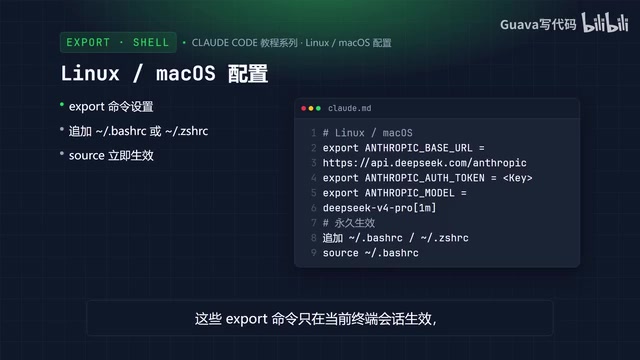
Linux and macOS: use the export command for the same settings. Point the Base URL to DeepSeek's interface, replace the Auth Token with your Key, set Model to deepseek-v4-pro[1m], map Opus and Sonnet to Pro, use Flash for Haiku and Agent, and set thinking intensity to Max. These export commands only take effect in the current terminal session; to persist them, append the commands to the end of configuration files such as .bashrc and .zshrc, then run source to make them take effect immediately.
Session-level vs. permanent environment variables
An environment variable is essentially a small block of key-value memory inherited when a process starts. $env:FOO="bar" or export FOO=bar is only valid in the current Shell process and its child processes, and disappears once the terminal is closed. So if you open a new terminal window, Claude Code will revert to the default Anthropic official address.
To make the configuration persist long-term, you need to write it into the Shell's startup script—for macOS/Linux that's ~/.zshrc (zsh is the default on macOS) or ~/.bashrc, and for Windows it's PowerShell's $PROFILE file, or you can write user-level variables via "System Properties → Environment Variables." After writing, you must restart the terminal or run source for it to be reloaded. Which approach to choose depends on whether you want to experiment temporarily in a single project, or want all terminals to default to DeepSeek.
Verifying Whether the Configuration Took Effect
After configuration is complete, enter your project directory and run claude to start. In the interactive interface, type /status. If you see the Base URL is DeepSeek, the Model is DeepSeek V4 Pro, and the small model is Flash, that means the configuration succeeded, and Claude Code is already reasoning with DeepSeek.
After that, just describe your needs in natural language—for example, ask it to outline the project directory structure, add a query method to a user file, or analyze the cause of a test error.
How to Choose Models: The Division of Labor Between Pro and Flash
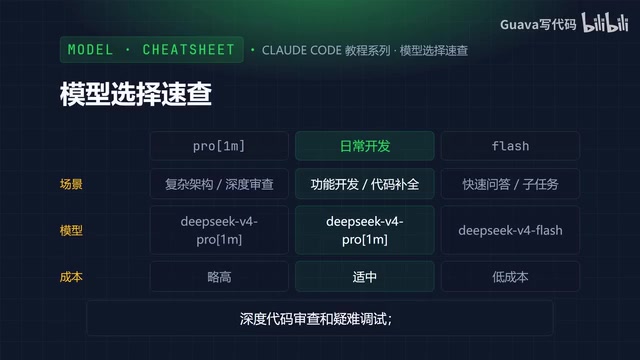
DeepSeek currently has two main models. DeepSeek V4 Pro[1m] is the strongest reasoning version, suitable for complex architecture design, deep code review, and difficult debugging; DeepSeek V4 Flash focuses on fast reasoning, suitable for batch file generation, simple CRUD, and documentation writing. Both support a 1M context window.
The selection logic is clear at a glance: use Pro for heavy work, use Flash for light work. Use Pro for complex architecture design, deep code refactoring, everyday feature development, and code completion; use Flash for quick Q&A, simple modifications, and subtasks, for faster responses and lower cost.
Summary
The core idea of this issue is to use environment variables as a bridge: Base URL points to DeepSeek's compatible interface, Auth Token holds the Key, and Model selects the model. On Windows use PowerShell's $env:, on Linux and macOS use export; if you want it to persist, write it into the Shell configuration file. After configuration, verify with /status. Remember the model choice—use Pro for heavy work, use Flash for light work. In the next issue, we'll start using it for the first time and see how Claude Code works in a real project.
One-line Summary
Connect Claude Code to DeepSeek via 7 environment variables to gain terminal AI programming capabilities at low cost.
Paragraph Summary
The article explains how to connect Anthropic's terminal programming assistant Claude Code to DeepSeek, so it can be used at lower cost in China. The core method requires no code changes—just set 7 environment variables such as ANTHROPIC_BASE_URL, ANTHROPIC_AUTH_TOKEN, and ANTHROPIC_MODEL to redirect requests to DeepSeek's Anthropic-compatible interface. It provides concrete operations for Windows PowerShell using $env: and macOS/Linux using export, explains the difference between temporary and permanent settings, and how to verify the configuration with the /status command. For model selection, V4 Pro handles complex architecture and deep review, while V4 Flash handles fast lightweight tasks, following the principle of "use Pro for heavy work, use Flash for light work." On security, it emphasizes that the API Key must never be committed to a code repository.
Related articles

Felix Rieseberg Personal Homepage
Felix Rieseberg's personal homepage sparks attention on Hacker News. This article covers the Slack engineer's technical background, the rise and fall of nativefier, and the value of a developer homepage as a tech calling card.

@ai-sdk/vue 3.0.306 Patch Release Syncs with [email protected] Update
@ai-sdk/vue 3.0.306 released, synced with [email protected]. A routine patch release for the Vercel AI SDK ecosystem with no public API changes; the Vue adapter layer stays version-aligned with the core package.

Gemini 4 Argon API Launches: The Era of Million-Token Output Begins
Google launches Gemini 4 Argon with sparse MoE architecture, up to 1M output tokens, and a 68.90% Vals Index score, available across API, AI Studio, and the Gemini app.