Claude Code Enterprise Guide: Environment Setup, Git Workflows, and Switching to Chinese AI Models

A hands-on enterprise guide to Claude Code covering CLI setup, Chinese model switching, and Git automation.
This guide covers Claude Code's evolution from a simple CLI tool to a full development collaborator, including installation steps, switching to Chinese AI models like DeepSeek via CC Switch, and using natural language to manage entire Git workflows — from branching and commits to automated bug discovery and fixes.
From CLI Tool to "Development Partner": The Evolution of Claude Code
Claude Code started as a relatively simple command-line tool — analyzing project code through conversation, understanding file relationships, and offering suggestions or making changes directly. But after rapid version iterations, today's Claude Code looks very different from its early incarnation, with a broad set of new tools and significantly enhanced capabilities.
Based on analysis from hands-on tutorials, the core evolution of Claude Code spans several dimensions:
- Upgraded Context Awareness: From understanding individual files to querying the entire project structure for in-depth analysis.
- Engineering-Oriented Capabilities: Expanded beyond pure code development to cover SDD (Specification-Driven Development) adoption, automated testing, and other engineering scenarios. SDD is a development methodology that uses formal specification documents as the core driver — before writing any code, system behavior is precisely defined through structured documents (such as OpenAPI, JSON Schema, interface contracts, etc.). Unlike TDD (Test-Driven Development) or BDD (Behavior-Driven Development), SDD emphasizes "specifications as contracts," enabling frontend and backend teams to develop in parallel against the same spec, dramatically reducing integration rework. Claude Code's SDD support means it can read existing specification documents, generate code aligned to those specs, and proactively flag deviations — essentially acting as an always-on "automated contract gatekeeper."
- Customizable Skills: Through a Skill mechanism, real-world development experience can be distilled into reusable skills, significantly boosting team productivity.
In short, Claude Code has gradually evolved from a "programming tool" into a true development collaborator: humans set goals, define constraints, make judgments, and control direction, while the AI handles execution, analysis, comparison, and repetitive tasks.
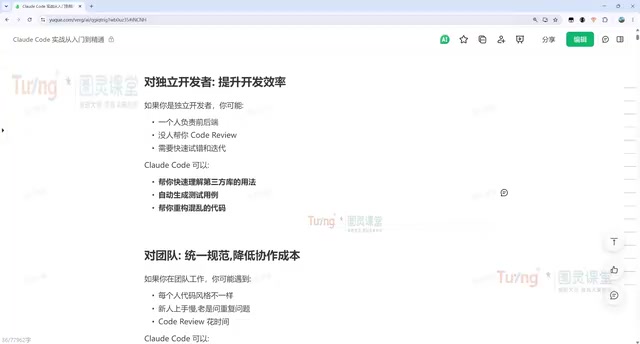
Value for Different Roles
Beginner Developers: Claude Code can help read difficult open-source code, locate project errors and tricky production issues, explain code logic, identify legacy bugs and performance bottlenecks, and fix them one by one.
Indie Developers: Through multi-agent orchestration, a single developer can simultaneously cover product, development, testing, and operations roles — dramatically accelerating full-stack development workflows. Multi-Agent Orchestration is a core architectural paradigm in modern AI engineering: complex tasks are decomposed into subtasks handled by different Agent instances in parallel or in sequence, with results aggregated by a master Agent. Each sub-agent has its own independent context window, preventing attention dilution as task complexity grows. Concurrent execution transforms linear development flows into parallel ones, potentially multiplying overall delivery speed.
Development Teams: Claude Code's value lies in standardizing practices and reducing collaboration overhead. Teams can enforce development conventions via CLAUDE.md, build dedicated Skills for Code Review and issue analysis, and help newcomers quickly grasp a project's full picture even without documentation. CLAUDE.md is a Markdown configuration file placed in the project root directory. Claude Code reads it automatically at startup and injects its content as global system instructions — teams can define code style, banned libraries, branch naming conventions, commit message formats, and other engineering constraints, ensuring every AI output naturally conforms to team standards. This mechanism draws inspiration from .editorconfig and .eslintrc — it transforms "team conventions stored in human memory" into "machine-readable structured specs," essentially serving as an always-online "project constitution."
Environment Setup: Installing Claude Code and Switching to Chinese AI Models
Claude Code currently comes in three main versions: a web version (browser-based, suited for simple conversations), a CLI version, and plugin versions integrated into editors like VS Code, Cursor, and PyCharm. Tutorial authors recommend prioritizing IDE plugins for enterprise development with the CLI as a supplement — but basic commands are still worth learning, since the visual interfaces ultimately call the same underlying commands.
CLI Installation Steps
Installing the CLI is straightforward — a single command does the job — but note differences by operating system:
- Mac / Linux / WSL: Use the official one-click installation script
- Windows: Use the corresponding Windows installation command
After installation, run claude -v to check the version (the tutorial demonstrates version 2.1.207). A successful version output means the installation succeeded.
The author specifically advises: use the official recommended one-click installation command for first-time installs, not npm; for subsequent updates, simply run claude update — the tool will also prompt for auto-upgrade when a new version is detected.
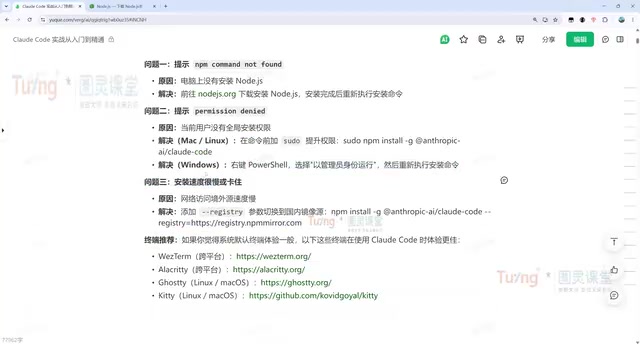
A prerequisite is a configured Node.js environment (version 22.2.0 is used in the tutorial). Verify with node -v. If network issues cause installation failures, switching to a domestic mirror source can help.
Switching to Chinese AI Models with CC Switch
Due to network limitations, the official Claude Code models may not be reliably accessible. The tutorial recommends using the CC Switch tool to quickly switch to Chinese domestic large models:
- Download the latest version from the CC Switch project page (Windows users can choose the portable version — note the difference between ARM and AMD architectures)
- Open the tool, click "+" to add a new model configuration
- Enter the API key for models like DeepSeekAd, Kimi, or Tongyi Qianwen (leave other addresses as default)
- Enable the corresponding model and check "Local Routing" in settings
- Restart Claude Code for changes to take effect
Chinese domestic models work essentially the same way as the official models, with some performance differences. Teams prioritizing stability may want to consider this approach.
CLI Interaction and Daily Workflow
The most practical tip for getting started with Claude Code is using conversation to learn the commands themselves. If you're unsure how a command works, just ask it — for example, "Which command do I use to restore a conversation?" — and it will tell you directly, no need to read the official docs.

Quick Command Reference
claude --resume(or-r): View conversation history and choose one to resumeclaude --continue(or-c): Resume the last conversation directly — the most common daily command/clear: Clear the current conversation and start freshclaude -p: Headless Mode — executes as a single command without entering an interactive window. Headless Mode, borrowed from the concept of headless browsers, runs the program non-interactively without a GUI. This enables Claude Code to be embedded in CI/CD pipelines, GitHub Actions workflows, or shell scripts — effectively "pipelining AI capabilities." For example, you could automatically callclaude -p "Check this PR for security vulnerabilities"on merge requests to perform automated code review, elevating Claude Code from an interactive developer tool to a component of engineering infrastructure.
Rapid Analysis of Enterprise Projects
The tutorial demonstrates the most typical use case: switching to a project directory and asking Claude Code to "analyze this project for me." This is the most efficient way for new hires or developers encountering an unfamiliar codebase to understand the project structure. In the demo, Claude Code accurately identifies the target as a Vue-based admin management system built on the RuoYi (若依) framework and delivers a module-by-module analysis. RuoYi is one of the most widely used open-source enterprise backend management frameworks in China, built on Spring Boot + MyBatis for the backend and Vue 2/3 for the frontend. It includes built-in modules for permissions, code generation, and workflows, with over 30,000 GitHub Stars and broad adoption in government systems, ERP, OA, and other traditional industry digitalization projects. Its complex project structure (typically 10+ Maven submodules) and heavy legacy code make it a rigorous test of an AI's ability to understand large-scale Java engineering projects. Claude Code's ability to accurately identify and analyze the framework at a module level has direct practical value for the many Chinese development teams that rely on RuoYi.
Code Modification Workflow
Every Claude Code modification follows a fixed process: locate relevant files → display proposed changes → wait for user approval → execute changes. Users can approve or reject changes individually, keeping all code modifications fully under control.
Git Engineering in Practice: Making Version Control as Easy as a Conversation
The most instructive part of the tutorial demonstrates how to hand the entire Git workflow over to Claude Code — with "not a single line of code written manually" and all operations completed through natural language conversation.

The Complete Git Operation Chain
- Create and push a project: Ask Claude Code to generate a personal tech blog in HTML+CSS+JS, then call GitHub commands to push it
- Pull a remote repository: Simply say "help me pull" and it executes the corresponding command automatically
- Commit and push: After moving files to a specified directory, complete the full add → commit → push flow in a single sentence
- Query commit history: Type "check how many commits there are and display in a table" for flexible output
- Branch management: Create a dev branch, implement three sorting algorithms on that branch, run automated tests, then commit and push
Throughout this entire process, users don't need to remember any Git command syntax — just describe what you need, and Claude Code handles the rest.
Automated Bug Discovery and Fix Loop
The tutorial also demonstrates a more advanced automated workflow:
- Ask Claude Code to analyze the project for issues and output findings to an
issue.mdfile - Automatically categorize correctness issues, documentation-implementation mismatches, and design/portability concerns
- Then instruct it to "refer to issue.md, fix all issues, and commit and push"
This creates a complete loop: identify issues → document and categorize → auto-fix → verify with tests. Claude Code's problem-solving logic is: first locate the relevant code and understand the context and root cause, then implement a solution. If the project includes test code, it will automatically run tests to verify the fix.
Summary
This hands-on tutorial makes clear that Claude Code is no longer a simple "code completion tool" — it's a full development collaboration platform covering environment setup, project analysis, code modification, and Git engineering workflows. For enterprise-level Java and Python development, mastering CLI interaction, IDE integration, Chinese model switching, and automated workflows can significantly reduce team collaboration costs and boost overall development efficiency. Topics like MCP services, SubAgent coordination, Skill customization, and Harness integration represent the deeper directions for AI-driven engineering in practice. MCP (Model Context Protocol) is a standardized protocol open-sourced by Anthropic in late 2024. By defining a unified three-layer abstraction of "resources," "tools," and "prompts," it allows AI clients to plug-and-play with enterprise systems like databases, Jira, Confluence, and GitLab — essentially the "USB protocol" of the AI era. Establishing this standardized connection layer will dramatically lower the engineering barrier for deep AI integration with enterprise systems, and is the key infrastructure enabling Claude Code's evolution from a development tool to an enterprise-grade AI engineering platform.
Key Takeaways
Related articles

U.S. Investigated Chinese Spy Plot Targeting Nvidia CEO
The New York Times reports the U.S. investigated a Chinese spy plot targeting Nvidia's CEO; a Singapore AI cloud executive is accused of illegally selling chips to China and possible espionage, highlighting escalating AI chip geopolitics.

Ex-Palantir Execs Found Dream, a16z Invests $17M to Build Construction AI World Model
Former Palantir executives founded Dream, which raised $17M from a16z to train an AI world model on 100M sq ft of building permit data, aiming to challenge Autodesk in construction.

Mistral Large 4 Updates Weights and Cuts Prices, AI Gateway Users Upgrade Seamlessly
Mistral Large 4 updates weights and lowers input, cached input, and output token prices on AI Gateway, enhancing agentic coding and defensive cybersecurity. Existing model IDs point to the new version automatically—seamless upgrade with no code changes.