Claude Code for Beginners: From Code Chat Tool to AI Coding Agent

A beginner's guide to unlocking Claude Code as a true AI coding agent, not just a code chatbot.
Claude Code is not an ordinary code generator — it's an AI coding agent that reads repositories, modifies files across a codebase, and executes commands and tests. Most users underutilize it by treating it like a chatbot. This article introduces a beginner-friendly course with four progressive modules covering basics, case studies, advanced features (Skills, MCP, Subagents), and integrated projects, while reminding readers that complex work still requires technical grounding and hands-on practice.
What Claude Code Actually Is
If you could only dive deep into one AI development tool this year, Claude Code deserves a top spot on that list. At its core, it isn't an ordinary code generator — it's an AI coding agent that understands natural language requirements, reads your project code directly, modifies files, executes commands, and even runs tests.
In other words, it doesn't just tell you what to do. It actually steps inside your project and gets the work done. Describe what you need in plain language, and it can help drive development forward — no need to write everything from scratch every time.

In terms of how you use it, Claude Code runs directly in the terminal and also supports IDEs, the web, and other interfaces — adapting to different development workflows. Whether you're building a website, developing an AI application, writing automation scripts, analyzing an existing project, modifying code, or fixing bugs, you can hand the task directly to Claude Code.
AI coding agents differ fundamentally from traditional code completion tools (like early GitHub Copilot) in one key way: execution capability. Traditional tools operate at the level of "suggestions" — they read the context around your cursor, predict the next snippet, but won't proactively explore the whole project, run commands, or verify results. An agent, by contrast, operates through a complete "perceive → plan → execute → feedback" loop: it can browse the file system, invoke terminal commands, read test output, and adjust its next action based on the results. This leap in capability makes agents far more effective than pure code completion tools when handling tasks that require multi-step reasoning — like "migrate this legacy project to a new framework" or "find all the functions causing performance bottlenecks and optimize them."
Most People Only Scratch the Surface
The biggest problem with this tool, ironically, comes from the users themselves. Many people open Claude Code and just ask it to generate a few code snippets or answer some programming questions — treating it like a "chatbot that can write code."
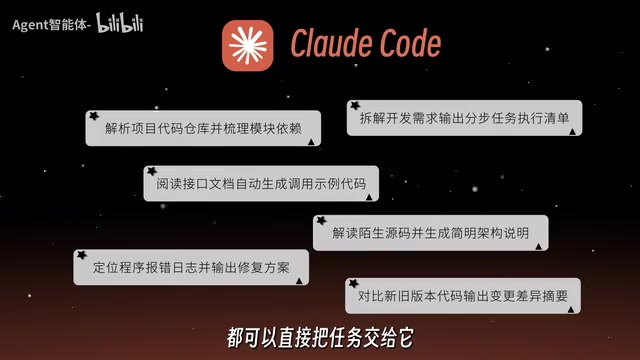
But Claude Code's real capabilities go much further. It can read entire code repositories, modify code across multiple files, and run commands and tests. Complete workflows that used to require reading through a project yourself, looking things up, writing code, and repeatedly debugging — all of that can now involve Claude Code as an active participant.
Using it only as a code chat tool is like buying a high-powered computer capable of complex calculations and only using it to add and subtract. This wasted potential is the most common — and most unfortunate — mistake people make with Claude Code today.
The Four Modules of This Course
Addressing the pain points beginners run into, this hands-on tutorial is structured into four progressively deeper modules:
Getting Started
Begins with the most fundamental operations. Even if you've never written a line of code or touched AI development, you can follow along. The focus is on installation, configuration, and basic interaction.
Case Studies
Real-world examples that tie the basics together, helping you understand how Claude Code performs in actual development scenarios.
Advanced Features
A deep dive into advanced capabilities like Skills, MCP, and Subagents. These are the features that transform Claude Code from an "assistant tool" into a genuine "development partner."
Integrated Projects
Brings everything together, walking you through complete workflows for real project development and debugging.

The overall learning path moves gradually from basic operations to real project development, with an emphasis on hands-on practice rather than passive reading.
Skills, MCP, and Subagents are three core concepts for understanding Claude Code's advanced capabilities. Skills refer to reusable task templates or workflows that allow Claude Code to handle specific types of work in a predefined way, reducing the cost of repeatedly describing the same requirements. MCP (Model Context Protocol) is an open protocol introduced by Anthropic that enables AI models to communicate with external tools, databases, and services in a standardized way — essentially giving Claude Code an extensible "external perception interface" so it can tap into a wider range of third-party resources. Subagents are a multi-agent collaboration mechanism: Claude Code can break down a complex task and dispatch multiple sub-agents to work on different parts in parallel or in sequence, then consolidate the results — much like a project manager coordinating several specialized teams. Together, these three capabilities are what genuinely elevate Claude Code from "an assistant that answers questions" to "a collaborator that can independently drive a project forward."
How Beginners Should Get Started
Not knowing how to code is fine. Never having touched AI development is fine too — the course emphasizes this repeatedly. A sensible onboarding path is to start with simple projects, follow along with the tutorials hands-on, and gradually work up to project development and debugging before moving on to advanced features like Skills, MCP, and Subagents.

One thing to be clear-eyed about: complex projects still require a certain level of technical foundation and human review. Claude Code isn't magic. It can dramatically lower the barrier to development, but it can't fully replace your understanding and verification of the code. For beginners, the more pragmatic approach is to start with basic tasks, gradually get comfortable with how it works, and build intuition for AI-assisted development.
The accompanying resource pack covers four areas: installation and configuration, prompt templates, usage examples, and a Skills usage guide — along with hands-on project materials you can start practicing with right away. The value of any tool lies in actually using it, not letting it collect dust in your bookmarks — and that's true of every AI tool out there.
Final Thoughts
Claude Code represents an important evolutionary direction for AI programming tools: shifting from "generating code snippets" toward "autonomously executing development tasks." For developers, the real dividing line isn't whether you've tried it — it's whether you've unlocked its full potential as an agent. Rather than treating it as a fancy code Q&A tool, try handing it real tasks and discovering, through practice, exactly where its boundaries lie and how far its potential truly reaches.
Related articles

Stop Over-Engineering Prompts: An Engineer's Guide to Agent Thinking
A tech blogger rejects the over-engineering narrative of Prompt Engineering: engineers' problem isn't imprecise prompts but turning one-sentence questions into complex features. With T3 Code case studies, this article explains how Agent thinking replaces reinventing the wheel and how to build MCP and other infrastructure for Agents.

Exponential Backoff with Jitter Still Fails 64%: 100 LLM Calls Tested and Root Cause Analysis
Tested 100 concurrent LLM calls: exponential backoff with ±10% jitter still fails 64%; full jitter improves tail but increases requests; honoring Retry-After and client-side rate limiting reduce times to 11.8s and 8.0s. The article also exposes three llm-retry bugs and offers eight practical retry and circuit breaker recommendations.

Google Open-Sources Harness2: Letting AI Agents Self-Evolve
Google Research open-sources Harness2, a framework that lets AI Agents automatically improve system prompts, tools, and memory configurations through a propose, trial-run, and select loop—no labeled data or scoring model required, validated on Gemini and GLM.