Claude Code G-code Generation in Practice: 3 Projects That Break Through 3D Printing Slicer Limitations

AI coding agent Claude Code generates G-code directly, breaking through 3D printing slicer limitations.
A Japanese blogger used Claude Code to generate custom G-code for a Bambu Lab A1 Mini, bypassing two fundamental limitations of traditional slicers: flat-layer stacking and fixed extrusion calculations. The experiments included a sine wave cylinder, a scale-textured vase, and automated Blender modeling—successfully achieving unconventional effects like free Z-direction nozzle movement, while also encountering failures such as collision issues with pyramid structures.
When an AI Coding Agent Meets a 3D Printer
What happens when an AI coding agent meets a 3D printer? Japanese 3D printing blogger Takeshi Uno (Age of 3DP channel) ran a series of experiments with Claude Code, successfully bypassing the limitations of traditional slicer software and getting a budget-tier Bambu Lab A1 Mini (around 20,000 yen) to execute print movements never seen before.
This article provides a detailed breakdown of his three hands-on projects—a sine wave cylinder, a scale-textured vase, and automated Blender modeling—along with the pitfalls encountered and key considerations along the way.
Why Bypass Slicer Software? Two Fundamental Limitations Explained
Before diving into the projects, let's understand a core question: what exactly does slicer software limit?
The traditional FDM (Fused Deposition Modeling) 3D printing workflow slices a 3D model horizontally and stacks layers sequentially—layer 1 completes before layer 2 begins, layer 2 before layer 3, with the nozzle moving within the same XY plane at each layer while keeping Z-axis height constant. Slicer software like Bambu Studio, Cura, and PrusaSlicer converts user-uploaded 3D models (STL/3MF format) into precise machine instructions, with built-in collision detection, support structure generation, temperature curve optimization, and other safety mechanisms.
This creates two fundamental limitations:
- Motion is locked to the XY plane: The nozzle cannot perform continuous Z-direction movement during printing—all geometry must result from "flat layer stacking."
- Extrusion volume is mechanically calculated by the software: The E value (extrusion amount) in G-code is automatically computed by the slicer based on nozzle travel distance, layer height, wall thickness, and other parameters—users cannot freely increase or decrease it.
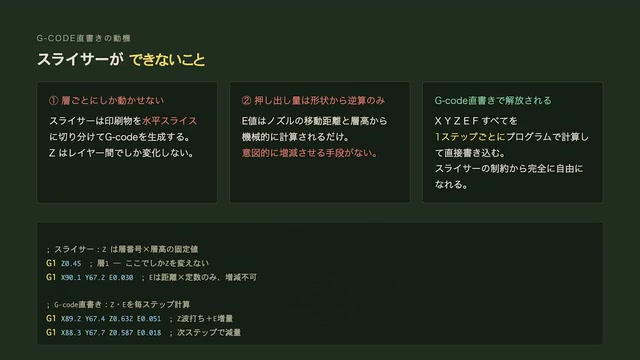
G-code is a programming language originating from the 1960s CNC machining industry. It's essentially the "action script" for a 3D printer, with each line precisely describing where the nozzle should move and how much material to extrude. A typical print file might contain hundreds of thousands of G-code instructions covering coordinate movements (G0/G1 commands), temperature control (M104/M109), fan speed (M106), and extrusion amounts (E-axis parameters)—every execution detail. Writing G-code directly breaks through both limitations above—allowing the nozzle to move freely in the Z direction and varying extrusion volume according to any mathematical function.
The problem is that hand-writing G-code has an extremely high barrier to entry for ordinary users. This is precisely where Claude Code enters the picture: describe your desired print effect in natural language, and let AI generate precise G-code for you.
Claude Code: Not Just Chat, but a Coding Agent That "Takes Action"
Claude Code is an AI coding agent (Agentic Coding Tool) released by Anthropic. Its essential difference from traditional chat-based AI lies in its "agentic" capability—it doesn't just generate code snippets but can autonomously execute code in a terminal environment, read and write files, debug errors, and iteratively refine, forming a complete "think-execute-verify" loop. This differs significantly from conversational AI like ChatGPT: the latter can only output text, requiring users to manually copy code and run/debug it themselves.
In 3D printing scenarios requiring precise numerical computation, agentic capability is particularly critical—generating sine wave G-code involves trigonometric calculations, coordinate transformations, extrusion compensation, and other complex math. Claude Code can directly run Python scripts to verify output results rather than relying solely on a language model's "intuition" to generate code. This is exactly why the blogger admits he "doesn't fully understand every line of code" yet still obtains usable results.
Experiment Platform: Capabilities and Boundaries of the Bambu Lab A1 Mini
The Bambu Lab A1 Mini is an entry-level consumer FDM printer from Chinese 3D printing company Bambu Lab, priced at approximately 20,000 yen (roughly 900 RMB). It's known for its high cost-performance ratio and out-of-the-box usability, with print speeds reaching 500mm/s. Notably, Bambu Lab's printer ecosystem is relatively closed—the official slicer Bambu Studio has certain compatibility limitations with third-party G-code, and the machines include proprietary features like AMS (Automatic Material System) and vibration compensation. By generating G-code directly to bypass Bambu Studio, the blogger forfeits all these proprietary optimizations—this is one reason why print speed needed to be manually reduced and cooling enhanced during the experiments.
Project One: Sine Wave Cylinder—Making the Nozzle Dance Freely in the Z Direction
Specific Operations for Generating G-code with Claude Code
The first project's goal was to print a cylindrical structure where the walls aren't flat circular rings but undulate along the Z direction in a sinusoidal curve, creating a wave-like three-dimensional texture.
The blogger's instruction to Claude Code was remarkably straightforward: "Generate G-code for a cylindrical shape whose walls undulate up and down along a sine curve." Claude Code generated a complete Python script in under a minute, which directly output a usable G-code file when run. The blogger admitted he didn't fully understand every line of the generated code—this is precisely the value of an AI coding agent.
Print Results of the Sine Wave Cylinder
During actual printing, the A1 Mini's print head exhibited clear up-and-down bouncing motion—something that would absolutely never occur in normal sliced printing. The sinusoidal trajectory directly became a three-dimensional texture on the wall surface. After small-scale tests succeeded, the blogger increased the wave layers to approximately 30, printing a vase-like decorative piece that showcased a design language impossible to achieve with traditional 3D printing.

Failure Lesson: Collision Issues with Pyramid Structures
However, not all Z-direction movements succeed. When the blogger attempted to print densely arranged pyramid-like structures, the printed sharp tips collided with the silicone sock surrounding the hot end. The reason is simple: the nozzle tip doesn't protrude far enough from the hot end assembly, so even slight vertical undulation causes collisions with already-printed sections. A sine curve that "escapes diagonally"
Related articles
 Product Reviews
The Programmer's Desk Setup Guide: Building a Workspace That Feels Like Home
Discover how programmers build productive, comfortable workspaces. From multi-monitor setups to ergonomic design, explore the desk philosophy that drives focus and flow.
 Product Reviews
Qoder vs Cursor Real-World Comparison: Which $20/Month AI IDE Is Better?
Hands-on comparison of Qoder vs Cursor AI IDEs: Agent autonomy, human interaction count, and architecture decisions. Qoder needed only 2 interactions vs Cursor's 8.
 Product Reviews
Cursor Cloud Agent Demo: Eliminating Bottlenecks Across the Entire Software Development Lifecycle
Deep analysis of Cursor's Cloud Agent demo showing how cloud VMs, automated test artifacts, and a full-chain control plane systematically eliminate human bottlenecks across the software development lifecycle.