Claude Code Getting Started: Complete Guide to Installation, Setup, and Avoiding Account Bans

Install Claude Code via NPM and use CC Switch to bypass login — the key to avoiding account bans in China.
This guide covers everything needed to get Claude Code running in China. Install via NPM (requires Node.js 22+, Git, and a VPN) for the most reliable setup. The biggest risk is account bans from official login — solved by using CC Switch to route API requests through third-party providers like DeepSeek, bypassing Anthropic's auth entirely. The article also emphasizes that pure natural language prompts yield poor results; using permission modes, MCP, Skills, and CLAUDE.md is essential for real productivity.
Claude Code has become a go-to programming tool for many developers in China. According to one Bilibili content creator's observations, most tech teams — except at older or smaller companies — are already pushing forward with AI-assisted coding (vibe coding). Some require 50% of code to be AI-generated, while others aim for 90% or higher. This article is based on their public course content, walking through the complete process of installing and using Claude Code, with a particular focus on how to avoid account ban risks.
No Coding Agent Is Universally Best — Use What Works for You
The most widely used coding agents among developers today include Claude Code, Codex, and Cursor, along with components from Amazon and Alibaba's Qwen. Based on personal experience, the general consensus is: these tools are all fundamentally coding agents, and none is objectively superior. The key question is whether a given tool fits your workflow.
Unless your company has strict constraints, the recommendation is to start with Claude Code or Codex. The recently released DeepSeekAd Harness is also worth trying. Overall, Claude Code currently has the largest user base, so this tutorial focuses on it.
Core topics covered in the course include: installation and integration, permission modes and built-in commands, MCP, Skills, Subagent (Submit), and effective use of the CLAUDE.md configuration file. One important note: many developers stop at the "chat with it in natural language" stage, which yields mediocre results. To truly improve efficiency and output quality, you need to leverage the built-in components the tool provides.
Installation: Why NPM Is the Recommended Method
Before installing, it's strongly recommended to read through the official documentation first — there's a Chinese version available, and it's clearly written. The official site offers multiple installation methods; Windows users can run the corresponding commands in PowerShell or CMD.
The problem, however, is the network environment. Due to network restrictions in China, installing directly via PowerShell or CMD has inconsistent success rates: users with fewer ISP restrictions might succeed, while those with stricter restrictions often can't get it to install at all. Fiddling with various API configurations and environment variable workarounds is generally not recommended — it's just too much hassle.
The recommended approach is installing via NPM, which is explicitly listed as an "advanced option" on the official site. As long as you have a working VPN, this method is essentially fail-proof — it's been used to install Claude Code for countless colleagues and students without a single failure.
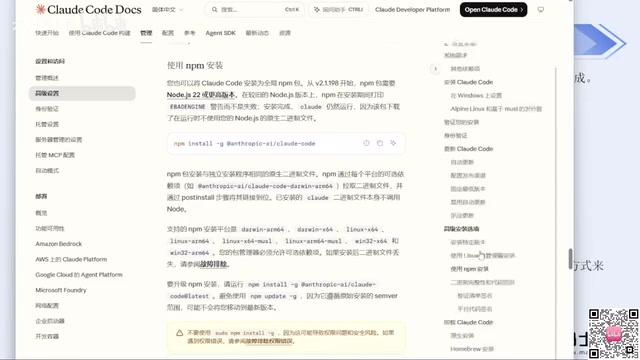
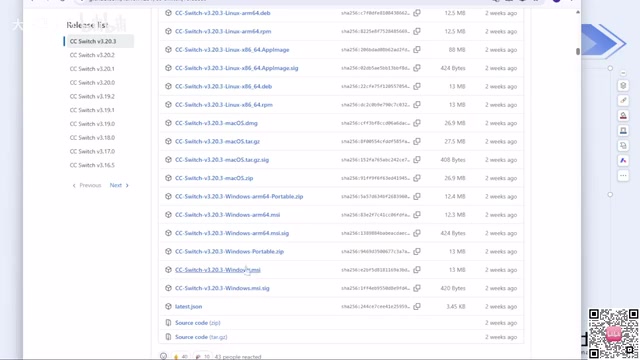
There are two prerequisites for NPM installation:
- Node.js: Version 22 or higher is required. Just download the latest version from the official site (currently version 24).
- Git: Also download and install from the official site.
Both are straightforward installs — just download the installer and click "Next" through the prompts. If your C drive is running low, you can change the installation directory.
Once installed, create a new directory, open CMD inside it, and type claude --version to verify. If it outputs a version number, the installation was successful. The first time you run claude, it will prompt you to trust the current folder, choose a color theme, and select a login method.
NPM (Node Package Manager) is the built-in package manager for Node.js. Claude Code is essentially a command-line package published to the npm public registry. The command
npm install -g @anthropic-ai/claude-codedownloads and globally installs it from registry.npmjs.org. Compared to PowerShell's winget or downloading a binary directly, NPM offers cleaner dependency version management, easier updates (a single command upgrades the tool), and more reliable connectivity when used with a VPN. Node.js version 22+ is required because Claude Code uses newer JavaScript runtime features internally — such as the native fetch API and ESM module support — which cause runtime errors on older Node.js versions.
The Key Trick: Use CC Switch to Skip Login and Avoid Account Bans
This is the single most important point in the entire guide. Be very clear about this: if you use the official login method, your account will very likely get banned — this has happened many times firsthand. Even configuring an API Key via environment variables has resulted in a ban.
The solution is an open-source tool called CC Switch. It now has a dedicated website, though it started as a GitHub project. The core idea is: after configuring CC Switch, running claude again will skip the official login step entirely. Since no account login is involved, there's no account to get banned.
The setup process is straightforward:
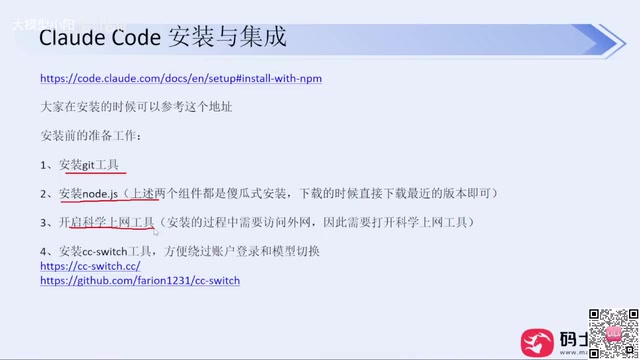
- Download the installer for your OS from the website or GitHub Releases (Windows users select the
.msifile; click "show all" to see all versions) - Double-click to install, then open the app
- Click the "+" button and select a model provider (e.g., DeepSeek, Zhipu, etc.)
- Enter the corresponding API Key and click Save
The app includes a wide range of mainstream model providers built in. You can also see different configuration ports for Claude Code, Codex, OpenCode, and other tools — just select the one you're using. If your provider isn't listed, use the "Custom Configuration" option and fill in your API Key, base URL, and request endpoint. Third-party relay services are fully supported.
After completing the configuration, rerun claude and the login step will be automatically skipped. Using this approach, there have been no bans for several months. If you've already installed and logged into Claude Code using the official method, you can still reconfigure with CC Switch to bypass the login going forward.
Note that Codex is also best used with CC Switch, but Codex uses separate tool entries in the app. When switching between tools, remember to switch configurations accordingly — otherwise you might end up with DeepSeek configured but Codex still not working. DeepSeek Harness, on the other hand, currently doesn't require CC Switch and can be configured directly through its own settings.
A practical tip on VPN services: given how strict current risk controls are, avoid purchasing annual memberships unless you're confident the service is stable enough. It's better to pay a little more and buy monthly for greater flexibility.
From a technical standpoint, Claude Code's official login relies on Anthropic's account system, and frequent use from Chinese IP addresses tends to trigger fraud detection, leading to accounts being flagged or banned. CC Switch essentially functions as a local proxy layer: it intercepts API requests from Claude Code and forwards them to third-party model providers configured by the user (such as DeepSeek or Zhipu GLM), completely bypassing Anthropic's account authentication system. This "API relay" pattern is extremely common in China's AI developer community — providers offer OpenAI-compatible interfaces, and client tools don't need to know which model is running underneath; just swap the Base URL and API Key. Worth noting: using a third-party model means actual inference quality depends on your chosen provider, which may differ from the official Claude 3.5/3.7 series. Weigh this against task complexity and cost accordingly.
Natural Language Chat Is Just the Starting Point — and It Performs Poorly
After getting the model configured, many people's first instinct is to type "Introduce yourself" or "Build me a Snake game." This kind of pure natural language interaction is essentially just prompt engineering.
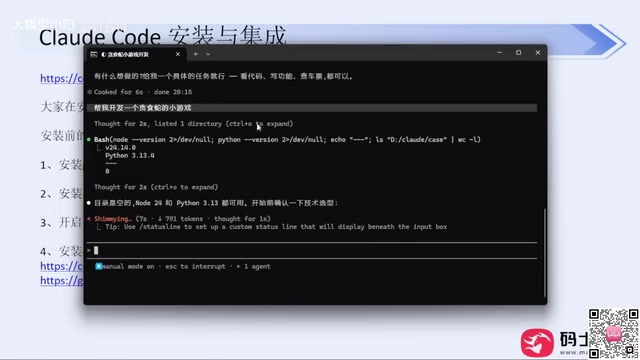
This simple prompting approach produces very poor results: it doesn't involve any technology selection decisions, doesn't define scope, consumes more tokens, and takes longer to generate. In a demo where Claude Code was asked to build a Snake game, newer versions will proactively ask how you want it implemented (e.g., the simplest approach using HTML) and what features to include, while older versions just dive straight into building.
This points to an important concept — democratizing technology. For a basic little feature, a single sentence can generate it without needing to learn programming or syntax. But this only works for personal side projects. Once you're operating in a commercial environment and trying to generate real revenue, a one-liner is nowhere near sufficient. Building production-quality large-scale platforms still requires technical knowledge. Otherwise, the generated code will be low quality with many bugs — and the demo code shown here was never put through any code review before running. In real production, those steps can't be skipped.
Permission Modes: Control How Often You're Interrupted
During code generation, Claude Code will repeatedly prompt you to confirm operations — if you're familiar with LLM technology, this is what's known as Human in the Loop. Having to press Enter to confirm every action gets tedious fast.
The solution is permission modes. You can see the current mode at the bottom of the interface; press Shift + Tab to cycle through modes including menu mode, accept edits, plan mode, and auto mode. Since Claude Code needs approval when executing user instructions, these four permission modes control different ranges of autonomous behavior. Choose based on your needs — if you don't want constant interruptions, switch to a mode with higher automation.
"Human in the Loop" is a core safety mechanism in AI Agent system design. When a coding agent executes tasks, it performs high-risk operations like reading/writing files, running CLI commands, and making network requests. If it runs fully autonomously without any intervention, a single hallucination or misunderstanding could result in files being accidentally deleted, buggy code being committed, or databases being overwritten — consequences that may be hard to roll back. This is why most agent frameworks require human confirmation at key checkpoints, which is the fundamental reason for all those pop-up prompts. Plan mode is a middle-ground solution: the agent first lays out a complete execution plan for the user to review, and once approved, executes all steps in one go — balancing efficiency and safety. Auto mode is best suited for controlled environments (like isolated test projects) and is not recommended for direct use on production codebases.
Summary
For users in China, the two main hurdles to getting started with Claude Code are installation reliability and account ban risk. The recommended solutions are clear: install via NPM (with Node.js 22+, Git, and a VPN set up first), and use CC Switch to bypass the official login and avoid bans. On the usage side, move beyond simple natural language prompts and gradually learn to leverage permission modes, MCP, Skills, CLAUDE.md, and other components — that's what actually drives up efficiency and output quality. One final practical note: domestic models are already capable enough for everyday work needs, so there's no need to risk account bans just to access overseas models.
Related articles

Felix Rieseberg Personal Homepage
Felix Rieseberg's personal homepage sparks attention on Hacker News. This article covers the Slack engineer's technical background, the rise and fall of nativefier, and the value of a developer homepage as a tech calling card.

@ai-sdk/vue 3.0.306 Patch Release Syncs with [email protected] Update
@ai-sdk/vue 3.0.306 released, synced with [email protected]. A routine patch release for the Vercel AI SDK ecosystem with no public API changes; the Vue adapter layer stays version-aligned with the core package.

Gemini 4 Argon API Launches: The Era of Million-Token Output Begins
Google launches Gemini 4 Argon with sparse MoE architecture, up to 1M output tokens, and a 68.90% Vals Index score, available across API, AI Studio, and the Gemini app.