Claude Code Getting Started: Environment Setup, Core Commands, and Git Workflow Automation

A complete beginner's guide to Claude Code: setup, core commands, and Git workflow automation.
This guide covers Claude Code's three usage formats (web, CLI, IDE plugin), how to switch to domestic Chinese LLMs via CC Switch, and how to use conversational commands for project analysis and Git operations. It also explains key concepts like SDD, multi-agent orchestration, CLAUDE.md, and headless CI/CD integration.
Why Claude Code Is Becoming a Developer Essential
If you still think of AI coding tools as "chat-in-a-browser, paste-the-code" experiences, you may already be behind. Claude Code started as a command-line tool — you'd open a terminal, have a conversation with it, and ask it to analyze project code, understand file relationships, or suggest changes. But after continuous iteration, today's Claude Code has evolved far beyond a simple coding assistant into a genuine "development partner."
This article provides a systematic overview of Claude Code's core capabilities, using a real project to walk through the complete onboarding path — from environment setup and basic commands to Git workflow automation.
From Code Assistant to Engineering Collaborator
Claude Code's evolution has a clear direction: engineering-first. Early on it could only analyze individual files; now you can ask it about the details of an entire project structure and get a remarkably thorough analysis. More importantly, it has begun supporting SDD (Specification-Driven Development), automated testing, and the accumulation of team engineering experience through a Skill mechanism.
What is Specification-Driven Development (SDD)? Specification-Driven Development is a software development methodology centered on formal or semi-formal specification documents as the core driver. The key idea is to explicitly define system behavior, interface contracts, and boundary conditions — in natural or structured language — before writing any code, and then have developers or tools implement the code based on those specifications. This contrasts with the traditional "code as you go" approach and effectively reduces rework caused by ambiguous requirements. In the context of AI-assisted programming, SDD has gained new relevance: developers only need to maintain clear specification documents, and AI tools can automatically generate, verify, and correct code accordingly — keeping human decision-making focused on what to define rather than how to implement.
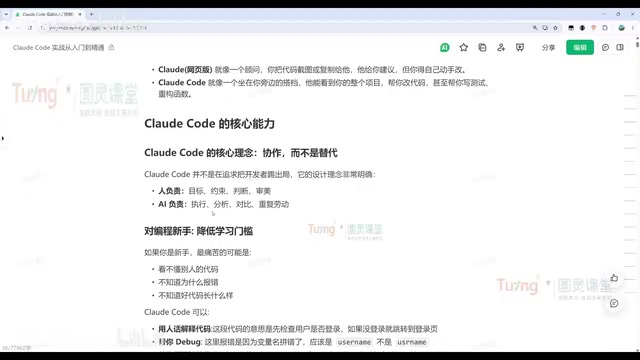
For independent developers, Claude Code can significantly boost productivity — dramatically cutting the time cost of full-stack development. Through multi-agent orchestration, it can simultaneously take on roles such as product manager, developer, tester, and DevOps engineer.
How Does Multi-Agent Orchestration Work? Multi-Agent Orchestration refers to breaking down a complex task and distributing the sub-tasks to multiple AI agents with different specializations or roles, running them in parallel or sequence, and then aggregating the results through a coordination layer. This architecture draws from distributed systems and microservices thinking. Applied to large language models, it addresses limitations like finite context windows and lack of focus in a single model. In a software development scenario, a "Product Agent" handles requirement decomposition, a "Development Agent" handles code generation, a "Testing Agent" handles test case execution, and a "DevOps Agent" handles deployment script generation — all working in concert to significantly shorten the path from requirements to delivery. Claude Code implements this capability in a lightweight way through its built-in Subagent mechanism.
For teams, the value lies in "unified standards and reduced collaboration overhead": using CLAUDE.md to enforce development conventions, using Skills for code review, and helping new hires quickly understand legacy projects with no documentation.
CLAUDE.md: An Engineering Standards Manual Written for AI CLAUDE.md is a project-level configuration file that Claude Code recognizes and follows. Placed in the project root directory, it is automatically loaded at the start of every session. In essence, it's an "engineering standards manual written for AI" — it can include code style conventions (e.g., indentation, naming rules), a list of prohibited actions (e.g., never modify certain core files), tech stack descriptions, testing requirements, and more. This mechanism draws inspiration from tools like
.editorconfigand.eslintrc, which embody the principle of "local config as constraint," making standards that were previously scattered across team wikis or informal agreements explicit and machine-readable. For multi-person teams, maintaining a high-quality CLAUDE.md is equivalent to providing every team member (including the AI) with a unified onboarding handbook — effectively preventing issues like inconsistent AI-generated code styles or violations of business rules.
Claude Code's Three Formats and Quick Environment Setup
Claude Code currently comes in three main forms:
- Web version: Use it directly in a browser; best suited for simple conversational tasks
- CLI version: The most fully featured option and the foundation for understanding the underlying mechanics
- IDE plugin: Integrates into mainstream tools like VS Code, Cursor, PyCharm, and IntelliJ IDEA — the highest day-to-day development efficiency
For beginners, the recommended approach is to start with the web version to get a feel for it, then use the IDE plugin for actual development. That said, it's still worth learning the CLI basics — the visual interfaces are ultimately calling these same commands under the hood.
CLI Installation: One Command Does It All
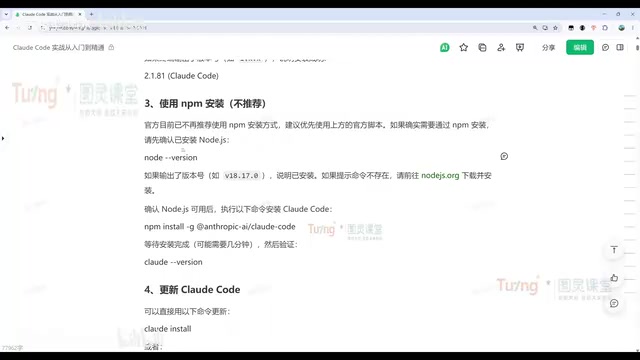
On macOS, Linux, or WSL, use the official one-line install script. On Windows, use the irm command. After installation, run claude -v — if you see a version number, you're good to go.
A few things to keep in mind during installation:
- Network stability: Occasional errors during installation are normal; retrying a few times usually resolves them
- NPM method: You can also install via npm, but Node.js must be installed first — verify with
node -v - Mirror acceleration: For users in China, switching to a domestic npm mirror will significantly speed up the process
- Version updates: Simply run
claude update; the tool also prompts you to auto-upgrade
Switching to Chinese LLMs: The CC Switch Tool
Due to network restrictions, accessing Claude Code's official models from within China can be unstable. The recommended solution is CC Switch, a tool that lets you quickly switch to domestic models like DeepSeek, Kimi, or Qwen (通义千问).
The setup process: download the appropriate version from the project's Release page (Windows users should check whether their machine is ARM or AMD64 — AMD64 is the common choice), then either extract and run it directly or install via the MSI package. Once installed, add your model configuration and API key in the CC Switch interface, enable it, check "Local Routing" in the settings, and restart Claude Code.
After configuration, use the /model command in the chat window to view and switch to models like DeepSeek. The experience is essentially identical to using the official model — and a far more stable option for developers in China.
Core Commands and Project Structure Analysis in Practice
The most common first step when picking up Claude Code is asking it to analyze a project. Just navigate to your project directory and type "help me analyze this project" — Claude Code will automatically identify the tech stack and map out the relationships between modules.
Ruoyi-Vue: One of China's Most Popular Enterprise Development Frameworks Ruoyi-Vue is a widely used enterprise-grade rapid development framework in China, built on a frontend-backend separation architecture. The backend is based on Spring Boot, Spring Security, and MyBatis; the frontend uses Vue.js with the Element UI component library. Because it comes with built-in modules for permission management, menu configuration, and code generation that enterprises commonly need, a large number of small-to-medium businesses and government IT projects use it as a base for secondary development. It has an extremely high adoption rate in China's Java backend admin system space. For AI tools, accurately recognizing a Ruoyi-Vue project structure means understanding the module organization logic of this specific ecosystem (such as the
sys_userpermission system and thegeneratorcode generation module), which enables more precise, context-aware analysis and suggestions rather than generic responses.
For example, Claude Code can identify that a project is a frontend-backend separated admin system based on Ruoyi-Vue and explain the purpose of each directory one by one.
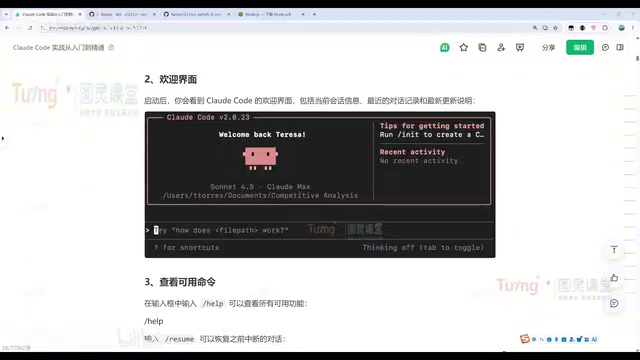
For new hires or developers encountering an unfamiliar codebase for the first time, this approach of "letting the AI read the project first" dramatically lowers the onboarding barrier — it can even partially replace the need to read official documentation.
Quick Command Reference
Claude Code commands fall into two categories: internal slash commands and external CLI commands.
Session management:
claude --resume(orclaude -r): View your session history and resume a past sessionclaude --continue(orclaude -c): Resume the most recent conversation directly — the most frequently used option/clear: Clear the current conversation and start a fresh session
Modification workflow: Every code change in Claude Code follows a fixed process — automatically locate the files to modify → display the proposed changes → wait for user approval → execute. You can approve changes one by one or reject them. This "human-in-the-loop" mechanism keeps all modifications under your control.
Git Workflow: Version Control Through Conversation
This is where Claude Code delivers its most tangible value. Conversational Git operations mean developers no longer need to memorize complex command syntax — just describe what you need in plain language and complete the entire version control workflow.
A Complete Automated Development Loop
Here's a typical end-to-end development flow demo:
- Create a project: Type "help me create a personal tech blog project using only HTML5 + CSS + JS"
- Push code: After moving files into the project directory, type "commit and push the code" — Claude Code automatically runs the necessary Git commands to complete the operation
- Branch development: Type "in the Test project, create a dev branch, implement three different sorting algorithms, then commit and push"

Throughout this entire process, the user never needs to remember a single Git command. Claude Code handles everything automatically: branch creation, code writing, automated testing (all tests pass), committing, and pushing.
Automated Bug Discovery and Fix Loop
Claude Code also supports autonomously identifying and fixing code issues, forming a complete code review + fix automation pipeline:
- First, type "analyze the dev branch of the Test project for issues and output them to issues.md" — it will compile a list of problems across dimensions such as correctness, documentation consistency, design, and portability
- Then type "fix all issues referenced in issues.md, then commit and push the code"
The complete issue-handling flow is: locate the relevant code → understand the contextual logic → analyze the root cause → present the solution → run tests to verify the fix.
Headless Mode: Integrating with Automation Scripts
Beyond interactive terminal sessions, Claude Code supports single-shot headless invocations via claude -p (print mode). For example, claude -p "analyze the project structure in the Test directory" outputs the result directly to the console without entering a conversation window. Commands like claude commit can also invoke Git commits directly, making them ideal for integration into CI/CD automation scripts.
Headless Mode and CI/CD Integration Explained Headless mode refers to a program executing tasks automatically without any user interface interaction, outputting results to standard streams or files. This concept is widely used in browser automation (e.g., Headless Chrome), server-side rendering, and automated testing. In CI/CD (Continuous Integration/Continuous Delivery) pipelines, all tools must support non-interactive invocation because pipelines run in unattended server environments. Claude Code's
-p(print) mode is designed precisely for this — it accepts a single instruction, performs the analysis or code operation, outputs the result to the console, and exits. This fully aligns with the Unix philosophy of "single responsibility and composability." Development teams can embed it into platforms like GitHub Actions or GitLab CI to automatically trigger AI code reviews, generate changelogs, or run regression tests whenever code is committed.
Closing Thoughts: A New Paradigm for AI-Powered Engineering
Claude Code's positioning has shifted from "a tool for programming tasks" to "a true development collaborator." Humans handle goal-setting, defining constraints, making judgments, and aesthetic decisions; execution, analysis, comparison, and repetitive work are delegated to AI.
Whether you're an independent developer looking to boost full-stack productivity or a team aiming to unify coding standards and reduce collaboration overhead, Claude Code offers genuinely practical value. And what's covered in this article is only the beginning — there's much more to explore: MCP service setup, Subagent coordination, Skill customization, Hooks workflow automation, and complete hands-on walkthroughs based on real enterprise projects.
Key Takeaways
Related articles

Databricks Genie: The AI Analytics Assistant That Tripled a Marketing Team's Data Usage
Databricks' AI analytics assistant Genie tripled marketing team data usage. Discover how this conversational NL2SQL tool lowers the data access barrier and what it means for enterprise AI adoption.

How The Oregon Trail Became a Cultural Icon for Generations
How The Oregon Trail grew from educational software into a multigenerational cultural icon — through classrooms, "You have died of dysentery," and shared childhood memories.

Health Benefits Platform Thatch Hits $1B Valuation as Healthcare Costs Surge
Thatch raises $108M and hits a $1B valuation, backed by a16z, Index Ventures, and General Catalyst, as surging U.S. healthcare costs drive demand for flexible benefits platforms.