Claude Code Getting Started Guide: Installation, Configuration, and the Five Stages of AI Programming
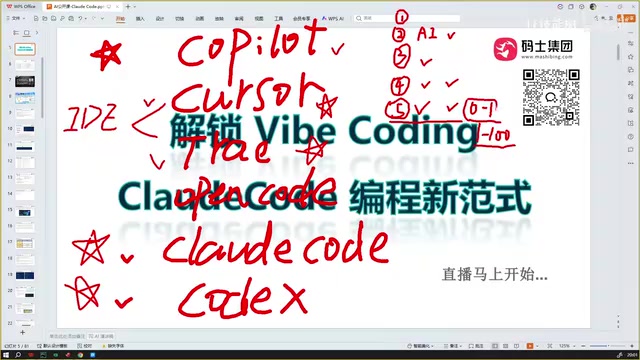
Claude Code represents Stage 5 of AI programming — autonomous agentic coding — with a key focus on technical breadth over depth.
This article maps out the five evolutionary stages of AI coding tools — from manual coding to ChatGPT chat, Copilot autocomplete, AI-native IDEs like Cursor, and finally Claude Code's autonomous agentic programming. Today's tools excel at 0-to-1 (generating projects from scratch) but still struggle with 1-to-100 (complex business iteration). The article also covers Claude Code's identity as a CLI tool (not an IDE), installation requirements, and why a global proxy — not just a browser-level one — is essential for successful setup.
The Five Evolutionary Stages of AI Programming
From writing code by hand to today's agentic programming, AI coding tools have followed a clear evolutionary path. Looking back at this journey, we can identify five key stages — understanding them helps clarify where Claude Code fits in.
Stage One is "Traditional Programming", where developers relied entirely on manually writing every line of code. Stage Two emerged in early 2023, as conversational AI tools like ChatGPT became popular and programmers began interacting with AI through chat interfaces, copying generated code snippets back into their IDEs to debug. Stage Three was the plugin-based autocomplete era, exemplified by GitHub Copilot — install a plugin directly in your IDE and get comment-driven inference, intelligent completion, and snippet editing.
Stage Four marked the arrival of AI-native IDEs like Cursor and Trae. These tools are essentially "Deep Agents" that can directly manipulate project code for debugging and modification. In their early iterations, however, their ability to reference broader context was limited, often requiring multiple rounds of conversation to get the right result.

Stage Five is the transformation happening right now, represented by Claude Code and Codex (with Cursor and Trae continuing to iterate as well). The defining characteristic of this stage is that AI doesn't just write code — it can directly run and debug, automatically commit code based on requirements, and execute tests, making it genuinely possible to complete full feature development in multiple rounds or even a single interaction.
Strong at 0-to-1, Still Weak at 1-to-100
The most fundamental capability divide among today's AI coding tools can be summarized as the gap between "0-to-1" and "1-to-100."
0-to-1 means giving the AI a detailed requirements description and having it generate code from scratch. On this front, Claude Code, Codex, Cursor, and Trae all perform impressively, producing high-quality code.
1-to-100 refers to continuously filling in more business logic and detail within an existing technical framework. This often involves complex scenarios like multi-person collaborative development and cross-module integration — areas where current AI coding tools still fall short. This is also where the next major breakthrough is most likely to come.
Worth noting is the emerging trend of "Clarification-First Programming." Some tools are already exhibiting this interaction pattern. For example, Claude Code's Plan mode proactively asks about your preferred implementation approach and coding style before writing any code. Alibaba's Coder similarly confirms requirements with developers during the coding process. This mechanism of actively clarifying requirements is making AI programming more controllable and precise.
Will Programmers Still Be Needed in the AI Era?
As AI programming capabilities accelerate, an unavoidable question surfaces: will developers still be needed in the future?
A pragmatic assessment: in the foreseeable future, demand for junior and mid-level programmers may decline. But that doesn't mean non-technical people can easily produce enterprise-grade projects. Quite the opposite — future developers will face higher demands for technical breadth: understanding both backend and frontend, cloud-native architectures and data analysis, and even multi-platform development across iOS and Android.
Why does breadth matter so much? Because when doing conversational programming with AI, broad technical knowledge lets you quickly evaluate whether the AI's chosen framework is sound and whether the direction is correct — enabling you to effectively oversee and course-correct the AI's output. This is precisely the key capability for guiding AI through the "1-to-100" phase.

For complete non-technical beginners, it may become possible to use AI to build simple projects for personal use — but enterprise-grade projects will remain a significant challenge. Of course, as programming methodologies like Vibe Coding mature, this boundary may be redefined.
Token Costs: Not as Expensive as You Think
Many people worry that LLM Token costs will keep rising, but the actual trend is the opposite — Tokens are only getting cheaper. Take DeepSeekAd as an example: its offerings have already delivered dramatic price reductions. Using DeepSeek's models alongside Claude Code offers an excellent cost-to-performance ratio and is well worth exploring.
Tokens are the basic unit of text processing for large language models. Roughly speaking, every 4 characters in English equals about 1 Token, while each Chinese character typically corresponds to 1–2 Tokens. In AI coding scenarios, Token consumption is often far higher than in ordinary conversation — because each interaction requires feeding the current file contents, project structure, and related dependency code into the context. A single request on a mid-sized project can easily consume tens of thousands of Tokens. The continued decline in Token pricing is driven by two forces: improved model inference efficiency (better quantization techniques and optimized inference hardware) and intensifying market competition. Models like DeepSeek have significantly reduced inference costs through Mixture-of-Experts (MoE) architectures, putting pressure on the entire industry's pricing structure. For developers who use AI coding tools heavily, the two main levers for controlling costs are choosing the right model and managing context length.
What Is Claude Code?
First, let's clear up a common misconception: Claude Code is not an IDE.
Tools like Cursor and Trae are IDEs (Integrated Development Environments) — you download and install them, then write code directly inside. Claude Code is fundamentally a command-line tool. It can be used standalone or configured as a plugin within various IDEs. When you do conversational programming with AI through Claude Code, you're actually invoking this locally installed command-line tool.

In short, Claude Code is an AI programming assistant. It excels at coding, but can also search for information and generate documentation, making it a versatile development tool.
Installation and Environment Setup
System and Hardware Requirements
Claude Code supports three operating systems: macOS, Windows, and Linux. Most developers use macOS or Windows for day-to-day coding. On the hardware side, at least 4GB of RAM is required.

You'll also need a shell interface (terminal), since both installation and subsequent conversational interactions happen there.
You Must Enable a VPN (Global Proxy) During Installation
This is the most important point in the installation process: you must have a VPN or proxy enabled when installing Claude Code, otherwise the installation will hang indefinitely and eventually error out. However, when using Claude Code for conversational programming afterward, no VPN is required.
For installation commands:
- macOS / Linux: Use the official installation command provided by Anthropic
- Windows: Use the corresponding PowerShell or CMD command
These are all standard official commands — simply copy and paste them into your terminal to execute. After a successful installation, type claude in your terminal and press Enter to enter Claude Code's interactive interface. If no large blocks of red error messages appear during installation, the installation was successful.
What to Do If Installation Fails: Troubleshooting
Many people report that Claude Code installation fails, and the root cause is almost always that a global proxy was not enabled. Here's a key diagnostic approach:
- Being able to access Google in your browser does not mean your terminal Shell environment can also connect to the internet normally
- Run
ping google.comin your terminal — if it shows request timeouts, your proxy tool is only proxying browser traffic and has not enabled global proxy mode - The correct approach is to enable global proxy mode, routing all network traffic from the entire operating system (including Shell and even virtual machines) through the proxy
To summarize: if your browser can access the internet but your terminal can't ping Google, the problem is that your proxy is not configured in global mode. This is the root cause of the vast majority of Claude Code installation failures.
The reason terminal environments and browsers follow different proxy paths comes down to the operating system's layered proxy configuration mechanism. Browsers typically read system proxy settings or have their own built-in proxy configuration, while terminal (Shell) processes don't inherit these settings by default — they require environment variables (
http_proxy,https_proxy) or a proxy tool's "Enhanced Mode" / "TUN Mode" to take over. TUN Mode works by creating a virtual network adapter at the system level, routing all process traffic through the proxy channel uniformly. This is the most comprehensive global proxy solution, covering terminal sessions, Node.js processes (likenpm install), and even network requests from within virtual machines. Mainstream proxy tools like Clash, Surge, and Quantumult X all support this mode; it's typically found under "Settings" or an "Enhanced Mode" option. Claude Code's installation depends on npm, which downloads binary packages from overseas CDNs during the process — requiring a stable proxy connection throughout.
Summary
Claude Code represents the fifth stage of AI programming — the evolution from "snippet completion" to "autonomous agentic programming." It is already quite mature at generating projects from scratch (0-to-1), but still has room to improve on continuous iteration over complex business logic (1-to-100). For developers, the core competitive advantage going forward is no longer deep expertise in a single tech stack, but rather the breadth to effectively guide and govern AI. For newcomers, correctly configuring a global proxy is the critical first hurdle to getting started with Claude Code.
Background Notes
The fundamental difference between a "Deep Agent" and early Copilot-style tools lies in execution-level autonomy. Copilot is essentially a suggestion engine — it predicts your next line of code, but all execution decisions remain with the developer. A Deep Agent, by contrast, has tool-use capabilities: it can read and write files, execute terminal commands, and search codebases, forming a closed loop of "perceive → plan → execute." This architectural leap means AI has shifted from "providing suggestions" to "independently completing subtasks." Context window size was the critical bottleneck limiting early Deep Agents — when project code exceeded the model's single-pass Token limit, the AI couldn't globally understand code dependencies, producing code that was locally correct but globally broken. As mainstream models' context windows have expanded from 4K to 200K and beyond, this problem is gradually being addressed.
"Clarification-First Programming" corresponds to the "requirements clarification" strategy in Prompt Engineering. When faced with ambiguous requirements, AI models have two processing strategies: one is "best-guess execution," where the model simply picks the most likely implementation and runs with it; the other is "active clarification," confirming key decisions before generating code. The first is faster but leads to more rework; the second has upfront communication overhead but produces results that better match expectations. Claude Code's Plan mode takes the second approach, outputting an implementation plan for the developer to review and modify before execution. This mechanism is especially important during the "1-to-100" phase — when adding features to an existing codebase, consistency in technology choices and architectural decisions is critical, and aligning upfront is far less costly than reworking after the fact.
Related articles

WorkBuddy Beginner's Guide: How AI Agents Automate Office Tasks
WorkBuddy tutorial: learn how this desktop AI agent workbench automates files, organizes data, and generates documents, compared with LLMs and Codex, plus a beginner path and cost analysis.

Doubao Work in Practice: Three Modes That Let AI Actually Get Work Done
Doubao Work practical tutorial: from chat mode to Work Mode Lite and Pro, explaining the logic for choosing among three modes with real office task demonstrations. Even complete beginners can learn to use an AI agent to handle local files, organize materials, and generate documents.

AI Agent Runs the Entire GEO Database Mining Workflow with a Single Prompt
Based on a Bilibili creator's demo, this article explains how the WorkBuddy AI agent completes GEO database mining with a single prompt: automatically searching datasets, downloading and organizing data, batch correction, differential analysis, WGCNA, machine learning-based feature gene screening, and regulatory network construction, and generating a complete analysis report.