Claude Code Getting Started: Installation Pitfalls, Account Safety, and Effective Usage Guide

A practical guide to installing Claude Code safely, avoiding bans with CCSwitch, and writing effective prompts.
This article draws on hands-on experience to walk through the full workflow of Claude Code, from installation to effective use. NPM is the recommended install method, requiring Node.js (v22+) and Git, with a VPN active throughout. For account safety, both official login and environment variable API Key configs carry high ban risk — the open-source tool CCSwitch bypasses login entirely, supporting DeepSeek and other major providers. On usage, vague natural language prompts waste tokens and produce poor results; newer Claude Code versions include guided questioning to clarify requirements. The article also briefly covers advanced components like MCP, SubAgent, and CLAUDE.md, and advises that domestic models are fully sufficient for most development needs.
As one of the most widely used AI coding tools among developers in China, Claude Code (often abbreviated as CC) has become a standard part of many companies' daily development workflows. Some companies even require that 50% to 90% of code be AI-assisted. Yet many developers are still stuck at the beginner level — issuing commands in plain natural language — without unlocking the tool's real potential, and often running into account bans. This tutorial is based on a public course by a Bilibili content creator and walks through the complete workflow from installation to effective use.
Choosing an AI Coding Tool
The most popular AI coding agents among developers today include Claude Code, Codex, Cursor, Trae, along with solutions from Amazon and Alibaba's Tongyi Qianwen. These tools are fundamentally all "coding agents" — there's no absolute winner among them. What matters most is which one feels natural to use.
From the creator's hands-on experience, if your company doesn't impose strict constraints, Claude Code or Codex are the top recommendations. DeepSeekAd Harness, released last month, is also worth trying — it's easy to configure, quick to get started with, and doesn't require any additional switching tools.
A practical perspective worth keeping in mind: while vendors are still competing fiercely on model capabilities, today's mainstream models are already more than capable of handling everyday development tasks. For most dev scenarios, domestic Chinese models work just fine — there's no need to chase after foreign models.
Installation: Why NPM Is the Recommended Approach
When installing Claude Code, it's strongly recommended that you read the official documentation first (a Chinese version is available). The official site lists several installation methods, including running commands in PowerShell or CMD on Windows.
However, these methods have a real-world problem — due to China's network environment, success rates can be low if your ISP or network has restrictions. If installation fails, don't go down the rabbit hole of tweaking API configs and environment variables. It's too much hassle.
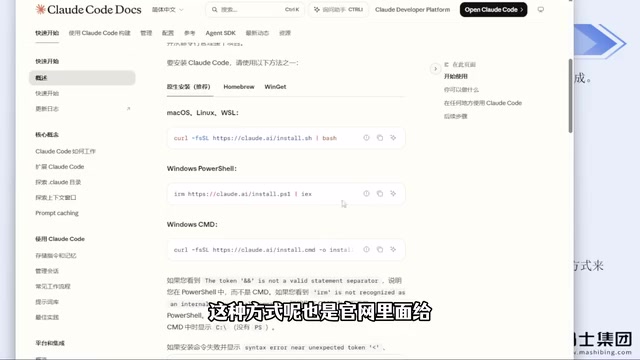
The most reliable approach is to install via NPM, which is also listed under "Advanced Options" on the official site. Extensive testing shows that as long as you have a working VPN/proxy setup, this method rarely fails.
Before using NPM to install, you need two prerequisites:
- Install Node.js — version 22 or higher required (the latest is version 24; just download the latest)
- Install Git
Both are straightforward installs — just download the installer and click through. If your C drive is tight on space, you can choose a custom install directory.
After installation, run claude --version in the command line. If it outputs a version number, the installation was successful. Make sure your VPN/proxy is active throughout the entire process, or it won't work.
Preventing Account Bans: CCSwitch Is the Key
When you run Claude Code for the first time after installation, it will ask you to confirm trust for the current folder, choose a display style, and then proceed to login. This is where many users hit their first major pitfall — the official account login method carries a significant risk of getting banned.
Even using environment variables to configure your API Key and skip the official login page still carries ban risk. The creator admits to having been banned multiple times using both the official account login and the environment variable approach.
The solution is an open-source tool called CCSwitch. It now has a dedicated website and an open-source GitHub repository. Installation is simple: go to the releases page, select the Windows version (click "Show all" to find the MSI installer), download it, and double-click to install.
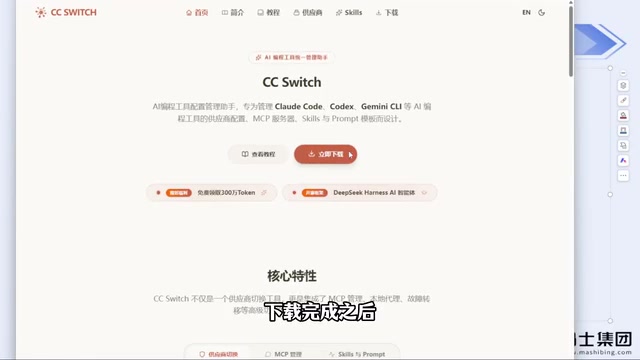
The core value of CCSwitch is that it bypasses account login entirely — no account means no risk of getting banned. Once the app is open, click the plus button to add a configuration, select a model provider (e.g., DeepSeek), enter the corresponding API Key, and save. The app includes built-in configuration options for most major model providers.
If you've previously installed Claude Code using the official login method, you can reinstall and use CCSwitch to skip the login step. The creator reports going months without a single ban using this approach — it's the safest option available right now.
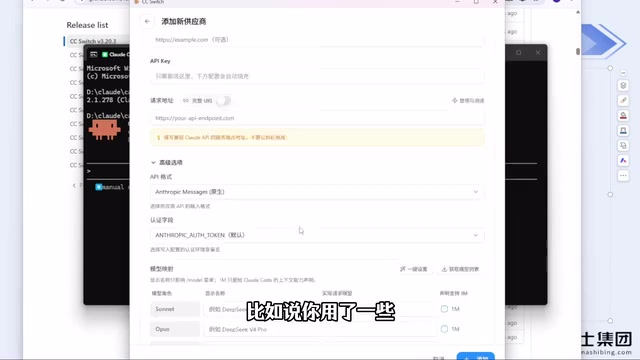
If the provider you want to use isn't in the list, you can select "Custom Configuration" — including third-party relay services — by simply entering the API Key, the official site URL, and the redirect address. With CCSwitch, there's no need to manually edit config files, and switching between models is straightforward.
Codex is also recommended for use with CCSwitch, but note that Codex is categorized by tool type — when switching, make sure you select the correct tool, otherwise you may end up with a configured API that doesn't actually work.
Advice on VPN/Proxy Usage
As a developer, having a working VPN or proxy is a basic skill. Most VPN tools available in China now require payment — just pay for them.
One practical tip: given how strict risk controls have become, it's not recommended to buy annual memberships unless you're very confident in the service's stability. A safer approach is to buy monthly, even if the per-unit cost is slightly higher, to limit your losses if the service suddenly goes down.
How You Write Prompts Determines Your Results
Once installation and configuration are done, the interface is ready to use. Most people's first instinct is to issue commands in plain natural language, like "help me build a Snake game."
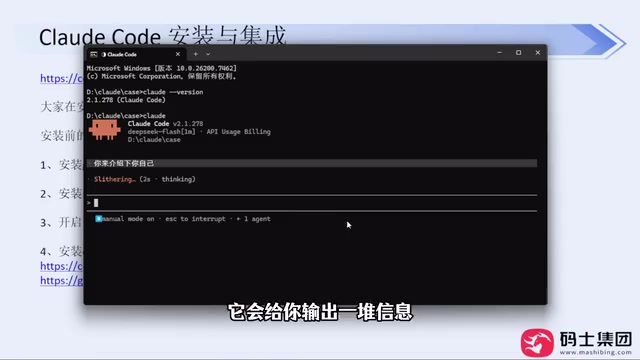
This kind of free-form natural language communication is what we call a prompt. But here's the thing — vague, unstructured prompts produce very poor results. Without any defined scope, the model can only guess, which wastes a large number of tokens and drags out execution time.
Newer versions of Claude Code have improved on this: before starting development, it will proactively ask questions to help you clarify your implementation approach, desired features, and technical choices. This is far more reliable than the older behavior of "just diving in."
On model selection, the creator shared a usage observation: DeepSeek Harness tends to have a higher cache hit rate; switching to other agent setups results in lower cache hits. After DeepSeek's price increase, costs have risen slightly, but they remain within an acceptable range.
Also worth paying attention to is the Human-in-the-loop mechanism — the tool frequently pops up confirmation prompts that require the user to press Enter before proceeding. This is an important safety design in AI agent task execution, and a key concept to understand for more advanced use.
Human-in-the-loop is a safety control mechanism in AI agent systems. It refers to requiring human confirmation at key decision points before the automated workflow continues. The design logic is this: when AI executes complex tasks, it may trigger irreversible actions — such as deleting files, deploying code, or calling external APIs. By inserting manual confirmation steps, users can review the agent's intentions at each stage and course-correct in time. The confirmation prompts in Claude Code are a direct implementation of this mechanism. In more advanced usage, you can configure "auto-accept" rules for low-risk operations to skip confirmations, striking a balance between safety and efficiency. Understanding this mechanism also helps you judge when to let the agent run autonomously and when human oversight is essential.
Summary
To truly get the most out of Claude Code, issuing commands in plain natural language is nowhere near enough. Mastering the right installation method (NPM recommended), using CCSwitch to avoid account bans, and understanding the importance of well-crafted prompts are the foundations you need to get right from the start. Advanced components — like MCP, Skills, SubAgent, and the CLAUDE.md configuration file — are where this tool's real power lies.
MCP (Model Context Protocol) is an open protocol developed by Anthropic to standardize how AI models interact with external tools and data sources. Think of it as giving Claude Code a "plugin interface" — it allows the model to access capabilities like the file system, databases, browsers, and code execution environments, rather than being limited to text generation. SubAgent is a concept in multi-agent architectures, referring to specialized sub-agents that a primary agent delegates tasks to after breaking down a complex project. Each sub-agent handles a specific domain — such as testing, documentation, or code review — and reports results back when done. This division of labor can significantly improve execution efficiency for complex projects. CLAUDE.md is a project-level configuration file read by Claude Code, where you can pre-define project context, coding standards, and prohibited actions. It keeps the model's behavior consistent throughout the entire project and is an important tool for aligning AI behavior in team collaboration scenarios.
Related articles

AgentCore in Practice: Connecting Custom Tools and MCP Servers to Agents
DebuggerCafe tutorial shows how to connect custom tools and MCP servers to Amazon Bedrock AgentCore agents, covering tool contract design, MCP reuse, and production concerns.

816B Parameters Scores Only 39? The Real Cost-Effectiveness of the Open-Source LLM Parameter Race
Meta's 816B Muse Spark Open scores just 39 on Artificial Analysis, while 180B Qwen3.8-Flash-Next scores 40. This article analyzes 11 open-weight models' parameters vs. scores, exploring the real impact of activated parameters, quantized size, and deployment cost.

Aerial Manipulators: The Next Step for Drones from 'Seeing' to 'Changing'
Starting from a Reddit discussion, this article analyzes the technical challenges, potential applications, and deployment bottlenecks of aerial manipulators, exploring the key challenges for drones moving from environmental perception to physical manipulation.