Claude Code Hands-On Review: A Comprehensive Comparison with Cursor, Trae, and Other AI Coding Tools

A comprehensive comparison of Claude Code against Cursor, Trae, and other AI coding tools based on real-world usage.
This article provides a hands-on comparison of major AI coding tools including Claude Code, Cursor, Trae, and GitHub Copilot. It explains how Claude Code differs from conversational AI coding through full-project context awareness, examines the evolution of AI programming tools from completion to autonomous agents, and concludes that Claude Code leads in code accuracy due to its powerful underlying Sonnet model.
What Is Claude Code?
Many programmers hear "Claude Code" and assume it's something mysterious, high-end, and out of reach. But the reality is quite the opposite—it's actually the closest tool to programmers, especially those with zero background. You don't need to master any deep technical principles; you can just start using it right away.
Claude Code is essentially an AI coding assistant. Its biggest feature is that you don't need to log into any website—just install it directly on your local machine. Once installed, you can call it directly from your development tools to work on projects. The entire workflow is remarkably streamlined.
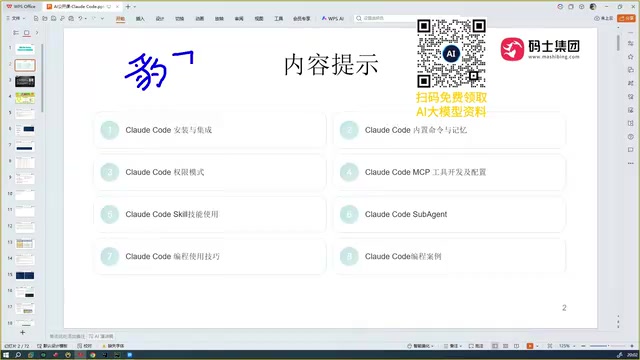
That said, Claude Code does have certain operating system requirements, but the vast majority of mainstream systems are supported, so compatibility shouldn't be a major concern.
The Fundamental Difference Between Claude Code and Conversational AI Coding
There's a key distinction to clarify here: Claude Code is fundamentally different from the "conversational coding" we typically do on platforms like DeepSeekAd or ChatGPT.
Conversational coding works like this: you type your requirements into a web interface, the AI returns a code snippet, you copy it back into your project to run and test, discover it doesn't work or has errors, go back to the chat to ask follow-up questions, and after multiple rounds of interaction, you might finally get working code.
The biggest limitation of this approach is missing context. Suppose your project has 100 code files—the AI can't read through all 100 of them. You have to manually tell it what's in your project, one piece at a time, which is extremely inefficient.
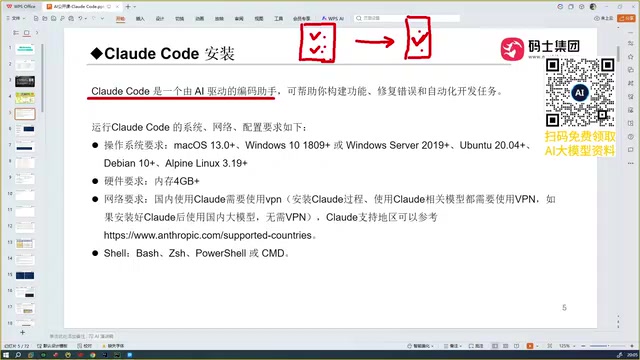
Claude Code is entirely different. It can:
- Read through all content in your entire project and provide it as context to the large language model
- Automatically generate the business code you need
- Automatically debug, ultimately delivering an accurate, error-free version of your code
Context Window: The Technical Foundation for Claude Code's Holistic Understanding
The technical basis for Claude Code's ability to read through entire projects lies in its underlying model's massive context window. A context window refers to the maximum number of tokens a large language model can process in a single interaction. Claude 3.5 Sonnet supports a 200K token context window, meaning it can read hundreds of thousands of characters of code content at once. By comparison, early GPT-3.5 only supported 4K tokens, and even GPT-4 initially offered only 8K-32K tokens. It's precisely this massive context capability that allows Claude Code to provide the model with the complete file structure, dependency relationships, and business logic of an entire project as full context, generating code that's highly consistent with the project rather than isolated snippets disconnected from context.
In other words, it's a tool that can automate development and programming tasks, not just a code snippet generator. This is the core reason it gained popularity so quickly—its capabilities are simply that powerful.
The Evolution of AI Programming Tools
To understand Claude Code's value, it helps to look at how AI programming tools have evolved.
The evolution has gone through three distinct phases: The first phase was "completion-based," where models predicted what should come next based on code context around the cursor. The second phase was "edit-based," where models could not only complete but also proactively modify multiple files, perform searches, and run commands. The third phase is "autonomous," where models have a complete Agent loop—planning tasks, reading files, writing code, running tests, and automatically correcting based on feedback, forming a closed-loop automated development workflow. These three phases represent a progression in human-AI collaboration, moving gradually from human-led to AI-led.
GitHub Copilot: The Disruptive Beginning
The first tool to gain widespread attention was GitHub Copilot. As a plugin, its biggest feature was automatic code completion. At the time, using it felt truly disruptive—it was the first time programmers experienced the power of AI-assisted programming. Copilot is based on Fill-in-the-Middle technology, predicting what developers will write next by analyzing code context before and after the cursor. Its underlying model was originally OpenAI's Codex model (a code-finetuned version of GPT-3).
Cursor: Smarter Automated Coding
Cursor came next, and its impact was even more explosive than Copilot's. Cursor could not only complete code but also automatically write code, with significantly higher intelligence. In some ways, it's already comparable to today's Claude Code. However, Cursor is a paid tool. Cursor introduced Agentic capabilities, where the model can proactively search codebases, modify multiple files, and execute terminal commands, marking the shift from passive response to proactive collaboration in AI programming.
Trae: A Domestically-Optimized Chinese Option
Trae comes in international and domestic versions. Users in China should go directly with the domestic version, as the international version is paid. Trae's major advantage is its excellent Chinese language understanding, with extensive optimization for Chinese users, and the domestic version is free—this is its core competitive edge compared to other tools. Trae is developed by ByteDance's team, also built on VS Code's open-source architecture, with built-in support for domestic models like Doubao.
Open Code and Codex
Open Code is another programming tool, but overall it's one of the harder ones to use among all programming tools and isn't recommended. Codex (powered by OpenAI's GPT-5), on the other hand, is genuinely powerful, with programming capabilities on par with Claude Code. The Codex referenced here is OpenAI's new-generation programming Agent launched in 2025—sharing the same name as the earlier Codex model used to train Copilot but being an entirely different product. It runs in a cloud sandbox environment and can autonomously complete complex software engineering tasks.
Head-to-Head Comparison: Why Claude Code Wins
From real-world usage experience, Copilot was used first, followed by Cursor and Trae. Before encountering Claude Code, Trae was considered the "most perfect coding tool"—because its Chinese comprehension was remarkably accurate.
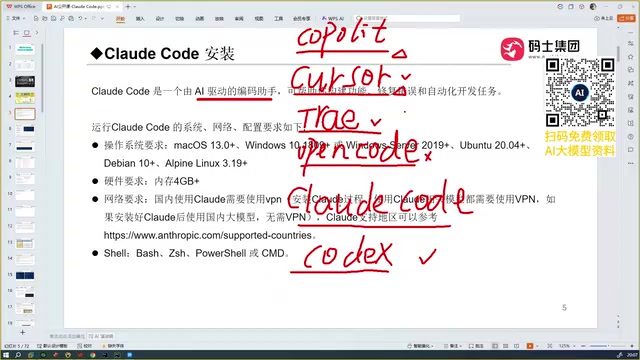
But after trying Claude Code, that perspective changed:
Claude Code is truly formidable. It's a tier above Trae, and using it gives programmers a deep sense of existential crisis.
The Core Differentiator: Code Accuracy
While Claude Code, Cursor, and Trae can all do automated programming, Claude Code's accuracy is exceptionally high—this is its most outstanding advantage over Cursor and Trae.
The reason comes down to this: the capabilities of all AI coding assistants ultimately depend on the underlying large language model powering them. The Sonnet model behind Claude Code is inherently powerful. After comparing multiple models including Trae, Tongyi Qianwen, and GLM-4.5, the conclusion is clear: in terms of actual programming effectiveness, Claude Code remains the best tool available.
Industry-standard benchmarks for measuring LLM coding ability include HumanEval, MBPP, and SWE-bench. SWE-bench is particularly important as it simulates real GitHub Issue fix scenarios, requiring models to understand complete code repositories and generate correct patches. Claude 3.5 Sonnet has consistently led on SWE-bench, which directly explains why Claude Code's accuracy in real-world programming surpasses competitors. Programming accuracy doesn't just mean syntactic correctness—it also encompasses logical correctness, edge case handling, consistency with existing code style, and multiple other dimensions.
Of course, Trae being free with excellent Chinese optimization is its advantage, though its generated code accuracy is slightly off; and some domestic models perform even weaker when writing code.
A Critical Distinction in Form Factor: IDE vs. Standalone Tool
One final important conceptual distinction lies in tool form factor.
Cursor and Trae are essentially IDEs (Integrated Development Environments). They're both built on VS Code—download them, double-click to install, and you can start programming directly within that IDE.
An IDE (Integrated Development Environment) is a comprehensive development tool that integrates a code editor, compiler, debugger, version control, and other features within a single graphical interface. VS Code is Microsoft's open-source lightweight IDE that has become one of the world's most popular code editors thanks to its powerful plugin ecosystem. Both Cursor and Trae are forked from VS Code's open-source codebase, with AI capabilities deeply integrated within the editor.
Claude Code, however, is not an IDE. Think of it as a standalone command-line tool that, once installed locally, works alongside your existing development environment. It runs via CLI (Command Line Interface), receiving natural language instructions from users in the terminal and directly reading and writing code files in the file system. The advantage of this architecture is that it's not tied to any specific editor—whether you use Vim, Emacs, JetBrains products, or VS Code, you can open a terminal window alongside and use Claude Code, achieving decoupling at the tool level. This design allows it to flexibly integrate into programmers' existing workflows rather than requiring them to switch to an entirely new editor.
How to Choose the Right AI Programming Tool for You
For developers looking to get started with AI programming, Claude Code represents one of the highest standards in AI-assisted programming today. Through its ability to read complete project context, automatically generate code, and automatically debug, it achieves truly automated programming—a generational leap from traditional conversational coding.
Recommendations:
- If you prioritize accuracy and automation: Claude Code is the top choice
- If you value free access and Chinese language understanding: Trae's domestic version is a solid alternative
- If you need integration with the GPT ecosystem: Codex is a powerful option on par with Claude Code
There are many tools to choose from, but what ultimately determines the ceiling of your experience is always the capability of the underlying large language model.
Related articles

WorkBuddy Beginner's Guide: How AI Agents Automate Office Tasks
WorkBuddy tutorial: learn how this desktop AI agent workbench automates files, organizes data, and generates documents, compared with LLMs and Codex, plus a beginner path and cost analysis.

Doubao Work in Practice: Three Modes That Let AI Actually Get Work Done
Doubao Work practical tutorial: from chat mode to Work Mode Lite and Pro, explaining the logic for choosing among three modes with real office task demonstrations. Even complete beginners can learn to use an AI agent to handle local files, organize materials, and generate documents.

AI Agent Runs the Entire GEO Database Mining Workflow with a Single Prompt
Based on a Bilibili creator's demo, this article explains how the WorkBuddy AI agent completes GEO database mining with a single prompt: automatically searching datasets, downloading and organizing data, batch correction, differential analysis, WGCNA, machine learning-based feature gene screening, and regulatory network construction, and generating a complete analysis report.