Claude Code Hooks Complete Guide: Event, Matcher, and Handler Three-Layer Architecture Explained

Claude Code Hooks enforce deterministic automation via Event, Matcher, and Handler — replacing unreliable CLAUDE.md reminders.
This article introduces Claude Code's Hooks mechanism, explaining how software-level forced triggering replaces the unreliable "reminder note" approach of CLAUDE.md. Hooks use a three-layer architecture — Event (when to fire), Matcher (what to intercept), and Handler (what to do) — with five Handler types: Command, HTTP, MCP Tool, Prompt, and Agent. The article breaks down 10 core Events by work phase and walks through two hands-on examples: blocking Git commits containing sensitive data and checking finished articles for AI writing tone. It also covers how to validate trigger scope and prevent Stop Hook infinite loops, plus key differences between Claude Code and Codex Hook support.
Why You Need Hooks: From Reminder Notes to Enforcement Mechanisms
If you've used Claude Code for any length of time, you've probably run into this frustration: you've clearly written in CLAUDE.md things like "always run tests after modifying code" or "stop and confirm before executing dangerous Git commands" — yet the AI still occasionally forgets to follow through.
This isn't your fault, and the AI isn't being lazy. The root of the problem lies in what CLAUDE.md fundamentally is — it's more like a reminder note for the AI. It provides instructions that the model will "try its best" to follow, but without any guarantee of execution every single time. Because CLAUDE.md works by having the model read it and judge for itself when to comply, there's an inherent randomness baked in.
If you want a more reliable, enforceable mechanism, that's exactly where Hooks come in. Hooks are a deterministic system built into Claude Code at the software level: once a configured trigger point is reached, the software directly intervenes and enforces the action — no model judgment required.
Think of a Hook like the automatic door at a convenience store. There's a rigid set of rules that will absolutely execute: the moment someone steps into the sensor zone, the door opens. No negotiation.
Three Types of Work, Three Different Places
Understanding the value of Hooks means knowing how they divide responsibilities with other mechanisms. The original video offers a clean decision framework:
- One-off tasks: Just mention them in the conversation. No configuration needed.
- General project rules and direction: Write these in CLAUDE.md for the model to reference.
- Actions that must be strictly executed at a specific moment, where you can't afford the risk of the AI forgetting: These belong in a Hook.
The most critical difference between Hooks and CLAUDE.md is who is responsible for triggering the action. CLAUDE.md relies on the model's own judgment, while Hooks are forcibly triggered by the Claude Code software in the background. That difference means the two operate at completely different levels of reliability.
Hook's Three-Layer Architecture: Event, Matcher, Handler
A Hook configuration file is just a set of instructions written in JSON format, typically stored in your project folder at .claude/settings.json. It might look dense, but you don't need to memorize it or type it line by line — just understand the three-layer architecture.
Take a Hook that checks for syntax errors as an example. The division of responsibilities is crystal clear:
Event: When Does It Trigger?
The first layer is the Event, which determines when the Hook activates. In the syntax-checking example, the Event is set to PostToolUse, meaning it fires the moment Claude finishes calling a tool.
Matcher: Which Operation to Intercept?
The second layer is the Matcher, which defines the filtering condition. Claude uses many different tools while working, so you don't want the Hook firing every time. The Matcher tells the system which specific actions to watch for and intercept. In the syntax-checking example, the Matcher targets the "modify code" action.
Handler: What Happens Next?
The third layer is the Handler — the part that actually takes action. When the preceding conditions are met, the Handler decides what to call and what to do. In this example, the Handler invokes your local syntax-checking script and automatically catches errors.
To summarize in three questions: Event determines when it fires, Matcher determines what it intercepts, Handler determines what action it takes. That's the core logic of how Hooks work.
Hook configuration is stored in .claude/settings.json in your project directory. This file uses standard JSON format and can be edited manually or generated directly by Claude Code. JSON (JavaScript Object Notation) is a lightweight data-interchange format that uses curly braces {} for key-value pairs and square brackets [] for arrays — readable by humans and easy for programs to parse. A single project can define multiple Hooks that operate independently without interfering with each other. It's worth noting that Hook settings come in two scopes: project-level settings only affect the current project, while user-level global settings in your home directory apply across all projects. Global settings are ideal for safety rules you always want enforced no matter which project you're in — for example, never committing files containing API keys.
Ten Core Events: Understanding Them by Work Phase
Claude Code currently supports as many as 31 Events. That sounds intimidating, but if you organize them by system work phase, you only need to internalize a few key ones.
Phase 1: System Startup and Receiving Instructions
SessionStart fires the instant you open a conversation — whether you're starting a new session, resuming a saved one, or clearing the screen with clear. The popular GitHub project Superpowers uses this to force-load its Superpowers Skill the moment a user opens a conversation, specifically to counter the randomness of AI Skill loading.
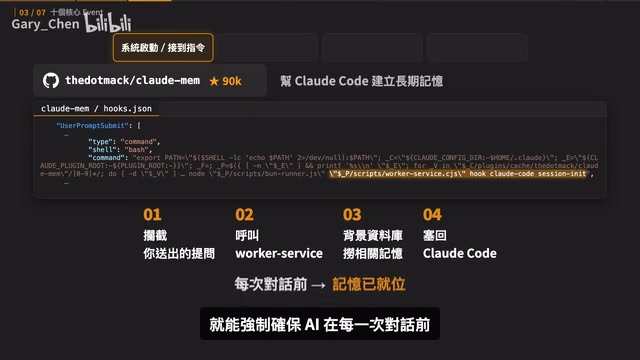
UserPromptSubmit triggers when you press Enter to submit a prompt. The open-source project Claudemem uses it to solve the cross-session memory loss problem — intercepting your submitted query, calling a Worker Service in the background, fetching relevant memories from a database, and injecting them into Claude Code before the conversation begins, ensuring every session starts with relevant context.
Phase 2: Safety Checks Before Making Changes
PreToolUse fires after a tool is queued to run but before it actually executes — perfect for safety checks. Some projects use it to block dangerous commands: it inspects Claude's Tool Call content, and if it detects something like git reset --hard (which would wipe out code) or a dangerous git push, it immediately intercepts, aborts the action, and tells Claude it doesn't have permission to proceed.
Phase 3: Quick Verification After Execution
PostToolUse fires after a tool successfully executes, making it ideal for quick quality checks. The frontend design Skill "Impeccable" uses this phase to enforce standards: the moment Claude modifies a UI file, a review immediately kicks off. If it finds an empty src attribute on an image tag, or a font color that doesn't meet contrast standards, it flags the issue and requires Claude to fix it.
Phase 4: Task Completion and Special Cases
Stop fires when the current round of conversation fully ends. Impeccable intentionally reserves deeper aesthetic checks — layout, rhythm, color palette — for the Stop phase, because it aggregates all files modified during the entire work session for a single comprehensive review, avoiding the slowdown of running a full check after every individual line change. Cross Model Review works similarly — it uses the Stop Event to have Claude write a Plan and then call Codex for a Peer Review.
This phase also includes a few Events for handling special situations:
- Notification: Sets up desktop notifications or audio alerts so you can step away while Claude works in the background and only be called back when confirmation is needed.
- SubagentStart / SubagentStop: Controls Sub-Agent quality — prepend rules before the agent starts, then verify the output meets standards when it finishes.
- PreCompact: When a conversation gets too long, Claude will automatically compress the context. If key decisions or progress notes keep getting lost in compression, use this Event to save important information before the compression happens.
Beginners only need to start with four Events: SessionStart (conversation starts/resumes), PreToolUse (before a tool is called), PostToolUse (after a tool executes), and Stop (when the current work round ends).
Matchers and Five Handler Types
The Matcher's job is simple: filter the specific actions this Hook actually needs to handle from all possible operations. For example, setting the Matcher to Edit|Write means only file modification actions will trigger the Hook. You can also add if conditions to narrow it further — for example, only checking files with a .ts extension.
There are currently five Handler types, each suited to different scenarios:
- Command: The most commonly used type. Executes a local command or script directly — for example, automatically running a lint check after code changes, formatting with Prettier, or blocking a dangerous operation with a pre-execution check.
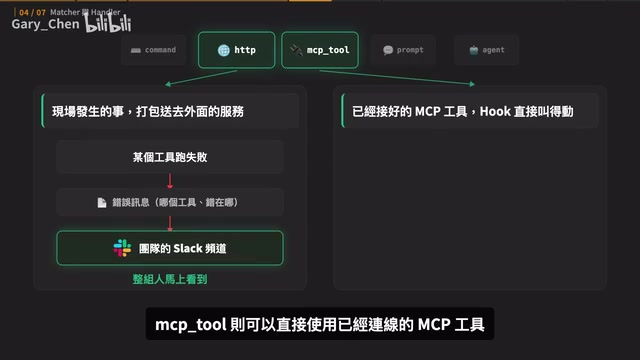
- HTTP: Sends Hook data to an external service — for example, automatically forwarding error messages to Slack when a tool fails.
- MCP Tool: Directly invokes a connected MCP tool — for example, automatically pulling today's tasks from Jira at the start of each session.
- Prompt: Calls another AI, passing it the event data along with check conditions. This AI only responds based on the data it receives and cannot open files or run searches on its own. Best suited for checking whether a commit message format meets team standards.
- Agent: A more complete option — it spins up a Subagent that can read files, search code, and run tests before returning a verification result. Better for scenarios that require actual investigation.
Simple distinction: Prompt answers with the data it already has; Agent investigates first, then answers.
Note that each Event supports different Handler types — some can use Prompt and Agent, others are limited to Command and HTTP. Before configuring, ask your AI to check the official documentation to confirm which combinations are supported.
The distinction between Prompt Handler and Agent Handler is worth elaborating on. A Prompt Handler is essentially a "tool-free LLM call": the system composes a prompt from event data (such as Tool Call parameters) and sends it directly to the model. The model can only respond based on the text it receives — it cannot proactively read files or execute commands. This makes it fast, low-cost, and well-suited for pure text validation tasks like format checking. An Agent Handler, by contrast, launches a complete Subagent with its own tool-calling capabilities. It can read files, search, and run tests, using real investigation results as the basis for its judgment. This makes it far better suited for scenarios like "verify whether the UI rendering matches the design spec" or "confirm all tests are passing" — tasks that require actual hands-on checking before a verdict can be reached. The key question in choosing between the two: Is the existing data enough to make a judgment, or do we need to actively investigate?
Hands-On: Using AI to Build Your First Hook
To have AI create a Hook, you just need to communicate two things clearly: when it should trigger, and what it should do when triggered.
Case 1: Check for Sensitive Data Before Git Commits
You can tell Claude Code directly: "Please create a Hook in the project settings that fires whenever a git commit is about to execute. Check the content being committed — if it includes a .env file or anything that looks like an API key, block the commit and tell me which file has the problem. If nothing suspicious is found, let it proceed normally."
The Hook Claude creates uses a PreToolUse Event with the Matcher targeting Bash, and a Handler that invokes a script called Git Commit Secret Guard. Even though it fires before every Bash command, the script first checks whether the command is actually a git commit — if not, it exits silently. In practice, any commit containing a .env file gets blocked on the spot. Remove the sensitive file and resubmit, and it passes normally.
Case 2: Check for AI Writing Tone After an Article Is Finished
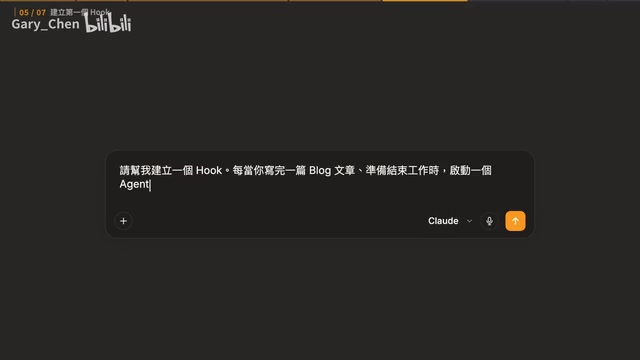
This case calls for "intuitive judgment." The author wanted every Hook triggered after Claude finishes writing an article to check whether the content still carries an AI-writing feel. They told Claude: "Whenever you finish writing a blog article and are about to wrap up, launch an Agent to read the newly produced article and call the Humanizer Skill — which is designed to remove AI writing patterns — to check whether any AI tone remains. If there are issues, pass the paragraphs and reasons back for revision. Only allow the session to end once the check passes."
This Hook uses the Stop Event and a Command Handler that runs a Humanizer Gate script. The script itself doesn't judge AI tone — instead, it identifies modified articles that haven't yet passed inspection and requires Claude to launch an Agent for review.
Two Things to Verify After Creating a Hook
First, is the trigger scope precise enough? A scope set too broadly will invoke the Hook on many unrelated operations, wasting time and interrupting your workflow. The Matcher should narrow the field first, with the Handler applying more granular conditions inside the script — which is exactly why the Git Hook uses the Matcher to target Bash, then lets the script determine whether it's actually a git commit.
Second, does the Stop Hook have a defined exit condition? Every time a Stop Hook blocks Claude from ending the session, it requires Claude to keep working. Without a clear passing condition, the Hook could create an endless loop of rejections, revisions, and re-checks. Humanizer Gate handles this by recording whether the current version has passed: once it has, the article can proceed as long as it hasn't been modified again. After three consecutive failed rounds, it stops blocking and hands off to human review.
The infinite-loop risk of Stop Hooks is one of the most common pitfalls in practice, and it's worth spelling out. When a Stop Hook determines that the work doesn't meet requirements, it blocks Claude from ending the session and demands further revision. If the check logic itself has flaws — for example, conditions that are too strict, or no mechanism for recording a "passed" state — Claude can enter an endless cycle of "revise → check fails → revise again → check fails again," continuously burning tokens and API credits. A robust Stop Hook should therefore have at least three safeguards: (1) a clear passing condition so the system knows when to actually allow completion; (2) a state-memory mechanism to avoid re-checking versions that have already passed; and (3) a maximum retry limit — once the threshold is exceeded, stop blocking and hand off to a human, preventing unstoppable automated loops.
Two Key Differences for Codex Users
The same Hook logic applies to Codex users, but the supported Events and Handlers aren't identical, so you can't directly copy Claude Code configurations into Codex.
The first difference is Event count: Claude Code has 31, Codex has only 11. However, both PreToolUse and Stop are supported on both platforms, so the core approach from both examples above can be ported to Codex.
The second difference is Handler support: Claude Code supports five types — Command, HTTP, MCP Tool, Prompt, and Agent. Codex currently only reliably executes Command. But this doesn't mean Codex can't handle workflows that require AI judgment. Humanizer Gate, for instance, uses a Command Handler to run a check script, which then asks the main Agent to call a Skill for the review. The same need is usually achievable — just connected differently.
The simplest approach: describe the problem you're trying to solve directly to Codex and ask it to build the Hook in the format it currently supports. Don't just copy-paste a Claude Code configuration.
Start with One Small Problem
At this point, you should have a complete picture of Hooks: they can automatically run checks, send notifications, or enforce safety rules at fixed moments on your behalf. Event determines when it fires, Matcher determines what it handles, Handler determines what action it takes.
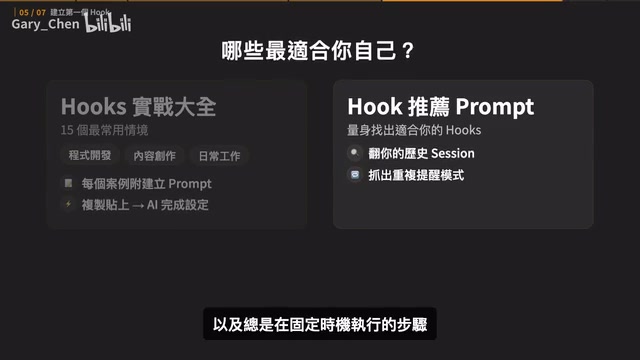
You don't need to write the configuration yourself or hand-code any scripts. Start by identifying one thing you frequently remind the AI to do — something that always happens at a predictable moment. Explain "when it should trigger" and "what it should do" clearly, and let AI build the first version for you. Then verify the trigger scope and the exit conditions.
Start with something small — like checking for API keys before committing code. As long as the task recurs and fits a fixed trigger point, it's worth making into a Hook. As you convert these repeated reminders into Hooks one by one, you'll find that many things you used to track manually and confirm repeatedly start happening automatically as part of your workflow — and you can save your attention for the decisions that actually require human judgment.
Related articles

Felix Rieseberg Personal Homepage
Felix Rieseberg's personal homepage sparks attention on Hacker News. This article covers the Slack engineer's technical background, the rise and fall of nativefier, and the value of a developer homepage as a tech calling card.

@ai-sdk/vue 3.0.306 Patch Release Syncs with [email protected] Update
@ai-sdk/vue 3.0.306 released, synced with [email protected]. A routine patch release for the Vercel AI SDK ecosystem with no public API changes; the Vue adapter layer stays version-aligned with the core package.

Gemini 4 Argon API Launches: The Era of Million-Token Output Begins
Google launches Gemini 4 Argon with sparse MoE architecture, up to 1M output tokens, and a 68.90% Vals Index score, available across API, AI Studio, and the Gemini app.