Claude Code Hooks in Practice: Auto-Format Code and Block Sensitive Operations

Claude Code Hooks use events, matchers, and scripts to turn verbal agreements into hard rules.
Based on episode 13 of the "Claude Code Whiteboard Course," this article explains Claude Code's Hooks mechanism. Hooks consist of lifecycle events, matchers, and scripts—upgrading prompts from "requests" to "guarantees" that execute automatically. Configured in the hooks block of settings files, they apply across user, project, and local layers and merge on trigger. Three scenarios show how: after-tool-call events auto-format files and return errors to the model for self-correction; before-tool-call events with exit code 2 block sensitive files (single-operation only); notification events send desktop alerts when confirmation is needed, enabling unattended work. Also covers loop timers (up to seven days, customizable loop.md patrol checklist) versus conditional tasks—loops are time-based, goals are condition-based.
Claude Code's Hooks mechanism turns verbal agreements like "format the code after editing" into hard rules that execute no matter what. Based on episode 13 of the "Claude Code Whiteboard Course" on Bilibili, this article breaks down the three-part structure of Hooks and demonstrates three real-world scenarios showing how to make Claude Code manage itself.
What Are Hooks: From "Request" to "Guarantee"
A prompt is essentially a request, not a promise. You can write "format after editing" a hundred times in your manual, but the model will still forget occasionally. Hooks solve this problem: they turn must-happen actions into scripts that execute automatically at the right moment.
The most satisfying automation isn't AI writing code for you—it's AI managing itself. A hook has only three components: a lifecycle event, a matcher, and your script. Events include "before tool call," "after tool call," "session start," and so on. The matcher filters for the tools you care about. What the script does is entirely up to you.
The biggest difference from prompts: prompts are requests, hooks are guarantees—they execute no matter what. Hooks can do more than run scripts—they can send network requests or call models for judgment.
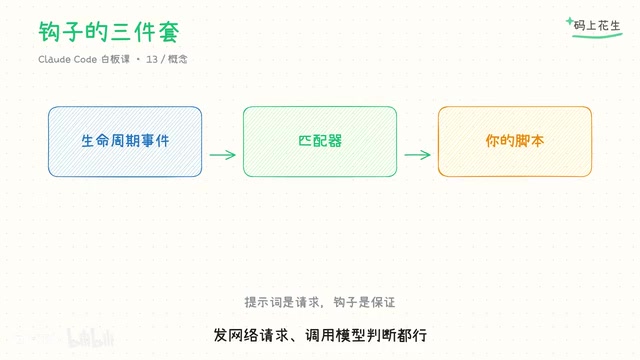
Lifecycle events are the trigger anchors for Hooks—a series of fixed moments that Claude Code broadcasts during execution, such as session start, user prompt submission, before tool call, after tool call, model response completion, and session end. Each event carries structured JSON input (including session ID, tool name, tool parameters, etc.), which the script reads from standard input. The event itself doesn't care what you do with it—it just hands control to the script at the right moment. The script's exit code and output are then interpreted by the framework as "allow/block" or as additional context passed to the model. This is why the same event model can be used for code formatting, access control, and notifications.
Configuration: All Three Settings Layers Apply
Hooks are configured in the hooks block of settings files. All three settings layers discussed earlier (user-level, project-level, local-level) apply. Hooks from multiple layers are merged and triggered independently without overriding each other. Save the file and it takes effect on the next action.
One common pitfall: remember to make your script executable, or it will fail silently—nothing appears to happen, and troubleshooting takes a lot of time.
Scenario 1: Auto-Format Files After Editing
Use the "after tool call" event and match file-editing tools. The script extracts the file path from the input, passes it to the formatter, and returns the result to the session.
The key design here is error handling: if formatting fails, the error message is also returned to the model, and it will fix it itself in the next round. Once it finishes writing, someone cleans up—you don't have to watch. This is where Hooks provide the most value—not replacing the model's code writing, but adding automatic fallback to the model's behavior.
Scenario 2: Sensitive Files Off-Limits
The second scenario is stricter: run a check script on "before tool call." When it hits the protection list—environment variable files, lock files, etc.—the script exits with code 2, and the operation is blocked outright. The reason is returned to the model, which will find another way. Rules go from verbal agreements to access control.
Note the semantics of blocking: it means "not this time," not a permanent blacklist. Normal edits outside the list are unaffected, so daily development isn't disrupted.

Exit code 2 is a convention with special semantics in Hooks: exit code 0 means allow, exit code 2 means "block this operation" (the standard error output is returned to the model as the reason for blocking, so it knows why it was rejected and tries another path), and other non-zero exit codes are generally treated as script errors and don't necessarily block. Therefore, blocking scripts must explicitly exit with 2, not casually use exit 1. This convention translates "the script's judgment" into "an actionable decision for the framework"—the technical prerequisite that makes blocking hooks possible.
Scenario 3: Desktop Notifications When Confirmation Is Needed
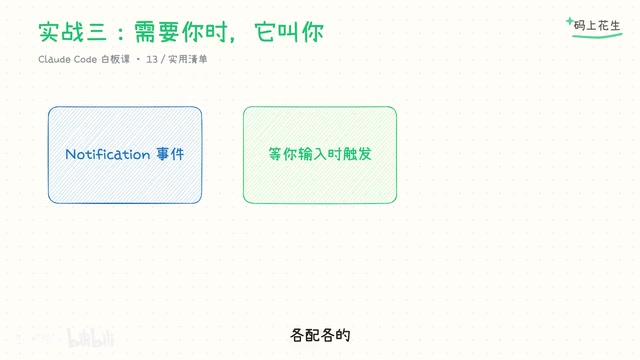
When Claude Code is waiting for your confirmation or input, it triggers a notification event. Configure a command to send a desktop notification, and you no longer have to stare at the terminal. Notifications also have types—you can configure them only for specific situations, each with its own settings.
This capability makes "walk away and do something else" a reality: let it work in the background and call you when it needs you.
Beyond Hooks: Session Timers and Loops
Beyond Hooks, there are session-level timed loops. The slash command loop supports checking deployments every five minutes, running on its own schedule. You can omit the interval—it will pick its own pace: stop when there's activity, rest when there's none. Loops last up to seven days and stop when the session closes. Patrol results are reported back in the session, so history is visible at a glance.
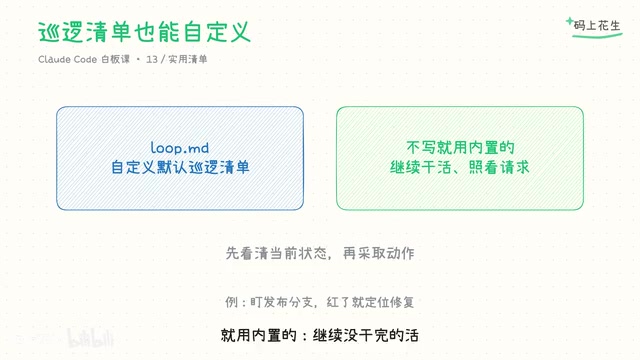
The content of long-term scheduled patrols is customizable: place a loop.md in your project with your own checklist, such as "when a branch goes red, pull logs to locate the issue and push a minimal fix." If you don't write this file, the built-in logic is used—continue unfinished work, watch merge requests, do cleanup when idle.
One more command: the slash hook sets a completion condition, and it keeps working round after round until the condition is met or you stop it. The difference between loops and conditional tasks can be summarized as: loops are time-based, goals are condition-based. Combined with acceptance criteria, long-running tasks can run unattended with more confidence.
loop.md is a custom patrol checklist file placed in the project root directory, used to override the default behavior of the loop command. List in natural language the items you want checked and handled repeatedly during the loop, such as "when a branch goes red, pull logs to locate the issue and push a minimal fix" or "reply to each unread merge request comment." The slash command loop reads this checklist when started and plans each round's actions based on its items. If the file doesn't exist, it falls back to the built-in logic (continue unfinished tasks, watch merge requests, do cleanup). It's essentially handing a "duty manual" to the AI, making long-running patrol content versionable and shareable across the team.
One-Line Summary: Writing a Rule a Hundred Times Is Worse Than Blocking Once
Make must-happen actions into hooks, judgment calls into skills, and patrols into loops. These three layers form the skeleton of Claude Code automation.
Here's an action item you can do today: configure the simplest hook—auto-run Lint or formatting after file edits—then have it edit two files and check whether formatting actually executed. Once configured, you have your first hard rule. Next, add blocking and notifications.
Claude Code can already manage itself. Next episode covers sub-agents and parallelism: leave judgment to the main thread and outsource the grunt work.
Related articles

From the Afghan Battlefield to Microsoft Research: Chris White's Path to Tech for Good
Microsoft Research Catalyst Lab lead Chris White shares his journey from Harvard postdoc to the Afghan battlefield, DARPA's Memex dark web search project, and driving tech for good at Microsoft—exploring problem selection, humble service, and holding onto hope in the dark.

Opus 5.5 Refuses to Ghostwrite Paper Section: Why Users Applaud This AI Guardrail
A Reddit user shares how Opus 5.5 refused to ghostwrite a dissertation paragraph: the model identified school AI restrictions, explained academic integrity risks, and returned decision-making power to the user. Why is this "explained refusal" called an ideal guardrail? This article analyzes the three-layer logic of AI guardrail design and product implications.

Google Open-Sources TorchTPU: How a PyTorch Native Backend Reshapes the TPU Ecosystem
Google and Meta open-source TorchTPU, a PyTorch native backend for Cloud TPU with eager execution by default and torch.compile/XLA support, set to replace PyTorch/XLA for new workloads. This article analyzes its architecture, execution trade-offs, and impact on developers and the TPU ecosystem.