Claude Code in Action: A Complete Walkthrough of Building a YouTube Clone from Scratch

How a senior engineer uses Claude Code — with proper planning, MCP tools, and design systems — to build a full YouTube clone.
This article breaks down a senior engineer's methodology for building a complete YouTube clone with Claude Code. The core argument: the quality of AI-assisted development depends on decisions made before coding begins, not during it. Key steps covered include using Plan Mode with hard scope constraints, selecting the Next.js + Supabase + ImageKit stack, pre-loading Skills and MCP servers for autonomous backend operations, and establishing a reusable design system before building any real pages. The result is a fully functional app with video uploads, adaptive bitrate playback, auto-captions, analytics, and a creator studio — built with minimal friction.
As a software engineer with ten years of experience, there's a world of difference between building real, production-ready apps with AI tools and just "vibing through code." This article breaks down a full hands-on demonstration by an experienced developer, unpacking how to use Claude Code to build a fully featured YouTube clone from scratch — complete with a creator studio, video uploads, a player, analytics, and more. The entire process emphasizes not letting AI run wild, but keeping the engineer firmly in control.
Plan First, Build Second: The Most Overlooked Step in AI Projects
There's a common trap when working with Claude models: they tend to "go off on tangents," building features you never asked for and adding unnecessary complexity. The author repeatedly stresses that before starting any new project, you need to be clear on three things — what your goal is, why you're building it, and what "done" actually looks like.
The practical approach is to open the terminal version of Claude Code (not the desktop app — the author considers the terminal version more capable), then press Shift + Tab to switch to Plan Mode. In this mode, Claude doesn't rush to write code; instead, it first thinks through planning questions.
A useful tip: ramble through your requirements out loud using voice input, then append this line at the end of your prompt: "Ask me any questions you need to clarify the requirements before building." This nudges Claude to proactively probe for deeper details rather than making assumptions.
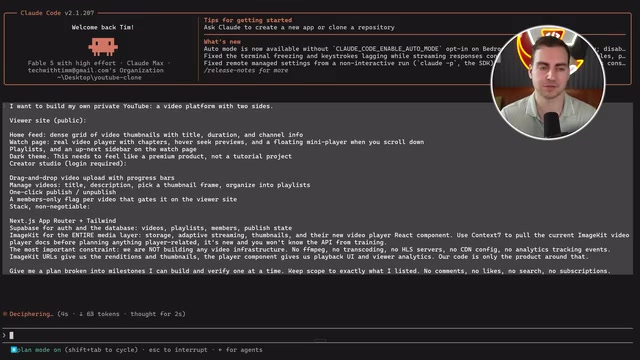
The author's complete requirements prompt is worth studying: it explicitly calls for a "dual-sided video platform" (a viewer-facing website + a creator studio), a home feed, watch page, playlists, dark theme, drag-and-drop uploads, and member-exclusive badges. Crucially, it locks in a "non-negotiable" tech stack and explicitly tells Claude to "strictly limit scope to what I've listed — don't add features like search or subscriptions" — using hard constraints to prevent AI overreach.
Tech Stack Decisions: Let AI Execute, You Decide
Tech stack choices directly determine the quality of everything that follows, and they must be driven by the human. The stack in this demo is:
- Next.js + Tailwind: frontend framework and styling
- Supabase: handles auth, database, edge functions, and storage — the full backend
- ImageKit: serves as CDN and video player, handling streaming, adaptive bitrate, thumbnails, and captions
The author's stance is clear: if you're unfamiliar with a tech stack, you can ask Claude to explain the trade-offs between different frontend/backend frameworks and languages — but ultimately, "you need to be the one steering the direction." A key reason for choosing ImageKit was its newly released video player feature, which supports custom branding, playlists, adaptive bitrate, caption chapters, and even built-in analytics.
ImageKit is a cloud platform focused on media optimization. Its core capabilities include real-time image and video transcoding, CDN delivery, adaptive bitrate streaming (ABR), and AI-powered automatic caption generation. Adaptive Bitrate Streaming dynamically switches video quality based on the viewer's current bandwidth — automatically bumping up to 1080p on fast connections and dropping to 480p when the network is congested. This is the same underlying mechanism that powers smooth playback on YouTube and Netflix. For independent developers, ImageKit's value lies in compressing what would otherwise be a complex infrastructure stack — FFmpeg transcoding servers, HLS segmentation logic, multi-CDN nodes — into a single API call and a player embed snippet, dramatically lowering the technical barrier for video applications.
Arming Claude Code with Skills and MCP
This is the most instructive part of the entire workflow: before actually building anything, equip Claude Code with the right toolchain so it can operate autonomously without constant human intervention.
Installing Skills
Use the /skills command to browse available skills. The author installs two key ones:
- Frontend Design skill
- UI/UX Pro Max skill
Installation is straightforward — copy the GitHub repo URL for each skill, paste it into the chat, and tell Claude to install it into the current project. The core purpose of these two skills is to avoid generating the "cookie-cutter AI garbage website" look, producing interfaces and design systems that feel closer to real products.
Connecting MCP Servers
Type /mcp to view connected MCP servers. The author demonstrates running a command in a separate terminal window to add the Supabase MCP server. Once added, Claude asks whether to use the server — selecting "yes" triggers a browser-based login to authorize the Supabase account. After authorization, Claude can automatically make database and backend changes to the specified project without any manual intervention.
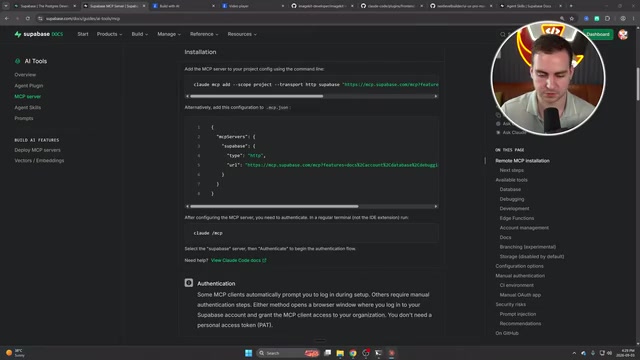
For ImageKit, the author similarly adds two project-scoped plugins via the plugin command, enabling Claude to automatically invoke ImageKit for all image and video assets. He also pastes in the documentation for ImageKit's new video player directly into the chat, explicitly instructing Claude to "make sure to use this feature when building" and to update the plan file accordingly.
A note from the author: many modern frameworks are now adding AI skills, MCP servers, or some kind of integration link. Whatever tools you're using, always check whether they offer agent skills you can pre-install before you start.
MCP (Model Context Protocol) is an open protocol released by Anthropic in late 2024, designed to standardize how AI models connect to external tools and data sources. Think of it as a "USB port for AI" — once a service provider implements an MCP server, Claude can interact with that service directly through a unified protocol, without needing custom integration code for each tool. Platforms including Supabase, GitHub, Figma, and Postgres already offer official MCP servers. Skills are a separate layer of abstraction — essentially pre-written prompt templates and context rule sets that tell Claude what standards and styles to follow in a specific domain (like frontend design). Used together, they're like installing "domain expert memory" and "automated operation arms" before the project even starts, dramatically reducing the manual interventions needed later.
From Scaffolding to Deployment: Practical Details of the Build Phase
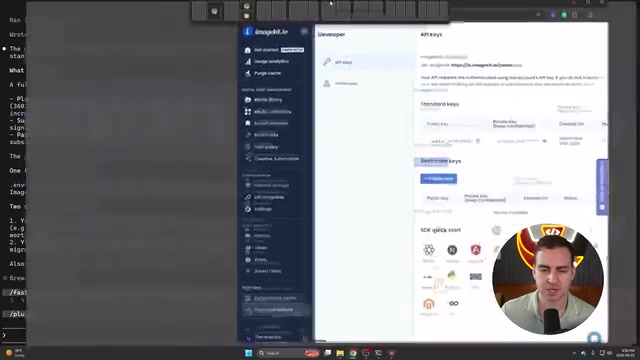
With everything in place, press Shift + Tab to switch to Auto Mode and let Claude generate the application scaffold. After generation, you'll hit a typical snag: ImageKit's four configuration values (ID, URL endpoint, public key, private key) are all placeholders. The author's solution is to copy the real values from the ImageKit developer options and paste them directly into the chat for Claude to fill in (he admits this isn't best practice, but it's convenient).
After running npm run dev and starting to test, issues emerge — registration appears successful but no confirmation email arrives, and logging in with the same credentials returns "invalid credentials." The author's approach here is worth remembering: don't panic when things break; describe the symptoms to Claude in as much detail as possible. After he laid out the full reproduction steps, the issue was quickly resolved.
Build a Design System, Not a Patchwork
Many AI-built apps just "improvise" their design, but turning something into software you'd actually share requires a reusable design system — buttons, cards, typography, inputs, and other components staying consistent across the entire product. The author uses the Frontend Design skill to establish a dark-theme design system (near-black backgrounds, restrained accent colors, high contrast, compact typography), and requests a style guide page at the /design route to evaluate component quality before applying anything to real pages.
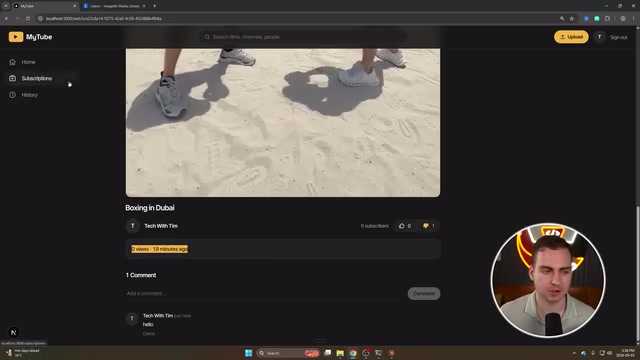
After applying the design system, the interface looks noticeably more professional. The author continues iterating: adding custom thumbnail functionality (either "capture current frame" from video or upload a custom image), verifying the video player's load speed and playback speed controls, and testing ImageKit's auto-generated caption capability.
A Design System is a collection of reusable assets — component libraries, design guidelines, and usage rules — aimed at ensuring visual and interaction consistency across every page of a product. For AI-assisted development projects, establishing a design system is especially critical. Without clear constraints, AI tends to produce inconsistent button colors, font sizes, and spacing rules across different pages, making the product look "cobbled together." By first generating a
/designstyle guide page, engineers can review and refine components centrally before they get applied to real business pages — essentially creating a visual "alignment anchor" for all subsequent AI-generated output. This practice borrows from the mature frontend engineering convention of "build a Storybook component library first, then assemble pages."
Analytics and Creator Studio: The Final Feature Pieces
The last piece is analytics and YouTube Studio-style functionality. Since the ImageKit player has built-in video analytics, tracking data can be viewed directly in its dashboard or pulled via API into a custom interface.
The author has Claude build a streamlined creator studio displaying metrics like view count, watch time, subscribers, likes, and comments, with drill-down to individual videos. He also has Claude generate fake accounts and seed data for testing subscriptions to other channels, search, and watch history — solving the "you can't subscribe to your own channel" blind spot in testing.
Conclusion: Good Outcomes Come from Getting the Beginning Right
The author acknowledges that plenty remains to be polished, but the core message isn't "build a complete YouTube." It's a methodology for building real applications with AI tools: plan in detail upfront, choose the right tech stack, equip Claude with the right Skills and MCP tools, and establish a design system.
Because those decisions were made correctly at the start, the rest of the build went through with minimal prompting and almost no obstacles — producing a fully functional application. This is the fundamental difference between "an engineer using AI" and "vibing through code" — AI is a powerful executor, but the steering wheel stays in human hands.
Related articles

JobRunner MCP Server: AI Agents Can Now Fix Failed Java Jobs
JobRunner launches an open-source MCP server enabling AI agents to view cluster status, diagnose failures, and recover Java jobs—incident response from any cloud coding environment or existing agent.

MLAI Digital Launches 9 Security Agents: MCP Server Safeguards the Full Lifecycle of Agentic AI
MLAI Digital launches Security MCP Server with nine built-in specialized security agents covering vulnerability discovery, attack simulation, prompt injection detection, API and infrastructure assessment, and accelerated remediation—embedding security validation across the full Agentic AI lifecycle from development to production.

Running Isaac Lab on H100 GPUs: Exploring Better Approaches
Exploring optimization methods for running Isaac Lab on NVIDIA H100 GPUs, including MIG configuration, mixed precision, TensorRT acceleration, and community experience to improve robotics simulation and reinforcement learning efficiency.