Claude Code in China: A Complete Guide from Installation to MCP
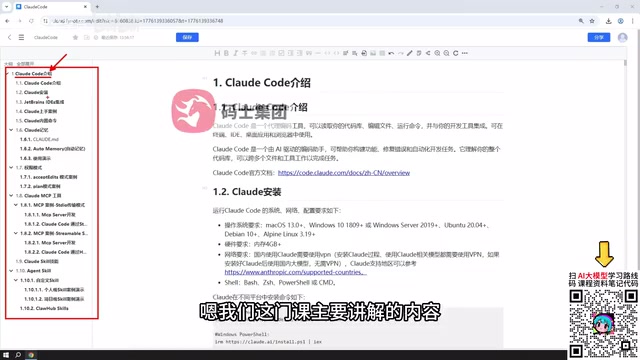
A full walkthrough of Claude Code: from installation and IDE integration to MCP tools and the Skills system.
This article draws on a structured Chinese tutorial to walk through the complete Claude Code workflow in a China-based environment. It covers cross-platform installation, IDE integration with PyCharm and VSCode, three permission modes (full auto, confirmation, planning), and the CLAUDE.md memory mechanism for persisting project context. On the extensibility side, it explains MCP tool integration via Stdio and HTTP/SSE, plus the Skills system for reusing or building custom capabilities. The article also flags the key trade-off: stronger capabilities come with higher token consumption.
Claude Code is one of the fastest-growing tools in the AI-assisted coding (AI Coding / Vibe Coding) space, and it's already changing how many developers work. It can take over code generation tasks during development and serve as a powerful assistant throughout large-scale projects. This article is based on a structured Chinese tutorial and maps out the full path — from installation to hands-on use — in a China-based environment, helping you understand Claude Code's core capabilities and key usage points.
What Is Claude Code and Why Does It Matter
At its core, Claude Code is an AI-assisted programming tool operating in the currently popular AI Coding space. It can offload portions of code generation to the model and provide assistance across the entire development lifecycle. The original tutorial author noted that Claude Code is evolving at a remarkable pace and delivers genuinely impressive results.
That said, there's an unavoidable trade-off to be aware of: the more capable an AI coding tool becomes, the more it demands from the underlying model — and the more tokens it consumes. Strong capability often comes with significant cost, so set your expectations accordingly before committing to Claude Code.
Installation and IDE Integration
The tutorial begins with the installation process, primarily demonstrated on Windows. The author notes that macOS and Linux users need not worry — the installation itself is straightforward and differences across platforms are minimal.
Once installed, you can technically use Claude Code entirely within PowerShell or CMD. In practice, though, a pure command-line workflow isn't ideal for most developers. The tutorial recommends pairing Claude Code with an IDE, using PyCharm as the primary example.
What's worth emphasizing is how transferable this approach is: whether you're using GoLand or IntelliJ for Java, or VSCode, you can follow the same general steps to install the corresponding plugin and connect Claude Code. The core integration logic isn't tied to any single editor.
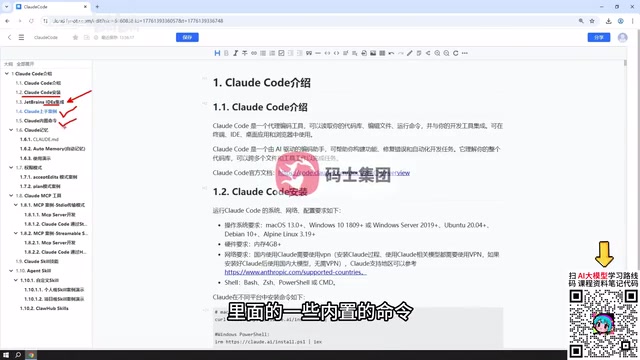
Built-in Commands and Memory Mechanism
After the initial hands-on example, the tutorial moves into Claude Code's more advanced capabilities. Memory is a key topic here, covering two layers: automatic memory, and context management through a CLAUDE.md file (referred to in the original as the Cloud Code MD file).
The value of this memory mechanism is that it allows Claude Code to retain a project's conventions, standards, and context — maintaining consistency across multiple interactions rather than starting from scratch each time. Paired with concrete demonstrations, this section helps developers build an intuitive understanding of how the tool's "memory" actually behaves.
Three Permission Modes
Permission modes are a critical design feature of the Claude Code experience. The tutorial outlines three:
- Full Auto Mode: Claude Code completes programming tasks from scratch with zero human intervention.
- Confirmation Mode: Any actions involving file modifications, plugin installations, etc., require the user to confirm each step.
- Planning Mode: Claude Code only produces a plan — it makes no actual file changes and doesn't prompt you to make any.
These three modes correspond to different levels of trust and risk tolerance. Full auto suits rapid iteration and low-risk scenarios; confirmation mode works well for projects where code changes need careful oversight; planning mode fits a more cautious approach where you want to review proposals before acting. Choosing the right permission mode is essential to using Claude Code both safely and efficiently.
CLAUDE.md is Claude Code's project-level configuration file. Placed in the project root directory, it's automatically read and injected into the context at the start of every session. Developers can use it to document the tech stack, coding style conventions, file paths that should not be modified, commonly used commands, and more — essentially a persistent "project brief" for the model. This mechanism compensates for a fundamental limitation of large language models: their stateless, session-independent nature. Even when starting a fresh conversation, the model can quickly reconstruct its understanding of the project by reading CLAUDE.md, eliminating the need to re-explain context each time. For team environments, CLAUDE.md can be version-controlled so that all team members share the same contextual baseline, reducing inconsistencies that arise from individual descriptions.
MCP Tools: Extending Claude Code's Capabilities
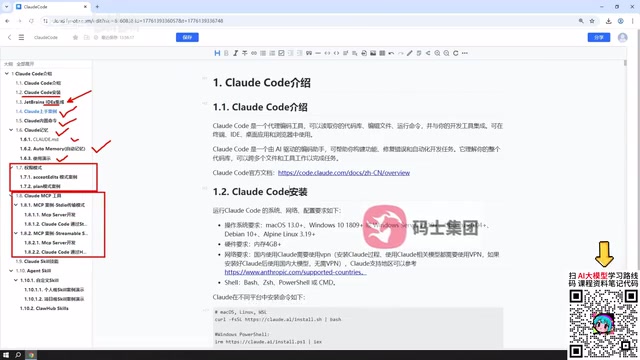
Claude Code ships with a set of built-in tools for file operations, code reading and writing, and similar tasks — enough for most everyday scenarios. But when you need more specialized capabilities — such as code linting, GitHub operations like commits and pull requests, or various analytics tools — you can customize or integrate external tools via MCP (Model Context Protocol).
The tutorial highlights that Claude Code's MCP support is comprehensive and easy to configure, and demonstrates building custom MCP Servers using two communication modes:
- Stdio mode: Define the MCP server using standard input/output communication, then integrate it into Claude Code.
- HTTP mode: Use Streamable / SSE mode for communication and configure the corresponding MCP Server within Claude Code.
Both sections walk through creating tools from scratch and launching them for Claude Code to call. Once you have a handle on MCP, you can transform Claude Code from a general-purpose coding assistant into a tailored toolset that fits your specific workflow.
MCP (Model Context Protocol) is an open protocol introduced by Anthropic in late 2024, designed to establish a standardized communication interface between large language models and external tools or data sources. Think of it as the "USB port" of the AI application world — as long as a tool implements the MCP Server spec, any compatible model client (including Claude Code) can call it directly, without needing custom integrations for each individual tool. Stdio mode is well-suited for local inter-process communication: it's simple to start, has low latency, and is commonly used for wrapping local scripts and CLI tools. HTTP/SSE (Server-Sent Events) mode is better for services that need to be accessed over a network or run persistently, making it easier to deploy on remote servers. The MCP ecosystem already has a large and growing library of community-contributed servers covering use cases like database queries, search engines, and code execution sandboxes — developers can use these directly rather than building from scratch.
Skills System
Beyond MCP tools, the tutorial also covers Claude Code's Skills system. Skills can come from existing resources found online or be custom-built by the developer. The author notes that virtually any skill you encounter online can be used directly within Claude Code.
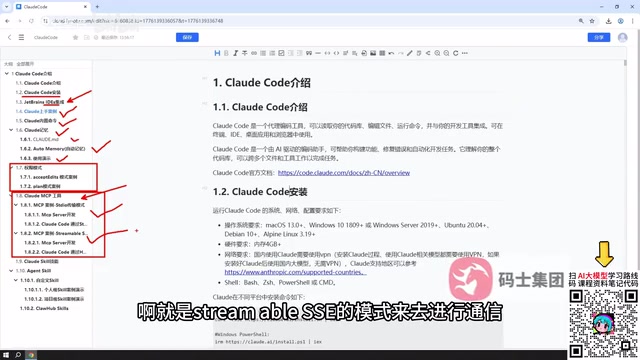
On the practical side, the tutorial explains how to define and write custom skills, as well as how to pull in skills from external sources and apply them. The author considers this section relatively approachable — not a high barrier to entry. The Skills system complements MCP tools and together they form the backbone of Claude Code's extensibility.
Summary
This tutorial covers the complete Claude Code workflow in a China-based environment, following the path of: Installation → IDE Integration → Hands-on Examples → Built-in Commands & Memory → Permission Modes → MCP Tools → Skills. For developers looking to get started with AI-assisted coding, the key to unlocking Claude Code's full value lies in understanding the permission mode trade-offs, leveraging the memory mechanism effectively, and extending capabilities through MCP and Skills. One important caveat: greater capability means greater token consumption, so in real-world use, you'll need to strike the right balance between performance and cost.
Related articles

MosMos: An AI Voice Writing Tool Built for the Entire Meeting Lifecycle
MosMos is an AI voice writing tool built for the full meeting lifecycle — ranked #2 on Product Hunt. It goes beyond dictation with style-aware drafting, a personal glossary, web search, speaker diarization, and structured meeting notes.
Getting Started with Claude Code: Capabilities and Installation Essentials for This AI Coding Assistant
Claude Code is Anthropic's AI coding agent that reads your full codebase, generates accurate code, and auto-debugs. Compare with Cursor, TRAE, Codex, plus key install requirements.

AINA: An AI Career Coach That Uses a Video Avatar to Uncover Your Job Search Blind Spots
AINA topped Product Hunt with its AI career coach that uses a video avatar to help job seekers find blind spots, polish their profile, and practice interviews.