Claude Code in China: A Practical Guide to Avoiding Bans — From Installation to Configuration

Use CC Switch with an API Key instead of account login to permanently avoid Claude Code bans in China.
This guide addresses the recurring account ban problem faced by developers in China using Claude Code, providing a complete workflow from installation to daily use. It recommends NPM installation with a VPN (requiring Node.js 22+ and Git), and — most critically — using the open-source CC Switch tool to authenticate via API Key instead of an official account login, structurally eliminating ban risk. The guide also covers two common pitfalls: relying on pure natural language prompts (inefficient and token-heavy) versus structured prompts with clear tech stack and scope, and how to reduce constant confirmation dialogs by switching permission modes.
Claude Code has become one of the go-to programming agents for developers in China. But the recurring account ban problem keeps interrupting the experience for many users. This guide is based on the hands-on experience of a Bilibili content creator, walking through a complete solution for installing Claude Code, logging in, and avoiding bans in a Chinese network environment — while also clearing up common misconceptions around permission modes and prompting.
The Current State of Coding Agents: Why Claude Code?
For developers in China, AI-assisted coding has long moved past the novelty stage — it's now a practical necessity. Many companies have set explicit targets for AI-generated code: some require 50%, others push toward 90% or even 100%. In this environment, choosing the right coding agent matters more than ever.
The main contenders right now include Claude Code, Codex, Cursor, and various offerings from Alibaba and Amazon. The creator's personal take: these tools are all fundamentally coding agents, with no absolute winner — it comes down to what feels natural in your workflow. If your company has no restrictions, Claude Code or Codex are solid first choices; the recently released DeepSeekAd Harness is also worth a try.
One important note: today's large models are already capable enough for most day-to-day development tasks. While vendors continue pushing model capabilities, domestic Chinese models are genuinely sufficient for the average developer — there's no need to chase overseas models at all costs.
Installation: Avoiding the Pitfalls of China's Network Environment
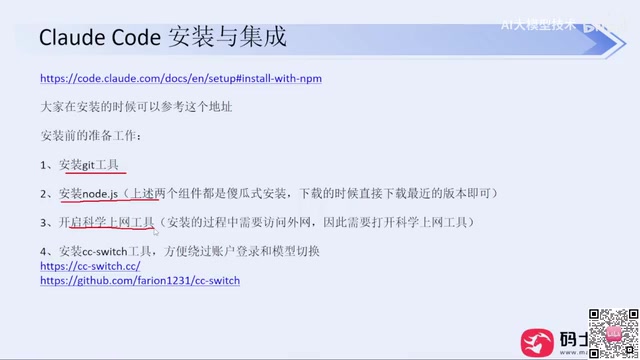
Installation is where most people run into trouble. The official documentation offers multiple installation methods and has a complete Chinese version — read through it first before doing anything else.
On Windows, there are two common approaches: running the install command in PowerShell, or running it in CMD. Due to China's network environment, neither method has a reliable success rate. You might get lucky if your ISP has fewer restrictions, but failure is common.
Use NPM — It's the Recommended Approach
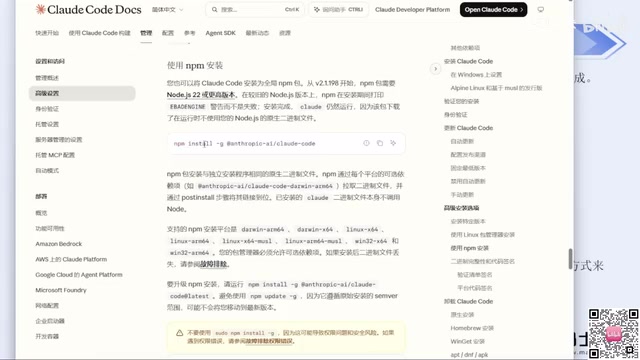
The creator's clear recommendation: when installation fails, don't waste time on tutorials that have you manually configuring API keys and environment variables. That path is unnecessarily complicated. The most reliable approach is the NPM installation method mentioned under "Advanced Options" in the official docs. With a working VPN, this method almost never fails.
Before installing via NPM, you'll need two prerequisites:
- Node.js: Version 22 or higher. Download the latest version (currently 24) from the official website — it's a straightforward next-next-finish installer.
- Git: Same deal — download the installer from the official site and click through.
You must have your VPN running throughout the installation. On that note, the creator offers a practical tip: VPN services in China face tight restrictions, so don't buy an annual subscription unless you've verified the service is stable. Monthly billing is the safer bet.
Once installation is complete, open a terminal in your target directory and run claude --version to verify the installation. If a version number appears, you're good. The first time you run claude, it will walk you through a few setup steps: whether to trust the current folder, your preferred UI theme (dark/light), and your login method.
The Core Ban-Prevention Strategy: Skip Account Login with CC Switch
This is the most important part of this entire guide. Logging in through any of the official login methods carries a significant risk of getting your account banned — the creator admits to being banned many times before finding this solution. Even if you have a legitimate account, the official login flow is not recommended.
What CC Switch Does
The solution is an open-source tool called CC Switch (originally a GitHub project, now with its own website). The core idea is simple: instead of logging into an official account, you configure an API Key directly — and with no account involved, there's nothing to ban.
Here's the step-by-step process:
- Download the installer for your OS from the official website or GitHub Releases page (Windows users want the MSI file) and install it.
- Open the app, click "+" to add a configuration, and select your provider (e.g., DeepSeek, Zhipu, etc.).
- Enter your API Key, leave other settings at their defaults, and save.
- Run
claudeagain — the login step will be automatically bypassed.
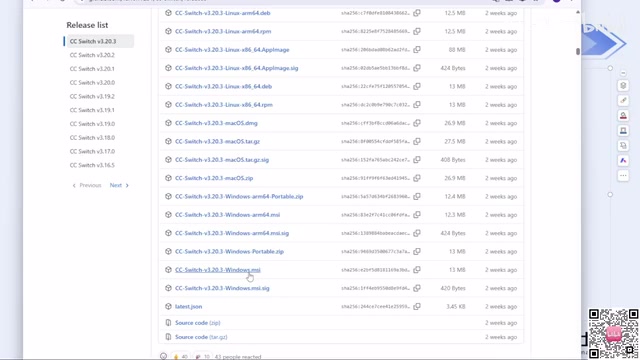
CC Switch ships with built-in configuration templates for most major model providers. If you're using a third-party API relay service, you can use the custom configuration option to supply your API Key, provider URL, and request endpoint — it works just as well.
An API Key is a credential string issued by a service provider. The client includes it in request headers as a substitute for username/password authentication. Unlike account-based login, an API Key is essentially a stateless access token: the server only checks whether the key is valid, with no association to geographic location, device fingerprint, or behavioral data. This is why CC Switch can structurally eliminate ban risk — it switches Claude Code's authentication from an "account session" model to a "key-direct" model, making every request look like a standard API call with no account trail for risk-control systems to track. Third-party relay services follow the same logic; requests are simply forwarded to an upstream provider, with no routing complexity visible to the user.
Codex Works the Same Way
CC Switch is equally recommended for Codex, but note that it maintains separate configurations per tool. When switching between tools, make sure to switch the corresponding configuration — otherwise you'll end up in a "key configured but not working" situation. Also, Codex may require one initial baseline login, so keep that in mind.
As for the environment variable method (setting your API Key in system environment variables before launching Claude), the creator tested it and found it still carries ban risk, so they switched entirely to CC Switch. Since making that switch, there have been zero bans over several consecutive months.
Note: DeepSeek Harness doesn't appear to support CC Switch at this time, but it's straightforward to configure on its own — just fill in the configuration fields directly and you're set.
Common Mistakes: Don't Rely Only on Natural Language
After getting Claude Code installed, many people default to purely natural language prompts — things like "build me a Snake game." This approach is actually quite inefficient: with no technical constraints defined, it consumes more tokens and takes longer to produce usable results.
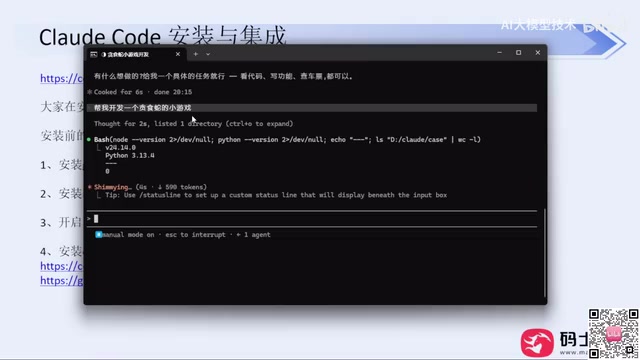
Newer versions of Claude Code have started proactively asking clarifying questions to pin down implementation approach, features, and tech stack — a clear improvement. But regular users still need to understand one key boundary:
The democratization of technology is real — if you're building a personal tool for fun, a single sentence can get you there, no technical knowledge required. But if you want to deploy the output in a commercial context or generate revenue from it, a single prompt won't cut it. Without technical grounding, code quality and bug handling will suffer, and there's typically no meaningful Code Review happening in the process.
A well-structured prompt typically covers several key dimensions: a clear tech stack (e.g., "use React + TypeScript, no additional state management libraries"), functional boundaries ("implement login and registration only, no permission management"), output format constraints ("provide each file separately with its file path"), and quality requirements ("functions must include JSDoc comments"). Compared to a single natural language sentence, structured prompts dramatically reduce the model's "guessing space," minimize back-and-forth clarification, and cut down on wasted generation — token consumption often ends up lower as a result. The proactive questioning in newer versions of Claude Code is essentially nudging users to fill in these dimensions. If you include them upfront in your prompt, you skip that entire round of dialogue and go straight to code generation.
Permission Modes: Reduce Constant Confirmation Dialogs
While generating code, Claude Code will repeatedly pop up confirmation dialogs requesting user input — this is the "Human in the Loop" mechanism in AI system design.
If you don't want to be interrupted constantly, you can control this behavior through permission modes. At the bottom of the interface, you can see the current mode (e.g., default mode on). Press Shift + Tab to cycle through modes including Accept Edits, Plan Mode, and Auto Mode. Each mode offers a different level of control over how much the agent can do autonomously — later modes require progressively less step-by-step user confirmation. Choose based on your use case.
"Human in the Loop" is a safety principle in AI system design that mandates human judgment at critical points in an automated workflow, preventing models from executing irreversible or high-risk operations. For coding agents, typical high-risk operations include deleting files, running shell commands, and modifying system configurations. The frequent confirmation dialogs in default mode are a direct expression of this principle. Auto Mode reduces interruptions but also relaxes the operational constraints on the agent — it's appropriate for use within a controlled development directory, and not recommended in production environments or directories containing sensitive data. Plan Mode is a middle ground: the agent first outputs a complete action plan for your review, and only executes after you confirm — balancing efficiency with control.
Summary
The core logic of this approach comes down to three things: use NPM + a VPN for a reliable installation; use CC Switch with an API Key to completely bypass account login and eliminate ban risk; use structured prompts and the right permission mode to maximize day-to-day efficiency. For users in China who have been repeatedly burned by account bans, the value of a tool like CC Switch isn't in its complexity — it's that it structurally sidesteps the risk in the first place.
Related articles

How Big Can Stars Really Get? The Physical Limits of the Largest Stars
Red supergiants are the largest stars by volume, with radii up to 2,000 times the Sun, engulfing the inner solar system. But there is no precise upper limit on stellar size—models predict up to 15,000 solar radii. The most massive blue stars are far smaller than red supergiants—biggest and heaviest are two different things.

Apple HomeView Smart Display Full Feature Breakdown: Wall-Mount or Desktop, $299
Apple launches HomeView, a $299 smart display with wall-mount and desktop options, 12MP camera for facial recognition, smart home control, music playback, and recipe step-by-step cooking. Full breakdown of watch faces, apps, privacy, and cooking integration.

Where Did the Promised New Studio Go? Craft Computing Answers After Five Years
Craft Computing's host responds to viewer questions: the new studio promised five years ago was shelved as construction costs soared from $30,000 to $75,000, and was replaced by a 168-square-foot garage conversion.