Claude Code in China: Install Guide & Ban Prevention with CC Switch

Install Claude Code via NPM and use CC Switch to bypass account login and avoid bans in China.
This guide covers the full path for developers in China to install and reliably use Claude Code. It recommends NPM installation over PowerShell/CMD, with Node.js 22+ and Git as prerequisites and a VPN active throughout. To prevent account bans — a risk with both official login and API Key environment variables — the open-source tool CC Switch bypasses the account system entirely. DeepSeek Harness offers strong cache hit rates, and domestic models are sufficient for daily coding work. Beyond setup, truly leveraging Claude Code requires mastering MCP, Skills, and Subagent components.
Claude Code, Anthropic's command-line AI coding assistant, presents two common pain points for users in China: installation failures and account bans. This guide, based on a hands-on tutorial, covers the complete path from a fresh install to bypassing account login — helping developers in China use this tool reliably.
Why Installation Keeps Failing in China
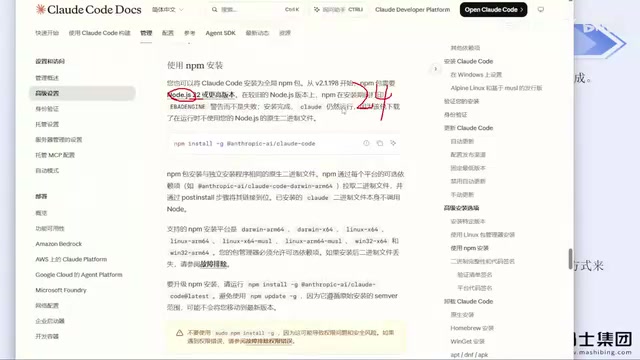
The official website offers three installation methods: Windows PowerShell command, CMD command, and NPM. The first two rarely succeed in practice — due to network restrictions, attempting a direct install via PowerShell or CMD often fails when ISP-level limitations are in play.
The tutorial author's clear recommendation: don't waste time configuring APIs and environment variables after a failed install — it's too complicated. The most reliable path is the NPM installation method listed under the advanced options on the official site. Having helped numerous colleagues and students through this process, the author confirms that as long as a VPN is active, this command almost never gets blocked or throws errors.
Two Prerequisites
Before going the NPM route, you need two things set up locally:
- Node.js: Version 22 or higher. Just download the latest version from the official site (currently version 24).
- Git: Download and install the package from the official site.
Both are straightforward installs — download the package and click "Next" through the wizard. If your C drive is low on space, you can change the install directory; everything else can be left as-is.
One critical note: your VPN must be active throughout the entire installation process, or even the NPM method will fail. On the topic of VPN tools, the author offers a practical tip: given the current crackdown environment, avoid buying annual memberships unless you're confident in the service's stability — monthly plans are safer, even if slightly more expensive per month.
NPM (Node Package Manager) is the package manager bundled with Node.js. It handles downloading and installing packages from the remote registry. Claude Code is essentially a CLI tool package published to the public npm registry, so as long as your local Node.js environment is working and your network can reach the npm registry, a single command — npm install -g @anthropic-ai/claude-code — handles the entire installation. Compared to PowerShell scripts or .exe installers, NPM's advantage is standardized installation logic with clear error messages that are easier to debug. The Node.js 22+ requirement exists because Claude Code uses newer ES module features and async APIs internally — older runtimes will throw compatibility errors immediately.
Verifying the Installation
After installation, create a new project directory and open a CMD window inside it. Many people jump straight to typing claude, but the safer approach is to run it with the --version flag first — if it outputs a version number, the installation succeeded.
The first time you run claude, you'll go through three interactive steps:
- Whether to trust the current folder;
- Choose a display style (dark, light, etc. — pick your preference);
- Choose a login method.
Step three is the most critical — and the most common trap.
The Root Cause of Bans and the CC Switch Solution
Most users choose the official account login at step three, and this is the primary cause of account bans. The author admits to having been banned repeatedly using official accounts. Even the approach taught in earlier tutorials — storing an API Key in environment variables to skip login — carries ban risk, which the author experienced firsthand.
The solution is an open-source tool called CC Switch. Originally a GitHub project, it now has a dedicated website where you can download it directly from the official site or the GitHub Releases page.
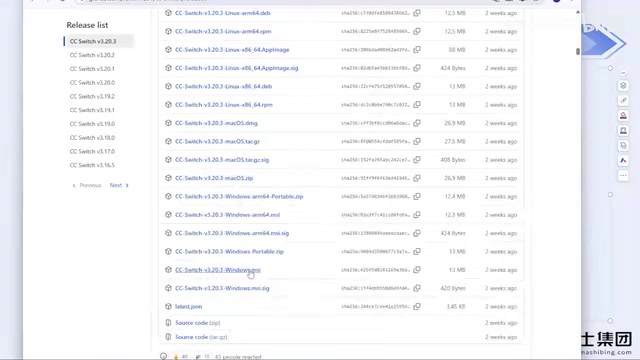
Windows users should click "show all" on the Releases page, select the corresponding .msi installer, and double-click to install. Its core value: it lets you bypass the Claude Code account login step entirely. No account login means no account ban — the author reports going months without a ban using this approach.
How to Configure CC Switch
Once you open the app, the interface lists configuration options for multiple tools including Claude Code, Codex, OpenCode, and others. The setup process is simple:
- Select Claude Code and click the plus icon in the top right;
- Choose a model provider (e.g., DeepSeekAd, Zhipu, etc.);
- Enter the corresponding API Key and save.
No manual editing of config files required. The tool has the major model providers built in. If your provider isn't listed, select "Custom Configuration" and fill in the API Key, provider URL, and request endpoint. Third-party relay services work the same way.
Once configured, running claude again will automatically skip the login step. If you've already logged in with an official account previously, you can reinstall CC Switch and use the same method to bypass account login going forward.
Anthropic uses an OAuth flow for Claude Code account authentication, which records device fingerprints, IP geolocation, and other data in the background at login time. Users in China — whose IPs frequently change due to VPN node switching, or whose IPs are flagged as high-risk regions — trigger risk controls far more often than users abroad, resulting in throttling at best and bans at worst. Storing an API Key in environment variables does skip the interactive login prompt, but the API Key is still tied to a specific account — if the account gets banned, the key goes with it. CC Switch takes a fundamentally different approach: it intercepts Claude Code's authentication requests and redirects them to a third-party model provider endpoint configured by the user. Anthropic's account system never appears anywhere in the call chain, which eliminates the root condition for account bans.
Notes for Codex Users
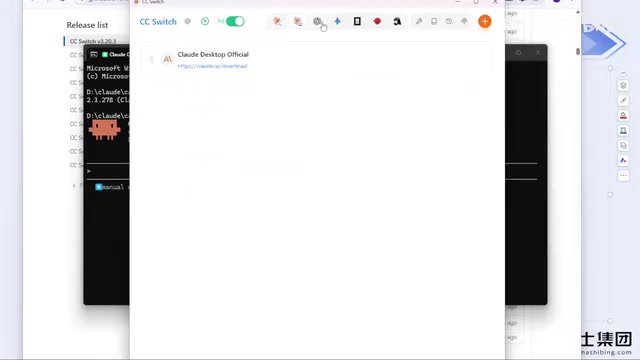
Codex is also recommended to be used with CC Switch, but there's one key difference: CC Switch manages configurations separately for each tool. That means a DeepSeek configuration you set up under Claude Code won't automatically apply to Codex — you'll need to add a separate configuration under the Codex section (just the API Key again).
Also note that Codex may still require a basic login. As for DeepSeek Harness, CC Switch doesn't currently support it, but it's straightforward to configure on its own — just fill in the details directly as a standalone config without needing CC Switch. Mac users following the NPM route use the exact same command as Windows — no additional adaptation needed.
On Model Selection: Domestic Models Are Good Enough
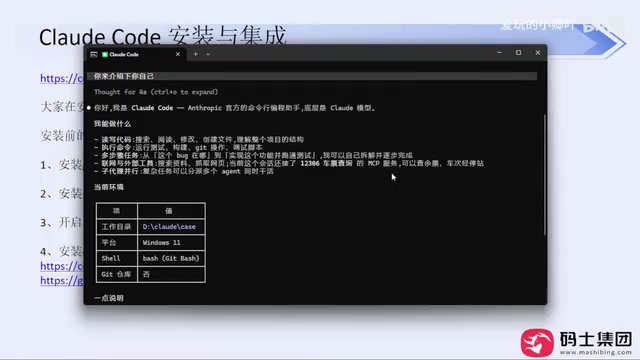
Regardless of which provider you configure, you'll need your own API Key — no account means no API Key, and there's no way around that.
On model selection, the author shares a noteworthy real-world observation: DeepSeek Harness has a noticeably higher cache hit rate than other coding agents. Despite DeepSeek's recent price increases, it still offers strong value for money.
More importantly, the author's overall take is: for day-to-day work, domestic models are "genuinely sufficient." Even as vendors continue competing on model capabilities, current models can already handle the vast majority of coding scenarios. There's no need to deal with bans and account switching just to use foreign models.
Why Natural Language Prompts Alone Produce Poor Results
After getting everything set up, many people's first instinct is to throw a single natural language request at it — something like "build me a Snake game." In practice, prompts like this produce very poor results — without technical constraints, the model won't make any sensible technology choices, leading to high token consumption, slow generation, and low-quality output.
Newer versions of Claude Code have improved on this front by asking follow-up questions like "how would you like this implemented," which guides users toward providing more specific context. This is a much friendlier experience than older versions that would just start generating immediately. But it also underscores the point: getting real value out of Claude Code takes more than just natural language conversation — you need to leverage its built-in permission modes, MCP, Skills, Subagents, and other components. These are the keys to higher efficiency and output quality, and the essential areas to master as you advance.
MCP (Model Context Protocol) is an open protocol proposed by Anthropic that creates a standardized context exchange channel between AI models and external tools or data sources. In Claude Code, MCP allows the model to directly read and write the local filesystem, run terminal commands, access databases or third-party APIs — rather than relying solely on text the user pastes into a conversation window. Skills are predefined task templates that encapsulate multi-step operations like "scaffold a new project" or "run tests and fix errors" into a single instruction, reducing repetitive descriptions. The Subagent mechanism allows the main task to dynamically break down subtasks and process them in parallel during execution, significantly reducing completion time for complex requests. Understanding how these components work is the key leap from "knowing how to use" Claude Code to "using it well."
Summary
The core takeaways for using Claude Code in China come down to a few points: install via NPM with a VPN active throughout; use CC Switch to bypass account login and avoid bans; and for everyday use, domestic models (especially DeepSeek Harness) are more than sufficient. Once you have these foundations in place, diving deeper into MCP, Skills, and other components is what unlocks the tool's full potential.
Related articles

How Big Can Stars Really Get? The Physical Limits of the Largest Stars
Red supergiants are the largest stars by volume, with radii up to 2,000 times the Sun, engulfing the inner solar system. But there is no precise upper limit on stellar size—models predict up to 15,000 solar radii. The most massive blue stars are far smaller than red supergiants—biggest and heaviest are two different things.

Apple HomeView Smart Display Full Feature Breakdown: Wall-Mount or Desktop, $299
Apple launches HomeView, a $299 smart display with wall-mount and desktop options, 12MP camera for facial recognition, smart home control, music playback, and recipe step-by-step cooking. Full breakdown of watch faces, apps, privacy, and cooking integration.

Where Did the Promised New Studio Go? Craft Computing Answers After Five Years
Craft Computing's host responds to viewer questions: the new studio promised five years ago was shelved as construction costs soared from $30,000 to $75,000, and was replaced by a 168-square-foot garage conversion.