Claude Code in China: Installation, Configuration, and Account Ban Prevention Guide

A practical guide to installing Claude Code in China and avoiding account bans using CCSwitch.
This article addresses two core pain points for Chinese users of Claude Code — installation failures and account bans. For installation, it recommends NPM as the most reliable method, with Node.js 22+ and Git as prerequisites alongside a VPN. For ban prevention, both official account login and API Key environment variable approaches carry risk; the more effective solution is CCSwitch, an open-source tool that redirects API requests to domestic third-party providers like DeepSeek or Zhipu, bypassing Anthropic's authentication entirely. The article also offers practical advice on model selection (domestic models are sufficient), VPN strategy (pay monthly), and the tool's capability limits (commercial-grade development still requires real technical skills).
Claude Code, the command-line coding assistant from Anthropic, is becoming a daily tool for more and more developers. But for users in China, just getting through the installation and login steps is enough to turn people away. This guide, based on a hands-on Bilibili tutorial, focuses on practical setup issues in the Chinese environment and helps you avoid the most common pitfalls.
Why Most People Aren't Getting the Most Out of Claude Code
A common pattern: many developers using Claude Code at work or on personal projects stay at the level of "giving instructions in natural language" — like typing "help me build a Snake game" and waiting for output.
This approach looks simple but delivers poor results. The tutorial's author is blunt about it: plain natural language prompts not only produce lower-quality output, they also burn through tokens quickly and drag out wait times. The real productivity gains come from actually using Claude Code's built-in components — permission modes, built-in commands, MCP, Skills, Subagents, and thoughtful use of configuration files.
In other words, the tool ships with a full capability framework, and most users are only scratching the surface.
Installing in China: NPM Is the Most Reliable Method
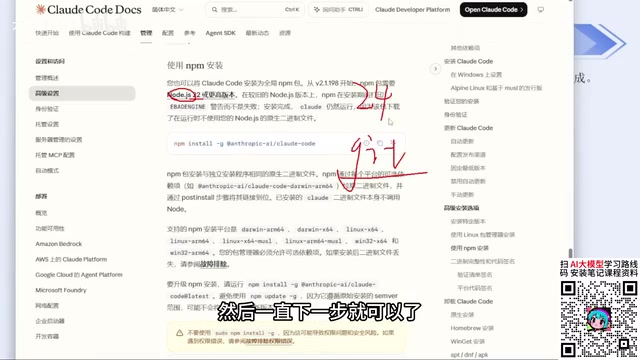
Installation is the first hurdle for users in China. The official docs offer several methods: Windows users can run the install command directly in PowerShell or CMD. But due to network restrictions, these methods have inconsistent success rates in China — the stricter your ISP's filtering, the lower your odds.
The author's core recommendation: use NPM to install. This is also the approach explicitly listed under "Advanced Options" on the official site. As long as you have a working VPN configured, this method is nearly foolproof.
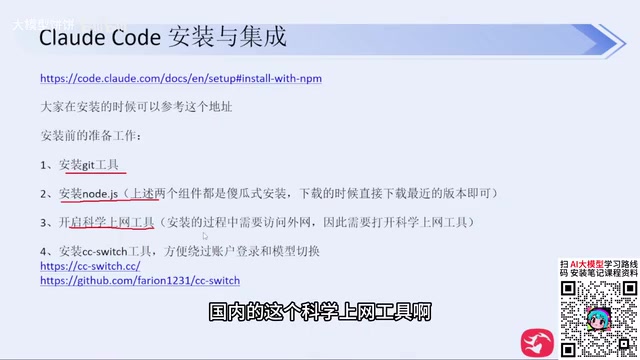
Before installing via NPM, you'll need two prerequisites:
- Node.js: Version 22 or higher. Just grab the latest release from the official site (currently version 24)
- Git: Also available from the official site, straightforward installer
Both are standard "click Next" installations. If your C drive is tight on space, you can change the install directory — otherwise, leave everything as default.
Once installed, run claude --version in your terminal to verify the version number outputs correctly. If it does, the installation succeeded. The first time you run claude, the tool walks you through: whether to trust the current folder, your preferred UI theme, and your login method.
The Key to Avoiding Bans: Use CCSwitch to Bypass Account Login
This is the most valuable part of the entire tutorial. Claude Code defaults to prompting you to log in with an Anthropic account — but for users in China, logging in with an official account is a fast track to getting banned. The author admits they got banned many times before.
The common workaround you'll find online is configuring various API Keys and environment variables to skip the login. But the author tested this too, and it still carries ban risk — plus it's tedious to set up.
The actually effective solution is an open-source tool called CCSwitch. It started as a GitHub project and now has a dedicated website. The core idea: configure a third-party model provider's API Key through CCSwitch and bypass official account login entirely — since you're never logging into an Anthropic account, there's nothing to ban. The author says they've run stably this way for several months without a single ban.
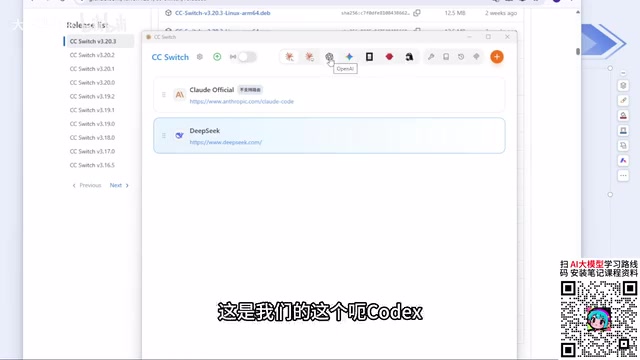
Here's the setup flow:
- Download the appropriate installer from the GitHub Releases page (Windows: pick the
.msifile; click "show all" to see all versions) - Double-click to install
- Open the app, click "+" to add a configuration, and choose your model provider (e.g., DeepSeekAd, Zhipu, etc.)
- Enter the corresponding API Key and save
CCSwitch comes with the major mainstream model providers built in. If your provider isn't in the list, there's a "custom configuration" option where you fill in the API Key, provider URL, and redirect address. Third-party relay services are also supported.
Once configured, re-run claude and the login step is skipped entirely. Even if you previously logged in with an official Anthropic account, reinstalling CCSwitch will bypass that login flow going forward.
It's worth noting this approach also works with Codex — but pay attention that Codex is listed as a separate tool in CCSwitch. When switching tools, remember to switch the corresponding configuration, otherwise you'll run into a "configured the Key but it doesn't work" situation. For Mac users installing via NPM, the commands are identical to Windows.
The underlying reason CCSwitch can bypass login comes down to Claude Code's architecture: the tool supports specifying custom API endpoints and keys via environment variables or config files, without being locked to Anthropic's official account system. CCSwitch is essentially a configuration manager that intercepts API requests from Claude Code locally and redirects them to your specified third-party provider's endpoint (like DeepSeek or Zhipu). Because the entire call chain bypasses Anthropic's authentication servers, the risk of account bans is eliminated at the root. This is different from simply setting official environment variables like ANTHROPIC_API_KEY — that approach still triggers Anthropic's account verification logic on their side and can be detected as an anomalous login.
Recommendations on VPNs and Model Selection
Since a VPN is unavoidable during installation, the author also offers practical advice here: VPN enforcement in China is strict right now, so don't buy annual memberships unless you've confirmed the service is stable. A safer approach is to pay monthly — even if the per-month price is a bit higher.
On model selection, the author's view is pragmatic: there's no need to chase foreign models by default. DeepSeek has gotten pricier after recent rate increases, but DeepSeek Harness tends to have a higher cache hit rate — it outputs more verbose information during use, but hits cache more often than other coding agents.
More importantly, the author emphasizes: even though major vendors are still competing on model capability, existing Chinese domestic models are already fully capable of handling day-to-day work needs. There's no reason to obsess over which model has the highest ceiling. It's also worth mentioning that DeepSeek Harness doesn't currently support configuration through CCSwitch, but it's simple enough to set up on its own — just fill it in as a configuration entry and you're done.
The "Democratization of Tech" — and Its Limits
Once you've finished the setup and type "help me build a Snake game," Claude Code presents technical choices (newer versions will proactively ask you to confirm features, tech stack, and game mechanics), then generates runnable code.
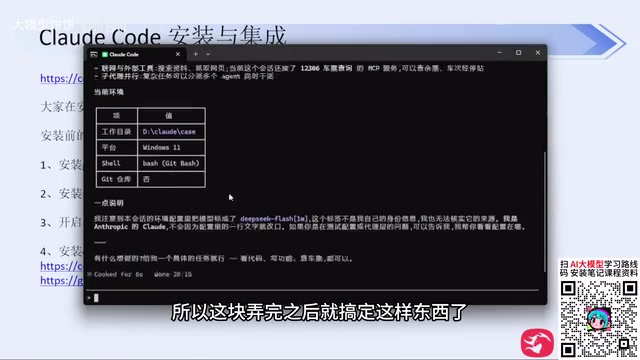
During the generation process, the tool keeps popping up confirmation prompts — this is called "Human in the loop" in large model engineering. If you don't want constant interruptions, you can control this by switching permission modes.
This leads the author to an important observation: the core value that large models and coding agents deliver is technological democratization. Want to build a little tool for personal use? One sentence gets it generated — no need to learn programming or syntax.
But he also draws a clear line: this logic only applies to personal side projects. If you want to ship something commercially and make money from it, a one-line prompt is nowhere near enough. Non-programmers who want to build large-scale commercial platforms will still need a solid technical foundation — otherwise code quality and bug handling will become serious problems. The mini-game demonstrated in the tutorial was run without any code review, purely for demonstration purposes, and doesn't represent real development standards.
"Human in the loop" is a core safety mechanism in AI agent engineering. It refers to forcibly pausing at key decision points during automated task execution and requesting human confirmation before proceeding. The purpose is to prevent AI from executing irreversible actions in an unsupervised state — such as deleting files, committing code, or calling external APIs. Claude Code's permission modes are essentially granular controls over this mechanism: in strict mode, nearly every step requires confirmation; in relaxed mode, the tool is allowed to execute autonomously across a broader range of actions. For personal experimental projects, loosening permissions is reasonable for efficiency. But in scenarios involving production environments or sensitive data, preserving human confirmation checkpoints remains sound engineering practice.
Summary
The core of this Claude Code setup approach for users in China can be distilled to: install via NPM, use CCSwitch to bypass account login and avoid bans, and use domestic models for everyday needs. The tools lower the barrier to coding — but "you still need to have the right technical foundation" may be the clearest-headed reminder in the entire tutorial.
Related articles

FastAPI: A High-Performance Python Framework and a Production-Ready API Development Powerhouse
FastAPI is a high-performance web framework based on Python type hints, supporting async and automatic OpenAPI docs. With over 100k GitHub stars, this article analyzes its core strengths, production readiness, and selection advice.

Tesla Optimus Begins Mass Production: Can the Goal of 20,000 Units Per Week Be Achieved?
Tesla Optimus officially begins mass production as Musk sets a target of 20,000 units per week. This article analyzes the supply chain challenges behind mass production, the real gap in capacity ramp-up, and the competitive landscape for humanoid robots.

PCL: A Minecraft Launcher with 8.5k Stars — Why Was It Written in VB.NET?
An in-depth analysis of PCL, the GitHub Minecraft launcher with 8,500+ stars: why it chose VB.NET, its features and China network advantages, and the limits of Windows-only.