Claude Code Installation & Anti-Ban Guide: Complete CCSwitch Configuration Walkthrough

Complete guide for Chinese developers: install Claude Code via NPM and use CCSwitch to avoid account bans.
This guide covers the full workflow for developers in China using Claude Code. NPM installation (requiring Node.js 22+ and Git) is recommended over official scripts for better reliability. The login step is the biggest risk — both direct account login and API Key via environment variables have led to bans. The solution is CCSwitch, which routes traffic through third-party APIs like DeepSeek to bypass official login entirely. The guide also covers VPN tips, model selection, prompt quality, and Claude Code's Human-in-the-Loop permission modes.
Claude Code, Anthropic's command-line coding assistant, is becoming a go-to tool for more and more developers. But for users in China, two major obstacles stand in the way: a tricky installation process and the risk of account bans. This hands-on guide, based on a practical tutorial from a Bilibili creator, walks you through a complete path — from installation to configuration to ban prevention — so you can avoid the common pitfalls.
Installing Claude Code: Why NPM Is the Recommended Approach
The official documentation offers several installation methods. Windows users often run the official script directly in PowerShell or CMD. However, due to network restrictions in China, the success rate of these script-based methods is unreliable — if your ISP or network environment has limitations, script installation tends to fail.
Rather than hunting for complex workarounds involving API configurations and environment variables, you're better off using the NPM installation method, which is also officially supported. You can find the corresponding NPM install command under the "Advanced Options" section of the official documentation. Based on the creator's experience deploying this method for colleagues and students in bulk, it rarely goes wrong as long as your VPN is properly configured — and account bans are far less common.
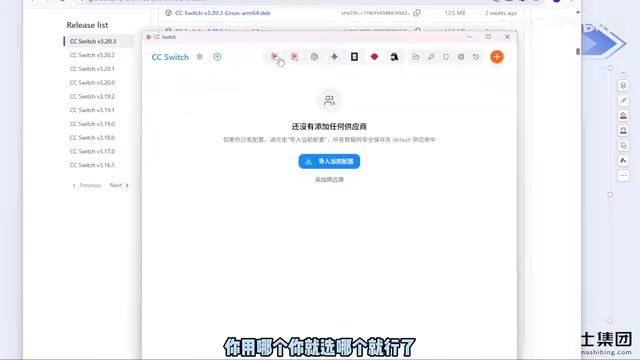
Note that NPM installation has two prerequisites:
- Install Node.js: Version 22 or higher is required. Download the latest version from the official site (currently around version 24).
- Install Git: Download the installer from the official site as well.
Both are straightforward installs — just download and click through the setup wizard. If your C drive is running low on space, you can change the installation directory; otherwise, keep everything at default. Once installed, run claude --version in your terminal to verify — if a version number is printed, you're good to go.
First Launch and Login: Why Official Login Carries Ban Risk
When you run claude for the first time, you'll go through three steps: confirming whether you trust the current folder, choosing a UI theme (black, white, etc. — purely cosmetic), and selecting a login method.
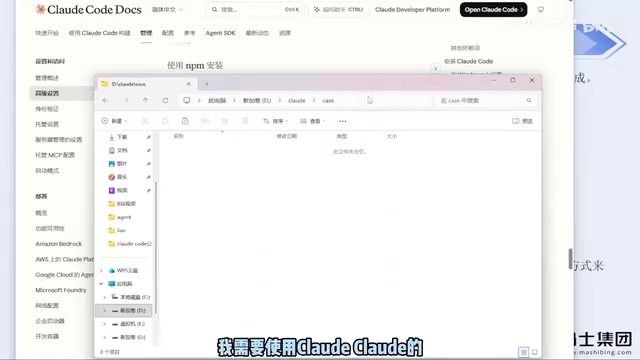
The login step is where things get critical. The creator explicitly warns: logging in directly with an official Anthropic account carries a real risk of being banned, even if your account is legitimate. A previously recommended approach — configuring an API Key via environment variables to bypass the official login — has also led to bans in the creator's own testing.
The hassle of a ban isn't really about the cost — it's the tedious process of switching to a new account and reconfiguring everything from scratch. The safer approach is to use a third-party tool to bypass the official login entirely.
CCSwitch: The Key Tool for Bypassing Account Login
The solution to the ban problem is CCSwitch (originally a GitHub open-source project, now available as a dedicated website). It lets you use Claude Code via a third-party API, completely bypassing the official account login mechanism.
The setup process is straightforward:
- Download the installer for your OS from the GitHub Releases page (Windows users click "Show all" and select the
.msifile). - Double-click to install and click through the wizard.
- Open the app — the interface lists multiple tools including Claude Code, Codex, OpenClaude, and more.
To configure it, select the tool you want (e.g., Claude Code), click "+" to add a new configuration, choose your model source (e.g., DeepSeekAd), enter your API Key, and save. You don't need to change anything else.
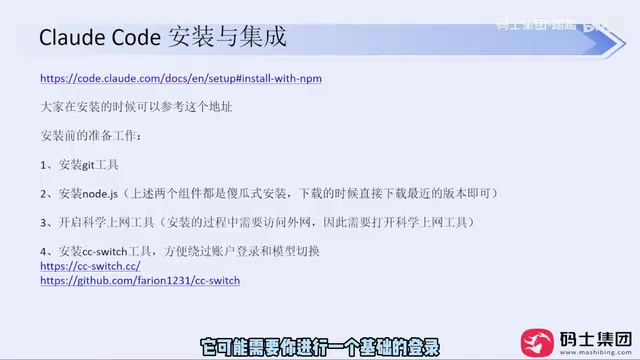
Restart Claude Code after saving, and it should work normally. Based on the creator's testing, this approach "basically never results in a ban." The process is identical on Mac and Windows. Codex is also supported by CCSwitch, but note that configurations are managed per-tool — make sure you're on the right configuration for whichever tool you're using, or it won't work. DeepSeek Harness currently doesn't support CCSwitch, but it can be configured directly and isn't particularly difficult to set up.
The reason CCSwitch works comes down to Claude Code's built-in support for custom API endpoints. On startup, Claude Code reads ANTHROPIC_BASE_URL and ANTHROPIC_API_KEY from environment variables or a local config file. What CCSwitch does, essentially, is automatically write these variables for you — redirecting traffic to a third-party API relay service (such as DeepSeek or OpenRouter) without requiring you to manually edit system environment variables or config files. These relay services are typically compatible with Anthropic's API format, so Claude Code doesn't need to know which underlying model it's actually calling. Understanding this mechanism is useful for troubleshooting: if things stop working after switching tools, the most likely cause is that CCSwitch didn't correctly activate the right configuration, or the API Key for the relay service is out of credits or lacks the necessary permissions — not a problem with Claude Code itself.
Practical Tips on VPN and Model Selection
Both the NPM installation and ongoing usage require a working VPN. The creator offers one practical piece of advice: given current censorship intensity, avoid buying annual VPN subscriptions unless you're confident the service is reliably stable. Monthly plans cost a bit more but are a safer bet.
On model selection, the creator makes a notable point: while AI companies are still racing to improve their models, what's available today is already more than sufficient for everyday development work. For most users who just need to get their regular work done, domestic Chinese models are perfectly adequate — there's no need to risk an account ban by using overseas accounts.
One practical tip when using DeepSeek: DeepSeek Harness tends to have a higher cache hit rate compared to other coding agents, making it more cost-efficient. That said, costs have gone up since DeepSeek raised its prices, so weigh the tradeoffs based on your needs.
Prompt Quality and Permission Modes: The Two Variables That Determine Real-World Results
Once everything is installed, the natural instinct is to jump straight in with something like "build me a Snake game." The newer version of Claude Code will actually turn the tables and ask you clarifying questions about gameplay, features, and technical implementation — a significant improvement over older versions that would just start generating immediately.
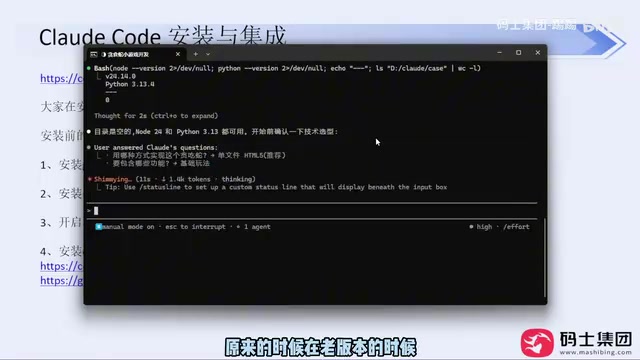
But the creator emphasizes a key insight: vague prompts will consistently produce poor results in real development work. Without a defined technical scope, the model won't make sensible technology choices, and you'll burn through more tokens and time. AI tools have genuinely democratized software development — non-programmers really can build small utilities with a single sentence. But if you want to use the output in a commercial context and actually make money from it, a one-liner prompt won't cut it. The necessary technical knowledge, Code Review steps — none of that goes away. Skip them and bugs and code quality issues will follow.
During generation, Claude Code will repeatedly pop up asking you to confirm actions — this is the "Human in the Loop" mechanism from AI safety engineering. If you don't want constant interruptions, you can switch permission modes: at the bottom of the terminal, press Shift + Tab to cycle through modes including menu mode, accept edit on, plan model, and auto model. Each mode controls a different level of permissions, so choose based on what your current task requires.
"Human in the Loop" is an important concept in AI safety and engineering practice — it refers to keeping a human review and decision-making step at critical points in an automated workflow. In agentic coding scenarios, a model might continuously perform high-risk operations like reading and writing files, running terminal commands, and modifying code. If the model makes a wrong call, the consequences can be hard to roll back. That's why Claude Code, by default, shows a confirmation prompt before executing sensitive operations, giving users a chance to stop or correct things. This is the same reasoning behind Level 2 driver-assist systems that still require the driver to remain attentive — the more autonomous the tool, the higher the cost of a single misjudgment. High-permission modes like auto model are best suited for controlled environments (such as a dedicated development sandbox) or after the task logic has been thoroughly validated. Enabling full auto mode directly on a production codebase carries significant risk.
Summary
The core of this workflow can be distilled into a few key points: use NPM for installation (with Node.js and Git set up first), avoid logging in with an official Anthropic account, use CCSwitch with a third-party API to sidestep ban risk, and always keep your VPN running. The tools are just a starting point — what actually separates good results from bad is the precision of your prompts and your own technical judgment.
Related articles

WorkBuddy Full Guide: How an AI Coworker Takes Over Workplace Automation
What is WorkBuddy? This article analyzes the core capabilities of this full-scenario AI agent: autonomous execution with deliverable results, local file processing, multi-agent parallelism, and workplace automation workflows, helping you judge its essential difference from ordinary AI chat tools.

The Truth About AI Agents: A Hundred Lines of Code + an LLM, Deconstructing the Agent's Underlying Logic
AI agents aren't a new AI species—just a language model plus tools, a loop, and a goal. Here's the underlying logic: how 100 lines of Python hit a 75% fix rate, why the harness beats the model, and Gartner's "agent washing."

AI Agent Deployment: Three Things Developers Should Do
AI Agent deployment doesn't require rushing into multi-agent systems. This article outlines an actionable deployment path and engineering acceptance thresholds for developers, covering human baselines, bounded single-agent scope, and a controlled code-modification loop.