Claude Code Installation, Configuration, and Anti-Ban Practical Guide

Domestic developers install Claude Code via NPM and use CC Switch to bypass bans and stably use AI coding tools.
The article targets domestic developers, systematically explaining Claude Code's installation and configuration. It notes that most Chinese companies now require 50% to 100% of code to be completed by AI tools, with Claude Code, Codex, Cursor, and Trae being mainstream choices. Installation via NPM is recommended over PowerShell/CMD, requiring Node.js 22+ and Git, plus a VPN. On first launch, avoid logging in with a Claude official account. The solution is CC Switch, which configures API Keys and request addresses from DeepSeek or custom relay stations to skip login. Model selection should prioritize practicality.
Why Claude Code Has Become the Go-To AI Coding Tool for Domestic Developers
AI coding tools have moved from the "early adoption" phase into the "mandatory implementation" phase. According to instructor Lian from Mashibing Education during a live-streamed class on Bilibili, most companies in China have already begun requiring a certain percentage of code to be completed by AI programming — companies with lower requirements mandate that 50% of code must be implemented via web coding, while those with higher demands go as far as 90% to 100%.
In terms of tool selection, programmers currently use Claude Code, Codex, Cursor, Trae, and others most frequently. After personally trying these products, Instructor Lian recommends: if your company doesn't impose specific constraints, prioritize Claude Code or Codex. He emphasizes that these tools are essentially just programming agents with no absolute good or bad — pick whichever feels most comfortable for you. However, based on current trends, Claude Code has more users.
Installation: Avoiding the Pitfalls of Domestic Networks
Why PowerShell and CMD Installation Are Not Recommended
The Claude Code official website offers multiple installation methods, including Windows PowerShell and CMD commands. But Instructor Lian discovered in actual teaching that due to domestic network environment limitations, the success rate of installing through these two methods is not high. Some students, after failed installations, go online looking for tutorials on configuring API Keys and setting environment variables — the process is cumbersome and error-prone.
NPM (Node Package Manager) is a package management tool installed alongside Node.js and is the world's largest open-source software registry. Through commands like npm install -g package-name, it downloads and globally installs command-line programs from remote repositories. Claude Code is distributed precisely as an NPM package. Compared to PowerShell scripts or CMD batch files, NPM installation uses HTTPS protocol to access a unified registry (default registry.npmjs.org), with a standardized process, clear error messages, and support for switching to mirror sources for acceleration. Under domestic networks, script-based installation methods often get interrupted due to throttled or unstable download addresses, while NPM can work with domestic sources like the Taobao mirror (npmmirror), resulting in significantly higher success rates. This is also why the official website places it under "Advanced Setup" as an alternative option.
NPM Installation: The More Reliable Choice
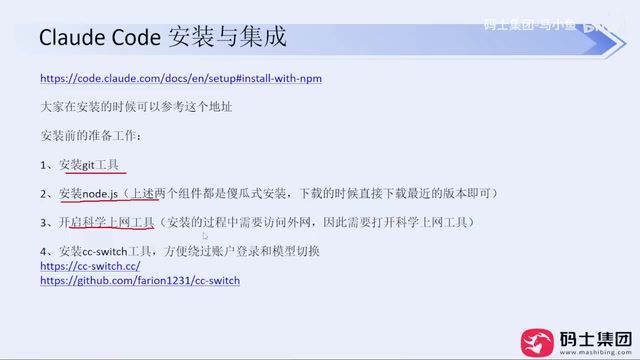
The more recommended approach is installation via NPM, which is also the solution provided under "Advanced Setup" on the official website. Using this method requires two prerequisites:
- Install Node.js: Version 22 or above is required, with the current latest being version 24. Just download the installer from the official website — the entire process is foolproof with next-step operations
- Install Git: Similarly, download and click next all the way through
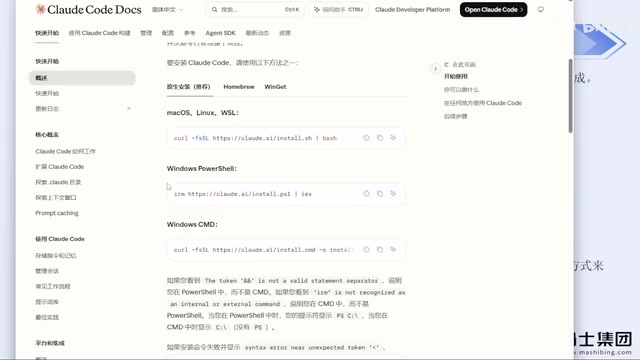
Be sure to enable your VPN/proxy tool during installation. Instructor Lian mentions that with NPM installation, as long as the network configuration is in place, installation failures basically don't occur. He has verified the stability of this method on his company's computers and multiple students' machines.
After installation is complete, enter claude --version in the command line to verify the version number. If it outputs version information normally, the installation was successful.
First Launch and Login Mode Selection
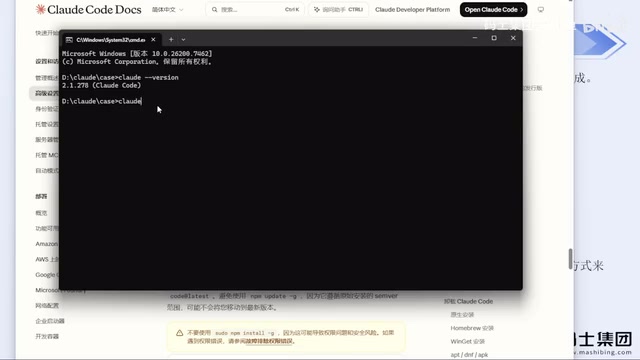
When running Claude Code for the first time, the system will guide you through several steps: first choose whether to trust the current folder, then select the interface theme style (dark, light, or other color schemes), and finally choose a login method.
Here's a key reminder: Instructor Lian explicitly advises against logging in with a Claude official account. He and his students have both been banned for using this method, and migrating accounts after a ban is very troublesome.
CC Switch: The Core Solution to Bypass Account Login
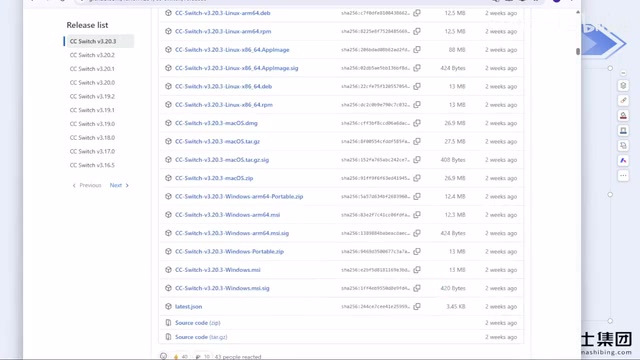
The best solution to the ban problem is to use the CC Switch tool. This tool was originally an open-source project on GitHub and has now been turned into a website. You can download the installer from the official website or the GitHub Release page.
Configuration Process
- Download and install CC Switch
- Open the software and select the corresponding tool (Claude Code or Codex)
- Click the plus sign to add a configuration, select a model provider (such as DeepSeekAd), and enter the API Key
- If your desired option isn't in the provider list, you can select "Custom Configuration" and enter the API Key and request address from a third-party relay station
After configuration is complete, run Claude Code again — the login step will be skipped entirely, no longer linking to your official account, thereby avoiding the risk of being banned. Instructor Lian states that after using this method, he hasn't encountered any ban issues for several months.
It's important to note that in CC Switch, the configurations for Claude Code and Codex are managed separately. If you configure a DeepSeek API Key in Codex but Claude Code has no corresponding configuration, the two tools cannot share it.
API Key is the identity credential for calling large model services — essentially a string of keys issued by the service provider. Developers enter it into request headers, and the service provider uses it to identify users, bill them, and control permissions. The Request Address (Base URL / Endpoint) is the entry server address for the API, such as the https://api.deepseek.com officially provided by DeepSeek. A so-called "third-party relay station" refers to service providers that act as proxy forwarders on top of official APIs. You just need to point the Base URL to the relay station and enter the API Key it issues, and you can call the underlying model via forwarding. This is also the principle behind how Claude Code can work normally without logging into an official Anthropic account — it only recognizes API configurations and doesn't force binding to the official login state, thereby circumventing the risk of official accounts being mass-banned due to regional risk controls. When configuring, be sure to confirm the relay station's stability and privacy policy, because your code content will be forwarded through its servers.
Model Selection: Good Enough Is Good Enough
Regarding the choice of underlying models, Instructor Lian offers practical advice. He believes that although major vendors are continuously competing on model capabilities, existing models are already sufficient to meet daily work needs. He doesn't particularly recommend buying foreign model accounts, citing high ban risks and the hassle of switching accounts.
At the product experience level, he shares a personal observation: when using DeepSeek Harness, the cache hit rate is relatively high, while calling through other programming agents may result in lower cache hit rates. However, this observation hasn't been rigorously verified through evaluation and is for reference only.
Cache Hit Rate is a key cost and performance metric in large model calls. Mainstream model services support Prompt Caching: when the prefix content of multiple requests is highly repetitive, the server caches the computation results, and subsequent requests only need to read the cache without recalculating. Tokens that hit the cache are typically billed at a price far lower than normal input, and responses are faster. In programming scenarios, system prompts, project context, and historical conversations are often highly repetitive, so the higher the cache hit rate, the lower the actual cost and the smaller the latency. Different programming agents differ in their strategies for assembling context and chunking requests, which leads to different cache hit rates for the same model across different tools — this is also the possible reason behind Instructor Lian's observation of higher cache hit rates with DeepSeek Harness.
Conclusion
The installation and configuration of Claude Code is not complicated. The core difficulties lie in the installation method under domestic network environments and account security. By installing via NPM combined with the CC Switch tool, these two problems can be effectively solved. This solution has already been verified in actual teaching and enterprise scenarios, and is suitable for developers who need to stably use AI programming tools in domestic environments.
One-line Summary
Domestic developers install Claude Code via NPM and configure CC Switch to bypass bans, stably using AI programming tools.
Paragraph Summary
The article targets domestic developers, systematically explaining Claude Code's installation and configuration methods. The author points out that most companies in China now require 50% to 100% of code to be completed by AI programming tools. Claude Code, Codex, Cursor, and Trae are mainstream choices, with Claude Code having more users. For installation, PowerShell and CMD are not recommended; instead, use NPM, which requires pre-installing Node.js 22+ and Git, and enabling a VPN. After installation, verify with claude --version. On first launch, the author strongly advises against logging in with a Claude official account due to ban risks. The solution is the CC Switch tool, which skips the login step by configuring API Keys and request addresses from providers like DeepSeek or custom relay stations. For model selection, the advice is "good enough is good enough" — no need to be fixated on foreign accounts.
Related articles

Chain of Thought Isn't Just for AI: How Humans Can Use CoT to Improve Thinking Quality
Chain of Thought isn't just a prompt trick for large models. Starting from a Hacker News discussion, this article analyzes why CoT works for human thinking too, breaks down actionable ways to transfer it, and highlights the key differences between human CoT and machine CoT.
Cloudflare Teams Up with OpenAI: Closi…
Cloudflare Teams Up with OpenAI: Closing the Loop from Vulnerability Discovery to Defense with AI
Cloudflare uses OpenAI Daybreak to investigate security vulnerabilities and generate reviewable remediation plans, while developers use Codex to boost coding efficiency and quality.

Orca Multi-Agent Orchestration in Practice: A Guide to Parallel Collaboration with Claude and Codex
Orca is Stable AI's free open-source agent workbench supporting 34 agents like Claude Code and Codex in parallel. Learn its Git worktree isolation, multi-model orchestration, and mobile management.