Claude Code Installation Guide: Configuration for China-Based Users & Superpowers Plugin in Practice

Install and configure Claude Code for China-based users, plus boost code quality with the Superpowers TDD plugin.
Claude Code is an AI Agent with perceive-plan-execute closed-loop capabilities that extends beyond coding to writing, presentations, and more. Users in China can install it with three commands to bypass regional restrictions and connect to domestic models via manual configuration or the CCSWITCH tool. The article also recommends the Superpowers plugin, which introduces Test-Driven Development (TDD) into AI programming through a three-step workflow—requirements clarification, task decomposition, and writing tests before code—significantly improving code quality.
Claude Code: An AI Agent That Goes Beyond Coding
Many developers consider Claude Code the most powerful AI agent available today, yet most still think of it as just a "coding tool." In reality, it excels in writing, presentation creation, copywriting, illustration, and more. The core engine behind the recently viral Mines is reportedly closely related to it as well.
To understand why Claude Code is so powerful, you need to grasp its true nature: it's an AI Agent, not a traditional code completion tool. The core difference between an AI Agent and a regular AI assistant lies in its "perceive-plan-execute" closed-loop capability—it can proactively invoke tools, read and write to the file system, execute terminal commands, and dynamically adjust its next steps based on execution results. Built on Anthropic's Claude model, Claude Code deeply integrates with your local environment through the MCP (Model Context Protocol), enabling it to operate your computer like a real engineer rather than merely generating text suggestions.
This tutorial will walk you through Claude Code installation and configuration from scratch, solve the regional restrictions that frustrate users in China, and introduce a key plugin that significantly improves code quality—Superpowers.
Install Claude Code in Three Commands
The Claude Code installation process is simpler than you might expect—it boils down to executing three commands. These three commands not only install Claude Code itself but also resolve the China region unavailability issue—which is crucial for developers in mainland China.
Why are there regional restrictions? Anthropic enforces IP geolocation-based access control on Claude services, directly blocking requests from mainland China IPs. The reason these three installation commands simultaneously solve this problem is that they typically configure the API requests to route through a proxy service compatible with the Claude API format, or directly replace the endpoint with one supporting OpenAI-compatible interfaces from domestic models. This "API compatibility layer" design is an important pattern in the current AI tool ecosystem—as long as services follow the same request/response format specifications, models from different providers can be seamlessly swapped without users needing to be aware of the underlying switch.
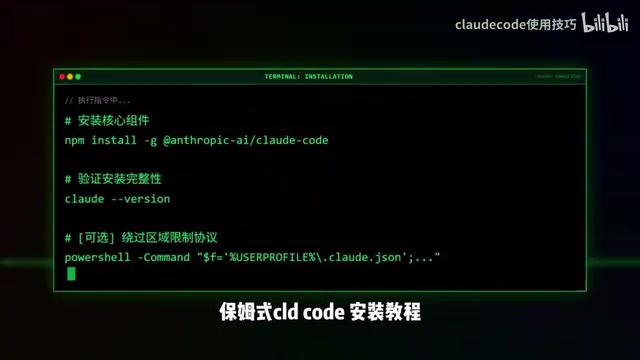
After installation, you'll need to authenticate on first launch. If you have an official Anthropic account, simply log in. Don't worry if you don't have an official account—Claude Code supports connecting to third-party models, including Chinese domestic LLMs. The configuration methods are detailed below.
Two Model Configuration Options for Users in China
Users without an official account, or those who want to use domestic models, can complete configuration through the following two approaches.
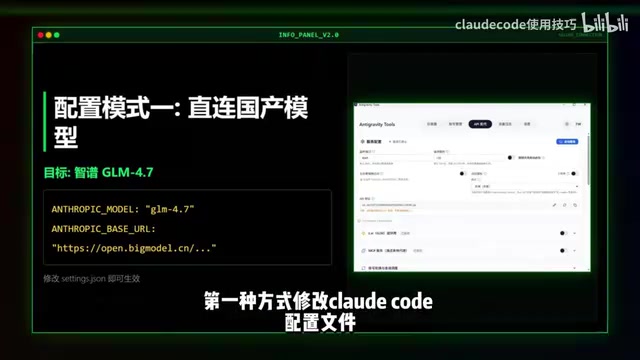
Option 1: Manually Edit the Configuration File
Directly edit Claude Code's configuration file and fill in the API address and key for a domestic model. This approach suits users with some technical background—the advantage is strong controllability, with precise adjustment of every parameter.
Option 2: Use the CCSWITCH Tool for Automated Configuration
If you'd rather not manually tinker with configuration files, try CCSWITCH, an automated configuration tool. Compared to the manual approach, CCSWITCH lowers the barrier to the minimum—a few clicks and you're done switching models.
Bonus Option: Connect Google Gemini Models
If you have a Google Pro account, you can also reverse-connect Google Gemini into Claude Code. This lets you invoke Gemini's capabilities directly within Claude Code's interface, enabling flexible cross-platform model switching and further expanding Claude Code's use cases.
The underlying logic of this integration leverages the OpenAI-compatible API format as a "universal adapter." Currently, mainstream LLM providers (including Google, Anthropic, and Chinese companies like Alibaba, Baidu, DeepSeekAd, etc.) all offer API interfaces compatible with the OpenAI Chat Completions format. This means any AI tool that supports custom API endpoints can theoretically connect to any provider's model. This "model-agnostic" architectural trend is driving AI tools from "locked to a specific model" toward "on-demand invocation of the optimal model"—users can flexibly choose based on task type, cost budget, and response speed, avoiding vendor lock-in.
Must-Have Plugin Superpowers: Improving Code Quality with Test-Driven Development
After installing Claude Code, it's highly recommended to also install one plugin—Superpowers. It's called a "must-have" because it fundamentally changes how AI programming works and solves the most common code quality issues.
Why Ordinary AI Programming Often Goes Wrong
Most AI programming assistants start writing code immediately after receiving requirements. While this seems efficient, it frequently leads to problems:
- Frequent logic gaps: Starting without fully understanding requirements causes critical logic branches to be missed
- Chaotic code structure: Lacking overall architectural design, code piles up randomly and becomes unmaintainable
- A vicious cycle of deterioration: Fixing one bug introduces three new ones, leading to endless rework
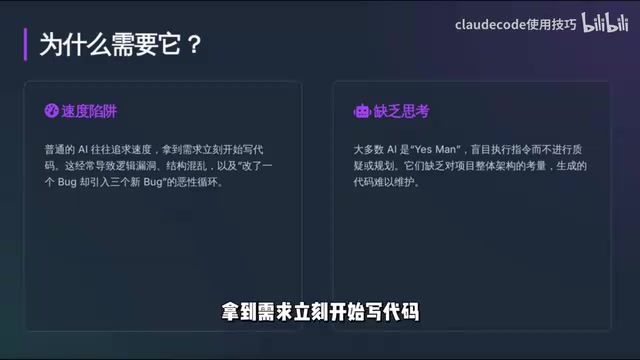
The root cause: AI skips the most critical "requirements analysis" and "architectural design" phases of software engineering, jumping straight into the coding stage.
Superpowers' Three-Step Workflow
The Superpowers plugin introduces the Test-Driven Development (TDD) methodology, breaking AI programming into three steps.
What is Test-Driven Development (TDD)? TDD is a development methodology systematized by software engineer Kent Beck in 2003 and is one of the core practices of Extreme Programming (XP). Its basic rhythm is called the "Red-Green-Refactor" cycle: first write a test that's guaranteed to fail (red light), then write the minimum amount of code to make the test pass (green light), and finally optimize the code structure under the protection of tests (refactor). The deeper value of TDD lies not just in test coverage, but in forcing developers to think clearly about "what this code should do" before writing it, fundamentally eliminating rework risk caused by ambiguous requirements. Superpowers transplants this methodology—validated through decades of engineering practice—into the AI programming scenario, representing a significant upgrade to AI programming workflows.
Step 1: Requirements Clarification and Solution Design
When you submit a requirement, the AI doesn't rush to write code. Instead, it proactively asks questions—clarifying requirement details, identifying edge cases, and outputting a design document. This step ensures you and the AI are completely aligned on the understanding of requirements.
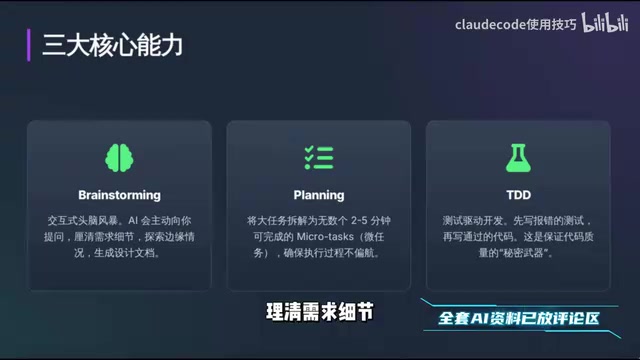
Step 2: Breaking Large Tasks into Small Tasks
The AI decomposes complex tasks into a series of small tasks completable in 2-5 minutes, each with clear objectives and a controlled scope. This "divide and conquer" strategy essentially transforms complex problems into a series of simple ones, making execution less likely to go off track.
Step 3: Write Test Cases First, Then Implementation Code
This is the core of TDD—first write a test case that's expected to fail, then write code to make the test pass. Through the "red light → green light" cycle, every line of code has a clear purpose and is verifiable, completely eliminating the awkward situation of "code is written but you don't know if it's correct."
Summary: The Right Way to Use Claude Code
Claude Code's power lies not only in its model capabilities but also in its execution framework as an agent—it can genuinely help you complete all kinds of tasks on your computer. Users in China can fully bypass regional restrictions by configuring domestic models or using the CCSWITCH tool.
The addition of the Superpowers plugin elevates AI programming from "fast but rough" to "systematic and reliable." If you plan to seriously use Claude Code for development, this plugin is practically standard equipment.
One final reminder: AI tools iterate rapidly. It's advisable to continuously follow official documentation and community updates to stay current with the latest configuration methods and usage tips.
Key Takeaways
- Claude Code is fundamentally an AI Agent with perceive-plan-execute closed-loop capabilities, not limited to programming scenarios
- Claude Code installation requires only three commands, simultaneously solving the China region unavailability issue
- Users in China can connect to domestic models via manual configuration file editing or the CCSWITCH tool
- Major model providers widely support OpenAI API format compatibility, making cross-platform model switching possible
- The Superpowers plugin brings Kent Beck's TDD "Red-Green-Refactor" methodology into AI programming workflows
- Superpowers' three-step workflow: requirements clarification → task decomposition → write tests before code, ensuring code quality
Related articles
 Tutorials
ChatGPT Plus Subscription Guide: Are GPT-5.5, image-2, and Codex Worth the Upgrade?
A detailed look at ChatGPT Plus features — GPT-5.5, image-2, and Codex — with a Plus vs Pro comparison and a complete step-by-step subscription guide for users outside the US.
 Tutorials
Harness AI Engineering in Practice: Using Claude Code to Master Enterprise-Level E-Commerce Development
Deep dive into Harness AI Engineering: master enterprise e-commerce development with Claude Code using the Rules, Skills, Wiki, and Changes framework.
 Tutorials
Cursor + Codex Dual-IDE Collaboration: A Practical Methodology for Open-Source Project Customization
A complete methodology for open-source project customization based on real-world experience, detailing the Cursor+Codex dual-IDE workflow, seven-stage process, MVP validation, and AI source code reading techniques.