Claude Code Installation Guide for China: Complete Setup from Scratch

Step-by-step guide to installing and configuring Claude Code in China, including VPN setup and model configuration.
Claude Code is a CLI-based Agentic AI tool, not an IDE — it integrates with Cursor, VS Code, and JetBrains tools. This guide covers installation on macOS and Windows, explains why a VPN is required during setup, highlights Git as a Windows dependency, and walks through first-launch configuration including API Key setup for users in China.
What Exactly Is Claude Code?
Before diving into installation, there's one critical misconception worth clearing up: Claude Code is not an IDE.
Developers who've used Cursor or Trae tend to think of AI coding tools as environments you download, install, and double-click to launch. In reality, both Cursor and Trae are IDEs built on top of VS Code — they're Electron-based applications with a full GUI, including an editor, file tree, debugger, and more. They're complete editors in their own right.
Claude Code is something fundamentally different — it's a command-line tool (CLI), falling squarely in the "Agentic AI" category. Unlike code-completion tools like Copilot, Claude Code uses a REPL (Read-Eval-Print Loop) interaction model. It can autonomously plan tasks, read and write files, execute terminal commands, and handle complex engineering tasks end-to-end. This architecture is precisely what allows it to embed as a plugin into any IDE that supports a terminal. Once installed locally, it integrates with your existing development tools:
- Integrate with Cursor
- Integrate with Trae
- Integrate with IntelliJ IDEA / PyCharm
- Integrate with VS Code
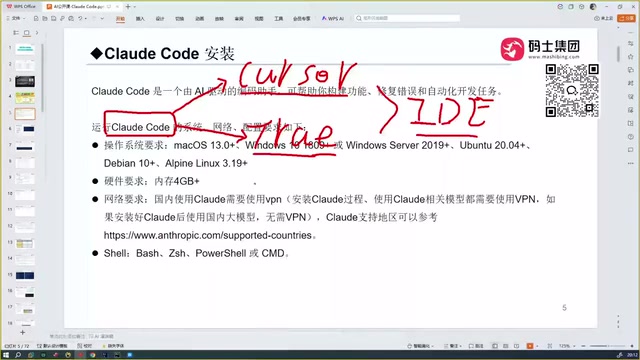
In other words, Claude Code exists as a plugin or command-line companion — it doesn't replace your editor, it enhances it. This is also Anthropic's officially recommended usage pattern. Understanding this will save you a lot of frustration. Don't expect to double-click it and have something "just run."
Prerequisites Before Installing
There are a few hard requirements you must meet before installing Claude Code in China.
System & Hardware
Claude Code supports all three major platforms: macOS, Windows, and Linux. Hardware requirements are relatively modest — 4GB of RAM or more is sufficient, and virtually any development machine will qualify.
Network Environment (The Most Critical Step)
This is where most users in China get stuck: you must have a working VPN (proxy) enabled during installation, or the installation will simply fail.
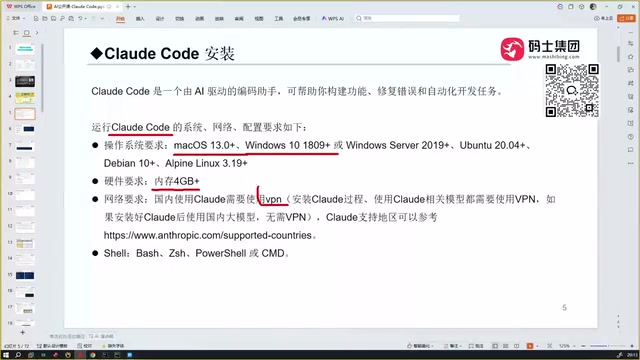
Here's the technical reason: Claude Code is installed as a global package via npm (Node Package Manager). npm fetches packages from registry.npmjs.org by default, which is blocked or restricted in China. The install command is essentially npm install -g @anthropic-ai/claude-code, and once installed, the executable is registered to your system PATH — meaning you can invoke it by typing claude from any directory.
One important nuance worth noting:
A VPN is required during installation, but not necessarily during everyday use. If you later connect to a China-compatible model backend, you may be able to use Claude Code without a proxy at all.
This is because Claude Code supports multiple model backend configurations — the official Claude API, third-party services with OpenAI-compatible interfaces, and locally deployed models. Developers in China can work around network restrictions by setting the ANTHROPIC_API_KEY environment variable or pointing base_url to a domestic proxy endpoint. This means the VPN is essentially a one-time dependency for installation, and day-to-day flexibility is much greater than you might expect.
Platform-Specific Installation Steps
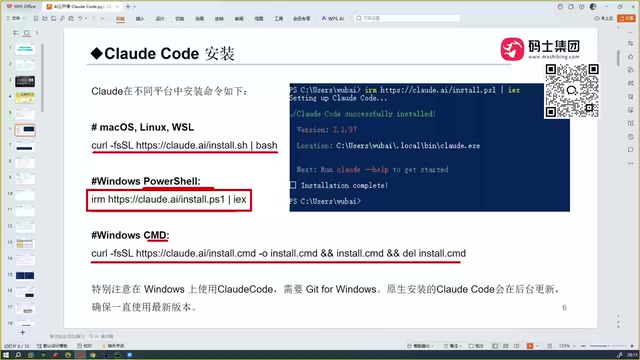
The installation process is straightforward — at its core, it's a single command.
macOS Installation
Run the official installation command in your terminal. The entire process takes roughly 3 to 5 minutes.
Windows Installation
Windows users can run the install command in either CMD or PowerShell. With a working VPN, installation typically completes within 3 to 5 minutes, and the terminal will confirm a successful install.
Windows Extra Dependency: Git
There's one easily overlooked requirement on Windows — Git must be installed. Note that Git isn't needed here for version control; Claude Code relies on it to automatically update itself.
With Git in place, version upgrades happen completely silently in the background. The initial install may be version 2.1.97, and it will automatically upgrade to 2.1.116 (or later) over time — no manual intervention required.

What to Do If Installation Fails
If you see a flood of red error messages in the terminal after running the command, the cause is almost always a network issue — the VPN isn't actually routing traffic properly. Don't second-guess the command itself; first check whether your proxy is actually working. Some VPN tools require you to manually enable "system proxy" mode or "TUN mode" so that terminal processes (like npm) route through the proxy. This is one of the most common failure points.
First Launch and Usage
Once installed, Claude Code is ready to use.
Navigate to Your Project Directory
The recommended best practice is: navigate to your project directory first, then launch Claude Code. Any code files it generates will default to the current directory — wherever you launch it from is where the AI works. This aligns with the Agentic tool design philosophy: the project root directory serves as the context boundary for reading code structure and running build commands.
Launch Command
Type claude in your terminal to enter the interactive interface.
Directory Trust Confirmation
The first time you enter a directory, Claude Code will ask whether you trust the current folder (Yes, I trust this folder). This mechanism is similar to VS Code's workspace trust feature — it's a security measure to prevent accidental file writes or terminal command execution in unknown directories. Confirm and press Enter to enter conversation mode.
Start Chatting
You can now type your requests directly — for example, "help me implement a certain feature" — and Claude Code will start writing code in the current directory.
One important caveat: launching Claude Code after a fresh install and immediately starting a conversation may result in an error. This is typically a model configuration issue — Claude Code needs an API Key to connect to a specific model service. If ANTHROPIC_API_KEY isn't set, no valid model endpoint is configured, or the required network environment isn't active, the first conversation will fail. This is a common stumbling block for new users who find it "installed but unusable" — installation and configuration are two separate steps.
Three Steps for Developers in China
The path to getting Claude Code running in China can be summarized in three steps:
- Understand what it is: It's a CLI tool, not a standalone IDE. It works alongside existing tools like Cursor or PyCharm.
- Sort out your network: A stable VPN is essential during installation. Make sure your proxy is actually routing terminal/npm traffic — this is the make-or-break step.
- Configure your model: Installation is just the first step. You need to correctly configure your API Key and model endpoint (either the official Claude API or a China-compatible service) before conversations will actually work.
Compared to the out-of-the-box experience of Cursor or Trae, Claude Code's learning curve is concentrated almost entirely in environment configuration. But once you clear that hurdle, it offers a remarkably flexible workflow as a deeply integrable, command-line-driven Agentic AI coding assistant — whether embedded in your existing IDE, connected to a local model, or invoked automatically in a CI/CD pipeline. The extensibility far exceeds what graphical tools can offer. For developers who enjoy tinkering with their environment and value command-line efficiency, the upfront investment is absolutely worth it.
Related articles

The Rise and Fall of Programming Languages: The Interplay of Ecosystems, Markets, and Communities
An in-depth analysis of the forces driving programming language rise and fall—ecosystems, market shifts, corporate backing, and technical inertia—to help developers make rational technology choices.

Redesigning Graphics APIs: Doing More with Less for Modern GPUs
Exploring the possibility of designing a modern graphics API from scratch, analyzing the sources of complexity in Vulkan and DirectX 12, and discussing how to better balance ease of use with GPU performance.

Gemini Omni and Nano Banana Model Analysis: Google's Multimodal AI Strategy
Analysis of Google's Gemini Omni full-modal model and Nano Banana lightweight model, exploring their positioning, technical features, and Google's multimodal AI product strategy.