Claude Code Launches Code Mode: Batch Tool Calls with a Single Snippet of Code

Claude Code launches experimental Code Mode, letting the model write JavaScript to batch and orchestrate tool calls.
Claude Code's v2.1.323 adds experimental Code Mode: instead of requesting tools one at a time, the model generates a small snippet of JavaScript that Claude Code runs in-session, batching multiple tool calls and returning only necessary results. Officials cite three use cases — repeated multi-file edits, filter-then-read searches, and concurrent unrelated commands. Security-wise, each call still obeys deny/ask rules and hooks, and Auto Mode's classifier reviews the whole snippet. The feature is off by default, terminal-only, and unsupported over gateways, Bedrock, or Foundry; the circulating "37% token savings" figure actually comes from Programmatic Tool Calling and can't be applied directly.
Claude Code Launches Code Mode: Batch Tool Calls with a Single Snippet of Code
For a long time, AI coding assistants have worked much like someone who goes to the supermarket without a shopping list: one trip, one item, back home to check the fridge, then decide what to buy next. Claude Code's answer this time is to have the model write a "shopping list" first — a small snippet of JavaScript — that packages multiple tool calls into a single execution. The feature is called Code Mode.
According to a breakdown by a Bilibili video creator, Claude Code has released version v2.1.323, with Code Mode added to the changelog. It's positioned as an experimental feature that must be actively enabled: the model writes JavaScript to call its tools. Two keywords are worth remembering — experimental means it's off by default and may be adjusted or even removed in future versions; actively enabled means if you don't turn it on, everything stays as it was.
Why Traditional Tool Calling Is Inefficient

AI can't reach your computer. To run commands, read files, or modify code, it must request tools — Bash, Read, Edit, and so on. The traditional flow is: call a tool once, read the result, then think about the next step.
Anthropic's engineering blog puts it bluntly: every call requires a full round of model reasoning, and intermediate results — useful or not — pile up in the context. A five-step job becomes five rounds of reasoning. This "ten trips" pattern is harmless for simple tasks, but once multi-file edits are involved, or scenarios that require searching first and then filtering, context overhead and round-trip count become a real burden.
Context windows and token overhead are key to understanding this inefficiency. Large models have limited context window capacity, and the return value of every tool call (file contents, command output, search results) accumulates as tokens. Tokens determine both cost and how much information the model can "remember." With call-by-call execution, intermediate results occupy the window whether or not they ultimately matter, easily pushing truly important information to the edges or even truncating it. One of Code Mode's core benefits is keeping those intermediate results inside the runtime, consumed by code, and returning only the small final portion the model actually needs — thereby reducing token consumption and context pollution.
Code Mode Takes a Different Approach
You still describe the task in one sentence, but Claude no longer asks for one tool at a time. Instead, it writes a small snippet of JavaScript and hands it to Claude Code to run in the session. Several commands can run at once, the output of one feeds directly into the next call, and only the needed portion of the output is handed back to Claude.
One developer's take on X was apt: the way to make large models smarter, it turns out, is batch processing.
The official documentation's example has Claude raise a retry limit: the first line uses rg to find files containing the RetryPolicy function, the second line takes the first result, the third line changes MaxAttempts from 3 to 5, and the last line returns both the changed file and the output of npm test. Four lines of code, one run.
In the conversation you still see tool calls, such as the diff of an edit.
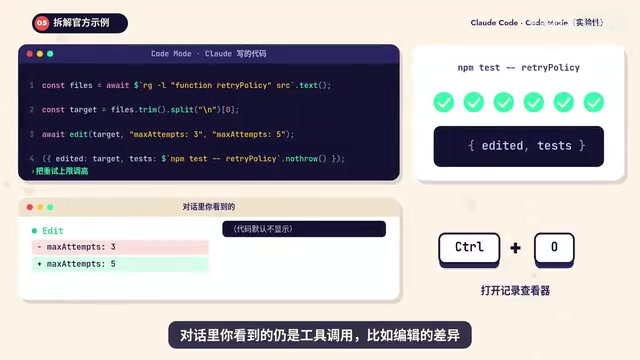
To see the code itself, press Ctrl+O.
Node VM, V8, and other runtimes are the execution foundation for Code Mode–style features. A VM (virtual machine) here refers to an isolated JavaScript execution environment: Claude's generated code runs inside it, not directly on the host machine. Isolation provides two things — first, safety: code access to the file system and network still goes through tool interfaces and permission rules; second, control: the runtime can limit execution time, catch exceptions, and return results in a structured form. Different products make different choices (Node VM, V8, QuickJS, etc.), with differences mainly in startup overhead, isolation strength, and available JavaScript features — which explains why the same idea shows up in multiple engineering implementations.
Use Cases and Expected Benefits
The official documentation lists three scenarios suited to Code Mode: the same change repeated across many files; search results that need filtering before reading; several unrelated commands that can run concurrently. What these share is "many round trips, small individual results" — precisely where traditional call-by-call execution suffers most.
As for how much it saves, Code Mode has no official benchmark numbers yet. The "37% token savings" circulating online comes from Programmatic Tool Calling, which Anthropic launched in its API in November 2025: in internal tests, average usage for complex research tasks dropped from 43,588 to 27,297 tokens. The idea is the same, but it doesn't measure the same feature, so that number can't be applied directly to Code Mode.
Security Boundaries: How an Entire Snippet Gets Reviewed

When one snippet calls several tools, security is unavoidable. According to the video breakdown, there are several layers of mechanism:
- Every tool call still goes through your deny/ask permission rules and pre-tool-use hooks.
- Under Auto Mode, the classifier reviews the entire snippet, not each call.
- Switches in project settings files are ignored — a repository you clone can't enable Code Mode for you.
The second point deserves particular attention: when review granularity shifts from "individual call" to "entire snippet," calls that must be controlled ultimately still depend on rules or hooks — you can't fully rely on the automatic classifier.
Pre-tool-use hooks are an interception mechanism provided by Claude Code: before a tool actually executes, a user- or organization-configured script is triggered, which can inspect arguments, log, or even reject the call outright. They complement deny/ask permission rules — rules do static matching by tool name and argument patterns, while hooks can execute custom logic, making them suited to sensitive operations that "must be controlled." With review granularity in Code Mode shifting to the entire snippet, hooks become even more valuable: the classifier might let through a snippet that looks harmless as a whole, but hooks can still validate each actual tool call individually — effectively preserving a last line of per-call gatekeeping within batch execution.
Known Limitations and Barriers to Entry
On limitations: if Claude waits in the foreground for code to finish, execution stops after at most 10 minutes; for code that can run in the background, the maximum is 2 hours. Code Mode sessions are terminal-only, and can only be resumed with Code Mode enabled; within a session you can't use Remote Control, Claude in Chrome, or Computer Use, nor can you move the session to the desktop app or turn it into a background session.

To try it, first confirm your version is v2.1.323 or later, then set the environment variable CLAUDE_CODE_EXPERIMENTAL_CODE_MODE to 1, start Claude, and the first time it will ask you to confirm.
There are also quite a few barriers: a Claude subscription or Console account is required; gateways and cloud platforms like Amazon Bedrock or Microsoft Foundry won't work; organizations with HIPAA configurations or zero data retention can't use it; the model must be a version like Sonnet, Opus 5.5, or Fable 5.2, and only interactive Claude in the terminal is supported.
Not Just Claude Code's Idea
Having the model write code to call tools isn't unique to Claude Code. Developer Riz Sullivan compared them on X: Claude Code uses Node VM running in the same process, Codex uses V8, OpenCode uses a self-built interpreter, and Py uses QuickJS. One idea, four implementations.
Behind this is really the same judgment: rather than having the model reason repeatedly and request one call at a time, let it generate a piece of executable logic and hand the orchestration work to the runtime. Code Mode's value isn't in the concept but in embedding it into the default workflow of a production-grade coding assistant — even if for now it's hidden behind an experimental switch. Next time you see AI modify ten files in one go, don't be surprised; it may just have learned to write a shopping list.
Programmatic Tool Calling is a related capability Anthropic launched at the API level, allowing the model to write code within a single request to orchestrate multiple tool calls. It shares Code Mode's idea of "using code instead of step-by-step reasoning," but operates at a different layer: the former targets API developers, while the latter is built into Claude Code's terminal sessions. This is exactly why the article cautions that the "37% token savings" can't be applied directly — the measurement targets, task types, and runtime environments all differ, and citing benchmark numbers across features can easily mislead.
Related articles
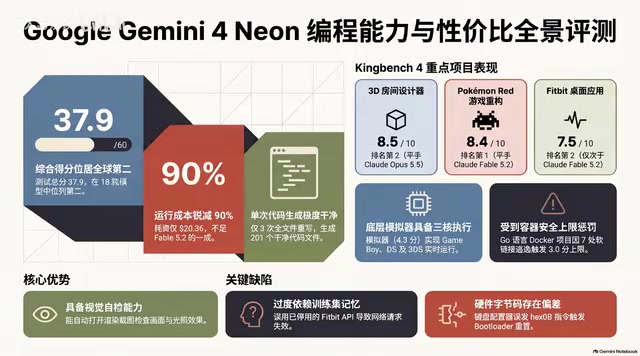
Gemini 4 Neon Hands-On: Value King or Confident Catastrophe?
Gemini 4 Neon review: 1M-token context, four thinking levels, 201 files in one KingBench4 pass at one-tenth Fable 5.2's cost—but it hallucinates fake data, leaves 7 symlink escapes, and bricks keyboards.

Google Gemini 4 Neon Hands-On: 6 3D Works That Impress and Fail
Hands-on with Google Gemini 4 Neon on a 3060 laptop: 6 3D works tested. Sunshower Fishing Harbor and mechanical keyboard impress; soft-body physics and faces fall short.
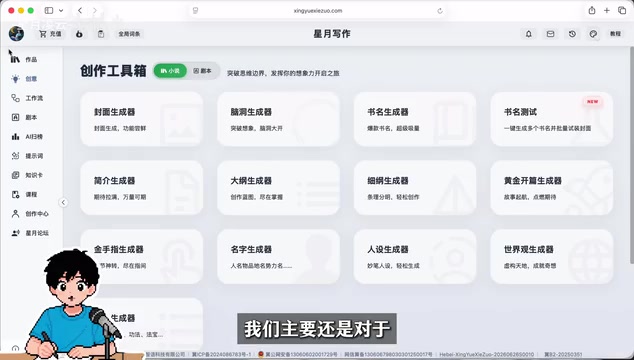
Gemini 4 Neo Web Novel Writing Test: Faint AI Flavor, Textured Dialogue
Bilibili creator's first-look review of Gemini 4 Neo for Chinese web novel writing: testing a Three Kingdoms transmigration opening with faint AI flavor, emotionally textured dialogue, and strong crisis building, plus comparison of 4A/4H/4C models and full workflow demos.