Claude Code Pitfall Guide: Using CC Switch to Avoid Account Ban Risks

Developers in China install Claude Code via NPM, bypass login with CC Switch, and use spec-driven development to run it stably.
The article addresses installation failures and account bans faced by developers in China when using Claude Code, offering a stable solution verified over several months. For installation, it recommends NPM over PowerShell/CMD, requiring only Node.js 22+ and Git beforehand, for a higher success rate. For login, it uses the open-source tool CC Switch to fill in a third-party API Key and skip official account login to reduce ban risk, noting that domestic models are sufficient for basic work. For development, it emphasizes spec-driven development (SDD): write requirement specs first, then use CLAUDE.md project memory to connect context, combined with MCP, Skills, and sub-agents to improve efficiency and reduce rework. Finally, it offers practical tips such as prioritizing Chinese documentation and buying network tools monthly.
Title
Claude Code Pitfall Guide: Using CC Switch to Avoid Account Ban Risks
Meta Description
Claude Code installation keeps failing in China? A Bilibili creator shares a stable solution: NPM installation + CC Switch to bypass login, with no bans for months, plus spec-driven development and project memory to keep code from getting messier with each change.
Article Content
As an AI coding assistant in the terminal, Claude Code is very capable, but developers in China often get stuck during installation and login—and may even have their accounts banned. In a video, a Bilibili creator shares a stable approach verified over several months: install via NPM, use CC Switch to bypass account login, and combine project memory with spec-driven development so code no longer gets messier with every change.
Installation: Why NPM Is Recommended Over PowerShell/CMD
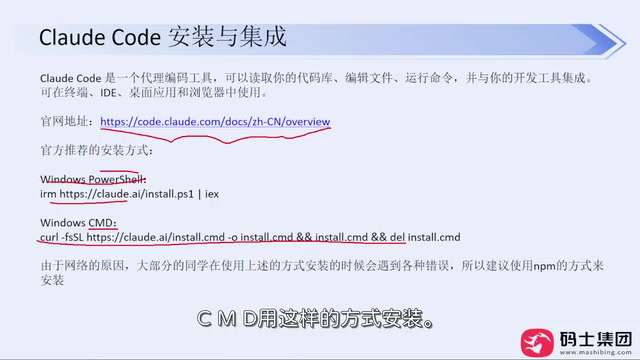
The video author points out that although the official website provides two installation commands—PowerShell and CMD—the success rate is not high under domestic network conditions. He recommends using the NPM installation method from the official site's advanced settings. You only need to install Node.js (version 22 or above) and Git beforehand; both are straightforward next-next-finish installs.
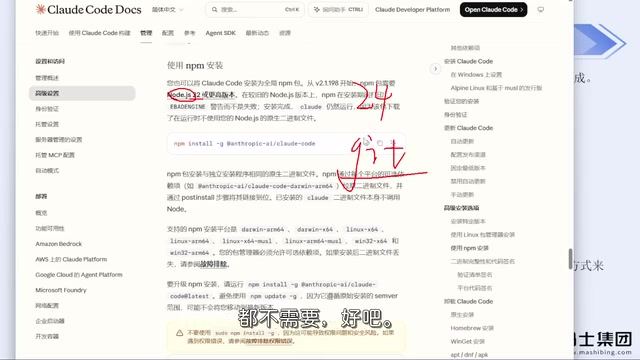
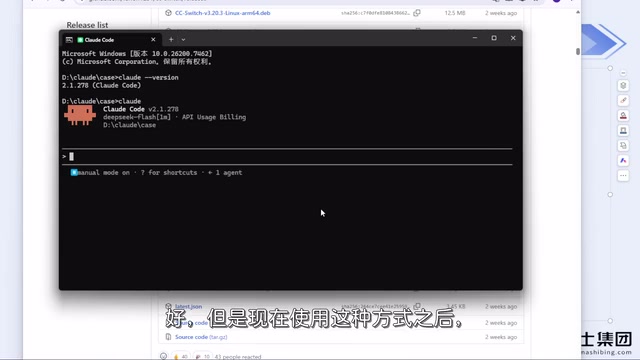
After installation, run claude --version in the command line to verify the version number and confirm success. The author emphasizes that NPM installation has not encountered errors so far, while the PowerShell/CMD method is prone to failure due to carrier network restrictions, so it's not worth spending time fiddling with environment variable configuration.
NPM (Node Package Manager) is the official package manager for Node.js and is installed alongside Node.js. Claude Code is distributed via NPM and is essentially a cross-platform JavaScript package. Installation requires just one command to pull from the NPM public registry and configure a global executable. Compared with PowerShell/CMD scripts, NPM installation does not depend on the system's built-in script interpreter's special handling of execution policies or network proxies, so it has a higher success rate under domestic network conditions. In addition, upgrading after NPM installation only requires re-running the install command, making version management simpler.
Login: How CC Switch Bypasses Account Ban Risks
On first run, Claude Code asks you to choose a trusted folder and theme style, then enters the account login step. The author explicitly warns: most users who use the official login method risk having their accounts banned, and even if you have an account, it's not recommended to enable it.
The solution is the open-source tool CC Switch. Download the Windows MSI installer from GitHub Releases (the same applies to Mac), double-click to install, then in the interface select the Claude Code configuration item and fill in the API Key from a third-party model provider. The author shows his own configuration page and notes that the API Key can be replaced at any time; no other items need to be changed.
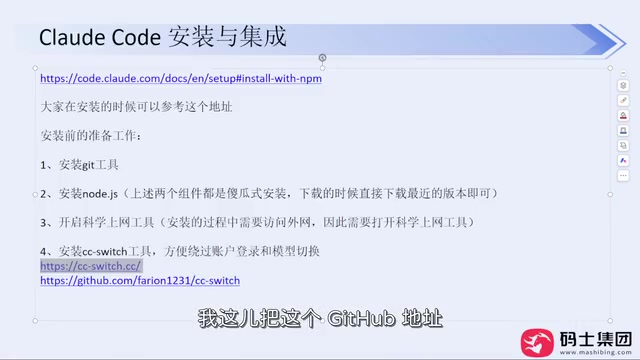
After configuration, run Claude Code again and the login step will be skipped directly. The author says that using this method, it has run stably for months without being banned, whereas he had been banned multiple times before when using an official account. CC Switch also supports other tools such as Codex, but note that you need to switch to the corresponding configuration for different tools; Codex requires filling in one additional configuration item.
Regarding model selection, the author suggests that domestic models are already sufficient for basic work needs, and there's no need to insist on foreign models. If you purchase network tools, it's recommended to buy monthly rather than annually to cope with unstable ban risks.
CC Switch is an open-source configuration management tool used to quickly switch model provider configurations for different AI coding assistants. Its core principle is to maintain a local configuration file. When Claude Code starts, it reads the API Key and endpoint address from that file, thereby directly connecting to third-party model services and skipping the official account login process. Using a third-party API means requests do not go through Anthropic's official account system, so official ban policies are not triggered. Note that third-party providers vary in availability and data privacy policies, so you should assess the risks yourself when choosing one.
Spec-Driven Development: Keeping Code From Getting Messier With Each Change
The video title mentions "code gets messier with each change." The core solution is to write requirements as a spec, then use project memory (CLAUDE.md) to connect subsequent development. This approach is called spec-driven development (SDD): first clarify requirement boundaries and acceptance criteria in document form, then have the AI execute according to the spec, avoiding the need to re-explain context in every conversation.
With the MCP and Skills mechanisms, Claude Code can call external tools and reuse predefined skills, while sub-agents can handle independent tasks in parallel. In the video, the author demonstrates scenarios of using multiple projects in parallel and emphasizes that this combination can significantly reduce rework rates.
MCP (Model Context Protocol) is an open protocol launched by Anthropic that enables AI models to call external tools and data sources in a standardized way, such as reading files, querying databases, or calling APIs. Skills are reusable instruction packages in Claude Code that predefine the steps and constraints for common tasks, which the AI automatically loads when needed. The sub-agent mechanism allows Claude Code to assign independent subtasks to multiple agents running in parallel, each with its own context, making it suitable for parallel development of multiple modules. Together, these three can significantly improve execution efficiency and consistency in complex projects.
Practical Recommendations
The author gives several practical suggestions: prioritize the official Chinese documentation; if installation fails, don't blindly search for environment variable configurations; network tools are basic infrastructure for programmers, so invest when necessary; the API Key application process is simple, just search for it yourself. For developers who want to try foreign models, CC Switch's custom relay configuration is also compatible with third-party services; you only need to fill in the API Key and redirect address.
Overall, this solution breaks down and solves the three stages—"installable, loggable, and stable to use"—separately, making it a useful reference for developers troubled by installation and ban issues.
Related articles

Claude Code Ban Prevention and Memory Management: CLAUDE.md and ccswitch in Practice
How to avoid account bans when using Claude Code in China? This article summarizes a Bilibili creator's tested approach: install via NPM to bypass network restrictions, use ccswitch to bypass official account login, and covers CLAUDE.md project memory, MCP, Skills, Hooks, and other specification constraint practices.

Microsoft Foundry: How Enterprises Can Keep Runaway AI Costs Under Control
Microsoft Foundry, part of Azure, offers built-in security and governance with a unified view of model counts, credit usage, and total spend—helping enterprises prevent runaway AI agent token costs. This article analyzes its enterprise positioning, use cases, and cost-control value.

Training-Free Fix for Model Repetition Loops: The Weight-Surgery Claude Code Plugin
A developer packaged a weight-surgery pipeline for small-model repetition loops into a Claude Code plugin. By scanning induction heads, splitting functional directions, and editing feed-forward write weights, it cuts loop rates without training or decoding penalties while preserving reading ability.