Claude Code Practical Guide: Environment Setup, Git Workflows, and Engineering in Production

A practical guide to Claude Code covering setup, Git workflows, MCP, Subagents, and enterprise engineering.
This article traces Claude Code's evolution from a CLI coding assistant to a full-cycle engineering collaborator. It covers environment setup, switching to domestic LLMs via cc-switch, core CLI commands, Git workflow automation through conversation, and advanced engineering features like MCP, Subagents, Skills, and Hooks — with enterprise project walkthroughs for Java and Python applications.
Claude Code has evolved from a simple command-line coding assistant into a full-cycle "engineering collaborator" covering development, testing, and deployment. Based on a systematic tutorial series, this article maps out the complete path — from environment setup and IDE integration to Git workflows and enterprise-scale projects — to help developers quickly get up to speed with this AI programming powerhouse.
How Claude Code's Core Capabilities Have Evolved
Claude Code started out as a command-line chat tool — analyzing project code, understanding file relationships, and suggesting edits. But across successive versions, its capabilities have undergone a qualitative transformation.
This evolution mirrors a broader paradigm shift in the AI coding assistant space: from "code completion" to "engineering agent." Early AI coding tools (like the first generation of GitHub Copilot) focused primarily on line-level autocomplete — essentially context-aware statistical prediction. Claude Code represents the next generation, built on an Agentic Loop architecture where AI no longer just responds passively but actively plans tasks, invokes tools, executes actions, and self-corrects based on results. This architecture enables it to understand cross-file dependencies, run terminal commands, and read/write the filesystem — turning "conversation" into real engineering action.
The change plays out across three dimensions: context understanding has grown from single-file analysis to deep comprehension of entire project structures; engineering orientation means it's no longer limited to writing code but can implement full workflows like test-driven development (TDD) and automated testing; and customizability through a Skill mechanism lets developers crystallize real-world experience into reusable capability modules.
Background on Test-Driven Development (TDD): The core TDD cycle is "Red-Green-Refactor" — first write a test that must fail (red), then write the minimum code to make it pass (green), then refactor under test coverage. Traditionally, TDD demands rigorous developer discipline, which has been the main barrier to adoption. Claude Code can automatically generate test cases, run them, and fix code based on failure output — dramatically lowering the barrier to TDD and making this long-admired but rarely practiced methodology genuinely accessible.
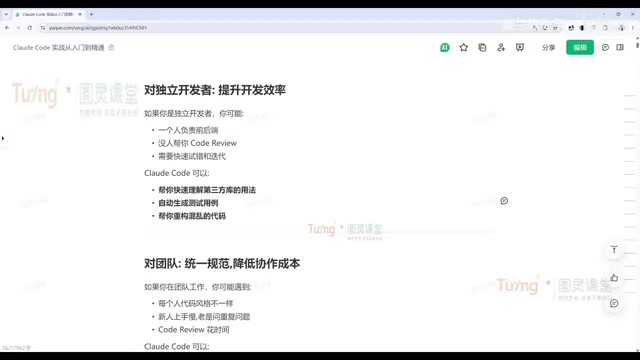
In other words, Claude Code has shifted from a single-purpose coding tool to a true working partner. The developer's core role becomes setting goals, defining constraints, evaluating results, and applying judgment — while the AI handles execution, analysis, comparison, and the bulk of repetitive work.
Value for Different Roles
For programming beginners, Claude Code doesn't just explain code line by line — it proactively discovers historical bugs, pinpoints performance bottlenecks, and fixes them one by one. This is exactly the capability beginners need most when navigating complex open-source projects.
For indie developers, multi-Agent orchestration lets you simultaneously simulate product, development, testing, and operations roles within a single project, dramatically cutting frontend and backend development time. Multi-Agent orchestration refers to an architectural pattern where complex tasks are broken into subtasks handled by multiple collaborating AI agents in parallel or in sequence. A single agent's context window is limited, and large projects' full codebases often exceed its capacity. By splitting across multiple agents, each sub-agent focuses on a local task with higher signal-to-noise ratio and more consistent output quality. Claude Code's Subagents mechanism is the concrete implementation of this idea.
For teams, Claude Code's value lies in unifying standards and reducing collaboration friction. Teams can use a CLAUDE.md file to enforce development conventions across all members, build custom Skills to handle code reviews, issue analysis, and architecture documentation, and help new team members understand the project even without complete documentation.
CLAUDE.md is the core configuration file through which Claude Code reads project context — think of it as the team's "AI-readable standards handbook." When Claude Code starts, it automatically scans for CLAUDE.md files in the project root and parent directories, loading their contents as initial context. A typical CLAUDE.md might include: code style constraints, architecture decision records, prohibited actions (e.g., no direct commits to the main branch), and a project-specific glossary. This mechanism makes the team's tacit knowledge explicit, giving AI collaboration an organizational memory — and it's the key to Claude Code graduating from a personal tool to team infrastructure.
Environment Setup: Three Versions and Switching to Domestic Models
Claude Code currently comes in three forms: a Web version (browser-based, suited for simple conversations), a CLI version, and editor plugins for VS Code, Cursor, PyCharm, and others. The tutorial recommends the editor plugin as the primary mode for efficiency, though the CLI's core commands are also worth knowing.
CLI Installation
Installing the CLI takes a single command — choose based on your OS. Mac/Linux/WSL users run the official script; Windows users use the IRM command. After installation, run claude -v to confirm the version number and verify success.
You can also install via npm, but you'll need Node.js first (version 22.x recommended). Be aware of network issues — switching to a domestic mirror source can significantly speed up downloads. To update later, simply run claude update.
Switching to Domestic LLMs (Key Step)
Because Claude's official models face network access restrictions in China, the tutorial strongly recommends a utility called cc-switch, which quickly redirects the backend to domestic large language models.
cc-switch works by setting up a local proxy server that intercepts API requests from Claude Code and routes them to a user-specified third-party model endpoint. This relies on the OpenAI-compatible API protocol — models like DeepSeekAd, Kimi, and Qwen all expose interfaces compatible with OpenAI's API format, meaning any client that supports configuring a base URL can seamlessly switch to these models without changing calling code. It's worth noting that some of Claude Code's engineering features (like precise tool-calling formats and complex multi-step reasoning) may perform differently across models. When evaluating alternatives, prioritize the stability of their Function Calling capability.
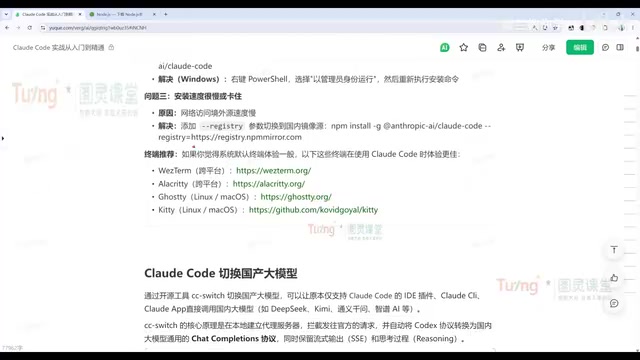
Here's the configuration process:
- Download the appropriate version from cc-switch's GitHub Releases page (Windows users should distinguish between AMD64 and ARM architectures; the portable version requires no installation);
- Obtain an API key for a domestic model — the author recommends DeepSeek, Kimi, or Qwen;
- In cc-switch, select Claude Code, click the plus icon to add a model, enter your key (leave other address fields at their defaults);
- Enable the configuration and check "Local Routing" in settings;
- Restart Claude Code for the changes to take effect.
After switching, use the /model command in the chat to see and select DeepSeek and other models. The experience is close to the official models, with only minor differences in output quality — providing a stable, accessible alternative for developers in China.
Core CLI Commands and the Code Modification Workflow
The most direct way to get started with Claude Code is to have it analyze an existing project. Navigate to your project directory, type something like "analyze this project" in natural language, and Claude Code will identify the framework (e.g., a Vue admin dashboard) and break it down module by module.
For users unfamiliar with commands, there's a handy trick: ask conversationally. For example, "what command should I use to restore a conversation?" — Claude Code will tell you directly, no need to dig through documentation.
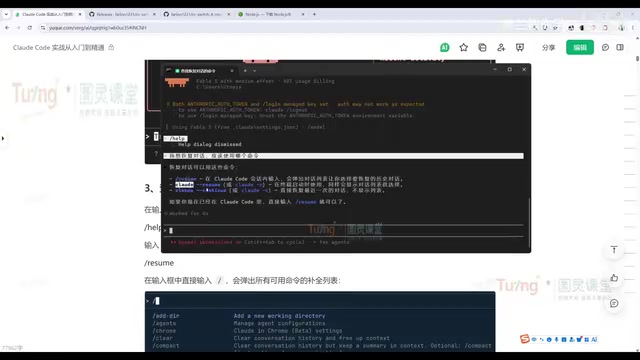
Here are the most frequently used commands:
claude --continue/claude -c: Resume the previous conversation (most commonly used)claude --resume/claude -r: View conversation history list and select one to resume/clear: Clear the current conversation and start freshclaude -p "prompt": Headless mode — execute a task as a one-shot command without entering the interactive window
The engineering value of headless mode goes far beyond surface-level convenience: it enables Claude Code to be embedded in CI/CD pipelines, cron jobs, Git Hooks, and all kinds of automation scripts. For example, you can automatically trigger a Claude Code code review every time a Pull Request is created and write results back to your code hosting platform, or have Claude Code scan for new technical debt daily and generate a report. This elevates AI capability from "on-demand assistance" to "always-running engineering infrastructure."
The Standard Code Modification Workflow
Every time Claude Code modifies code, it follows a fixed process: locate relevant files → display proposed changes → wait for user approval → execute the changes. Users can approve changes one by one or accept all at once. This controlled workflow ensures transparency and safety for all AI-driven edits.
Git Workflow: Driving Version Control Through Conversation
One of Claude Code's standout features is making Git operations feel like everyday conversation. Developers don't need to memorize specific commands — just describe your intent, and Claude Code automatically invokes the appropriate Git instructions.
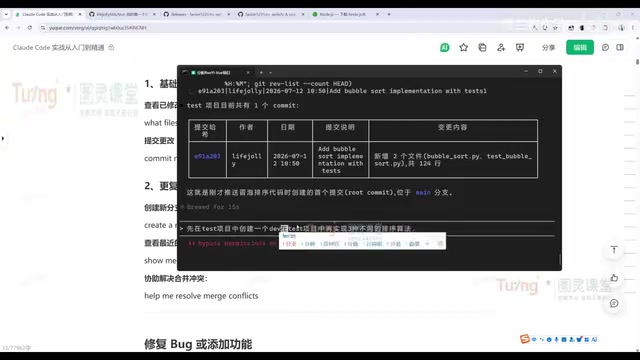
The tutorial walks through a complete end-to-end engineering practice:
- Have Claude Code build a pure HTML/CSS/JS tech blog project;
- Use conversation to pull a blank GitHub repository, add files, and "commit and push";
- Query the project's commit history in table format;
- Create a dev branch, implement three sorting algorithms on it, auto-generate 12 test cases, and push.
Going further, the author demonstrates an automated problem discovery and fix loop: first have Claude Code analyze the dev branch for issues and output findings to an issue.md file (covering correctness, documentation-implementation mismatches, portability, etc.), then instruct it to "refer to issue.md, fix all problems, commit and push." Throughout the entire process, the author "didn't touch a single line of code" — everything was done through conversation.
This workflow reveals the underlying logic of how Claude Code handles problems: understand context → analyze code logic → identify root cause → present and display solution → run tests to verify the fix.
Engineering in Production: Enterprise-Scale Project Walkthroughs
The tutorial's ultimate goal is enterprise deployment. The author outlines two complete real-world projects: a Java-based admin management system and a Python-based intelligent customer service application, both integrated with Harness for AI engineering.
For engineering workflows, Claude Code offers several advanced capabilities:
-
MCP Server setup: MCP (Model Context Protocol) is an open standard protocol released by Anthropic in late 2024, designed to solve the "integration fragmentation" problem between AI models and external tools and data sources. MCP defines a unified client-server communication specification: MCP Servers encapsulate specific resource access logic (such as querying databases or calling internal APIs), and Claude Code discovers and invokes these capabilities through the standard protocol — deeply integrating with enterprise internal systems (JIRA, Confluence, monitoring platforms, etc.) to access real business context. This is the core infrastructure that transforms Claude Code from a general-purpose tool into an enterprise-specific AI engineer.
-
Subagents: Enable complex task distribution and multi-agent coordination, with each sub-agent focused on a specific domain — preventing quality degradation from overloading a single agent's context
-
Skill accumulation: Modularize team development experience for reuse across projects; code review standards and domain-specific implementation patterns can be packaged as Skills, forming organization-level AI capability assets
-
Hooks: Automate development workflow triggers; combined with headless mode, they form a continuously operating AI engineering automation loop
-
Checkpoints and parallel tasks: Engineering management in conjunction with Git workflows, supporting interruption-recovery and concurrent execution for long-running tasks
Closing Thoughts
Claude Code's value isn't in replacing developers — it's in freeing developers from repetitive work so people can focus on setting goals and making quality judgments. Whether you're a beginner trying to understand a project quickly, an indie developer boosting productivity, or a team looking to standardize practices, Claude Code offers a genuinely practical path forward. For users in China, the cc-switch approach to switching domestic models further lowers the barrier to entry. To truly unlock Claude Code's power, start with the CLI fundamentals and progressively master engineering capabilities like MCP and Subagents — weaving AI collaboration into your complete development workflow.
Related articles

LangChain Retry Middleware Configuration: Practices and Selection Guide
Based on Reddit community discussion, this article analyzes LangChain ModelRetryMiddleware retry parameter configuration practices, covering the selection logic and alternatives for key options like max_retries, backoff_factor, and jitter.

Texas Senate Race in Trouble: Why Are Republicans Nervous?
Texas Senate race stirs Republican anxiety. Based on street interviews, this article analyzes the Democratic offensive in funding, organization, and running everywhere, and how Republicans are defending "Texas, Texas" amid the political pendulum effect.

Gemini Chat Now Generates and Edits Google Docs Directly, a New Breakthrough in Office Productivity
Google Gemini's chat interface now generates and edits PDF, Google Docs, Sheets, Slides, Markdown, TXT, and code files. Available to all users; web supports all formats, mobile only PDF for now.