Claude Code Remote Control Hands-On: Setup Guide & OpenClaw Comparison

Anthropic launches Remote Control for Claude Code, enabling mobile control of local terminal coding sessions.
On February 25, 2026, Anthropic launched the Remote Control feature for its terminal coding agent Claude Code, solving the long-standing pain point of developers being chained to their desks. The feature lets users view and control locally running coding sessions from a phone or browser, while code and sensitive data stay on the local machine. Though it currently has limitations like requiring the terminal to stay open and supporting only one session per machine, it directly challenges the core advantage of open-source tool OpenClaw, reflecting the fierce competition between AI companies over developer workflow entry points.
The Core Problem: Being Chained to Your Desk While Coding
Claude Code is Anthropic's terminal-based coding agent, capable of writing code, managing files, and handling complex tasks. Unlike traditional IDE plugins, a terminal agent can directly manipulate the file system, execute Shell commands, and call external APIs with a much higher degree of autonomy — its core architecture is built on the "Tool Use" mechanism, where the model doesn't just generate text but can trigger a predefined set of operations like reading/writing files, running tests, committing code, and more. Claude Code, alongside GitHub Copilot Workspace, Cursor, and similar tools, forms the emerging "AI-native development environment" category, but it places a stronger emphasis on a CLI-first workflow, targeting developers who are comfortable working in the terminal. Its market performance has been impressive — by February 2026, it had reached $2.5 billion in annualized revenue and was installed 29 million times on VS Code alone.
But there's always been one critical pain point: you had to stay at your computer. The moment you stepped away, your session would either get interrupted, or you'd have to cobble together clunky workarounds using third-party tools like Tailscale, Termux, or Tmux. These solutions worked, but none of them were natively designed for this scenario.
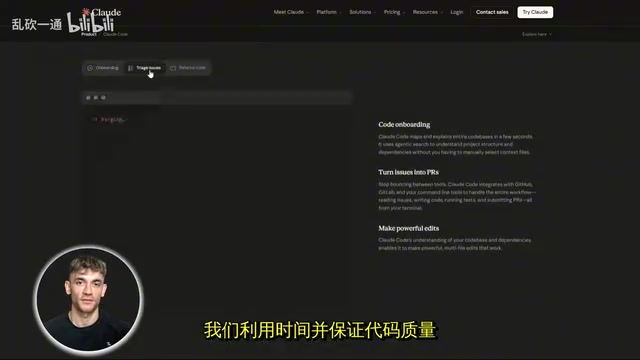
On February 25, 2026, everything changed — Anthropic officially launched the Remote Control feature.
What Is Remote Control?
In simple terms, it's a built-in Claude Code feature that lets you continue controlling your local terminal session from a phone, tablet, or any browser.
The keyword here is local. Your code keeps running on your machine — the file system, MCP servers, toolchain, project configuration — everything stays in place. Your phone simply becomes a window into that session for viewing and interaction.
It's worth explaining why MCP servers matter here. MCP (Model Context Protocol) is an open-source standard protocol released by Anthropic in late 2024 to unify how AI models interact with external tools and data sources. Developers can use MCP servers to connect databases, code repositories, internal APIs, and more to Claude, building highly customized workflows. These MCP servers typically run locally or within corporate intranets, handling sensitive credentials and private data. Remote Control's "local execution" design means these sensitive resources never leave the controlled environment — the phone only transmits commands and result text, not raw data. This represents a fundamental architectural difference from cloud-based AI agent services in terms of security.
A typical use case: you're at your desk and ask Claude to refactor a codebase or run an analysis task, then you grab your phone, open the Claude App, and you can send messages, check progress, and steer the conversation in the same session — whether you're on the couch, in the car, or anywhere else.
How to Set Up Claude Code Remote Control
Prerequisites
Currently requires a Claude Max plan. Pro plan support is coming soon (confirmed by Anthropic). API keys are not yet supported, and Team and Enterprise plans are not yet available either.
Detailed Setup Steps
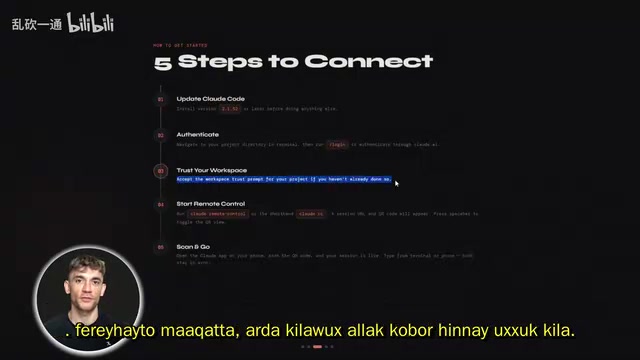
- Update Claude Code to version 2.1.52 or higher
- Navigate to your project directory in the terminal and run the login authentication
- Accept the workspace trust prompt (if you haven't already)
- Run
claude remote-controlor the shorthandclaude rc - The terminal will generate a session URL and QR code (press spacebar to toggle the QR code display)
- Open the Claude App on your phone and scan the QR code to connect
From a technical implementation perspective, communication between the phone and local machine needs to traverse NAT and firewalls. Anthropic most likely uses reverse proxy technology similar to ngrok or Cloudflare Tunnel, establishing an encrypted channel through Anthropic's relay servers — this also explains why account authentication is required rather than just URL access. The use of QR codes borrows from the TOTP (Time-based One-Time Password) approach, ensuring session binding security and preventing unauthorized access if the URL is intercepted.
If you're already in the middle of a session and don't want to start over, just type rc in your current session. It preserves your conversation history and gives you a URL for your phone to connect — nothing gets reset.
Configuration tip: If you want remote control enabled by default every time, run hotconfig to enable it globally — set it once, and it stays on permanently.
Current Limitations and Caveats
This is a research preview, and there are some practical limitations:
- Only one remote control session per machine at a time
- The terminal must stay open — closing it ends the session
- If the network disconnects for more than 10 minutes, the session automatically times out
- The
dangerously-skip-permissionsflag currently has no effect — Claude will request approval before every operation
The "terminal must stay open" limitation reveals the fundamental nature of the current architecture: Remote Control operates in a "synchronous blocking" mode, where the agent's lifecycle is tied to the terminal process. True background scheduling would require submitting agent tasks to an independent daemon process or cloud queue, triggered asynchronously by a scheduler. This isn't technically complex, but it involves critical security decisions: background autonomous execution means AI operating on file systems and codebases without human oversight, and defining permission boundaries requires a more mature design. The mandatory human approval before each operation is precisely Anthropic choosing the conservative path between feature expansion and security control.
Head-to-Head Comparison with OpenClaw
The Story Behind the Timeline
OpenClawAd is an open-source personal AI agent that was once one of the fastest-growing repositories on GitHub. The "Personal AI Agent" concept it represents refers to AI systems that can autonomously execute long-running tasks on user devices, as opposed to cloud-based SaaS AI services. Its core value propositions are data sovereignty (data never leaves the user's device), low latency (local execution with no network round trips), and deep integration (access to local files, applications, and system resources). OpenClaw's biggest selling point was exactly this — controlling your machine from your phone, filling the gap Claude Code had in mobile-side control.
Here's an interesting timeline: Remote Control launched on February 25, and almost simultaneously, OpenClaw's founder Peter Steinberger joined OpenAI to lead the personal AI agent initiative. Steinberger was previously known for developing iOS productivity tools like PDF Expert, and his move to OpenAI to spearhead personal AI agents suggests OpenAI is shifting its strategic focus from purely cloud-based services toward on-device intelligence. Anthropic's near-simultaneous release of Remote Control reflects just how sensitive both top AI companies are to the battle over the "AI agent entry point" — whoever captures developers' daily workflows first controls the core node of the next-generation software ecosystem. This is no coincidence.
Can Remote Control Fully Replace OpenClaw?
Not entirely. OpenClaw still has some differentiated advantages:
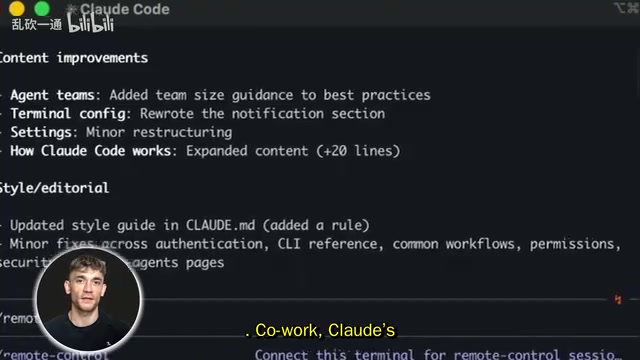
- Scheduled tasks: OpenClaw supports scheduled tasks. Claude Code currently has no native scheduling capability. While Claude's companion tool Co-work added scheduled tasks the same week, they only run when the computer is awake and the app is open. If you need fully automated background scheduling, Remote Control can't do it.
But for the core scenario — staying connected to a running session without being stuck at your desk — Remote Control is clean, built-in, maintained by Anthropic, and requires zero third-party configuration. For most developers, that's enough. This is indeed a direct blow to OpenClaw's primary advantage.
Practical Scenarios
Remote Monitoring of Long-Running Tasks
When Claude is handling a task that takes 30–40 minutes, you don't need to sit at your desk. Start the task, walk away, and check progress and provide feedback from your phone at any time.
Multi-Machine Management
Run Claude Code on multiple computers, each with its own remote control session. Switch between different machines' sessions in the Claude App just like switching between chats, making it easy to manage multiple projects.
Related articles
 Product Reviews
The Programmer's Desk Setup Guide: Building a Workspace That Feels Like Home
Discover how programmers build productive, comfortable workspaces. From multi-monitor setups to ergonomic design, explore the desk philosophy that drives focus and flow.
 Product Reviews
Qoder vs Cursor Real-World Comparison: Which $20/Month AI IDE Is Better?
Hands-on comparison of Qoder vs Cursor AI IDEs: Agent autonomy, human interaction count, and architecture decisions. Qoder needed only 2 interactions vs Cursor's 8.
 Product Reviews
Cursor Cloud Agent Demo: Eliminating Bottlenecks Across the Entire Software Development Lifecycle
Deep analysis of Cursor's Cloud Agent demo showing how cloud VMs, automated test artifacts, and a full-chain control plane systematically eliminate human bottlenecks across the software development lifecycle.