Claude Code Setup in China: Avoid Bans with CC Switch

Full guide to installing Claude Code in China: NPM setup, CC Switch for ban prevention, and prompt quality tips.
Based on a Bilibili tutorial, this guide addresses three key pain points for Chinese developers using Claude Code: install via NPM (requires Node.js 22+ and Git with VPN active) for far better reliability than PowerShell; use the open-source CC Switch tool to reroute API requests to domestic providers like DeepSeek, completely bypassing Anthropic's account system and eliminating ban risk; and write specific prompts with defined tech stacks instead of vague natural language to improve output quality and reduce token costs. The article closes with a candid note: AI coding tools are genuinely accessible for personal projects, but commercial-grade development still requires real technical skills — and domestic models are already good enough for most daily work.
For developers in China, AI coding tools have shifted from a novelty to an everyday necessity. Many companies now explicitly mandate AI-assisted code generation — some requiring 50% of code to come from AI, others pushing that figure to 90% or even 100%. Among tools like Claude Code, Codex, Cursor, and Tree, Claude Code tends to have the largest user base. This article is based on a public tutorial from a Bilibili creator, focusing on the practical steps for installing and configuring Claude Code in a Chinese network environment — and, critically, how to avoid getting your account banned.
Choosing a Tool: It's About What Works for You
Coding agents are fundamentally just assistants. There's no objectively superior choice — what matters is whether it fits your workflow. After personally trying Claude Code, Codex, Cursor, Tree, and others, the creator's recommendation is: unless your company has strict compliance requirements, go with Claude Code or Codex first.
DeepSeekAd Harness, released last month, is also worth trying — it's easy to configure and doesn't require any extra account-switching tools. Ultimately, tool selection comes down to personal preference. Use what you like.
Installation: Why NPM Is the Better Choice
When installing Claude Code, the first piece of advice is to go straight to the official website — it has complete, clearly written documentation. The official installer supports multiple methods: Windows users can run the appropriate command in PowerShell or CMD.
Here's the catch: due to China's network restrictions, direct installation via PowerShell or CMD has a low success rate. If your ISP has minimal restrictions, it might work — but with any network limitations, these methods will likely fail.
The more reliable approach is to install via NPM, which is explicitly listed under "Advanced Options" on the official site. Before doing so, you'll need two prerequisites:
- Install Node.js: Version 22 or higher is required. Download the latest release (e.g., version 24) directly from the official site.
- Install Git: A straightforward installation — just click through the defaults.
Both tools support custom installation directories, so if your C drive is running low on space, you can redirect them elsewhere. Leave everything else at default.
Important: Keep your VPN active throughout the entire installation process. Without it, the NPM install will fail. The creator emphasizes that as long as your VPN is properly configured, this installation method has worked reliably without issues.
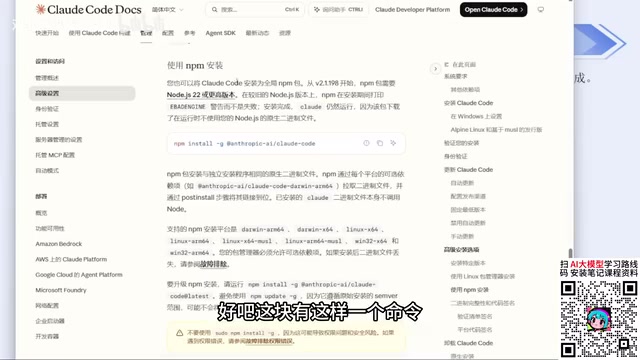
Once installation is complete, run claude --version in your terminal. If it outputs a version number, the installation was successful.
What is NPM? NPM (Node Package Manager) is the official package manager for the Node.js ecosystem, used to install, manage, and distribute JavaScript/Node.js packages. Claude Code is a Node.js application, so installing it via NPM means pulling the official package directly from the npm registry. Compared to downloading a binary from GitHub or a website, this approach offers automatic dependency resolution, easier version management, and access to multiple mirror sources in China for faster downloads (though Claude Code itself still requires a VPN). The Node.js 22+ requirement is tied to modern JavaScript syntax features used in Claude Code — older versions may lack necessary runtime APIs, causing startup failures or broken functionality. When you install Node.js, NPM comes bundled automatically.
The Key to Avoiding Bans: Use CC Switch to Skip Official Login
This is the most critical part of the entire guide. The first time you run the claude command, the tool will prompt you to: confirm you trust the current folder, choose a color theme, and select a login method.
The problem is in that login step. If you log in with your official Claude account, there's a very real chance your account will get banned. The creator admitted to getting banned multiple times using an official account, and even the approach of setting an API Key in environment variables has resulted in bans.
The solution is an open-source tool called CC Switch. It's now available as a website, though it started as a GitHub project. Here's how to use it:
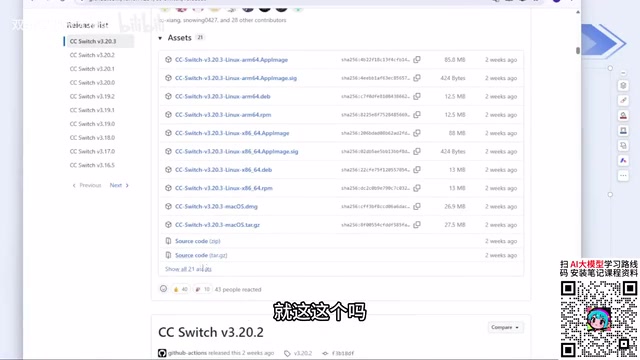
- Download the installer for your OS from the official site or the GitHub Releases page (Windows users should select the MSI file — click "Show All" to find it)
- Double-click to install and open the app
- Select the tool you want to configure (Claude Code, Codex, OpenCloud, etc.)
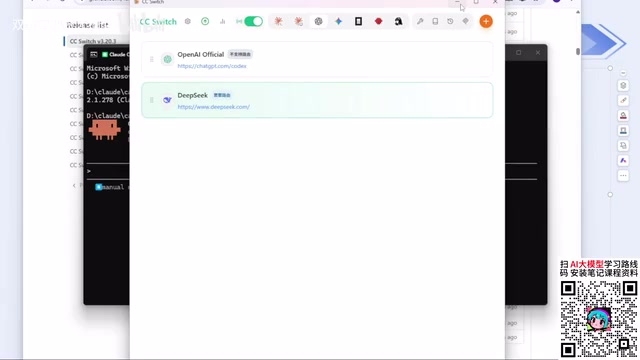
- Click "+", choose a model provider (e.g., DeepSeek), enter your API Key, and click Add
Once configured, rerun the claude command — the login step will be automatically skipped. No account login means no account to ban. This is the core logic the creator repeatedly emphasizes.
CC Switch includes most major model providers out of the box, including DeepSeek and Zhipu AI. If your third-party API provider isn't in the list, select "Custom Configuration" and fill in your API Key, provider URL, and redirect endpoint.
CC Switch is equally recommended for Codex, but note that it distinguishes between different tools — when switching tools, remember to update the configuration accordingly to avoid situations where DeepSeek is configured but not actually being used. Codex may also require a one-time base login. The NPM install command is identical for both Windows and Mac users.
On the topic of VPNs: given the current strict enforcement environment, the creator advises against buying annual memberships unless the service is proven stable. A safer approach is to buy month by month — slightly more expensive, but far less risky.
Why does CC Switch prevent bans? CC Switch works by replacing the API call pathway that Claude Code uses. Claude Code is fundamentally a client that calls the Anthropic API. The normal login flow binds your Anthropic account to each request, and requests originating from Chinese IP addresses can be flagged by Anthropic's risk control systems — potentially leading to a ban. CC Switch intercepts Claude Code's API requests locally and redirects them to your specified third-party provider's endpoint (e.g., DeepSeek). The entire process never touches Anthropic's account system, so there's no Anthropic account to get banned. This differs from the approach of setting
ANTHROPIC_API_KEYin your environment variables — that method still routes through Anthropic's authentication channel and carries ban risk. CC Switch bypasses Anthropic's servers entirely at the request-routing level.
Don't Just Use Plain Natural Language: Prompts Determine Output Quality
Once everything is configured, most people's first instinct is to fire off a natural language request like "help me build a Snake game." While this technically works, the results are poor.
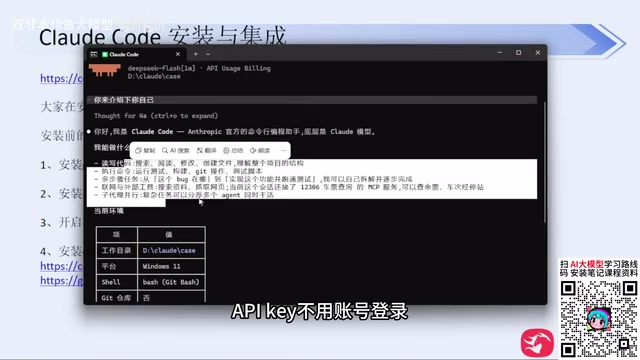
The reason: a vague prompt like that involves no tech stack decisions and no defined scope, leaving the model to improvise freely. The creator notes that relying on rough prompts in day-to-day development doesn't just produce low-quality output — it also burns significantly more tokens and takes more time.
Newer versions of Claude Code have started proactively asking clarifying questions before generating code, helping you nail down tech stack choices, feature scope, and other details — something older versions didn't do. The confirmation dialogs that pop up during generation are essentially the "Human in the Loop" mechanism from ML systems. If you'd rather skip manual confirmations, you can later enable a permissive mode (like yolo mode) to bypass them.
On cost: the creator notes that DeepSeek's recent price increases have made its API relatively expensive. DeepSeek Harness is worth considering as an alternative — in real-world testing, DeepSeek Harness tends to have higher cache hit rates, making it more cost-efficient than other coding agents.
What is "Human in the Loop"? Human in the Loop is an important design philosophy in ML and automation systems — it means introducing human confirmation or intervention at critical points in a model's autonomous task execution, ensuring outputs meet expectations and reducing the risk of errors. In AI coding agent contexts, this manifests as confirmation dialogs that appear before high-risk operations like writing files, running shell commands, or calling external APIs. This mechanism helps prevent the model from taking destructive actions under ambiguous instructions — like accidentally deleting files or running the wrong shell command. Users who understand the task boundaries and want fully automated execution can enable "yolo mode" to skip confirmations. For beginners who aren't familiar with the codebase, keeping these confirmation steps is actually an important safety net.
The Two Sides of Technical Democratization
The biggest value AI coding tools bring is technical democratization: want a basic feature? Describe it in a sentence and it's generated — no programming knowledge required. For non-developers, this genuinely lowers the barrier to entry.
But the creator also offers a sobering perspective: building personal tools is one thing; trying to monetize with production-grade software using one-line prompts is another entirely. If you're building a large commercial platform, you still need real technical knowledge — otherwise code quality and bug management will become serious problems. The code demonstrated in the tutorial had zero code review; it was purely for demonstration purposes.
There's also a broader point worth noting: while model providers are still racing to improve capabilities, from a practical standpoint, domestic Chinese models are already capable enough to handle everyday work tasks. For users whose needs are covered by standard work scenarios, it's simply not worth risking repeated account bans just to use foreign models.
Related articles

Felix Rieseberg Personal Homepage
Felix Rieseberg's personal homepage sparks attention on Hacker News. This article covers the Slack engineer's technical background, the rise and fall of nativefier, and the value of a developer homepage as a tech calling card.

@ai-sdk/vue 3.0.306 Patch Release Syncs with [email protected] Update
@ai-sdk/vue 3.0.306 released, synced with [email protected]. A routine patch release for the Vercel AI SDK ecosystem with no public API changes; the Vue adapter layer stays version-aligned with the core package.

Gemini 4 Argon API Launches: The Era of Million-Token Output Begins
Google launches Gemini 4 Argon with sparse MoE architecture, up to 1M output tokens, and a 68.90% Vals Index score, available across API, AI Studio, and the Gemini app.