Claude Code + Skills in Action: A Complete Guide to Automated Test Case Generation

Use Claude Code + Skills to auto-generate production-ready test cases from requirements docs in under 10 minutes.
This article demonstrates how to combine Claude Code with its Skills mechanism to fully automate test case generation from requirements documents. The three-phase pipeline — requirements breakdown, test point extraction, and test case generation — takes less than 10 minutes end-to-end, at least doubling efficiency over manual writing while delivering more thorough, production-ready output.
The Efficiency Problem with Writing Test Cases
In software testing, writing test cases is a time-consuming and tedious task. Faced with requirements documents that can run hundreds of pages, test engineers often spend days — sometimes weeks — breaking down requirements line by line, extracting test points, and writing production-ready test cases. This process is also highly prone to omissions and incomplete coverage.
According to Gartner research, the test design phase (i.e., test strategy formulation and test case writing) accounts for 40%–60% of total testing effort, making it the stage with the greatest potential for automation optimization in the entire testing workflow. This is the fundamental reason why AI-assisted testing has become a major evolutionary direction in the testing engineering field in recent years.
This article is based on a hands-on demo shared by a Bilibili content creator, introducing how to use the Claude Code + Skills combination to fully automate the generation of test cases from requirements documents. According to the creator's real-world testing, the entire process takes less than 10 minutes — at least doubling efficiency compared to manual writing — and the quality of the output is actually more thorough than what a human would produce.
The Core Approach: One Command Drives a Three-Phase Workflow
The elegance of this solution lies in its minimalist interaction model. Users don't need to craft complex prompts. A single command — "Please use our Skills to generate test cases from the requirements document" — is enough for the AI to parse the instruction and invoke the appropriate Skills to execute the task.
Technical Background: Claude Code and the Skills Mechanism
Claude Code is Anthropic's AI coding assistant for developers. One of its core capabilities is support for the "Skills" mechanism — an engineering design pattern that encapsulates specific tasks into reusable, callable modules. Skills are conceptually similar to functions or microservices: each Skill defines a clear input, processing logic, and output specification. When executing complex tasks, the AI can combine multiple Skills on demand, much like calling an API. This design philosophy closely aligns with the "Single Responsibility Principle" in software engineering, making the AI's capability boundaries clearer, its outputs more predictable, and the whole system easier for teams to share, collaborate on, and iteratively improve.
In the demo, the test subject is a requirements document with 9 chapters, with chapters three through six being the most critical functional modules. After receiving the command, the AI plans the entire task into three distinct phases:
- Phase 1: Invoke the "Requirements Breakdown" Skill to split the document by chapter
- Phase 2: Invoke the "Test Point Extraction" Skill to extract test points from the broken-down requirements
- Phase 3: Invoke the "Test Case Generation" Skill to produce the final test cases
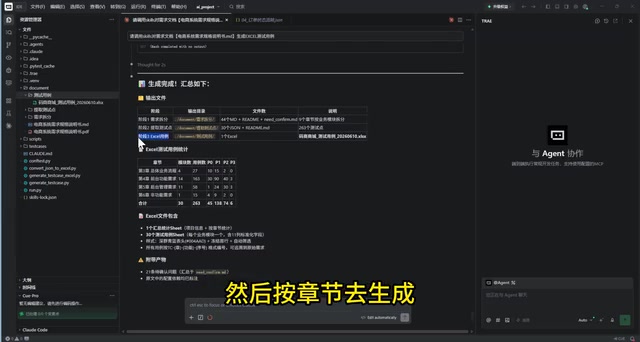
This "one operation, one Skill" modular design is the core value of the Claude Code Skills mechanism — decomposing complex tasks into reusable, composable atomic capabilities.
Phase 1: Intelligent Requirements Document Breakdown
The goal of Phase 1 is to split the requirements document by chapter as-is, without adding, removing, or summarizing content. The 9 chapters are split into 9 independent folders, preserving the original requirements intact.
Converting Tables and Images to Text
The most technically sophisticated aspect of this phase is the conversion of table- and image-based requirements into text. The content creator specifically highlighted this in the demo:
"The hardest part is dealing with the tables and images embedded in the requirements — that's what we need to handle."
This processing step has a solid technical rationale: today's leading large language models (LLMs) excel at processing plain text, but face significant bottlenecks when handling non-text formats like tables, flowcharts, and screenshots. Tabular data often loses its row-column relationships when converted to text; text and logic within images require OCR and multimodal models for accurate recognition; and the conditional branches and loop logic encoded in flowcharts are especially difficult for language models to capture directly. Pre-processing these formats into structured natural language is a universal best practice in modern AI engineering, and is one of the core technical challenges in RAG (Retrieval-Augmented Generation) and document intelligence parsing.
Taking the "Guest Browsing Flow" in Chapter 3 as an example, the AI marks the original location of the requirement (Chapter 3, Section 3.1), provides a module overview, and converts the flowchart into a textual format. For the table-based requirements in Chapter 4 on "Product Details," the AI similarly transforms them into natural language descriptions that are easier for large models to understand.
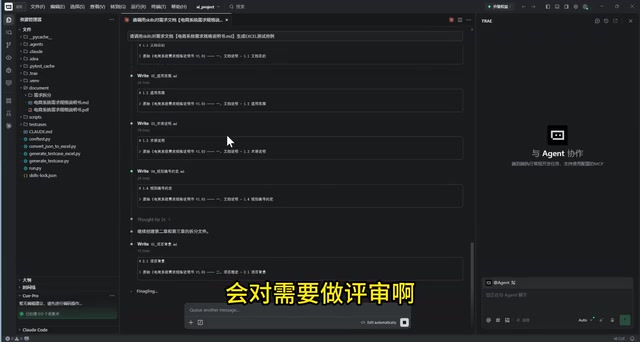
This approach has clear technical logic: LLMs understand structured text far better than non-text formats like images and tables. Normalizing all requirements into clear textual descriptions significantly improves the accuracy of test point extraction in the next phase.
Automated Review: Flagging Ambiguous Requirements
Phase 1 isn't just content transcription. The AI also performs an automated review of the broken-down requirements, specifically flagging areas with unclear descriptions — including conditions, exceptions, edge cases, and acceptance criteria — to give test engineers a clear set of focus points for manual follow-up.

Phase 2: Structured Test Point Extraction
Once the requirements breakdown is complete, the workflow automatically moves to Phase 2 — test point extraction.
Intelligent Filtering of Non-Requirement Content
The AI automatically identifies and skips the document overview and description content in the first two chapters, since these are non-functional sections that don't require test points. This filtering capability eliminates wasted effort and improves overall efficiency.
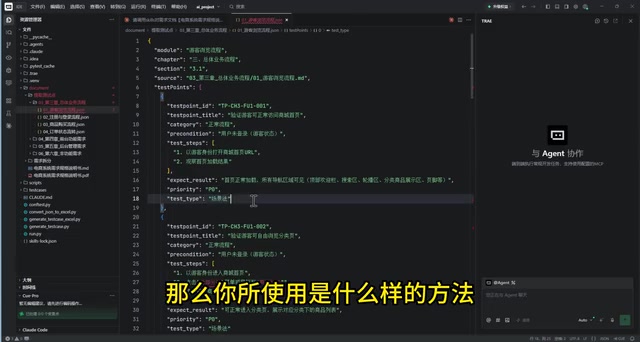
Standardized Test Point Output in JSON Format
Every extracted test point follows a unified JSON format containing the following key fields:
- Module and chapter
- Test point title (e.g., "Verify the normal flow for a guest visiting the store homepage")
- Test status and operational steps
- Expected results
- Priority
- Test design methodology applied
The deeper engineering value of JSON output lies in its native machine-readability — JSON structures can be directly imported into mainstream test management platforms like Jira, Zephyr, and TestRail, enabling automated archiving and statistical analysis. This truly bridges the gap between "AI generation" and "toolchain deployment," eliminating the efficiency losses and error risks that come with manual re-entry.
This structured output format not only facilitates human review, but also provides standardized input for Phase 3's test case generation. Once test point extraction is complete, the AI performs an automated review to ensure comprehensive coverage.
Phase 3: Production-Ready Test Case Generation
In the final phase, the AI invokes the "Export Test Cases" Skill to generate the final test cases by chapter, based on the reviewed test points.
One Requirement Broken Down into Multiple Executable Cases
Using the first feature in Chapter 3 as an example, one original requirement was broken down by the AI into 8 test cases:
- Verify that a guest can normally access the store homepage
- Verify the category browsing functionality
- Verify the search functionality
- Verify the product detail page
- Four additional scenarios for actions requiring login prompts: shopping cart, favorites, placing an order, and user center
A single, originally vague requirement statement is accurately decomposed into multiple executable test scenarios that map precisely back to the original requirement.
Complete and Standardized Test Case Fields
In software testing engineering, standardized test cases are the foundation for quality traceability. Industry-standard test cases include fields such as: case ID, module, title, preconditions, test steps, expected results, priority (P0/P1/P2), and test type (functional/boundary/exception).
Each test case contains a complete set of fields — title, test type, priority, preconditions, test data, operational steps, and expected results — along with a dedicated column for human review and annotations linking each case back to its corresponding test point, enabling full traceability.
Dual Gains: Efficiency and Quality
Based on real-world results, the core value of this solution manifests across two dimensions:
Efficiency: The entire pipeline from requirements document to test cases takes less than 10 minutes. The equivalent manual effort would typically take days. The content creator noted that the efficiency gain is "definitely more than double."
Quality: The generated cases are production-ready and ready-to-use — comprehensive in coverage, consistent in format, and arguably more thorough than manually written cases. The automated AI review mechanism at each stage further ensures output quality.
Conclusion: The Ideal Form of AI Engineering in Practice
This case vividly demonstrates the real-world capabilities of Claude Code + Skills in specialized, vertical use cases. The keys to its success are:
- Task decomposition: Breaking a complex task into three reusable Skills — requirements breakdown, test point extraction, and test case generation;
- Format conversion: Transforming non-text content such as tables and images into LLM-friendly textual descriptions;
- Automated review: Incorporating AI self-review at each stage to ensure output quality;
- Human-AI collaboration: Retaining dedicated human review columns to combine AI generation with human oversight organically.
From a broader perspective, the current landscape of AI-assisted testing exploration spans three layers: test case generation from requirements documents (the "design-layer automation" demonstrated in this article), regression case recommendations based on code changes, and risk area identification based on historical defect data. Compared to traditional test automation focused on "execution-layer automation" (such as Selenium and Appium), the breakthrough at the design layer carries far greater significance.
For test engineers, this solution is not meant to replace human effort — it's about freeing people from tedious, mechanical work so they can focus on higher-value activities: requirements review and edge case validation. This may well be the ideal form of AI-assisted testing in practice — let AI handle the repetitive work, and let humans focus on the judgment calls that truly matter.
Key Takeaways
Related articles

Fifty Years Studying Power: Robert Caro's Writing and Insights on Power
Robert Caro reflects on 50 years studying power: Lyndon Johnson's persuasion and leverage, Robert Moses's transformation from idealist to ruthless builder, the dilemmas of large-scale construction, and his methods of compressing themes and solitary focus in biography writing.

Can a $20,000 Robot Do Your Chores? The Test Results Are Surprising
A YouTube test video shows how a $20,000 robot responds to commands like washing dishes, turning off lights, taking out trash, and feeding the dog. This article analyzes its real capability boundaries, the state of voice interaction technology, and how far household robots are from mainstream adoption.
The Complete Guide to Running AI Models Locally: Inference Engines and Tool Stack Explained
A systematic breakdown of the complete local LLM tool stack: from PyTorch and GGML compute libraries to llama.cpp, vLLM, SGLang inference engines and Ollama, LM Studio wrapper layers, with benchmark data on performance differences and selection logic.