The Complete Guide to Running AI Models Locally: Inference Engines and Tool Stack Explained
Most local AI tools are just shells around llama.cpp or vLLM—choose your scenario first, then the engine.
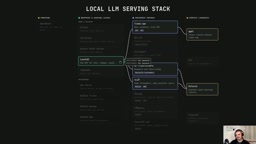
The article breaks the local LLM tool stack into three layers: compute libraries (PyTorch, GGML, MLX, TensorRT), inference engines (llama.cpp, vLLM, SGLang, TensorRT-LLM, etc.), and wrapper layers (Ollama, LM Studio, Open WebUI, etc.), noting that the many tools are mostly shells around a few engines. On an 8GB VRAM RTX 3060 Ti with the same OpenAI-compatible script: 100 parallel requests took llama.cpp 9.2s, vLLM only 1.6s, and TensorRT-LLM about 3.6–3.8s—slower than vLLM—showing compilation optimization is highly scenario-dependent. On VRAM strategy, llama.cpp allocates on demand while vLLM pre-allocates a ratio; mixed quantization fits a 14B model into 8GB VRAM. The conclusion: determine single-machine vs. multi-user, flexibility vs. performance, and VRAM constraints first, then pick the engine, and only then the wrapper layer.
Most local AI tools are actually wrappers around the same batch of inference engines and compute libraries. Understanding this underlying ecosystem matters more than memorizing each tool's command line.
A YouTube tech creator used an ecosystem map and a series of hands-on demos to break the local LLM tool stack into three layers: compute libraries, inference engines, and wrapper/service layers. The core conclusion is clear—the dazzling array of tools you see are mostly just shells around llama.cpp or vLLM.
Three-Layer Architecture: Compute Libraries, Inference Engines, and Wrapper Layers
Compute Libraries: The Heavy Math Behind the Scenes
The bottom layer handles tensor operations and CUDA kernels. PyTorch is the Python deep learning framework that powers most tools in the ecosystem; GGML is its C/C++ counterpart, built by the creator of llama.cpp and specifically optimized for it; MLX is Apple Silicon's proprietary solution; and TensorRT is NVIDIA's optimizing compiler that compiles models into operation graphs targeting specific hardware, specific models, and specific settings—trading flexibility for performance.
The significance of this layer: if you use vLLM, you're using PyTorch; if you use llama.cpp, you're using GGML. Understanding this layer is key to understanding why different tools vary so much in hardware compatibility and performance.
KV Cache is the key mechanism affecting VRAM usage in inference engines. Large models generate text autoregressively—each new token requires recomputing attention over all previous tokens, with computation growing quadratically with context length. KV Cache stores the Key and Value tensors already computed for each layer so subsequent tokens can reuse them, reducing per-step computation to linear. The cost is that VRAM usage grows linearly with context length and the number of concurrent requests—which is exactly what vLLM accounts for when pre-allocating its --gpu-memory-utilization ratio, and why llama.cpp's on-demand allocation strategy is more memory-efficient. PagedAttention (vLLM's core technology) manages KV Cache through paging to reduce memory fragmentation, and is key to its high throughput.
Inference Engines: Each Has Its Trade-offs
Inference engines sit atop compute libraries and handle loading, serving, and inference. The author gave a one-line positioning for each engine:
- llama.cpp: Best for a single person running a single model on home CPU or GPU; the earliest widely adopted tool in the early days of local AI.
- vLLM: Aimed at GPU, parallelism, and high-throughput scenarios—the go-to when multiple users are requesting simultaneously; no out-of-the-box CPU support.
- SGLang: Same tier as vLLM, but optimized for repeated context (multi-turn conversations, agents, structured output), and may outpace vLLM in repeated-prompt scenarios.
- Hugging Face Transformers: Better suited for fine-tuning, research, and rapid experimentation; serving capability is only incidental.
- LM Deploy: Focused on performance optimization for 4-bit quantized models, built by the InternLM team, and smoother when paired with their own models.
- TensorRT-LLM: Exclusive to the NVIDIA ecosystem; a common sight in data center scenarios.
- MLX-LM: Apple Silicon exclusive; the author didn't demo it due to lacking Apple hardware.
Quantization is the core means of running large models on limited VRAM. It compresses model weights from FP16 (16-bit floating point) to 8-bit, 4-bit, or even lower, reducing VRAM usage to 1/4 to 1/8 of the original. Common formats include GGUF (llama.cpp ecosystem), AWQ, and GPTQ (common for GPU inference). Quantization introduces accuracy loss, but 4-bit is nearly imperceptible on most conversational tasks. The article's coverage of LM Deploy focusing on 4-bit quantization performance optimization and xLama v3 squeezing a 14B model into 8GB VRAM via mixed quantization with "different bit rates for different layers" are extensions of this idea: applying different precision to attention layers and feed-forward layers to strike a finer balance between VRAM and quality.
Wrapper Layers: Convenience Over Capability
Ollama, LM Studio, Open WebUI, Docker Model Runner, LocalAI, and TabbyAPI all belong to this layer. They don't change underlying capabilities—they just make invocation more convenient: Ollama makes pulling and running models extremely simple; LM Studio offers a polished GUI and very convenient model search; Open WebUI layers a ChatGPT-like interface on top of Ollama; Docker Model Runner lets models be written directly into Compose files; LocalAI unifies text, images, and other modalities under a single OpenAI-compatible API; and TabbyAPI is the standard serving layer for xLama v3.
Hands-On Testing: Same Script, Different Engines
The author ran a set of controlled experiments on an RTX 3060 Ti with 8GB VRAM. All engines expose OpenAI-compatible interfaces, so the inference script essentially only needs port and model name changes.
Parallel request testing reveals the biggest differences: with 100 requests fired simultaneously, llama.cpp took 9.2 seconds; vLLM only 1.6 seconds; Ollama remained slow even with num_parallel=16 enabled; Hugging Face Transformers' parallel performance was "completely unusable"; TensorRT-LLM took about 3.6 to 3.8 seconds—actually slower than vLLM. SGLang performed fast on structured output tasks, but the author also noted that vLLM's ecosystem is broader in most scenarios, unless testing confirms SGLang is faster and that performance matters to you.
Differences in VRAM Strategy
llama.cpp allocates VRAM on demand, while vLLM pre-occupies a specified ratio (configured via --gpu-memory-utilization), counting both KV cache and the model itself. The author warns against setting too high a ratio when running small models on devices with 128GB shared memory. The xLama v3 + TabbyAPI combination demonstrates another approach: using mixed-bit quantization across layers to squeeze a 14B model into 8GB VRAM, with testing showing VRAM nearly maxed out.
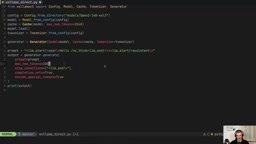
OpenAI-compatible APIs are the precondition for these tools being interchangeable by "only changing the port and model name." This refers to inference engines exposing HTTP endpoints consistent with OpenAI's /v1/chat/completions and similar interfaces, with requests and responses using the same JSON structure. This way, upper-layer clients, agent frameworks, and IDE plugins don't need to know whether the backend is llama.cpp, vLLM, or Ollama—just change the base URL to switch. This is also the foundation for wrapper layers to exist: Ollama, LocalAI, and TabbyAPI are essentially all doing protocol adaptation, packaging their respective engines into a unified OpenAI interface so tools in the ecosystem can be freely combined.
How to Choose: Match by Scenario
Home single-model, want convenience: llama.cpp or Ollama; want a graphical interface and model search: LM Studio; want zero-barrier onboarding: Open WebUI; already have a Docker Compose workflow: Docker Model Runner; need a unified multimodal API: LocalAI; GPU multi-user high throughput: vLLM; repeated context and agent workflows: SGLang; quantized models with tight VRAM: LM Deploy; NVIDIA data center: TensorRT-LLM; large models in small VRAM: xLama v3 + TabbyAPI.
Data center orchestration tools (Ray Serve, NVIDIA Triton, Dynamo, NIM) were only introduced conceptually without demos, since the focus is on consumer-level experience.
Editorial View
The value of this content isn't in listing tools, but in revealing the fact that "beneath the wrapper layers there are only a few real engines." For developers, this means the questions to ask when choosing are "is my scenario single-machine or multi-user, is flexibility or performance priority, is VRAM constrained"—not chasing newly released wrapper tools. Once the underlying engine is determined, which shell you put on top is merely a matter of convenience.
One noteworthy detail is that TensorRT-LLM didn't beat vLLM in the author's parallel tests, showing that the benefits of compilation optimization depend heavily on the specific model, settings, and batch shape—you can't assume "compilation is always faster." Similarly, Ollama's weak parallel capability is determined by its design orientation; using it as a high-concurrency service is choosing the wrong tool.
One-line Summary
Most local AI tools are just shells around llama.cpp or vLLM—choose your scenario first, then the engine.
Paragraph Summary
The article breaks the local LLM tool stack into three layers: compute libraries (PyTorch, GGML, MLX, TensorRT), inference engines (llama.cpp, vLLM, SGLang, TensorRT-LLM, etc.), and wrapper layers (Ollama, LM Studio, Open WebUI, etc.), noting that the dazzling array of tools are mostly shells around a few engines. The author ran controlled experiments on an RTX 3060 Ti with 8GB VRAM using the same OpenAI-compatible script: with 100 parallel requests, llama.cpp took 9.2 seconds, vLLM only 1.6 seconds, and TensorRT-LLM at about 3.6 to 3.8 seconds didn't beat vLLM, showing that compilation optimization benefits are highly scenario-dependent. On VRAM strategy, llama.cpp allocates on demand while vLLM pre-allocates a ratio; mixed quantization can squeeze a 14B model into 8GB VRAM. The conclusion is that selection should first determine single-machine vs. multi-user, flexibility vs. performance, and VRAM constraints, then choose the underlying engine, and finally consider the wrapper layer.
Related articles

Google's Satellite AI Server Reaches Orbit: Gemma Model Generates First Reply in Space
Google's TPU-equipped satellite powers up in orbit, with the onboard Gemma 4 model generating the first reply from space. This article analyzes the technical path, real-world constraints, and implications for edge computing and satellite remote sensing.
AI Agents for Flight Booking Customer Support: Real Needs and Implementation Challenges
Starting from a real Reddit question, this article breaks down four needs for introducing AI Agents into flight booking call centers: basic Q&A, agent assist, call summarization, and quality inspection, and analyzes accuracy concerns and handoff boundary design.
Vercel Unifies Runtime Cache: Data Cache Merges into Runtime Cache
Vercel merges Data Cache into Runtime Cache, unifying storage quotas and billing for Next.js fetch cache, unstable_cache, getCache, and use cache: remote. Pro and Enterprise projects get more storage, and cache reads/writes are now billed at Runtime Cache pricing.