Claude Code Templates: A CLI Guide for One-Click Configuration and Real-Time Monitoring

An open-source CLI tool for Claude Code offering one-click templated configuration and real-time monitoring.
davila7/claude-code-templates is an open-source Python CLI tool for Claude Code, offering templated configuration and usage monitoring. With nearly 30K GitHub stars, it addresses the configuration consistency and observability pain points of scaling AI coding tools, helping teams use AI assistants in a manageable, standardized way.
Project Overview
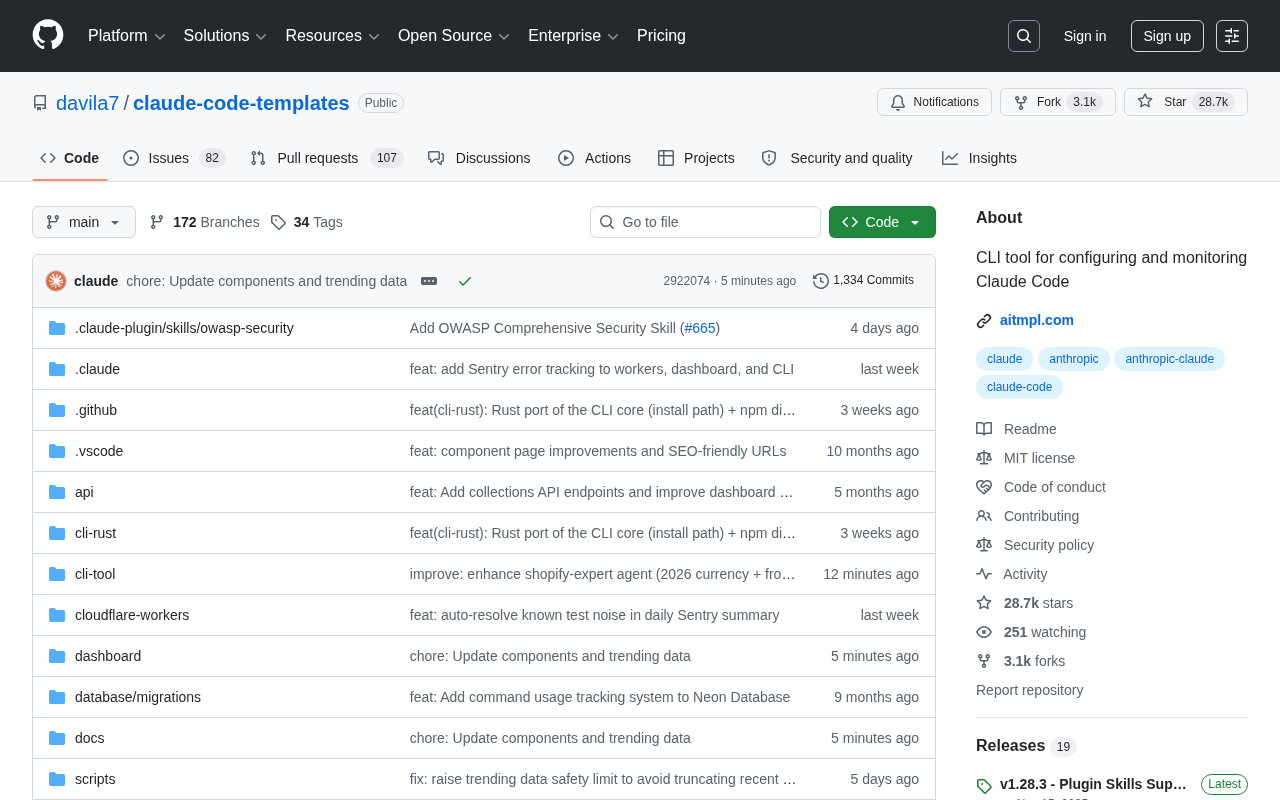
As AI coding assistants gradually become a standard part of developers' daily workflows, the demand for configuring and managing these tools is also growing rapidly. davila7/claude-code-templates was born against this backdrop—an open-source command-line tool (CLI) built specifically for Claude Code, designed to quickly configure and monitor Claude Code's operational status in real time.
The project has already garnered 28,667 stars and 3,146 forks on GitHub, with 104 new stars in a single day, and its popularity continues to climb. Its primary development language is Python, which means it offers good compatibility with the vast majority of development environments and a relatively low barrier to entry.
Why a Claude Code Configuration Management Tool Is Needed
Claude Code is an AI coding assistant launched by Anthropic based on the Claude large language model. It adopts an Agentic architecture—meaning it can not only generate code snippets but also autonomously perform a series of continuous operations within the terminal environment, such as reading and writing files, running commands, and calling external tools, giving it the ability to complete end-to-end programming tasks. Compared with earlier "Q&A-style" AI coding tools, this agentic design significantly boosts the level of automation, but it also introduces more complex requirements for managing behavioral boundaries—development teams need to precisely constrain the scope of the AI's behavior, code style preferences, and project context through configuration. This is the fundamental reason a dedicated configuration management tool exists.
In real-world team collaboration and engineering practice, simply using an AI assistant often runs into several practical pain points:
Cumbersome Configuration That's Hard to Standardize Across Teams
Every project has different expectations for an AI assistant—some require strict adherence to specific coding standards, while others need preset project context and workflows. Manually configuring each one is not only time-consuming but also prone to inconsistencies among team members.
From an engineering perspective, this problem is essentially an extension of the Infrastructure as Code (IaC) philosophy into the AI toolchain. The core idea of IaC is to manage environment configurations as versioned, reusable code, thereby eliminating the "it works on my machine" collaboration dilemma. claude-code-templates brings this philosophy to the AI assistant's configuration layer—through templating, developers can apply preset configurations with a single click, keeping the AI's behavior consistent across the entire team. This greatly reduces initialization costs and lays the groundwork for configuration version tracking and auditing.
Lack of Observability, Turning Usage Into a "Black Box"
An AI coding assistant's background invocation patterns, resource consumption, and response performance are often difficult to track. When a team uses it at scale, the lack of monitoring means it's hard to evaluate the return on investment and hard to detect anomalies in a timely manner.
Observability is one of the core concepts of modern software engineering. Originating from cybernetics, it has been widely applied to distributed system monitoring in the cloud-native era through toolchains such as Prometheus, Grafana, and OpenTelemetry. Its essence lies in the three pillars of "Metrics, Logs, and Traces," enabling engineers to infer internal system state from external outputs. Today, as AI components become deeply embedded in software development processes, the boundaries of observability are extending from the infrastructure layer to the AI application layer—monitoring an AI assistant's invocation frequency, task types, response latency, and even token consumption is gradually becoming a necessary means for engineering teams to manage their AI toolchains. This tool's monitoring focus is precisely aimed at filling this observability gap.
A Detailed Look at Core Features
Based on the project's positioning, this Claude Code CLI tool primarily revolves around two core capabilities:
Template-Based Configuration (Configuring)
The tool provides a template-based configuration solution, allowing developers to quickly apply standardized settings to Claude Code via the command line. This "templates as configuration" approach shares a common spirit with scaffolding tools in the frontend world (such as create-react-app) or project initialization tools in the backend world (such as Spring Initializr and Cookiecutter)—it distills proven best practices into reusable assets, letting new projects start from a sensible foundation and avoiding wasted time repeatedly solving the same class of configuration problems.
Usage Monitoring (Monitoring)
Beyond configuration management, the tool also provides the ability to monitor Claude Code usage. This is especially important for teams that want to quantify the effectiveness of AI-assisted programming. Through monitoring data, teams can understand information such as the AI assistant's actual usage frequency and task type distribution, enabling more informed decisions about tool selection and process optimization.
Technology Choices and Ecosystem Significance
The project is written in Python, a choice with considerable strategic significance. Python is the common language of the AI and data science fields, and the vast majority of developers are familiar with it. As a CLI tool, the Python version can be easily integrated into all kinds of automation scripts, CI/CD pipelines, and local development environments. Thanks to the maturity of the pip ecosystem, the tool's installation and distribution costs are extremely low—one of the key reasons it has been able to spread quickly to a broad developer audience.
More importantly, the emergence of such tools signals that AI coding tools are evolving from "single-point capabilities" toward an "engineered ecosystem." Looking at the maturity path of technical tools, they often follow a pattern: a new technology initially centers on capability validation, while the scaled-adoption phase gives rise to complementary toolchains focused on governance, standardization, and manageability. Take container technology as an example—Docker solved the "can it run" problem, while toolchains like Kubernetes, Helm, and Prometheus solved the "how to run reliably in production" problem. AI coding tools are undergoing a similar evolution—early developers focused on whether AI could write correct code, whereas today the focus is gradually shifting to how to use these capabilities in a scalable, standardized, and manageable way. The formation of a third-party ecosystem of configuration templates and monitoring tools around Claude Code is itself strong evidence of this trend.
Getting Started Recommendations
For developers who want to try this tool, we recommend approaching it along the following path:
- Clarify your needs: First, figure out whether your team's biggest pain point when using Claude Code is configuration consistency or a lack of usage data;
- Start with templates: Prioritize applying the configuration templates provided by the community rather than setting things up manually from scratch;
- Enable monitoring: Turn on the monitoring feature in your daily workflow, and evaluate only after accumulating data over a period of time;
- Give back to the community: Contribute the high-quality configuration templates your team has refined back to the open-source repository, creating a positive feedback loop.
Conclusion
The popularity of claude-code-templates is no accident. It precisely hits the configuration and monitoring pain points that arise as AI coding tools scale into production, delivering practical, usable value in a lightweight CLI form. Nearly 30,000 stars and steadily growing attention reflect the genuine demand within the developer community for "engineered AI coding tools"—which aligns closely with the historical pattern of complementary toolchains emerging after every shift in development paradigms.
For individual developers or teams making heavy use of Claude Code, this tool is worth evaluating as an addition to your toolbox. It may not directly improve the quality of AI-generated code, but it lets you harness the power of AI programming in a more organized and controllable way—and that is precisely a key step in the journey of AI tools from "useful" to "trustworthy."
Related articles

DeepCell: One-Click AI Generation of Documents, Spreadsheets, and Slides
DeepCell tops Product Hunt with one-click generation of documents, spreadsheets, and slides, using the .deepcell format for linked updates, designed for System 2 tasks like modeling and sales reviews.

Doneas: 15-Minute Daily Accountability Calls That Keep Indie Developers From Procrastinating
Doneas is a daily accountability tool for indie developers: plan tasks on Monday, join a 15-minute call with five builders each day, and log deliveries on a public progress page. This article analyzes its core mechanics, effectiveness, and potential issues around retention and matching.

Fastlane 2.0: Fully Automated AI Ad Campaigns, From Creative to Optimization
Fastlane 2.0 is an AI ad automation tool: enter your website and it learns your brand, generates video and image ads, and runs and optimizes them on Meta, TikTok, Instagram, and YouTube.