Claude Code v2.1.280 Update Breakdown: Opus 5.5 Becomes the Default Model

Claude Code v2.1.280 debuts Opus 5.5 with 1M context and delivers broad stability, security, and VSCode improvements.
Claude Code v2.1.280's headline upgrade is Claude Opus 5.5, featuring a 1M token context window and ultra-low cache read pricing, now set as the default Opus model — with Pro and Team Standard plans switching from Sonnet to Opus by default. The update resolves several critical API errors that caused complete session failures, fixes message loss and state sync bugs in background subagents, and replaces Auto mode's infinite retry loops with proper backoff and rejection logic. Symlink write detection is hardened against path traversal risks, and the VSCode extension gains new slash commands including `/status`, `/sandbox`, and `/export`, along with smarter paste handling.
Anthropic's Claude Code has released version v2.1.280, and the most notable change in this update is the introduction of the new Claude Opus 5.5 model, which has been set as the default Opus model. The update also includes a wide range of stability fixes, interaction improvements, and expanded VSCode integration capabilities.
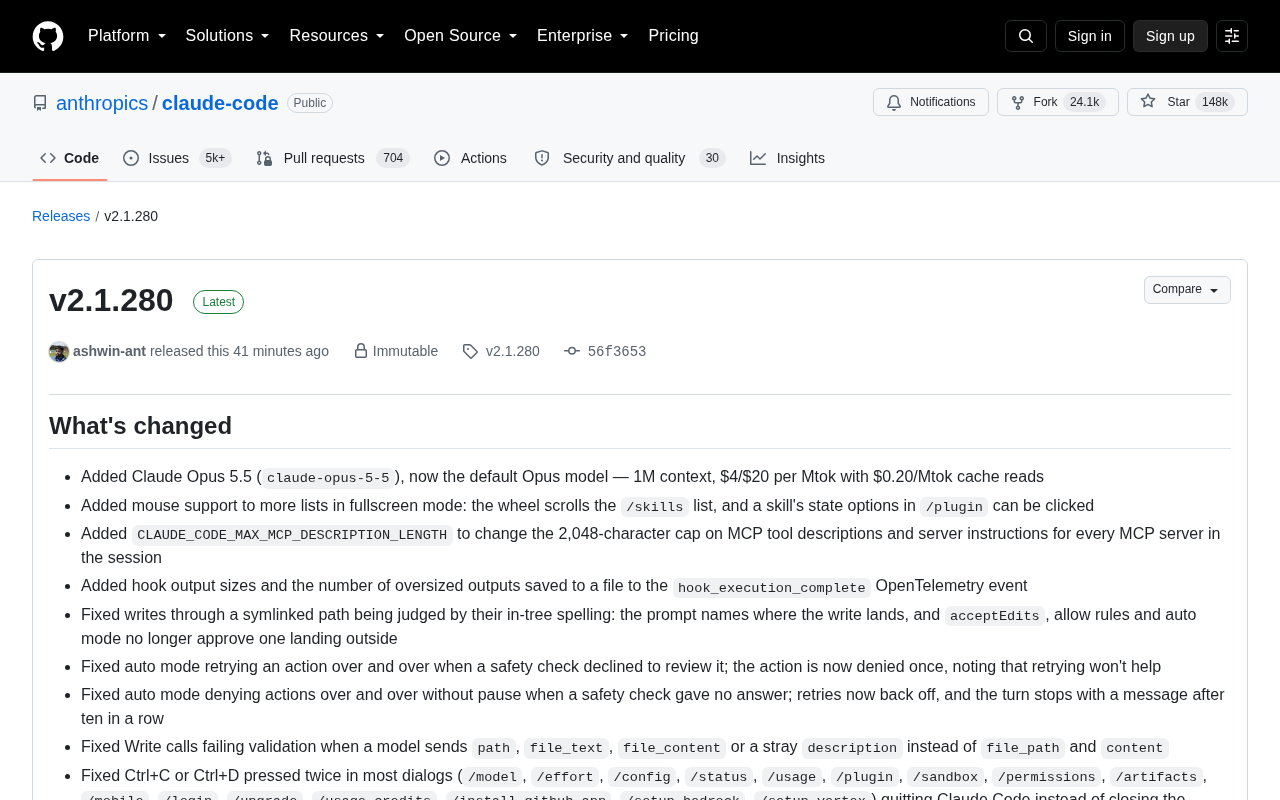
Opus 5.5: Larger Context, Lower Cost
The headline feature of this update is the addition of the claude-opus-5-5 model, which is now the default Opus model. According to the release notes, Opus 5.5 comes with a 1 million (1M) token context window, priced at $4 per million input tokens and $20 per million output tokens, with cache reads as low as $0.20 per million tokens.
For developers working with large codebases or lengthy documents, a 1M context window means more information can be loaded in a single pass, reducing the fragmentation that comes with chunking. Meanwhile, the ultra-low cache read pricing makes workflows that repeatedly reuse the same context — such as iterating on the same project — significantly more cost-effective.
Also worth noting: this update adjusts the default model strategy. Pro and Team Standard plan users will now default to Opus instead of Sonnet, bringing them in line with Max, Team Premium, and Enterprise plans. This means more users will benefit from the more capable Opus model by default.
Context Window refers to the maximum number of tokens a model can process in a single inference pass, encompassing the input prompt, conversation history, and output. A 1M token context is roughly equivalent to 750,000 English words, or tens of thousands of lines of code. By comparison, early mainstream LLMs typically had context windows of 4K to 32K tokens. For code assistant use cases, an extra-large context window is practically significant: developers can load an entire repository's key files, full test suites, and verbose debug logs in one shot, allowing the model to understand global dependencies within a single "view" without manually splitting context and losing continuity. Cache Read is part of Anthropic's Prompt Caching mechanism — when repeated prefix content appears in requests (such as a fixed system prompt or a large codebase snapshot), the platform reuses cached KV computation results, dramatically reducing the compute cost per call. At $0.20 per million tokens, cache read pricing is approximately 5% of the standard input price, which can meaningfully control total API costs for development workflows that repeatedly iterate on the same project.
Stability Fixes: Resolving Several Critical Errors
This update invested heavily in stability, fixing several severe issues that could cause sessions to fail entirely.
These include: sessions failing on every turn due to the "role 'system' must precede an 'assistant' message" API error; sessions failing every turn with API error 400 behind proxies or gateways that don't support the advisor feature (requests now automatically retry without that feature); and crashes when resuming sessions whose saved records contained malformed system messages.
For long-running full-screen sessions, the team fixed a cause of the "Claude Code exited after an unrecoverable interface error" — corrupted cached message lists are now rebuilt rather than causing an exit. A hang caused by settings files being replaced with named pipes during reads has also been resolved.
These fixes significantly improve Claude Code's reliability in complex, long-running session scenarios, reducing the risk of work being unexpectedly interrupted.
Background Subagent and Auto Mode Improvements
Issues related to background subagents received concentrated attention in this update. Fixes include: messages sent to background subagents being silently dropped in headless and SDK sessions; completed subagent reports being lost when the session that spawned them was compacted before the report was read; and background subagents being unable to use LSP tools.
On the Auto mode front, the team fixed several logic flaws. When a safety check refused to review an action, Auto mode previously retried indefinitely — it now rejects the action once and explains that retrying won't help. Endless retries when a safety check returned no response now use a backoff strategy, stopping after ten consecutive attempts with a message to the user.
These improvements make Auto mode behavior more predictable and safe, avoiding resource waste and unintended actions caused by logic loops.
Background Subagent is a core concept in Claude Code's multi-agent architecture. When handling complex tasks, the main session can spawn multiple subagents running in parallel, each independently executing a subtask (such as parallel search, code analysis, or file modification), then reporting results back to the main agent for consolidation. This architecture can significantly improve execution efficiency for complex tasks, but it also introduces engineering complexity around session management, message routing, and state synchronization — which is exactly why these fixes were needed. Headless mode refers to running Claude Code purely programmatically without an interactive terminal, commonly used in CI/CD pipelines or automation scripts. SDK sessions are sessions driven via Anthropic's official SDK through a programmatic interface. Silent message loss in either mode means automated workflows can produce incomplete results with no indication that anything went wrong — a particularly harmful defect in production environments. Session Compact refers to the mechanism where the system summarizes earlier content to free up context space when conversation history exceeds a certain length.
Permission and Symlink Security Hardening
Among the security-related fixes, the improvement to symlink write determination is especially important. Previously, when writing through a symlink path, the system judged permissions based on the "in-tree spelling," which could cause acceptEdits, allow rules, and Auto mode to incorrectly approve writes that landed outside the project tree. After the fix, prompts clearly display where the write will actually land.
The /permissions interface also received several improvements: focus returns to the rule list after viewing, adding, or removing rules; confirmation dialogs for deleting rules and removing directories now default to "No"; and navigating with ←/→ and Tab in the rule list now switches tabs directly instead of moving focus to the tab bar.
Additionally, the Artifact tool no longer silently disappears when organizational policies can't be loaded (e.g., behind a web proxy) — it now explicitly tells the user what is blocking it.
Symbolic Link (Symlink) is a special file in operating systems that points to another file or directory, similar to a shortcut. In code editing tools, the security risk posed by symlinks is known as "Path Traversal" — an attacker or malicious code can place a symlink inside a project directory pointing to a sensitive system path outside the project root (such as /etc/passwd or configuration files in the user's home directory). When a tool blindly judges write permissions based on the "in-tree spelling," it incorrectly considers the operation safe and approves it, when in reality it's modifying files outside the project scope. Claude Code's fix requires the system to display the "true destination" of a write operation (i.e., the actual path after resolving the symlink) in permission prompts, allowing users and auto-approval rules to make decisions based on the real target rather than the surface path — fundamentally closing this potential security vulnerability.
VSCode Integration Significantly Expanded
This update adds several new dialogs and slash commands to the VSCode extension, further aligning it with the terminal experience.
New features include: the /status status dialog, which shows session version, account, model, and server details; the /sandbox sandbox dialog; the /chrome Claude in Chrome dialog; /export for exporting conversations (copy or save as plain text); and /plan for toggling plan mode.
On the interaction side, the chat box now handles pasted text more intelligently — pastes exceeding 800 characters or 2 line breaks are tagged, allowing Claude to distinguish pasted content from manually typed input. Invisible Unicode formatting characters are also stripped before sending. VSCode also fixes an issue where Claude Code couldn't launch when the Python extension activation hung, with a 60-second timeout now in place.
Summary
Claude Code v2.1.280 is a significant update centered on a model upgrade, supported by a large number of stability and experience improvements. Opus 5.5's 1M context window and lower costs, combined with the adjusted default model strategy, will directly impact how many developers use Claude Code day-to-day. The intensive fixes across background agents, Auto mode, permission security, and VSCode integration reflect the team's ongoing commitment to production-environment reliability. For users who rely on Claude Code for AI-assisted programming, this is a version well worth upgrading to promptly.
Related articles

DeepCell: One-Click AI Generation of Documents, Spreadsheets, and Slides
DeepCell tops Product Hunt with one-click generation of documents, spreadsheets, and slides, using the .deepcell format for linked updates, designed for System 2 tasks like modeling and sales reviews.

Doneas: 15-Minute Daily Accountability Calls That Keep Indie Developers From Procrastinating
Doneas is a daily accountability tool for indie developers: plan tasks on Monday, join a 15-minute call with five builders each day, and log deliveries on a public progress page. This article analyzes its core mechanics, effectiveness, and potential issues around retention and matching.

Fastlane 2.0: Fully Automated AI Ad Campaigns, From Creative to Optimization
Fastlane 2.0 is an AI ad automation tool: enter your website and it learns your brand, generates video and image ads, and runs and optimizes them on Meta, TikTok, Instagram, and YouTube.