Claude Code vs Cursor vs Windsurf: In-Depth 2025 AI Coding Tool Comparison & Selection Guide

Claude Code is reshaping AI coding; combining tools is the best practice for developers in 2025.
AI coding expert Ross Mike systematically analyzed differences among major AI coding tools: Cursor and Windsurf share the same underlying model, with real differentiation in tool calling chains; Claude Code outperforms thanks to Anthropic building tools for its own model, especially in large codebase comprehension and Agent capabilities. The recommended combo: Claude Code for execution, Cursor/Windsurf for browsing and understanding, and CodeRabbit for code review. The upcoming Claude Code SDK may reshape the entire AI coding tool ecosystem.
The AI Coding Tool Landscape Has Shifted: How Important Is Choosing the Right Tool?
Cursor, Windsurf, Claude Code, Copilot, Codex, Devin… AI coding tools are flourishing, and developers face an unavoidable question: Which one should I actually choose?
Recently, AI coding expert Ross Mike systematically broke down the underlying logic, core differences, and use cases of these tools in an in-depth conversation. His key takeaway: Claude Code is changing the game in AI programming, and model providers entering the tool space directly may be the biggest variable in this field.
The Underlying Logic of Cursor and Windsurf: What Actually Makes Them Different?
Tool Calling Is the Real Differentiator
Many people debate whether Cursor or Windsurf is better, but Ross Mike points out an overlooked fact: they both use the same underlying model (Claude 4). So what actually makes them different?
The answer is Tool Calling.
Tool calling is a core concept in LLM application architecture. An LLM is essentially a text generation engine — it cannot directly interact with the outside world: it can't read files, execute code, or access databases. The tool calling mechanism inserts structured function call instructions during model inference, allowing the model to "direct" external programs to perform specific operations. This mechanism was first popularized at scale by OpenAI's Function Calling feature in 2023 and has since become an industry standard. In AI coding tools, the quality of tool calling implementation directly determines user experience: call chain latency, context window utilization efficiency, error recovery strategies, and other details significantly impact code generation accuracy and speed.
The model itself is just a knowledge base — you can ask it questions, but if you ask Claude 4 to "read a specific file in the codebase," it can't do that on its own. What truly gives these IDEs their capabilities is the tool chains each has developed — file readers, file writers, context management systems, and more.
Here's an example: When you say "change this page's color to green" in Cursor, here's what actually happens:
- Cursor sends the request to Claude 4
- Claude determines it needs to read a file and calls Cursor's file reading tool
- After obtaining the file contents, Claude decides how to modify them
- It then calls Cursor's file writing tool to complete the modification
The implementation, efficiency, and context management strategies of these tools are the real "secret weapons" of Cursor and Windsurf. This also explains why Windsurf is developing its own model (SWE-1) and why Cursor raised $900 million to pursue the same path — when the underlying model is the same, the tool chain is the only moat.

Why Is Claude Code Considered "More Powerful"?
The Dimensional Advantage of a Model Provider Building Its Own Tools
Claude Code's core advantage comes down to simple logic: The people who develop the model understand best how to build tools for it.
Ross Mike shared a key piece of information: he attended the Claude Code launch event, where the Anthropic team revealed that 95% of their internal engineers use Claude Code, with only 5% still using Vim or other tools. Claude Code was originally an internal Anthropic tool that was later opened to the public.
From actual usage experience, Claude Code excels in the following areas:
- Deeper understanding of large codebases: When handling complex projects, Claude Code's comprehension and execution capabilities are notably superior to other tools
- True Agent experience: With auto mode enabled, it not only continues executing until the task is complete but also proactively writes tests and verifies code
- Higher task completion rate: Ross Mike's backend developer colleagues reported that tasks Cursor and Windsurf couldn't solve in 30 minutes were resolved by Claude Code with a single prompt
In AI, an Agent refers to an AI system capable of autonomously planning, executing multi-step tasks, and adjusting behavior based on environmental feedback. Unlike traditional "question-and-answer" interactions, an AI in Agent mode breaks a complex task into multiple sub-steps, executes and verifies each step's results sequentially, and can autonomously backtrack and correct when encountering errors. This capability relies on reasoning frameworks like ReAct (Reasoning + Acting), which allow the model to alternate between "thinking" and "acting" in cycles. Claude Code's auto mode is a typical implementation of this Agent architecture — it doesn't just generate code but also proactively runs tests, checks for compilation errors, and fixes issues, forming a complete automated development loop.
"This was the first time I truly understood what 'Agent' means. You enter a prompt, walk away for seven or eight minutes, and come back to find the task completed."
Best Practice: The Claude Code + IDE Combined Workflow
You might not have noticed, but Ross Mike doesn't recommend using Claude Code alone. His recommended best workflow is:
Embed Claude Code within your preferred IDE.
His personal setup: Claude Code window pinned in the upper left, terminal below, and a Cursor chat window on the right. Cursor is used for asking questions and understanding code (as an assistant), while Claude Code is used for executing tasks (as the executor).
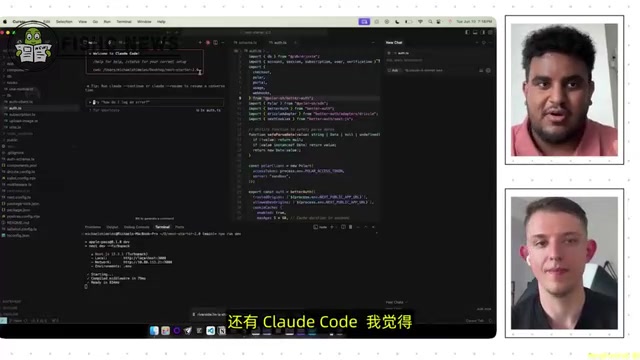
The benefit of this combination: you can use Cursor's friendly interface to browse files and understand code structure while leveraging Claude Code's powerful Agent capabilities to complete actual coding tasks.
The Full AI Coding Tool Landscape: Where Do Codex, Devin, and CodeRabbit Fit?
Codex: Advantages and Limitations of the Cloud Approach
The biggest difference between OpenAI's Codex and Claude Code is: Codex runs in the cloud, while Claude Code runs locally.
The limitations of the cloud approach are obvious — you're restricted to the environments and tools OpenAI allows you to install. A local approach means you can install any dependencies, run any services, and handle sensitive keys without worrying about security issues.
But Codex has unique advantages: for non-technical users, the cloud approach has a lower barrier to entry. Imagine a future where ChatGPT directly integrates Codex — a user says "help me create an app" and gets back a link to an accessible web application. Ross Mike commented: "If OpenAI has proven anything with consumer-grade products, it's that they're unmatched in that arena."
Devin: An AI Software Engineer for Enterprises
Devin is positioned more toward enterprise scenarios. It excels at working on existing, mature codebases — integrating Git workflows, connecting to Slack, building new features, and reviewing code. However, Ross Mike noted that he hasn't heard of anyone using Devin to build a project from scratch.
For Vibe Coders (non-professional developers using AI-assisted programming), if your product hasn't yet achieved PMF (Product-Market Fit), Devin might not be the best choice. PMF is a core concept in the startup world, popularized by Silicon Valley investor Marc Andreessen, referring to the state where a product has found a sufficiently large market and can effectively satisfy that market's needs. Before achieving PMF, the biggest risk for a startup team isn't imperfect technical architecture — it's that the product direction itself might be wrong. Therefore, tools like Devin that target mature codebases offer a poor ROI for early-stage projects still rapidly iterating to validate their direction.
CodeRabbit: An Underrated AI Code Review Powerhouse
Ross Mike specifically recommended CodeRabbit as a code review tool. How it works: when you push code to GitHub, it analyzes all changes and identifies potential bugs, security issues, and optimization opportunities.

A key insight: after prolonged use of AI coding tools, code quality tends to decline due to context overload — "it always starts strong, but gets progressively worse." There's an important technical reason behind this: the Context Window refers to the maximum number of tokens an LLM can process in a single inference pass. Even though modern models have expanded context windows to hundreds of thousands or even millions of tokens, research shows that models don't utilize information in long contexts uniformly — there's a phenomenon called "Lost in the Middle," where models pay more attention to information at the beginning and end of the context while tending to overlook information in the middle. As conversation turns accumulate, the aggregated code snippets, modification history, and instructions gradually fill the context window, causing the model's "memory" of earlier code structures to become blurry, leading to inconsistent modifications or the introduction of new bugs.
CodeRabbit reviews all code in one pass without context degradation issues, making it particularly adept at catching errors that get missed during extended coding sessions.
Even more practical: when CodeRabbit finds issues, it directly generates fix prompts that you can copy and paste into Claude Code or Cursor for one-click fixes.
Practical Guide: How to Efficiently Build Projects with Claude Code
Start from a Template, Not from Scratch
Ross Mike emphasizes that most projects share the same foundational infrastructure needs: landing pages, user authentication, databases, payment systems. Rather than building from scratch each time, find a reliable template as your starting point.
His recommended workflow:
- Choose a Starter Template (a base template with Auth, payments, and database)
- Use Claude Code to analyze the codebase and generate a Markdown file explaining the application's architecture and workflows
- Use this Markdown file as the foundation to start building specific features with Claude Code

Tech Stack Selection: Don't Overthink It, Just Get It Running
Ross Mike's attitude toward tech stack selection is highly pragmatic: Before achieving PMF, whether you choose Supabase or Convex for your database doesn't matter. Similarly, the choice between Cursor and Windsurf isn't worth agonizing over. This philosophy aligns closely with Lean Startup methodology: first validate market hypotheses with a Minimum Viable Product (MVP), then optimize technical architecture once the direction is confirmed. Premature technical perfectionism is often the silent killer of startup projects.
He suggests focusing on "AX" (AI Experience) — choosing tech stacks that AI models handle well. TypeScript is favored by AI because its type system provides a self-validation mechanism — even when the model "hallucinates," type checking can catch errors.
Specifically, TypeScript is a superset of JavaScript whose core feature is a static type system. In traditional development, the type system helps developers catch errors at compile time rather than runtime. In AI coding scenarios, the type system plays an additional critical role: it provides AI models with an "automatic validation mechanism." When AI-generated code has type mismatches, unimplemented interfaces, or parameter errors, the TypeScript compiler immediately throws errors, and the AI Agent can automatically correct the code based on this error information. By contrast, errors in dynamically typed languages like Python often don't surface until runtime, making it harder for AI to independently discover and fix problems. This is also why TypeScript's adoption rate in AI-assisted development is significantly higher than its market share in traditional development.
Real Case: Building a Complete App with Claude Code in 4 Hours
Ross Mike demonstrated a project he built with Claude Code called "Vibe Check" — a web-based code review tool. This complete application featuring GitHub login, code analysis, security scanning, and an AI chat interface had 70% of its code written by Claude Code, taking only about 4 hours total (two days, two hours each day).
He admits that this project would probably have taken two weeks if built entirely by hand. Claude Code's value isn't in doing things humans can't — it's in dramatically compressing development time.
Future Outlook: Ecosystem Explosion After Claude Code SDK Launch
Anthropic is about to release the Claude Code SDK, supporting TypeScript and Python. This means anyone can build their own coding tools on top of Claude Code.
An SDK (Software Development Kit) is a collection of programming interfaces and tools that a platform provides to third-party developers. The strategic significance of Anthropic opening the Claude Code SDK is analogous to Apple opening the iOS SDK and catalyzing the App Store ecosystem. By letting third-party developers build vertical tools on top of Claude Code, Anthropic is effectively upgrading Claude Code from a "product" to a "platform." If this platform strategy succeeds, it will create powerful network effects: more third-party tools attract more users, more users generate more usage data, and more data helps Anthropic improve the underlying model.
This presents both an exciting and unsettling prospect: if Claude Code's capabilities are on par with Cursor, then anyone could create a "Cursor-level" coding tool. Ross Mike predicts that vertical-domain specialized AI coding tools will emerge as winners — tools focused on React, focused on WordPress, or even running on mobile devices.
For Cursor and Windsurf, the only long-term moat may be building their own models. This also explains why Cursor raised $900 million — because the only way to compete against the Anthropic "behemoth" is to "recreate an Anthropic." They're not just competing with Claude Code as a product; they're competing with the entire Claude Code ecosystem.
Summary: Recommended AI Coding Tool Combination for 2025
For today's developers and Vibe Coders, Ross Mike's recommended golden combination is:
| Tool | Role |
|---|---|
| Claude Code | Core execution Agent, responsible for writing and modifying code |
| Cursor or Windsurf | IDE and Q&A assistant, responsible for code browsing and understanding |
| CodeRabbit | Last line of defense for code review |
| Starter Template | Project starting point, avoiding reinventing the wheel |
As Ross Mike says: "Don't take tool selection too seriously — most tools have free trials and cost just a few dollars per month. Before you really need to get serious, just enjoy the fun of building."
Key Takeaways
- Cursor and Windsurf use the same underlying model; the real difference lies in their respective tool calling chains (file I/O, context management, etc.), which form their core moat
- Claude Code's core advantage is that the model provider (Anthropic) builds the tool chain themselves; 95% of Anthropic engineers use it, and it performs stronger in large codebase comprehension and Agent capabilities
- Best practice is combining Claude Code embedded within Cursor/Windsurf — the IDE handles browsing and understanding code, while Claude Code handles task execution
- Codex (cloud-based) suits consumer-level users, Devin suits enterprise feature iteration, and CodeRabbit is an underrated code review powerhouse — each tool has a different positioning
- The Claude Code SDK is about to launch, which will spawn numerous vertical-domain coding tools; the only long-term moat for Cursor and Windsurf is building their own models
Related articles
 Product Reviews
The Programmer's Desk Setup Guide: Building a Workspace That Feels Like Home
Discover how programmers build productive, comfortable workspaces. From multi-monitor setups to ergonomic design, explore the desk philosophy that drives focus and flow.
 Product Reviews
Qoder vs Cursor Real-World Comparison: Which $20/Month AI IDE Is Better?
Hands-on comparison of Qoder vs Cursor AI IDEs: Agent autonomy, human interaction count, and architecture decisions. Qoder needed only 2 interactions vs Cursor's 8.
 Product Reviews
Cursor Cloud Agent Demo: Eliminating Bottlenecks Across the Entire Software Development Lifecycle
Deep analysis of Cursor's Cloud Agent demo showing how cloud VMs, automated test artifacts, and a full-chain control plane systematically eliminate human bottlenecks across the software development lifecycle.