Claude Code vs Gemini vs Cursor: A Real-World Android Native Development Comparison

Three AI coding tools tested on Android native dev: each excels differently, platform integration depth is key.
A developer tested Claude Code, Gemini, and Cursor by building an OpenCloud Android node app from scratch. Results show Claude Code has the best engineering workflow but high token consumption and failed to implement core features; Gemini excels in UI fidelity and Android feature implementation thanks to deep Android Studio integration; Cursor performs steadily with unmatched model flexibility. The test reveals that AI coding tool effectiveness depends not just on model intelligence, but critically on integration depth with the target platform.
When AI coding tools are shining in web development, a more challenging question emerges: How do they actually perform when building a moderately complex Android native application from scratch?
A developer chose three mainstream AI coding tools—Claude Code, Gemini, and Cursor—to develop an OpenCloud Android node application as a test project. From simple prompts to comprehensive prompts, they conducted a thorough head-to-head comparison. The results are quite thought-provoking.
Why This Test Project?
The test project involves developing an Android node application for OpenCloud, with core planned features including establishing connections and communicating with OpenCloud. There are several key reasons for choosing this project:
- It's relatively new: OpenCloud is a fairly new project with limited code available online, especially for Android—meaning AI can't simply "memorize answers"
- Moderate difficulty: It's a medium-difficulty project, and OpenCloud's documentation isn't very detailed in this area
- References exist but aren't easy to use: While official code is available for reference, the code structure isn't clear enough to use directly
OpenCloud is the next-generation open-source cloud storage platform from ownCloud, designed to provide self-hosted file sync and sharing services. It uses a microservices architecture, rewritten in Go, with significant improvements in performance and scalability compared to its predecessor. Since the project is still in rapid iteration, its SDK and client ecosystem are not yet mature, especially on mobile. This makes it an ideal project for testing AI coding tools' "real capabilities" rather than "memory"—AI cannot retrieve ready-made solutions from training data and must truly understand requirements and generate original code.
This project setup genuinely tests AI's depth of understanding in native development and code generation capabilities.
Test Environment and Model Configuration
The model choices for the three tools each have their own considerations:
- Claude Code: Using Opus 4.7 model
- Gemini: Using 2.5 Pro, deeply integrated within Android Studio, specifically optimized for Android development
- Cursor: Using Max Mode with Premium routing, no single model specified

Claude Code is Anthropic's command-line AI coding tool that runs directly in the terminal, capable of reading and writing files, executing commands, and searching codebases. Its Opus series model is Anthropic's most powerful reasoning model, excelling at complex multi-step task planning. This approach of directly manipulating project files in the terminal gives it extremely high autonomy, but also means its token consumption far exceeds tools running within an IDE.
Cursor is a deeply customized AI coding IDE based on VS Code. One of its core competitive advantages is model agnosticism. Max Mode allows users to use longer context windows and more computational resources in a single conversation, while Premium routing is Cursor's intelligent model scheduling mechanism—the system automatically selects the most suitable model (such as Claude, GPT-4o, Gemini, etc.) based on task complexity, or compares and fuses results across multiple models. This architecture ensures Cursor isn't bound by any single model's capability limits.
You might not have noticed, but the Gemini integrated in Android Studio differs from the standalone Gemini CLI—the former is specifically optimized for Android development. Google began deeply integrating Gemini into Android Studio starting with the Ladybug version, and this is more than just a simple chat window. Gemini can perceive the entire Android project context, including Gradle build configurations, AndroidManifest permission declarations, resource files, Jetpack Compose component hierarchies, and can directly access official Android documentation, best practice guides, and understand Material Design 3 specifications. Android Studio offers both account and API Key access methods; according to official documentation, the standard subscription tier isn't ideal for coding, and hands-on testing confirms the difference is substantial.
Both Cursor and Claude have Android Studio plugins that can be used directly in the IDE like Gemini, but naturally they can't match the capabilities of the deeply integrated Gemini.
Design Phase: First Experience with AI Prototyping Tools
Before actual coding, app development requires designing prototypes. Google launched Stitch in 2025, and Claude recently released Claude Design. Both make the design process fully visual—AI continuously adjusts layout, color schemes, and components based on your feedback, supporting text or voice chat for design modifications.

Google Stitch is an AI prototyping tool announced at Google I/O 2025 that generates high-fidelity UI prototypes from natural language descriptions and exports them as Figma files or directly generates frontend code. Its MCP (Model Context Protocol) support means design drafts can be passed directly to coding models as context, enabling seamless design-to-code transitions. MCP is an open protocol proposed by Anthropic to standardize communication between AI models and external tools. It has been adopted by multiple AI tool vendors and is becoming the de facto standard for AI tool interoperability.
Both platforms have distinctive design styles:
- Stitch: Offers multiple export options after generating prototypes, with MCP support for mainstream coding models (though it doesn't currently support Android Studio)
- Claude Design: Fewer export options, and currently no MCP support
From practical experience, Claude's understanding and implementation of descriptions is more precise and conservative, while Stitch tends to be more creative and divergent.
Simple Prompt Test: Framework Scaffolding Comparison
The first round of testing used simple prompts, without installing any plugins or using any special techniques. Under these conditions, AI typically only scaffolds the project framework and implements some basic features.
Results comparison:
All three apps had extremely simple UI styles, but in comparison, Claude's generated app contained more logic. Claude clearly searched for information about OpenCloud and Node connections, while Gemini and Cursor didn't research the relevant logic—they just generated standard WebSocket connection code.
WebSocket is a protocol for full-duplex communication over a single TCP connection, commonly used in scenarios requiring real-time data exchange. In Android native development, implementing WebSocket connections typically relies on network libraries like OkHttp or Ktor, but establishing node connections with cloud storage services often involves more complex protocol handshakes, authentication token management, and reconnection mechanisms. AI generating "standard WebSocket connection code" means they only implemented the standard WebSocket protocol layer without handling OpenCloud's specific node discovery, service registration, and session management logic—this is precisely the key difference between generic code generation and project-specific understanding.
This shows that in "cold start" scenarios, Claude's proactive exploration ability is stronger—it attempts to understand the project's specific requirements rather than applying generic templates.
Full Prompt Test: The Real Showdown
The second round provided more comprehensive prompts, including UI design mockups, official repository and documentation URLs, and hints that the AI could reference or directly use code from the official repository.
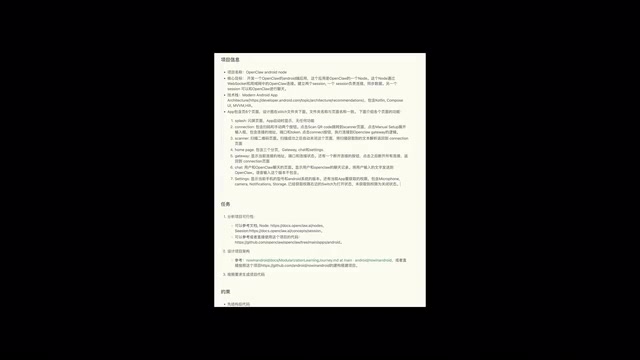
Engineering Capabilities: Claude Far Ahead
From a software engineering perspective, Claude is far ahead. It:
- Plans detailed implementation steps for the project
- Breaks the implementation into multiple specs
- Writes plans, verification, and tests for each spec
- Writes summary documentation after completion
Here, "spec" refers to Specification documents in software engineering. Claude Code breaks large tasks into multiple independent spec files, each containing requirement descriptions, implementation plans, verification criteria, and test cases. This approach simulates the agile development workflow of professional software teams, and is particularly important in large projects or team collaboration scenarios—each module has clear boundaries and can be independently verified, significantly reducing integration risk.
Of course, this rigorous engineering workflow comes at a cost—it consumed massive amounts of tokens, drastically increased the project's total generation time, and nearly exhausted Claude's weekly quota before completion. In comparison, Gemini and Cursor only wrote simple documentation as requested.
UI Fidelity: Gemini Takes the Crown
UI is Gemini's strong suit, which was expected. Gemini's generated UI most closely matched the design mockups, and it even implemented some animation effects. This benefits from Gemini's deep understanding of Jetpack Compose (Android's modern declarative UI framework) and the Material Design 3 design system—it can precisely map visual elements from design drafts to corresponding Compose components and theme configurations. Cursor's UI completion was relatively lower, showing no obvious advantage compared to the other two.
Feature Implementation: Unexpected Results
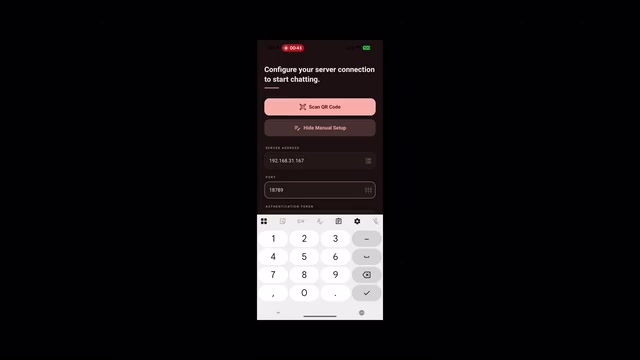
Surprisingly, despite consuming so many tokens and so much time, Claude still failed to implement the critical connection feature. It had more details and peripheral feature implementations than Gemini and Cursor, but didn't break through on the most critical business logic. This exposes a thought-provoking issue: comprehensive engineering processes don't equate to core feature implementation—excessive planning and documentation can sometimes divert AI's "attention" and token budget away from key technical challenges.
Step-by-Step Development Phase: Gemini's Home Advantage
During the subsequent phase of having AI solve problems incrementally and progressively refine the application, the situation changed. This part isn't about generating large amounts of code at once, but having AI gradually solve specific problems.
Since most of the architecture, UI, data, and networking component code used during development belongs to the Android project itself, Gemini performed the best.
A typical example: when the developer asked AI to add permission requests, Gemini not only completed the permission request code but also automatically linked it to the settings screen UI logic, implementing a complete functional loop in one go. The other two models simply added permission request code without considering the associated UI interactions.
To understand the importance of this difference, you need to know Android's permission model: starting from Android 6.0 (API 23), apps must not only declare permissions in AndroidManifest.xml but also dynamically request user authorization at runtime. A complete permission handling flow includes checking permission status, displaying permission rationale dialogs, initiating permission requests, handling user responses, and guiding users to system settings when they deny permissions. Gemini's ability to automatically link this entire chain shows it understands the complete lifecycle of Android's permission model, rather than just calling the requestPermissions() API. This holistic grasp of platform-level interaction patterns is precisely the advantage that deep integration brings.
Overall Scores: Each AI Coding Tool Has Its Strengths
It's important to note that these test results are specific to Android native application development and don't represent how these models perform on other types of projects.
| Dimension | Claude Code | Gemini | Cursor |
|---|---|---|---|
| Engineering Process | ⭐⭐⭐⭐⭐ | ⭐⭐ | ⭐⭐ |
| UI Fidelity | ⭐⭐⭐ | ⭐⭐⭐⭐⭐ | ⭐⭐ |
| Android Feature Implementation | ⭐⭐⭐ | ⭐⭐⭐⭐⭐ | ⭐⭐⭐ |
| Model Flexibility | ⭐⭐ | ⭐⭐⭐ | ⭐⭐⭐⭐⭐ |
| Token Efficiency | ⭐⭐ | ⭐⭐⭐⭐ | ⭐⭐⭐⭐ |
Claude Code leads significantly in project development workflow and engineering design, making it especially suitable for large-scale or team collaboration projects. Gemini has a clear advantage in Android app feature development and implementation—after all, it's Google's own product. Cursor performs solidly but unremarkably, yet its support for nearly all mainstream AI models is its biggest competitive edge—when a model updates or a new model launches, users can switch immediately without being locked into a single vendor's ecosystem.
For Android native developers, if your primary workspace is Android Studio, Gemini's deep integration and targeted optimization is definitely worth prioritizing. But if you work across multiple tech stacks, Cursor's model flexibility might suit you better. And for projects that prioritize engineering standards and team collaboration, Claude Code's systematic methodology is an irreplaceable advantage.
This test also reveals a deeper insight: the capability boundaries of AI coding tools depend not only on the underlying model's intelligence level, but are also highly dependent on how deeply the tool integrates with the target development platform. On Android—a platform with complex lifecycles, permission models, and UI frameworks—deep understanding of platform characteristics is often more critical than general-purpose code generation capabilities.
Related articles
 Product Reviews
The Programmer's Desk Setup Guide: Building a Workspace That Feels Like Home
Discover how programmers build productive, comfortable workspaces. From multi-monitor setups to ergonomic design, explore the desk philosophy that drives focus and flow.
 Product Reviews
Qoder vs Cursor Real-World Comparison: Which $20/Month AI IDE Is Better?
Hands-on comparison of Qoder vs Cursor AI IDEs: Agent autonomy, human interaction count, and architecture decisions. Qoder needed only 2 interactions vs Cursor's 8.
 Product Reviews
Cursor Cloud Agent Demo: Eliminating Bottlenecks Across the Entire Software Development Lifecycle
Deep analysis of Cursor's Cloud Agent demo showing how cloud VMs, automated test artifacts, and a full-chain control plane systematically eliminate human bottlenecks across the software development lifecycle.