Claude Cowork Complete Beginner's Guide: 7 Core Capabilities Explained with Real-World Use Cases

Claude Cowork upgrades from chatbox to automated work assistant through local files, persistent memory, connectors, and skills.
Claude Cowork is Anthropic's native desktop work assistant. Its key advantages over Claude Chat are direct local file access (bypassing the 20-file/30MB cloud limit), a larger context window, and delivering actual files rather than chat responses. Its most valuable capabilities are persistent memory (via local CLAUDE.md and MEMORY.md files with no size cap), connectors (integrating Gmail, Notion, Google Drive, and more), skills (locking repeatable workflows into one-click processes), and scheduled tasks (running reliably thanks to the compounding effect of all other capabilities). The main current weakness is the browser extension — slow, unreliable, and resource-heavy — along with the inability to force web search. Cowork's real power emerges from all seven capabilities working in combination, not from any single feature.
If you use Claude Chat every day, find Claude Code intimidating, and have heard of Cowork but aren't sure what it actually does — this article is for you. Claude Cowork is a native desktop application from Anthropic. It's not just a chat interface; it's a work assistant that can genuinely access local files, remember your preferences, connect to external tools, and execute tasks automatically. This article is based on a 20-minute hands-on tutorial and breaks down Cowork's 7 core capabilities, explaining where each fits into a real-world workflow.
Three Fundamental Differences Between Cowork and Claude Chat
To understand Cowork, you first need to understand how it differs from the Claude Chat you already know. Both require an internet connection, but Chat uploads files to the cloud — which comes with hard limits: a maximum of 20 files per conversation, each no larger than 30MB. Cowork accesses your local files directly, so none of those restrictions apply. You can work with far more files, and far larger ones.
Cowork also has a significantly larger context window, meaning you can accomplish more before triggering "Compacting" — the process where Claude summarizes earlier context to free up space, potentially losing critical details.
The second difference is more significant: Claude Chat gives you a chat response that you have to copy, format, and download yourself. Cowork actually does the work — it delivers ready-to-use files directly into your folder.
Third, because of these two differences, the way you give instructions to Cowork needs to change. Chat uses "task-first" language — you tell it what to do step by step. Cowork uses "outcome-first" language — you define the final deliverable, constraints, and quality standards, then let it run. For example: "I have 15 original thumbnail images in this folder. I need them organized into subfolders by theme, with descriptive filenames."
What is a "context window"? The context window refers to the total amount of text a model can process simultaneously in a single conversation, typically measured in tokens (roughly 1,500 tokens per 1,000 Chinese characters, or ~750 words in English). When a conversation exceeds the window limit, the model must "compact" — replacing earlier exchanges with summaries, causing raw details to be lost. The Claude 3.7 series has a context window of approximately 200K tokens. Because Cowork accesses local files directly rather than uploading copies, it can reference file content within the window more efficiently, leaving more usable space. This matters especially for workflows that repeatedly reference large materials — like an entire contract or dozens of pages of meeting notes — within the same task.
Essential Initial Setup
Before you start, there are a few settings you must configure. In the Cowork tab under Settings, you can add instructions that apply only to Cowork. These are essentially "guardrails" that prevent it from touching your files without permission — for example: "Before deleting, overwriting, or renaming any existing files, tell me what changes will be made and wait for confirmation." Think of them as training wheels you can gradually remove as you get more comfortable.
Under Capabilities, enable both memory features, disable location metadata to protect your privacy, and set tool access to "on demand." Finally, create a subfolder called Cowork Playground inside your Documents directory. Keep all of today's activity inside this one folder so nothing else on your machine is affected.
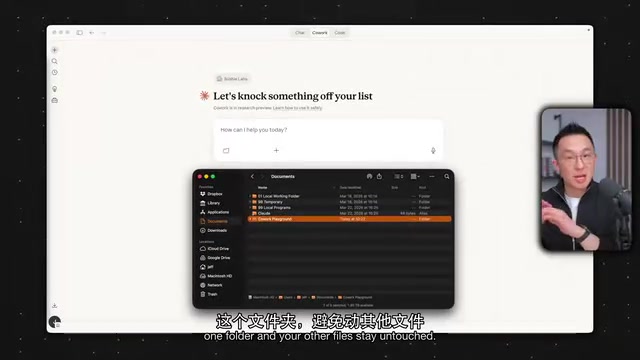
One important note: Cowork is very strict about file access. Even if you drag a file from your Downloads folder into a conversation, if it isn't inside an authorized folder, Cowork can see it but can't read it. So as you follow along, make sure all your files are inside the Playground folder.
Capability 1: Create, Edit, and Organize Files Directly
This is the foundation everything else builds on. Here's a concrete example: drop a folder containing 100+ receipts (a mix of PDFs and JPEGs) into Playground, then tell Cowork: "Generate an expense report from the receipts folder. Give me an Excel file with date, vendor, category, amount, and a totals row. Flag anything unclear for review."
Thanks to the guardrail instructions, Cowork will first outline its planned steps and wait for confirmation, then read each image one by one, extract the data, and output a formatted Excel file directly — with suspicious rows already flagged. This is essentially impossible in Claude Chat. The 20-file limit stops you cold, and even with fewer files, Chat would only give you a table inside the chat window that you'd have to download manually.
Similarly, Cowork can split an oversized PDF (400MB+) into multiple smaller files named by chapter, or reconstruct a "image-based" uneditable presentation generated by Notebook LM into a proper slide deck with real, editable text boxes.
Capability 2: Persistent Memory
Persistent memory is the most important capability in this article — and it's only possible because Cowork has local file access.
Claude Chat does have memory — if you ask it to remember a preference, it will carry that forward in future conversations. But Chat's memory lives in the cloud and has a hard capacity limit. Cowork writes memories to real files on your computer. It can remember every decision and every preference you ask it to retain, for as long as you want.
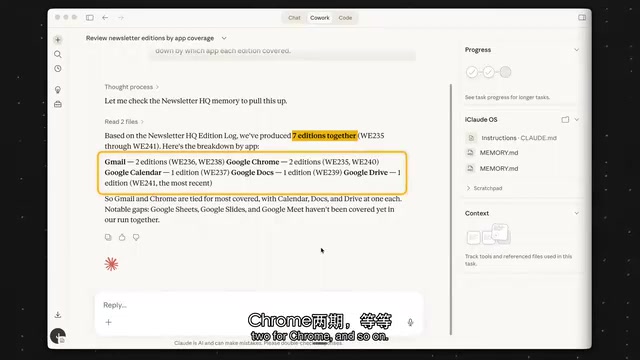
In practice: ask Cowork to summarize a meeting transcript. If you're unhappy with the structure and edit it yourself, then tell it: "Compare your version with mine, save these preferences to visible CLAUDE.md and MEMORY.md files in the root directory, and remember them next time." Cowork will create both files in the Playground root. From then on, every time you ask it to remember something, it writes it there — and the more you add, the better it understands how you work.
Capability 3: Connectors for External Tools
By default, Cowork can only see what's inside your folders. Connectors let it reach into the tools you already use — Gmail, Google Drive, Notion, and others — to both read from and work directly within them. Add them under Customize → Connectors in the left sidebar. At minimum, connect Gmail, Google Calendar, Google Drive, and Notion.
Once Gmail is connected, you can ask it to "read my emails from the past month, extract my tone and style, and save it as writing guidelines." Future email drafts will automatically match your voice. Even more powerful is pairing two connectors: have it cross-reference Google Drive meeting transcripts from Gemini with Notion meeting notes to surface commitments and action items that were said but never written down. When no existing connector fits your needs, you can add custom connectors via MCP.
What is MCP? MCP (Model Context Protocol) is an open protocol introduced by Anthropic in late 2024, designed to define a unified standard for communication between AI models and external tools or data sources. Think of it as a "USB port" for AI: tool developers expose interfaces according to the MCP spec, and AI clients like Cowork can plug in and use them without custom adapters. Databases, code execution environments, and enterprise SaaS tools already have MCP server implementations. For Cowork users, this means that when a tool isn't in the official connector catalog, as long as it has an MCP server, you can paste its address into Cowork's custom connector field and bring almost any external service into your workflow.
Capability 4: Skills
The core idea behind Skills is simple: walk through a real workflow once, then lock it in as a one-click repeatable process. A simple example: ask Cowork to rewrite some text to be clearer and more concise. When you're happy with the result, say "Turn what you just did into a clarity-and-conciseness skill." It will invoke the built-in skill creator, ask a few clarifying questions, and generate a skill you can add with one click.
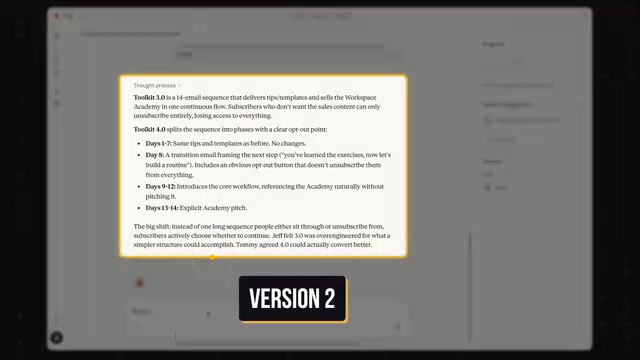
A more practical scenario is the weekly status report: hand Cowork updates from three teams in different formats, give iterative feedback ("lead with three cross-team metrics, then three highlights and three lowlights, keep it under 300 words, output as PDF"), and once you're satisfied, say "Look back over this conversation and create a weekly report skill." What used to take 10 steps now runs automatically every time — and the time savings compound significantly over the long run.
Three things to keep in mind about Skills: First, make sure Anthropic's skill creator is enabled before you start. Second, when you update a skill you need to copy it over the old version manually — back it up to Google Drive, because skills don't migrate automatically if you switch computers. Third, don't use the "create a skill together with Claude" approach from scratch. Walk through a real workflow manually first, then reverse-engineer it into a skill — the results are much better.
Capability 5: Projects
Cowork Projects are largely the same as Claude Chat Projects — the key difference is that Cowork Projects come with all the capabilities described above built in: local file access, persistent memory, connectors, and skills.
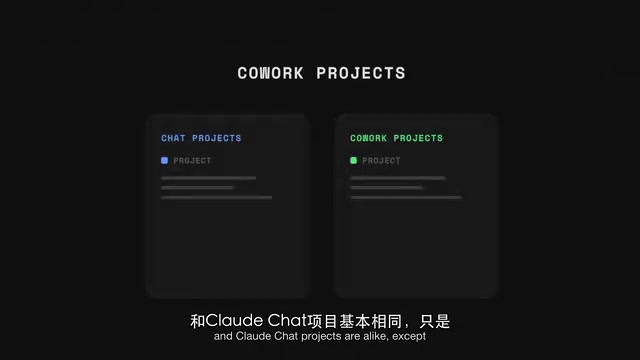
One distinction worth highlighting: Cowork Projects can write directly to their own knowledge files. In a Chat Project, if you ask Claude to lock in something it learned, it can only generate an updated knowledge file — you still have to manually delete the old one. In Cowork, one instruction — "lock this principle into this project" — and it writes directly to the instruction file. No extra steps needed.
Capability 6: Browser Extension — The Biggest Weak Point
This capability is conceptually simple: with the Claude browser extension installed, Cowork can in theory delegate tasks to the browser. But the honest assessment is that it can't be recommended right now, for three reasons. First, it's slow — most interactions require a screenshot to be sent back to Cowork before it decides on the next action. Second, it's unreliable — tasks frequently stall midway. Third, it's resource-intensive — controlling the browser causes it to over-deliberate and overthink each step.
Related to this is a weakness with web search. Claude Chat lets you force-enable or force-disable web search, and even toggle it mid-conversation. Cowork cannot force web search, and frequently falls back on that unreliable browser extension instead. This is a real, tangible limitation.
Capability 7: Scheduled Tasks
Scheduled tasks aren't a new idea — Gemini and ChatGPT have had them for a while. But Cowork's scheduled tasks are described as working "almost perfectly" — and the reason is precisely the compounding effect of all the capabilities described above.
Take a "morning inbox triage" task that runs at 6am every day: it generates a report and drafts replies to all emails. Here's what's actually happening behind the scenes — Cowork distills an Inbox Zero workflow into rules and saves them as a Markdown document via local file access; it reads all Gmail messages via the connector and drafts replies against those rules; and after a week of mediocre results, persistent memory retained all the corrections (like exactly how to sign off on emails), until it now handles the inbox the way you would yourself.
This represents weeks of accumulated feedback, context, and "learning" — and it illustrates where Cowork's real power comes from: the combination of all seven capabilities, not any single feature in isolation.
What is Inbox Zero? Inbox Zero is an email management philosophy coined by productivity writer Merlin Mann. The core goal is to keep your inbox perpetually empty. The practice involves making an immediate decision on every email: reply now, delegate, defer, archive, or delete — rather than letting emails pile up as a de facto to-do list. Its value lies in reducing "continuous partial attention" — an inbox full of unprocessed messages constantly draws on your cognitive bandwidth. Cowork's morning task codifies this methodology: your personal sorting and reply standards are written into a Markdown file, and the model executes them automatically each day, turning a process that required repeated decisions into a rule set that runs itself.
Summary
Claude Cowork's value isn't in any single flashy feature — it's in the compounding effect of local file access, persistent memory, connectors, and skills working together. That combination is what transforms Cowork from "a chat interface that gives advice" into "a work assistant that actually delivers results." For anyone who relies heavily on Claude in their daily work, spending 20 minutes setting up your Playground, memory files, and connectors can turn one-off repetitive tasks into automated workflows that run themselves. That said, the browser extension and the inability to force web search remain clear weak spots in the current version — worth keeping in mind before committing to Cowork for any workflow that depends on live web data.
Related articles

Chain of Thought Isn't Just for AI: How Humans Can Use CoT to Improve Thinking Quality
Chain of Thought isn't just a prompt trick for large models. Starting from a Hacker News discussion, this article analyzes why CoT works for human thinking too, breaks down actionable ways to transfer it, and highlights the key differences between human CoT and machine CoT.
Cloudflare Teams Up with OpenAI: Closi…
Cloudflare Teams Up with OpenAI: Closing the Loop from Vulnerability Discovery to Defense with AI
Cloudflare uses OpenAI Daybreak to investigate security vulnerabilities and generate reviewable remediation plans, while developers use Codex to boost coding efficiency and quality.

Orca Multi-Agent Orchestration in Practice: A Guide to Parallel Collaboration with Claude and Codex
Orca is Stable AI's free open-source agent workbench supporting 34 agents like Claude Code and Codex in parallel. Learn its Git worktree isolation, multi-model orchestration, and mobile management.