Claude Cowork vs Codex: An In-Depth Multi-Dimensional Comparison

A comprehensive head-to-head comparison of Claude Cowork and OpenAI Codex across key dimensions.
This article provides a detailed multi-dimensional comparison of Anthropic's Claude Cowork and OpenAI's Codex. Claude Cowork excels in third-party integrations, granular permissions, and creative planning, while Codex stands out in image generation, execution-oriented tasks, and editing interactions. Both offer $20/month plans, but differ in free-tier access and automation organization. The ideal approach is using both tools based on their respective strengths.
Introduction
More and more users are integrating AI Agent tools into their daily workflows. AI Agents are AI systems capable of autonomously perceiving their environment, making decisions, and executing tasks—distinct from traditional Q&A chatbots. Since 2024, AI Agents have evolved from concept to product. The core capability of these tools lies not just in understanding natural language instructions, but in proactively invoking external tools, manipulating file systems, and accessing APIs to complete complex multi-step tasks. This marks a paradigm shift in AI applications from "conversational assistant" to "work partner."
Anthropic's Claude Cowork and OpenAI's Codex are two of the most closely watched AI work assistants, each with its own strengths. This article provides a comprehensive comparison across multiple dimensions—user interface, third-party integrations, automation capabilities, design performance, and pricing—to help you find the tool that best fits your needs.
User Interface & Work Mode Comparison
Claude Cowork: Tab-Based Separation Design
The Claude desktop app uses three independent tabs: regular Chat, Cowork (knowledge work), and Claude Code (code-related tasks). Tasks in each tab are isolated from one another—chat content won't bleed into the Cowork interface. This design gives users a clear sense of their current working context.
This tab-based separation design draws from the cognitive psychology concept of "context switching costs." Research shows that when users frequently switch between different types of tasks, cognitive load increases significantly and error rates rise accordingly. Separating chat, knowledge work, and code development into independent tabs essentially helps users build a clear mental model—each tab corresponds to a work mode, reducing information interference. This design pattern isn't uncommon in professional software; for example, the workspace switching logic in Adobe Creative Suite follows a similar principle.
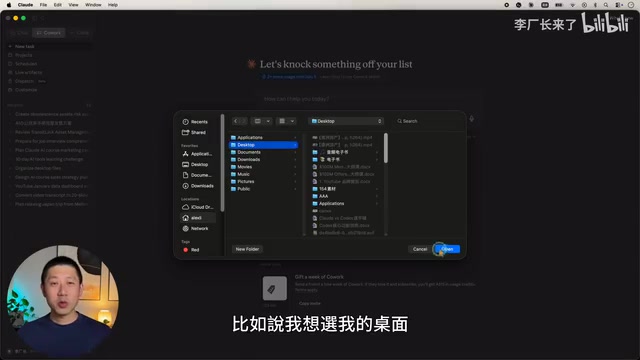
Cowork supports selecting multiple folders for the same task—for instance, linking both a project folder and a desktop folder simultaneously, making it easy to save task outputs to different locations. Additionally, multiple projects can be created within the same folder, enabling categorized management of different task types.
Codex: Unified Integrated Design
Codex has no tabs; all features are integrated into a single interface. Users switch contexts through "work modes" in settings—coding mode or general work mode. The advantage is smooth operation without switching back and forth; the downside is a relatively cluttered interface with too much content in the left sidebar.
A notable characteristic of Codex is that selecting a new folder automatically creates a project, and each folder can only correspond to one project. This becomes a limitation when you need to manage multiple task types within the same folder.
Interface Comparison Verdict: Both have their pros and cons—it's a tie. Claude is more organized and structured; Codex is more streamlined and fluid.
Third-Party Tool Integration
Connectors vs Plugins
Claude Cowork's "Connector" system supports a large number of third-party tools and can be further extended through Zapier. Zapier is one of the world's largest no-code automation platforms, connecting over 7,000 apps and services. When Claude Cowork extends its connectors through Zapier, it means users can extend the AI Agent's capabilities to virtually every mainstream SaaS tool—from Slack and Notion to Salesforce and HubSpot. This dual-layer architecture of "Connectors + Zapier" enables Claude Cowork's integration capabilities to grow exponentially.
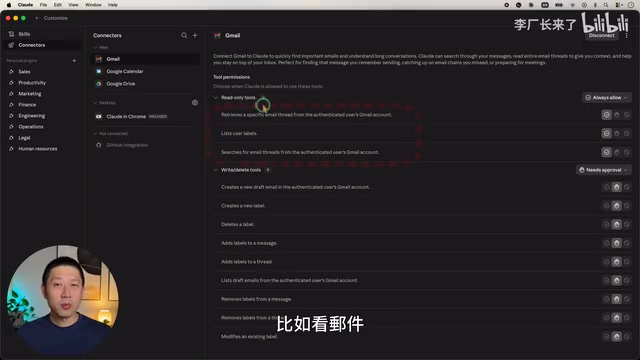
The most impressive feature is its granular permission control. Take Gmail as an example: you can set read-only operations (viewing emails, searching threads, etc.) to fully automatic access, while write operations (sending emails) require manual confirmation. This read-write permission separation strategy borrows from the enterprise security concept of the "Principle of Least Privilege." In practice, an AI agent automatically reading email content for analysis and summarization carries relatively manageable risk; but automatically sending emails could have irreversible consequences—wrong recipients or inappropriate wording could cause serious problems. By setting read operations to automatic and write operations to manual confirmation, Claude strikes a balance between efficiency and safety. This "Human-in-the-Loop" design philosophy represents the current industry best practice for safe AI Agent deployment.
Codex's "Plugin" system has a relatively smaller selection, lacks Zapier integration, and offers less flexible permission settings. The absence of Zapier support means Codex can only rely on its own limited plugin ecosystem, creating a notable gap in enterprise-level workflow orchestration.
Integration Verdict: Claude Cowork wins decisively, with more connectors and finer-grained permission management.
Scheduled Tasks & Automation
Both support scheduled task configuration. For example, setting up "report last night's stock market performance every morning at 7 AM" works reliably on both platforms.
The key difference lies in task organization, reflecting fundamentally different information architecture philosophies:
- Cowork: All run records for the same scheduled task are grouped under a single entry, with historical runs viewable via the top-right corner. This adopts a "task-oriented" hierarchical structure, similar to the Conversation View in email clients, aggregating related content together.
- Codex: Each automation run is listed as a separate record, using a "timeline-oriented" flat structure. As tasks accumulate, the left sidebar becomes increasingly bloated.
When the number of automated tasks is small, the difference is negligible. But once users set up dozens of scheduled tasks, Codex's flat list quickly becomes unmanageable, while Cowork's aggregated view keeps the interface clean.
Automation Verdict: Cowork's organizational approach is more sensible, with a clear advantage as task volume grows.
File Creation & Design Capabilities
Documents & Presentations
Both excel at creating PDFs, Excel spreadsheets, and Word documents. For PowerPoint creation, Cowork leans more toward creative design, while Codex focuses more on information density.

Codex has a unique advantage in supporting full-screen preview and an "annotation feature"—you can select parts of a slide you're unhappy with and leave comments for modifications directly, without switching back and forth between the chat window and preview. This WYSIWYG interaction approach dramatically reduces the communication cost of design iterations.
Image Generation
This is Codex's absolute stronghold. Codex has GPT Image 2 built in, enabling direct generation of high-quality images. GPT Image 2 is OpenAI's native image generation model launched in 2025, integrated directly into the GPT-4o architecture, achieving deep fusion of text understanding and image generation. Compared to the earlier DALL·E series, GPT Image 2 shows significant improvements in text rendering accuracy, style consistency, and detail control—particularly excelling at generating commercial design assets with precise text. Codex's built-in integration means users can complete copywriting, layout design, and image generation within the same workflow, without switching to external tools like Midjourney or Stable Diffusion. This end-to-end creative experience offers high practical value for marketing teams and content creators.
Claude itself doesn't support image generation and can only achieve it indirectly through third-party connectors, adding an extra layer of intermediation that compromises both flexibility and efficiency.
Web Design
Both can generate web pages and landing pages with solid results. Codex supports full-screen display and localized annotation editing, providing a better editing experience.
Design Capability Verdict: Codex has a clear advantage in image generation and editing interaction; PPT and web design are roughly comparable.
Pricing & Subscription Plans
| Plan | Claude Cowork | Codex |
|---|---|---|
| Free | Not available | Available (limited quota) |
| Basic Paid | $20/month | $20/month (Plus) |
| Premium | $100-200/month | - |
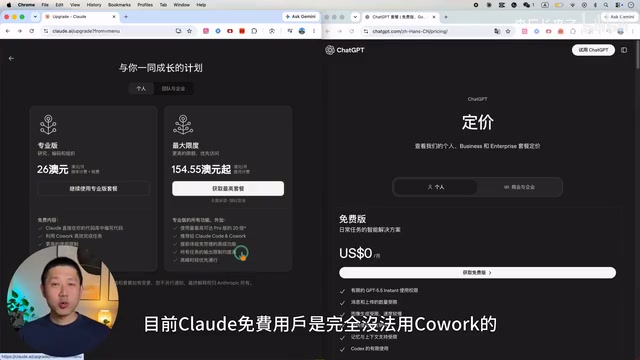
For typical daily use, the $20/month plan on either platform is generally sufficient. Power users may need Claude's higher-tier plans. One detail worth noting: free ChatGPT users can access Codex (albeit with limited quota), but free Claude users have no access to Cowork whatsoever. This strategic difference reflects the two companies' distinct market approaches: OpenAI tends to attract users through free trials for conversion, while Anthropic positions Cowork as a purely paid professional tool.
User Experience & Use Case Analysis
Speed & Token Consumption
Cowork responded faster in nearly all tests, but also consumed more tokens. Tokens are the basic unit of measurement for how large language models process text—roughly 1-2 tokens per English word and about 1.5-2 tokens per Chinese character. Token consumption directly impacts API call costs and subscription quota efficiency.
Cowork's higher token consumption likely relates to Claude's reasoning strategy—Anthropic's models tend to generate more detailed intermediate reasoning steps (similar to Chain-of-Thought prompting). While this improves output quality, it also increases token overhead. For users on usage-based premium plans, this means Codex may complete more tasks on the same budget, while Cowork offers better quality assurance per individual task.
Best Use Cases for Each
Recommended scenarios for Claude Cowork:
- Complex front-end development with emphasis on visual design quality
- Deep planning and brainstorming
- Workflows requiring automatic task delegation
- Building custom workflows with Skills—the Skills feature allows users to package frequently used workflows into reusable templates. For example, you can create a Skill called "Competitive Analysis Report" with preset data sources, analytical frameworks, output formats, and file save paths, then trigger the entire process with a single click. This mechanism is similar to "Macros" in traditional automation tools or "process bots" in RPA (Robotic Process Automation), but leveraging the understanding capabilities of large language models, Skills can handle unstructured tasks requiring judgment—far exceeding the capabilities of traditional automation tools.
- Team collaboration in enterprise environments
Recommended scenarios for Codex:
- Extensive research or web scraping
- Generating structured documents (PDFs, reports)
- Projects requiring workflow management, review, and publishing
- Projects requiring image generation
- Ongoing execution of long-term projects
Core Differences Summary
Claude Cowork is more creative, adept at offering different perspectives and catching ideas that users themselves hadn't considered. It's better suited for the planning phase and tackling difficult problems. This trait likely stems from Anthropic's unique interpretation of "Helpfulness" in model training—not just answering questions, but proactively providing valuable insights.
Codex is more "obedient," better at following instructions, and well-suited for the everyday execution tasks of typical office workers. It particularly excels in long-term projects, quietly completing tasks in the background while also being proficient at code review and bug fixing. This execution-oriented style makes it perform better in work scenarios requiring high consistency and predictability.
Final Recommendations: How to Choose the Right AI Work Assistant
Don't agonize over which tool is "better"—the key is choosing the right tool based on the task at hand. An ideal workflow would be: use Claude Cowork for planning, brainstorming, and strategy development, then use Codex for code review and plan execution.
If budget allows, subscribing to both services and allocating tasks based on each tool's strengths may be the most efficient approach currently available. Stay open-minded—use whichever feels right, and don't hesitate to try new tools as they emerge. Migration costs are actually lower than you might think. As the AI Agent ecosystem rapidly evolves, competitors like Google's Gemini and Microsoft's Copilot are also iterating at full speed. Maintaining tool flexibility is wiser than betting on a single platform.
Key Takeaways
Related articles

AI Comic Drama with WorkBuddy from Scratch: A Step-by-Step Skill Pack Installation Guide
Learn how to create AI comic dramas with WorkBuddy from scratch. This guide covers installation, Skill pack import and invocation, plus a script generation demo with manual revision tips to get you through the first step from script to storyboard.

WorkBuddy Agent Runs the Entire GEO Database Mining Pipeline with a Single Prompt
WorkBuddy agent automates GEO database mining: from data search and curation to batch correction, differential analysis, co-expression networks, feature gene screening, and immune infiltration—a single prompt generates a complete bioinformatics report, greatly lowering the barrier to bioinformatics analysis.

PC Memory Wasted? Hacker News Debates Centralized Data Centers
Hacker News users argue that personal computer memory is wasted and should be centralized in data centers, sparking debate on centralized vs. distributed computing resource allocation. This article analyzes the logic behind the claim, the costs of centralization, and new tensions in memory resource allocation in the AI era.