Claude Opus 5.5 Arrives on Cursor: Tops CursorBench, Cuts Costs by 40%

Claude Opus 5.5 tops Cursor's CursorBench leaderboard while slashing per-task costs by 40%.
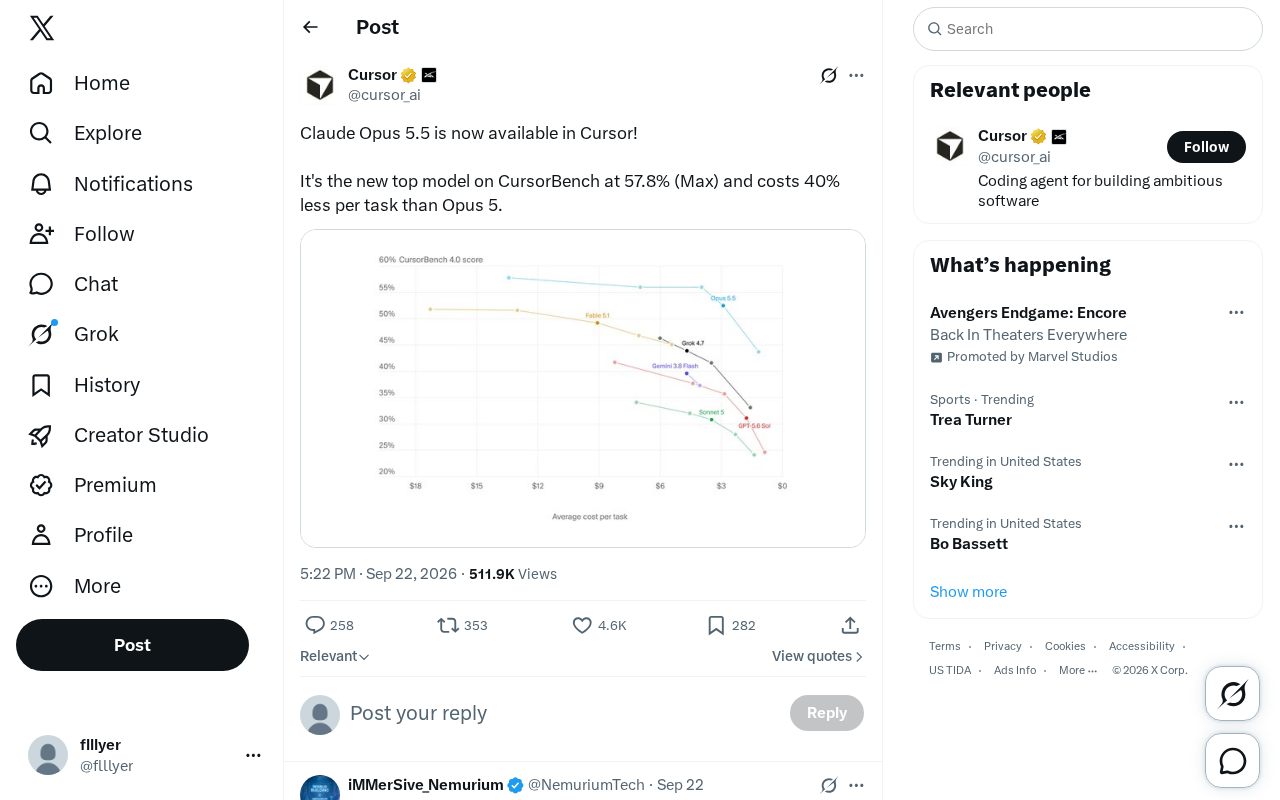
Anthropic's Claude Opus 5.5 has launched on the Cursor coding platform, claiming the top spot on CursorBench — Cursor's real-world coding benchmark — with a 57.8% score in Max mode, while cutting per-task costs 40% versus Opus 5. CursorBench focuses on engineering-level tasks like cross-file edits and code refactoring, making it a stronger signal of practical value than general benchmarks. The cost reduction makes the previously expensive Opus series accessible for everyday development workflows.
Claude Opus 5.5 Now Available on Cursor
Cursor has officially announced that Claude Opus 5.5 is now live on its coding platform. The new model tops the leaderboard on CursorBench — Cursor's in-house evaluation benchmark — with a score of 57.8% in Max mode, making it the strongest-performing model on the chart. Even more notable: its per-task cost is 40% lower than its predecessor, Opus 5.
For developers who work with AI coding assistants every day, these two metrics — stronger performance and lower cost — are exactly what directly impact the day-to-day experience.
What Does 57.8% on CursorBench Actually Mean?
CursorBench is an evaluation benchmark Cursor designed around real-world coding scenarios. Compared to general-purpose code test suites, it more closely mirrors the tasks developers actually encounter in production projects: cross-file edits, context comprehension, code refactoring, and debugging.
Opus 5.5 scoring 57.8% in Max mode and claiming the top spot signals that it has stronger reasoning and execution capabilities when handling complex, multi-step programming tasks. Max mode typically means the model can leverage a larger context window and a more generous reasoning budget, so this score represents the upper bound of the model's capability.
It's worth noting that the official announcement only disclosed this single headline figure. Detailed comparisons against other models, breakdowns across individual task categories, and other granular data haven't been published yet — so real-world effectiveness will still need to be validated within each developer's own workflow.
CursorBench is a domain-specific benchmark, distinct from general code generation benchmarks like HumanEval or MBPP, which primarily test whether a model can generate code from scratch given a specific function signature. CursorBench questions are much closer to what an engineer actually does on a typical workday: locating bugs within a large existing codebase, coordinating changes across multiple files, and understanding implicit dependency relationships. These tasks demand stronger long-context retrieval and multi-step planning, making scores a more meaningful reflection of an AI's practical value in real engineering environments — not just its ability to solve algorithm puzzles.
The Real-World Value of a 40% Cost Reduction
Compared to the performance gains, a 40% drop in cost may actually be the more compelling headline. As AI coding tools become increasingly mainstream, the per-call cost of a model directly determines whether a team can use high-end models at scale and with high frequency.
The Opus series has historically been powerful but expensive, leading many users to reserve it for only the most critical tasks while relying on cheaper models for everyday development. By cutting per-task costs by 40% while maintaining — or even improving — capability, Opus 5.5 effectively lowers the barrier to using the best model, making it practical for more developers to rely on it throughout their daily work.
This also reflects a broader trend in the large model space: vendors are no longer purely stacking capabilities. Instead, they're optimizing for a better balance between performance and cost-efficiency.
In the pricing structure of AI coding tools, "per-task cost" is typically measured in token consumption — each request the model processes (input tokens + output tokens) incurs a corresponding fee. For an IDE-level tool like Cursor, every autocomplete suggestion, code explanation, or refactoring recommendation triggers a model call, and costs can add up quickly in high-frequency usage. A 40% reduction means you can complete roughly 1.67× the workload on the same budget — or put another way, a team could increase their use of the top-tier model by nearly 70% without changing their monthly API spend. This is especially meaningful for small and mid-sized teams, who previously had to compromise between cost and capability when it came to the Opus series.
What This Means for Developers in Practice
For Cursor users, the arrival of Opus 5.5 means they can switch directly to the new model within their existing workflow with no additional configuration required. The combination of stronger capability and lower cost makes it a viable option for everything from complex refactoring jobs to routine code completion.
That said, there's often a gap between benchmark scores and real-world experience. A high CursorBench score is a strong signal, but every project has its own code style, tech stack, and task types — and model performance will vary accordingly. It's worth running small-scale tests in your own environment before committing to it as your primary model.
As vendors continue to iterate at a rapid pace, the capability and cost landscape for AI coding assistants is still evolving quickly. For users, staying on top of new model releases and validating them promptly is the key to getting the most out of these tools.
Related articles

How Big Can Stars Really Get? The Physical Limits of the Largest Stars
Red supergiants are the largest stars by volume, with radii up to 2,000 times the Sun, engulfing the inner solar system. But there is no precise upper limit on stellar size—models predict up to 15,000 solar radii. The most massive blue stars are far smaller than red supergiants—biggest and heaviest are two different things.

Apple HomeView Smart Display Full Feature Breakdown: Wall-Mount or Desktop, $299
Apple launches HomeView, a $299 smart display with wall-mount and desktop options, 12MP camera for facial recognition, smart home control, music playback, and recipe step-by-step cooking. Full breakdown of watch faces, apps, privacy, and cooking integration.

Where Did the Promised New Studio Go? Craft Computing Answers After Five Years
Craft Computing's host responds to viewer questions: the new studio promised five years ago was shelved as construction costs soared from $30,000 to $75,000, and was replaced by a 168-square-foot garage conversion.