Claude Plans Fully Explained: Differences from Free to Ultra and the Truth About Account Bans

Claude's quota is a shared pool with dual timers; four tiers scale up progressively, and bans have clear boundaries.
The article breaks down Claude's quota and pricing: usage is a pool shared across web, desktop, mobile, and Claude Code, bound by two independent timers—the 5-hour window and weekly quota—with either one running out stopping use. It details how Free, Pro, Max, and Ultra differ, how Team and Enterprise sell by seat, how API credits work, and the reasons for account bans plus appeal, export, and refund paths.
How exactly are Claude's usage limits calculated? Why does it say "you've reached your usage limit" after only a few exchanges? What's the difference between the four tiers—Free, Pro, Max, and Ultra? And why do accounts get banned? Based on a detailed breakdown by a Bilibili creator, this article answers all these questions at once.
Usage Mechanism: One Pool, Two Timers
Claude's usage isn't counted by number of messages—it works like a shared pool. The web version, desktop app, mobile app, and Claude Code all draw from the same pool. Two timers hang over this pool:
- 5-hour window: The timer starts when you send your first message. How much you can use within the window depends on conversation length, file size, and the model selected. Once used up, the entire amount recovers after 5 hours.
- Weekly quota: Recovers at a fixed time for the account, independent of the 5-hour window.
You need balance in both timers to keep using Claude. The official docs don't disclose the conversion between quota and message count, so there's no fixed answer to "how many more messages can I send." A common situation: the 5-hour window has long since reset, but the weekly quota is exhausted, so you still can't use it.
All four entry points share one quota—paste a few long documents in the web interface, and your remaining balance in the terminal drops accordingly. To check your remaining usage, go to the usage page in settings.
Tokens are the basic unit of measurement for how large language models process text, and the underlying way Claude's usage is consumed. Models don't read or write text directly in "characters" or "words"—they first use a tokenizer to split text into tokens: in English, a common word usually corresponds to one token; in Chinese, one character may take 1 to several tokens; code, punctuation, and rare characters are split even more finely. The consumption of a single conversation is determined by input tokens (what you send, attachments, retrieved materials) plus output tokens (the model's generated response), with output typically priced higher. This explains two things: why pasting a few long documents "costs" more quota than dozens of rounds of casual chat, and why different models consume noticeably different amounts in the same conversation—the longer the context, the more historical tokens must be reprocessed each round, so cost accumulates as the conversation grows.
The Four Tiers Broken Down Step by Step
Prices are based on US official website monthly billing excluding tax; other regions and mobile may differ.
Free: Can Chat, But Lacks Heavy-Duty Tools
The free version supports chat, search, file uploads, and code execution, with up to 5 Projects folders. Both the 5-hour window and weekly quota exist—the pool is just smaller. It lacks two key capabilities: first, Claude Code (the entry point in the terminal for reading codebases, editing files, and running commands); second, Opus (Anthropic's most powerful model series). Without these two, complex tasks have to be broken down and done manually.
Pro: The First Complete Personal Plan
Pro costs $20/month or $200/year (about $17/month). It adds Claude Code and Opus, plus Research (research and write long reports on its own) and Cowork (delegate office tasks to it), and Projects are no longer limited in number. But Pro isn't unlimited—the 5-hour window and weekly quota still apply, and hitting either one stops you. The more complex the project, the faster the consumption. Also, there's another model line outside the plan that isn't counted in the Pro quota—using it requires separately purchasing usage credits and a monthly fee. These are two separate bills.
Max: Bigger Pool, But Still the Same Pool
Max costs $100/month, monthly billing only. It raises the available amount per 5-hour window to 5× that of Pro, and the weekly quota scales up accordingly. All multiples are based on Pro, not additive from the free version. This isn't a new feature—it's the same pool, made bigger. The Fable model is included in Max's quota, taking up to half the weekly quota—half is the cap, not a bonus. Priority access during peak hours also starts at this tier; the specific ordering rules are undisclosed. Max also includes $100/month in API credits, detailed later.
Ultra: No 5-Hour Window, But With Conditions
Ultra costs $200/month. The weekly quota goes from 5× Max to 10× Max, but the real change isn't the multiple: the official docs state that verified accounts are no longer subject to the 5-hour window—one of the two timers is gone. The weekly quota remains, and so does the half-quota cap for Fable, so Ultra isn't unlimited—what it removes is the per-5-hour cap.

Removing the 5-hour limit comes with conditions: it only applies to verified accounts. The official docs say verification is automatic, based on account history and payment records—you can't just click to pass. Ultra accounts that haven't passed verification temporarily get the 5-hour limit, which is automatically removed once verified—no manual action needed. What's easy to confuse: verifying your phone number at checkout is a different matter and won't make you a verified account. To confirm whether you're verified, go to the usage page in settings—if you can't see the current window column, you're verified.
Ultra still has three limits left: the weekly total quota, the Fable half cap, and the context window. The context window is how much material the model can see at once in a single conversation, measured in tokens (one character may take several tokens). There are currently three tiers: 200K, 500K, and 1M tokens, depending on the model used—the official docs don't provide a mapping table. Part of the window must be reserved for the response, so actual usable space is slightly less than nominal; long conversations are automatically compressed and summarized, but quota is still consumed.
The context window and the quota pool are two independent concepts that are easy to confuse. The context window refers to the upper limit of tokens the model can "see" at once in a single conversation—anything beyond that isn't remembered; the quota pool measures how much you can consume in total over a period. A large window doesn't mean more quota, and a small window doesn't mean less. When a conversation approaches the window limit, the system automatically compresses and summarizes earlier content to free up space, but the compressed history still needs to be reprocessed during generation, so each round of a long conversation costs more. Window size is determined by the model used; the official docs haven't published a model-to-tier mapping, and actual usable space must also reserve output space for the response, so the nominal value is slightly less than what you can actually fit in.
Team and Enterprise: A Different Sales Model
Team requires a minimum of two seats and a maximum of 150 standard seats. Standard seats cost $25/month or $25/year (billed annually); premium seats cost $25/month or $120/year (billed annually). Both seat types include Pro's feature access; the difference is per-window capacity: standard is 1.25× Pro, premium is 6.25× Pro—five times the standard seat. "Per-window" refers to capacity within the 5-hour window. The official docs only state that there's a weekly quota, without giving multiples relative to Pro. Team's context window is listed as 200K, lower than the highest tier available on Pro personal plans.
Team's quota is per person, not per team—one person using up their quota doesn't affect others, and you can't transfer remaining balance to colleagues. What you're buying more of is management capability: one place to view bills, add/remove people, single sign-on, role permissions, which data sources can be connected, and enterprise search that aggregates and searches company materials.
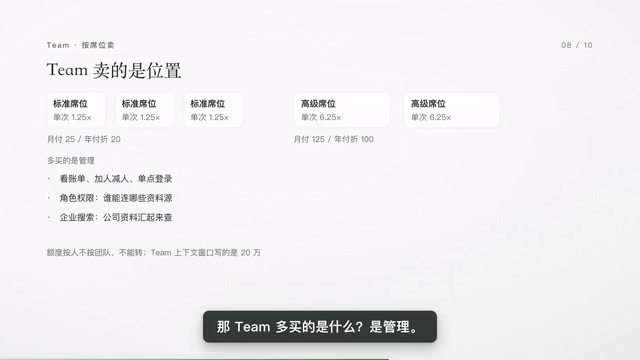
Privacy defaults also differ: Team and Enterprise are commercial products and are not used for training by default; the four personal tiers are labeled "can opt out," meaning they participate by default—you have to go into settings to turn it off.
Enterprise billing is different from all previous tiers: only one seat type, $20 per person per month, billed annually. Self-service online purchase requires a minimum of 20 seats; purchase with sales assistance requires a minimum of 50 seats. This $20 only buys access—usage is billed separately by consumption. The official principle is that seat fees only cover access; pay-as-you-go plans have no plan-level quota cap and no seat-level cap; contract-based seat enterprises may still have limits, and admins can set spending caps for the organization and individual members. Audit logs, custom data retention, and network access restrictions are all available at this tier.
API Credits: Not Automatically Credited
Max includes $100 and Ultra includes $200 in API credits, but they don't automatically flow into your plan. You need to stay on an eligible plan for 7 days, then link an API organization. Team is the same—the team admin claims it. API is the interface for programmatic calls; the chat interface doesn't count—only usage generated with an API key spends this credit. When interacting through Claude Code with subscription login and no API key, it doesn't apply—so Claude Code in the terminal, editor, desktop, and web, as well as extra usage in chat and Cowork, cannot use it. What can use it: your own programs calling the API, the Console playground, managed agents, and SDKs. Unused credits don't accumulate—they reset each billing cycle and don't change plan quota.
API and subscription are two separate billing systems—understanding this is key to seeing why "API credits" can't be used for chat. Subscription plans give you a shared usage pool within time windows, usable by logging into the client; API bills per token per call, authenticated with an API key, for programmatic calls. The two accounts can be linked, but the books are separate: gifted API credits only offset calls with an API key, and subscription quota only covers interactions within the client. This also means Claude Code logged in via subscription draws from the plan pool, while your own scripts calling the API draw from API credits—mixing them leads to the confusion of "I have balance but can't use it." API credits reset each billing cycle, don't accumulate, aren't convertible to cash, and are promotional add-ons rather than core plan capacity.
Why Do Accounts Get Banned?
The help center lists only three reasons: repeatedly violating usage policies; registering an account from an unsupported region (the official supported-regions list is available—check before registering); violating terms of service. The most easily overlooked item in the terms of service is that accounts cannot be lent to others. The usage policy also lists several specific situations: bulk-registering alt accounts to evade detection is not allowed; coming back with a new account after being banned is not allowed; turning a personal subscription into an API resale is not allowed. Being blocked once by real-time protection doesn't itself mean a usage policy violation.
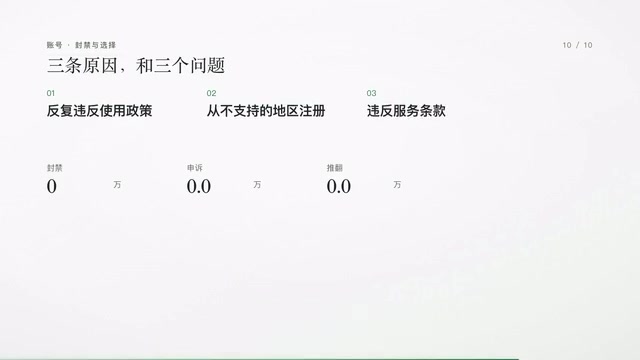
If you do get banned, there are three things you can do:
- Appeal: Log in with the banned account—there's an appeal entry on the page, visible only after logging in. Many people get stuck at this step.
- Export data or delete the account: Personal accounts banned for violations can export all content, and any banned account can be deleted; exportable content may be limited and doesn't mean restored access.
- Check refund eligibility: No refund if you violated policies and the official side terminated access; if the official side actively terminates the subscription for reasons not due to your violation, a prorated refund applies based on remaining time.
On scale: the official transparency report published the number of banned accounts (not percentage) covering all products and regions in the first half of 2026 as 11.4 million, with 398,000 appeals and 42,000 overturned—about 10.6%. Conversations you delete yourself are cleared from the backend within 30 days; inputs and outputs of conversations deemed violations are retained for up to two years.
How to Choose: Three Questions Are Enough
Do you need Claude Code, Opus, Research, or Cowork? If none, just check whether the free quota is enough. If not, upgrade to Pro. Will you hit the 5-hour window? If the window or weekly amount isn't enough, look at Max first (5× weekly amount). If the weekly amount still isn't enough, or you don't want to wait for the window, then it's Ultra's turn. Only if you need others to manage it together does Team come into play.
Rules verified as of November 4, 2026; may change afterward.
This article is based on content from a Bilibili creator's video, written after cross-verifying multiple sources.
One-line Summary
Claude's quota is a shared pool with dual timers; the four tiers scale up progressively, and bans have clear boundaries.
Paragraph Summary
The article breaks down Claude's quota and pricing system: usage isn't counted by message but is a pool shared across web, desktop, mobile, and Claude Code, constrained by two independent timers—the 5-hour window and the weekly quota—with either one running out stopping use. Free lacks Claude Code and Opus; Pro adds these plus Research and Cowork; Max raises window capacity to 5× Pro and includes API credits; Ultra removes the 5-hour limit for verified accounts and offers 10× Max weekly quota, but is still bound by the weekly total and context window. Team and Enterprise sell by seat, focusing on management and privacy defaults, with Enterprise seat fees covering only access and usage billed separately. The article also explains the conditions and scope of API credits, the three reasons for bans, and the paths for appeals, data export, and refunds.
Related articles
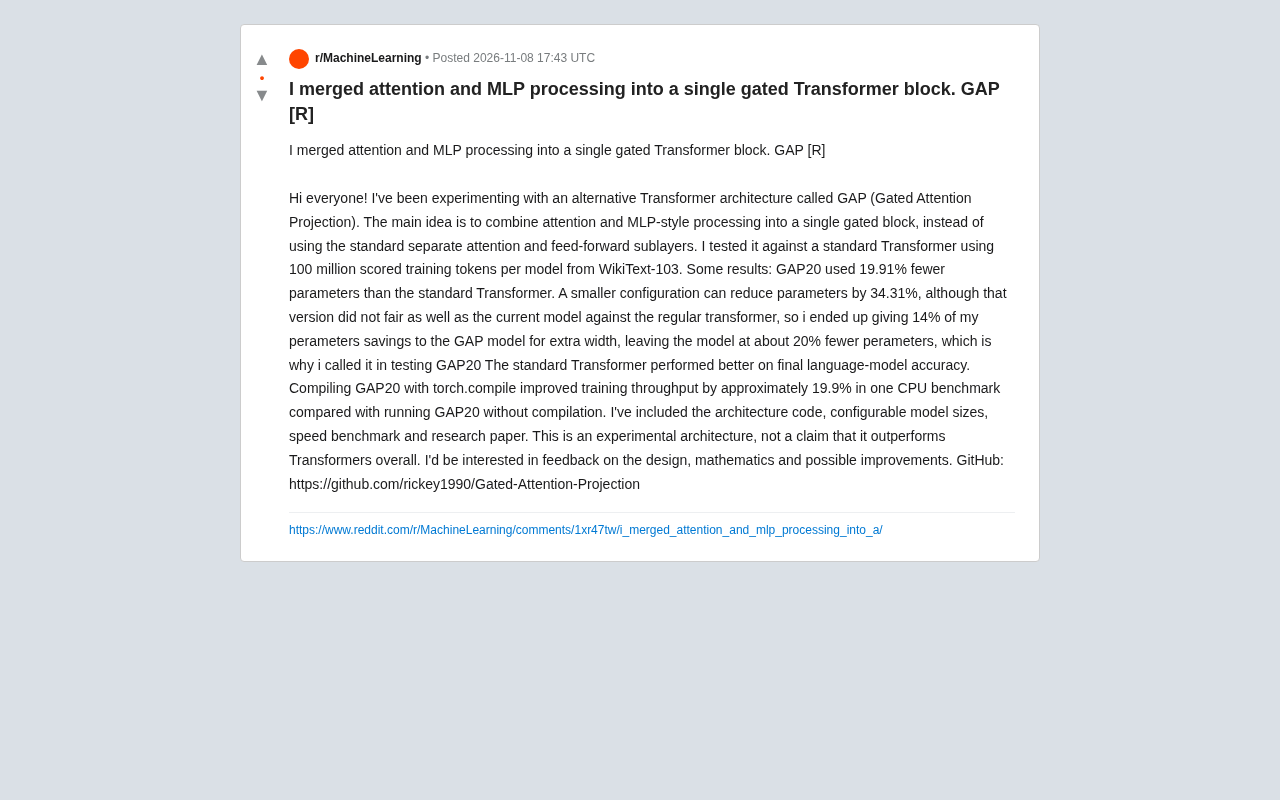
GAP Architecture: A Gated Transformer Block That Merges Attention and MLP
Reddit researcher proposes the GAP architecture, merging attention and MLP into a single gated Transformer block. On WikiText-103, GAP20 reduces parameters by 19.91%, but final accuracy falls short of the standard Transformer; torch.compile brings about a 19.9% throughput gain.
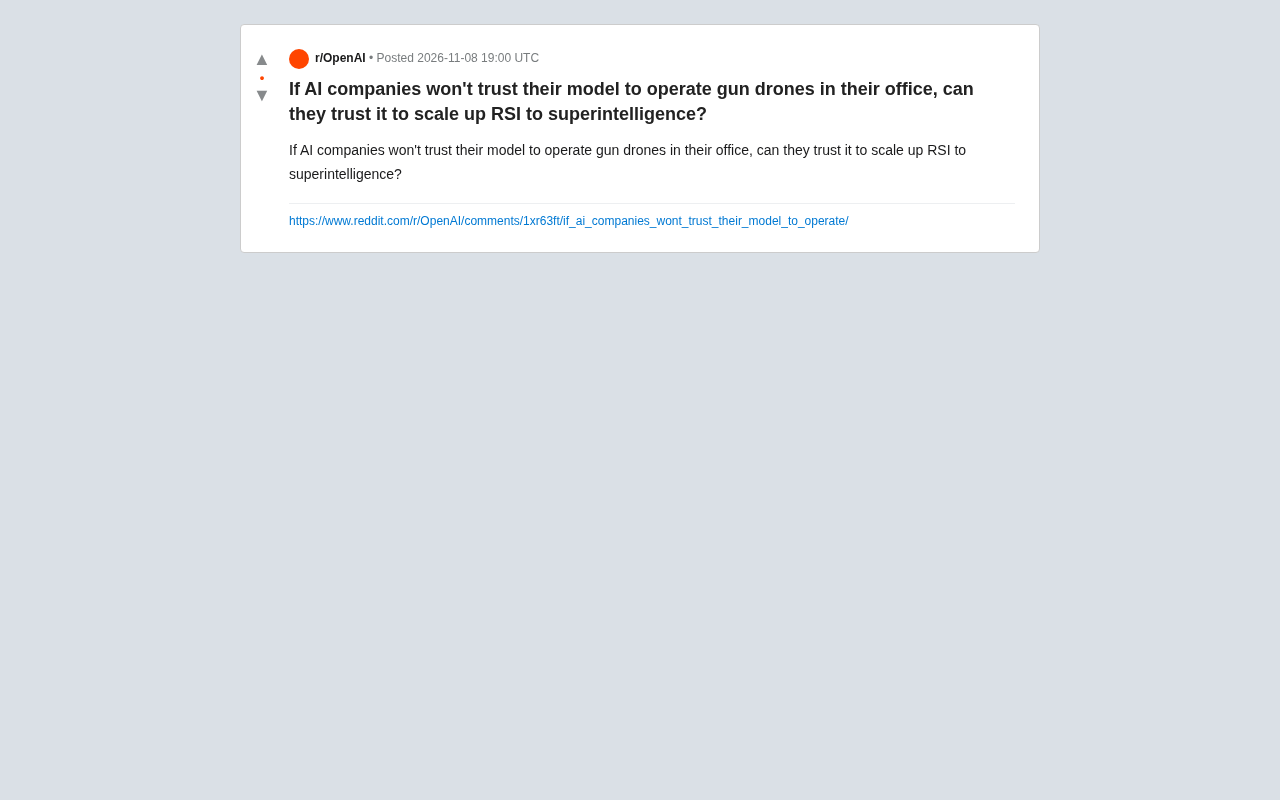
The AI Trust Paradox: Won't Let Models Operate Gun Drones, but Will Let Them Recursively Self-Improve?
Reddit debate on the AI trust paradox: companies won't let models operate office gun drones, yet discuss recursive self-improvement (RSI) toward superintelligence. The article breaks down the trust gap between lab safety constraints and grand narratives, analyzes why RSI is harder to supervise than physical tasks, and examines the semantic slippage of trust in AI safety discourse.
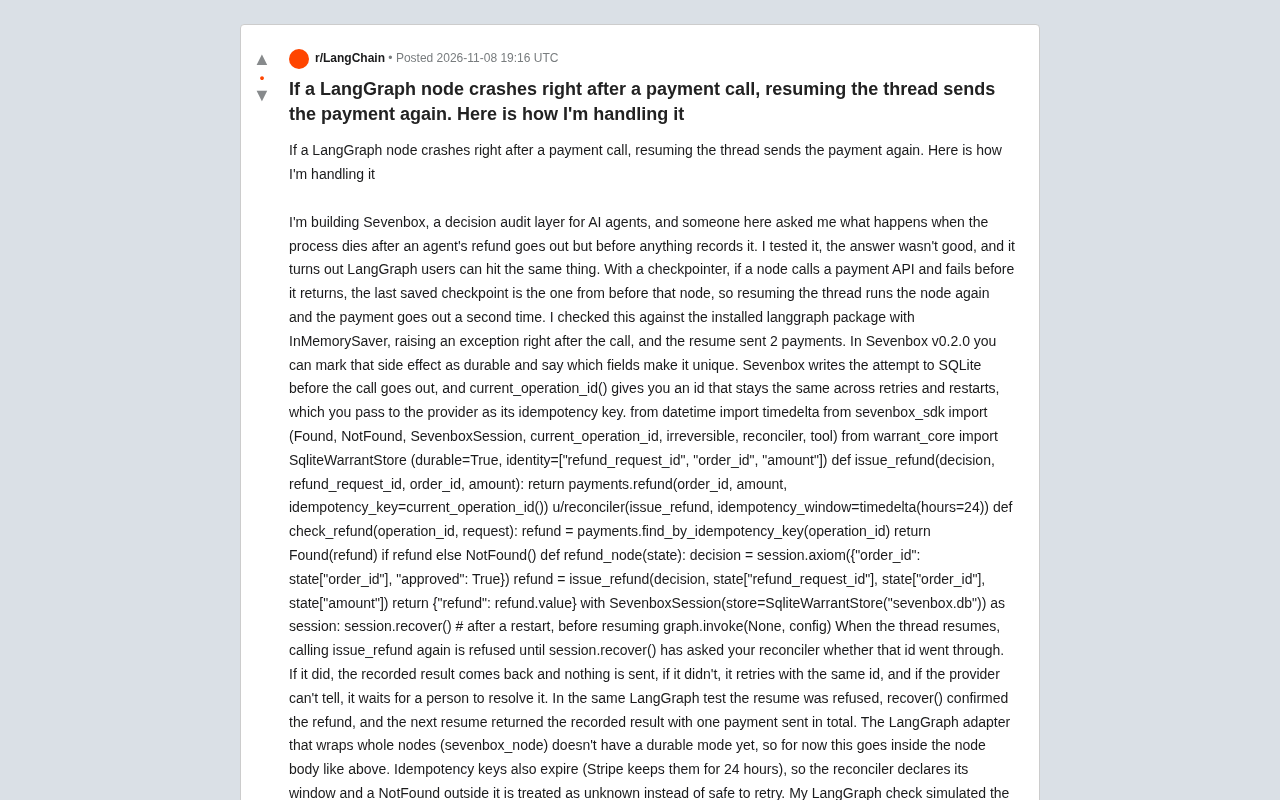
LangGraph Node Crashes Causing Duplicate Payments? Solve It with Durable Side Effects and Idempotency Keys
LangGraph nodes crash after payment calls, causing duplicate charges on thread recovery. Learn how durable side effects, idempotency keys, and reconcilers prevent duplicate calls, plus idempotency expiration and adapter limitations.