Claude Sonnet 4.5 Document Generation in Practice: One Prompt to Create Excel, Word, and PPT

Detailed guide and real-world tests of Claude Sonnet 4.5's document generation for Excel, Word, and PPT.
Claude now offers Pro users code execution and file creation capabilities for batch-generating Excel, Word, and PPT documents. This article outlines four key strategies: enable extended thinking mode, write detailed prompts, upload company templates, and iterate through review. Three case studies—salary analysis, career planning, and financial sentiment analysis—demonstrate its power, while noting limitations like data source accuracy issues and complex formatting challenges.
Claude recently opened its code execution and file creation features (Artifacts) to Pro users, meaning regular users can now batch-generate Excel spreadsheets, Word reports, PowerPoint presentations, and other professional documents. This article, based on hands-on testing, provides a detailed breakdown of Claude Sonnet 4.5's document generation capabilities, best practices, and real-world results.
Feature Overview: Claude's Document Pipeline Capabilities
Supported File Types and Limitations
Before using these features, you need to manually enable both "Code Execution" and "File Creation" toggles in Claude's settings. Artifacts is a core interactive feature that Anthropic launched in mid-2024, initially designed for real-time previewing of code, SVG graphics, and web snippets within the chat interface. With the addition of Code Execution capabilities, Artifacts evolved from a "preview tool" into a "production tool"—Claude no longer just generates code text but actually runs code in a server-side sandbox environment and outputs files. The significance of this architectural change is that users can access complete data processing and document generation capabilities without installing any local development environment.
Once enabled, Claude supports uploading and processing the following document types:
- Common documents: PDF, Word, TXT, HTML
- Data files: CSV, Excel spreadsheets
- Other formats: EPUB
Each file can be up to 30MB, with a maximum of 20 files per chat session. Something you might not have noticed: if an uploaded PDF is under 100 pages, Claude processes both the text and visual elements in the document, which is extremely useful for analyzing reports containing charts.
Underlying Runtime Environment
By directly asking Claude about its runtime environment on the official website, you can discover that it runs on Ubuntu, uses Bash Shell, Python version 3.12, and comes with a large number of pre-installed Python packages—covering data science, machine learning, image processing, web networking, and many other domains.
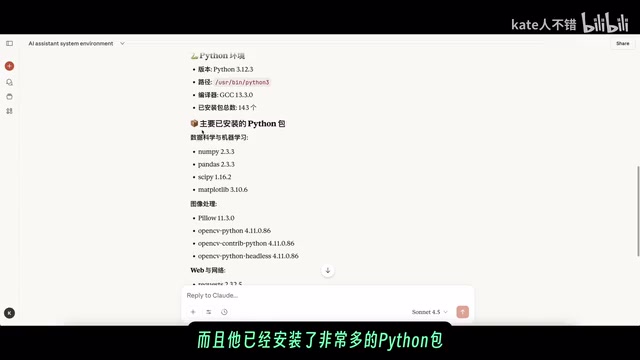
This is essentially a fully-featured Linux development environment supporting Python and JavaScript, with the ability to install additional Python packages on demand for more complex analysis tasks. The sandbox environment comes with a rich set of pre-installed libraries, including pandas and numpy for data analysis, matplotlib and seaborn for visualization, openpyxl for Excel file operations, python-docx for Word document generation, and python-pptx for PowerPoint creation. These mature open-source libraries form the technical foundation of Claude's document generation capabilities.
Four Key Strategies: Maximizing Output Quality
To get Claude to generate high-quality Excel, Word, or PPT documents, these four key strategies are worth mastering:
Strategy 1: Enable Extended Thinking Mode
Use Sonnet 4.5 (currently Claude's most intelligent model) and enable extended thinking mode to give the model more room for reasoning. Extended Thinking is a reasoning enhancement mechanism that Anthropic introduced for Claude, with its core concept rooted in the Chain-of-Thought reasoning paradigm. When this mode is enabled, the model conducts a longer internal reasoning process before generating its final answer—similar to how humans sketch out their thinking on scratch paper before solving complex problems. This reasoning process consumes additional token budget but significantly improves the model's performance on multi-step tasks (such as document structure planning, data analysis logic chains, and format consistency checks).
In practice, enabling extended thinking noticeably improves both structural completeness and content accuracy of documents. For complex tasks like document generation that require simultaneously balancing content accuracy, logical coherence, and format standardization, extended thinking mode is particularly effective.
Strategy 2: Write Detailed Prompts
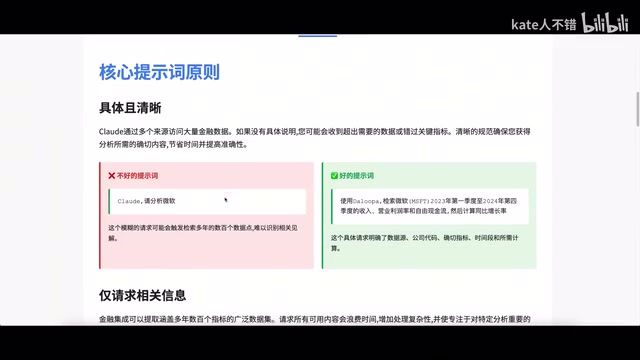
The specificity of your prompts directly determines output quality. Taking PPT creation as an example, you can specify: startup pitch style, specific font sizes and line spacing, exact color codes (such as brand primary color #2E86AB), and instruct Claude to verify that all elements fit the slide and don't overlap.
For Excel spreadsheets, you can request specific features like freezing rows, data validation, cell locking, and conditional formatting rules. For Word documents, you should describe the document's purpose and structural requirements. The more explicitly you describe the expected output format and content structure in your prompt, the more precise Claude's planning during the extended thinking phase will be, and the closer the final document will be to your expectations.
Strategy 3: Upload Company Templates
Many companies have standardized document templates. Uploading your template directly to Claude and having it create content based on that template can dramatically reduce post-production adjustments. Claude will parse the style definitions, layout arrangements, and brand elements in the template, then reuse these format settings as much as possible when generating new content. This is especially efficient when batch-generating standardized documents like weekly or monthly reports.
Strategy 4: Download, Review, and Iterate
After Claude generates a document for the first time, always download it and open it locally to inspect, then ask for targeted modifications based on specific issues. This iterative process is the key step for ensuring final quality. Common issues requiring iterative fixes include: chart display effects at different screen resolutions, calculation accuracy of Excel formulas under specific edge cases, and text box-image overlap issues in PPT.
Case Study 1: Data Science Salary Analysis
From Raw Spreadsheet to Multi-Dimensional Analysis Report
In testing, a data table containing data science roles, skills, and salaries was used. After uploading, Claude was asked to perform a quick analysis. It first calls command-line tools to view the first 20 rows of the table, understanding the data structure (including column names, data types, missing values, etc.), then uses Python scripts for analysis—primarily relying on pandas for data cleaning and aggregation, matplotlib and seaborn for generating visualizations, and finally using the openpyxl library to write analysis results into a multi-worksheet Excel file.
When opened locally in WPS Office, the generated content is quite rich: five different charts at the top, multiple worksheet tabs below, and complete calculation formulas—all generated from a single prompt with no manual modifications needed.
From Data Analysis to PPT Presentation
Next, Claude was asked to create a "Remote Work Guide" PPT based on the same dataset, with requirements including: current state of remote work, salary analysis, geographic arbitrage opportunities, remote-friendly company identification, and skill demand differences, totaling 15 slides with a modern design style.
"Geographic Arbitrage" is a salary optimization strategy that emerged in the remote work era, referring to working remotely for companies in high-salary regions (like San Francisco or New York) while living in areas with lower costs of living (like Southeast Asia, Eastern Europe, or small cities in the American Midwest), thereby maximizing disposable income. As remote work has become more prevalent, an increasing number of tech companies have adopted "location-based salary adjustment" policies, making the actual returns from geographic arbitrage more complex, requiring consideration of multiple dimensions including salary adjustment magnitude, tax differences, and quality of life.
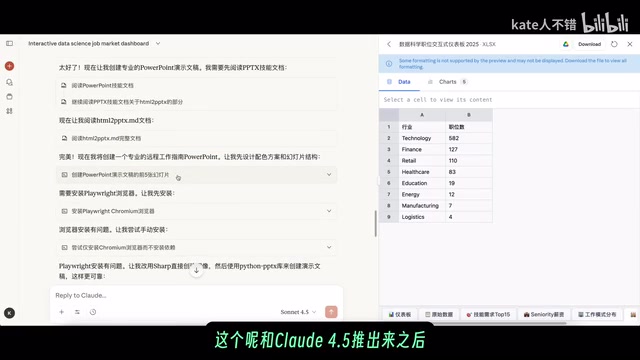
Claude's processing workflow is quite interesting: it creates multiple documents (Markdown, JS, Python scripts) in the virtual machine's folder, first reads PPT skill documentation, finds relevant scripts, and then begins creating slides. During the process, it attempted to install Playwright for format checking—Playwright is an open-source browser automation framework developed by Microsoft that supports Chromium, Firefox, and WebKit browser engines. Claude tried to use it to render HTML pages and verify the visual layout of slides. This is a common "HTML-to-document" technical approach: first precisely control layout with HTML/CSS, then render to images or PDF via a browser engine.
However, Playwright failed to install in the sandbox environment, and Claude automatically switched to using Pillow (Python imaging library) to create images, then used the python-pptx library to generate the presentation—this automatic detection and error correction capability is impressive, demonstrating AI's toolchain degradation strategy in constrained environments.
The final output was a complete PPT containing remote position data (118 remote vs. 619 on-site), salary comparisons, industry remote-friendliness, skill demand analysis, job search strategy recommendations, and more.
Case Study 2: Career Development Path Report
Using the same data table, a new conversation was started asking Claude to generate a "Career Development Path Analysis Report." The resulting Word document has a clear structure: executive summary, data science career landscape, four career stages explained in detail, skill development roadmap, salary expectation management, and other sections are all present, with a personal development plan template appended at the end. This Word document's generation relies on the python-docx library, which can precisely control heading hierarchy, paragraph styles, table formatting, and headers/footers.
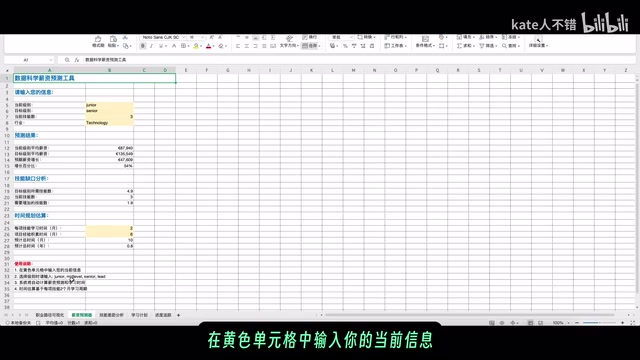
The simultaneously generated Excel "Career Planning Tool" is even more practical: it contains clear development paths and salary prediction tools, with yellow cells for users to input their current information and the system automatically calculating results. Different worksheet tabs contain complete calculation formulas, timeline planning, and even development progress tracking features. These interactive features rely on openpyxl's support for advanced Excel features, including named ranges, data validation dropdown lists, conditional formatting (such as automatic color changes based on completion percentage), and cross-worksheet formula references.
Case Study 3: Financial Analysis and Sentiment Analysis
Three-Phase Financial Analysis Workflow
Claude has a mature workflow for financial data analysis, divided into three phases:
- Data Retrieval: Gather information from multiple channels through search functionality
- Analysis & Insights: Transform raw data into valuable insights
- Deliverable Creation: Generate professional documents such as investment memos, competitive analysis presentations, and portfolio performance reviews
Financial data analysis has several specific prompting tips: first confirm which data sources Claude can access, request specific needed information (avoid wasting time on overly broad datasets), and reasonably control data volume. Note that Claude's search function accesses publicly available web information and cannot connect to professional financial data terminals like Bloomberg Terminal or Wind. Therefore, for analysis scenarios requiring real-time market data or deep financial data, it's recommended to first export the needed data as CSV or Excel files and then upload them to Claude for processing.
HackerNews Sentiment Analysis Test
In testing, Claude was asked to analyze HackerNews comments about OpenAI/Apple SDK. Claude first attempted to fetch web content using the Fetch tool, and after failing, switched to searching for the topic, searching forty to fifty websites in total, then converting each slide page to HTML format first, ultimately generating an 18-page analysis PPT.
However, this exposed a problem: Claude claimed the data came from HackerNews community discussion threads, but in reality it initially failed to directly access HackerNews content, and the subsequent web searches, while including HackerNews, were not purely from that source. This reminds us to maintain a cautious verification attitude toward data source claims in AI-generated content.
This case reveals a universal issue with current AI tools—"Hallucinated Attribution." Large language models tend to annotate their analytical conclusions with seemingly credible data sources when generating reports, but these source claims themselves may not be accurate. This is consistent with the widely discussed AI "hallucination" problem in academia: model-generated content appears logically coherent and properly formatted on the surface, but the authenticity and completeness of the underlying data cannot be guaranteed by the model alone. In scenarios with extremely high requirements for data accuracy, such as financial analysis and market research, this limitation requires particular vigilance.
Summary and Recommendations
Claude Sonnet 4.5's code execution and file creation capabilities essentially combine a complete Linux development environment with a large language model's comprehension abilities. Its core value lies in:
- One-stop document pipeline: From data analysis to report generation, from format conversion to visualization—all achievable with a single prompt
- Intelligent error correction: When encountering issues like tool installation failures, it automatically finds alternative solutions and continues execution
- Multi-format output: Can generate Excel (with formulas and charts), Word, PPT, and PDF
However, several limitations should be noted: data source accuracy requires manual verification, generated documents still need careful review after downloading, and complex formatting (such as advanced animations in PPT, VBA macros in Excel, mail merge in Word, etc.) may require multiple rounds of iterative adjustments or even manual supplementation. Positioning Claude as an "efficient first-draft generator" rather than a "perfect final-draft producer" is the most pragmatic usage mindset.
For professionals who frequently need to create reports, spreadsheets, and presentations, mastering this workflow can significantly boost office productivity—especially in document scenarios driven by data analysis, where Claude's automation advantages are most pronounced. It's recommended to start practicing with simple single-document generation, gradually transition to complex multi-document workflows, and simultaneously build your own prompt template library, codifying frequently used document format requirements to further improve efficiency.
Related articles
 Product Reviews
The Programmer's Desk Setup Guide: Building a Workspace That Feels Like Home
Discover how programmers build productive, comfortable workspaces. From multi-monitor setups to ergonomic design, explore the desk philosophy that drives focus and flow.
 Product Reviews
Qoder vs Cursor Real-World Comparison: Which $20/Month AI IDE Is Better?
Hands-on comparison of Qoder vs Cursor AI IDEs: Agent autonomy, human interaction count, and architecture decisions. Qoder needed only 2 interactions vs Cursor's 8.
 Product Reviews
Cursor Cloud Agent Demo: Eliminating Bottlenecks Across the Entire Software Development Lifecycle
Deep analysis of Cursor's Cloud Agent demo showing how cloud VMs, automated test artifacts, and a full-chain control plane systematically eliminate human bottlenecks across the software development lifecycle.