ClaudeMD: The Config File That Makes AI Code Assistants Follow Your Rules

A version-controlled ClaudeMD file gives AI coding agents persistent project rules, solving rule-breaking code.
The article covers the "rule-breaking" problem with AI coding assistants and how placing a ClaudeMD file in the project root lets agents auto-read project conventions at session start—no repeated prompting. Compatible with ClaudeCode, Cursor, and any agent adopting the convention, the version-controlled file enables sharing, replay, and auditing, giving AI a persistent, reproducible initial context that mitigates context drift. It outlines a five-step build method—project overview, naming rules, pinned test commands, tone and detail, forbidden patterns and skills—and recommends stalemap for auto-updating dependency blocks, committing to the repo, and testing in a new session.
Why Does AI-Written Code Always Break the Rules?
When using AI coding assistants like ClaudeCode and Cursor, a common frustration is having to restate project conventions every single time—naming style, import order, test commands, forbidden patterns. According to the YouTube video "The File That Fixes AI Code," placing a ClaudeMD file in your project root lets any AI agent that adopts the convention automatically read the rules at the start of a session, with no extra prompting required.
The core idea is to move "team conventions" out of conversations and into version control: rules are written once, and everyone and every AI agent shares the same file, keeping behavior consistent.
What Does ClaudeMD Actually Do?
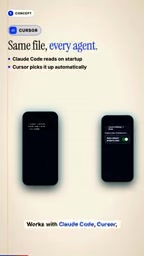
ClaudeMD lives in the project root, and the agent reads it at the start of every session. It works with both ClaudeCode and Cursor—any agent that accepts the convention will honor it. Because the file is under version control, rules can be replayed, audited, and shared—replacing the copy-paste-prompt practice among team members with a single shared file.
What this really solves is "context drift": the AI starts every conversation as a blank slate, while ClaudeMD gives the project a persistent, reproducible initial context.
"Context drift" here refers to the fact that large language models have no memory of a project's historical decisions across new sessions; they regenerate behavior patterns based on their training distribution, causing inconsistent code styles and constraints across sessions, team members, and agents within the same project. Prompt-based rules are more prone to drift because prompts often exist only in someone's chat history or local notes and can't be audited or reused. By codifying rules into a version-controlled file, the agent starts every session with the same initial context—essentially providing the model with a stable, reproducible "system prompt" baseline that significantly reduces behavioral randomness. This mechanism resembles the "fixed context injection" approach in retrieval-augmented generation, but is lighter-weight and more controllable.
Building a Production-Grade ClaudeMD in Five Steps
According to the video, a usable ClaudeMD can be built with the following steps:
- Start with a project overview: one line stating the project name, tech stack, and architecture.
- Define naming rules: e.g., max 50 characters per line, no
any, specified import order. - Pin down test commands: include the test commands so the agent can run them directly.
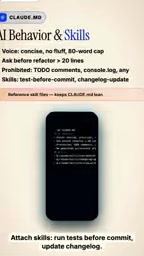
- Define tone and level of detail: specify output style and require the agent to ask before refactoring.
- List forbidden patterns: explicitly call out the "junk code" habits the agent must avoid, and attach skills such as running tests before committing and updating the changelog.

Additionally, you can paste key dependencies and breaking changes, or run stalemap to auto-generate the dependency block. Rule material can also be drawn from community resources like awesome agent conventions and slop lists.
Tips for Keeping ClaudeMD Fresh
The biggest enemy of a rules file is staleness. The video's approach: after upgrading dependencies, run stalemap, which automatically rewrites the dependency block; then commit ClaudeMD to the repository to ensure consistent team behavior. AI context kit can also help keep the file portable.
Pitfalls to avoid include vague rules, outdated dependency information, and conflicts between global and project rules—all of which cause the agent to "malfunction."
Dependency information going stale is a high-risk failure point for rules files. Tools like stalemap work by scanning the project's lock files (e.g., package-lock.json, poetry.lock) or manifest files (package.json, pyproject.toml), extracting direct dependencies, version numbers, and known breaking changes, then rewriting them as a structured Markdown block into ClaudeMD's dependency section. This way, when the agent generates code or suggests upgrades, it sees dependency information consistent with the repository's actual current state, not old versions memorized during training. Manually maintaining the dependency block is hard to sustain, while automatic rewriting can fold it into the upgrade workflow: upgrade dependencies → run stalemap → commit changes—a three-step loop that prevents rules from drifting out of sync with the code's actual state.
Implementation Checklist
Save ClaudeMD to the project root with this structure: header, conventions, AI rules, skills, dependencies—then commit. Finally, test in a new session to verify the agent actually reads and follows the rules.

The video teases a next step: a ClaudeMD skill that automatically runs tests, reads failure output, and patches code until it passes—eliminating the manual copy-paste step. For teams heavily using AI coding, codifying conventions into a file may be the lowest-cost way to improve code consistency.
One-line Summary
A version-controlled ClaudeMD file gives AI coding agents persistent project rules, solving the problem of code that doesn't follow the rules.
Paragraph Summary
The article addresses the common "rule-breaking" problem with AI coding assistants by introducing the practice of placing a ClaudeMD file in the project root: the agent automatically reads the file at the start of every session, so project conventions are available without re-pasting prompts. ClaudeMD works with ClaudeCode, Cursor, and any agent that accepts the convention, and because it's version-controlled, it can be shared, replayed, and audited—essentially giving AI a persistent, reproducible initial context that mitigates context drift. The article lays out a five-step build method—project overview, naming rules, pinned test commands, tone and detail level, and forbidden patterns plus skills—and recommends using stalemap to auto-update the dependency block, committing to the repository, and verifying in a new session.
Related articles

AI Tools Quietly Altering Settings: Postman Silently Installs Plugin, Codex Sharing Option Auto-Resets
AI Daily reports: Postman silently installs a Mac plugin and self-approves startup hooks, logged as auto-existing upgrade; Hacker News developers say Codex data-sharing opt-out flips back. Plus Simon Willison's raw float weight experiment with QEN 3.8-27B.

AI Learns to Rewrite AI: MIT's "Weightspace Programming" Redraws the Path to Recursive Self-Improvement
MIT team proposes weightspace programming: GPT-6 Astra reads and edits AI model weights directly. Math scores jump several-fold, hand-written networks beat trained models. Eight experiments analyzed, plus Anthropic's same-day warning and the real boundaries of recursive self-improvement.

Running Qwen 3.8 on a Laptop to Read Raw Weights: 46 Minutes Per Answer
Simon Willison reproduced weight space programming with Qwen 3.8 27B on a laptop: a 17GB model file, 46 minutes per answer, 43,506 reasoning tokens, Pong over an hour, Freeway failed. Suited for interpretability researchers.