CLI-Anything Complete Beginner's Guide: How AI Operates Software — Principles and Practice

CLI-Anything wraps software operations into CLI interfaces, making them invocable and checkable for AI Agents.
CLI-Anything is an open-source project that solves the problem of AI Agents struggling to operate GUI-only professional software. It uses a three-layer architecture: a generator lets a coding Agent analyze target software interfaces and auto-write command-line tools, generated tools execute tasks, and CLI Hub discovers, installs, and manages ready-made adaptations. Generation and execution are separated, commands are independently testable programs, and Agents advance precisely using structured JSON return values. The command line doesn't bypass software limits — credentials, permissions, platform dependencies, and complex GUI interactions still need separate handling, and evaluation should start from small workflows with two-layer testing.
CLI-Anything Complete Beginner's Guide: How AI Operates Software — Principles and Practice
AI can already write code and hold conversations, but getting it to actually operate professional software — drawing flowcharts, building 3D scenes, processing engineering files — is still a challenge. Most software only offers a graphical interface, and Agents can't click buttons or drag layers like a human. The open-source project CLI-Anything, introduced by a Bilibili creator, tries to solve this: wrap software operations into command-line tools so Agents can complete tasks and check results by invoking commands.
Positioning: A Three-Layer Architecture That Builds the Bridge
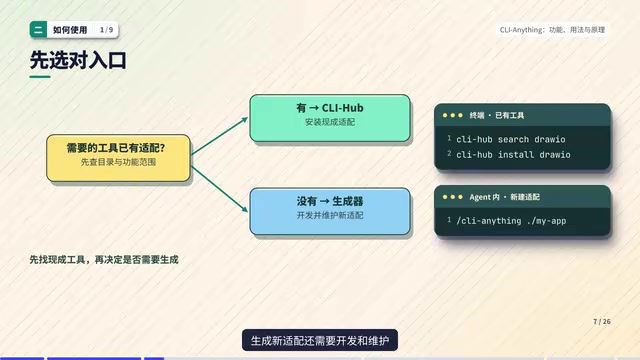
CLI-Anything is not a newly trained large model — the code writing and decision-making are still done by the Agent you choose. What it provides is three layers of capability:
- Generator: The Agent analyzes the target software's callable interfaces and automatically writes a command-line tool adapted to that software;
- Generated tools: Responsible for actually executing tasks, such as creating a canvas, adding nodes, connecting lines, and exporting;
- CLI Hub: Helps users discover, install, and manage ready-made tools.
The repository already has adaptations for DrawIO, Blender, and office and media tools. But the creator specifically warns: having a piece of software in the directory doesn't mean all its features are covered — what it can actually do depends on the commands, dependencies, and test records.
CLI (Command-Line Interface) is an interaction method that operates software through text commands rather than a graphical interface. A program exposes a set of commands with parameters and options, and returns results as text or structured data (such as JSON) after execution. For AI Agents, the core advantages of CLI are discoverability, composability, and verifiability: command descriptions can be read, output formats are fixed, and the Agent can determine whether an operation succeeded without relying on screenshots or coordinate clicks. CLI-Anything leverages exactly this to map operations that graphical software could originally only perform via mouse into semantically clear commands, letting the Agent steadily advance tasks through the loop of "read descriptions — select commands — parse return values."
Getting Started: Find Ready-Made Tools First, Then Consider Generation
Before using it, ask one question: has someone already built the tool I need? If so, install it directly through CLI Hub — Search to search, Info to view descriptions, Install to install, Launch to start. Before installing, check the source and dependencies clearly: some tools need local file permissions, some connect to services, and others require the original desktop software to be installed.
The creator demonstrated the actual workflow with a DrawIO example: create a 900×420 canvas and save it as an editable project file, explicitly specifying the target of operations through the Project parameter; add two nodes, API and DB, setting type, position, size, and numbering; execute connect add to draw a line; finally use Project info to query the state, which returns two shapes and one edge from API to DB.
The key to this example is how the Agent works: first read the tool descriptions to select commands, then continue operating based on the returned JSON. Returning structured results — node numbers, types, coordinates — lets the next command reference them precisely rather than by guessing.
If the needed adaptation isn't in the directory, take the generator route. Using Claude Code as an example, add the plugin marketplace and install the CLI-Anything plugin, then hand the target software's source code or project path to a slash command, and the Agent will analyze the interfaces and generate command-line code, tests, and documentation. The first version usually covers only the most obvious operations; you can use the refine command to specify the workflows you want filled in, then re-test.
Underlying Principles: Generation and Execution Are Separated
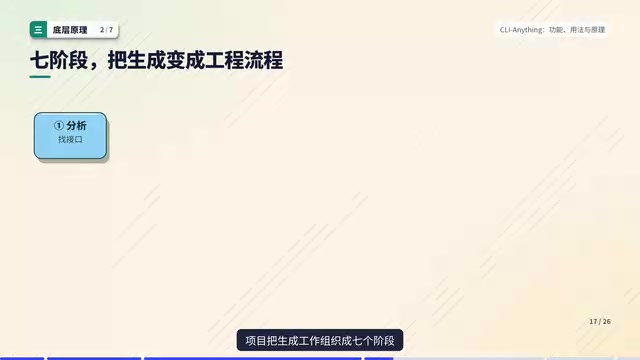
Broken down, the first stage is generating tools — the coding Agent reads the software materials, designs interfaces, and writes code; the second stage is running tools — invoking the already-generated commands to modify files or access backend services. Ordinary command execution doesn't require regenerating code each time; the commands themselves are concrete programs that can be run and tested independently.
The generation process is organized into seven stages: analysis, design, implementation, formulating a test plan, implementing tests, recording results, and packaging for installation. The specification also adds skill documentation generation, so the Agent knows how to use the artifacts. Interface design, test basis, installation entry points, and usage instructions are all part of the deliverable.
Taking DrawIO's real code as an example, the CLI is responsible for parsing command groups, parameters, and options; ShapeAdd corresponds to a specific function, which after obtaining the current drawing passes the type, coordinates, and label to the shape operations module, and finally outputs the result uniformly. You can think of it as a translation layer: outside are easy-to-call commands, inside are still explicit business functions — not guessing where to click next based on screenshots.
Continuous operations need to remember state. DrawIO's Session holds the current XML project, saves snapshots before modification, and supports in-process undo and redo; commands run separately continue via the project file. But the creator warns that saving a drawing number doesn't mean the entire undo history is preserved across processes — the specific behavior depends on the implementation.
Coding Agent refers to an AI agent with the ability to read and write files, execute commands, and run tests, capable of autonomously completing programming tasks — such as Claude Code. Unlike ordinary conversational models, it can proactively browse projects, modify source code, and repeatedly run verification, making it suitable for engineering work like "analyzing the target software's interfaces and generating a CLI adaptation layer" that requires multiple iterations. The slash commands mentioned in the generator route are preset instructions triggered in the coding Agent's session in the form of /xxx, used to solidify specific tasks (such as analyzing source code, generating commands, running tests) into repeatable processes, reducing the user's description cost.
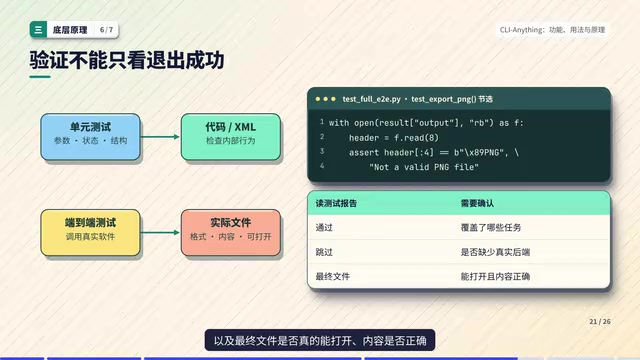
End-to-end testing (E2E testing) complements unit testing: unit tests verify the correctness of a single function or parameter handling in an isolated environment — fast, but unable to prove that the artifact is truly usable; end-to-end tests start from the complete workflow, invoking real software or real dependencies, and check whether the final output files, images, or service states meet expectations. In CLI-Anything, export functionality often depends on the desktop program being present; if the environment lacks that dependency, related E2E tests may be skipped while still showing "passed." Therefore, when evaluating, you must distinguish between "executed and passed" and "skipped," and confirm that key artifacts can actually be opened and verified.
Applicable Boundaries: The Command Line Doesn't Bypass Software Limitations
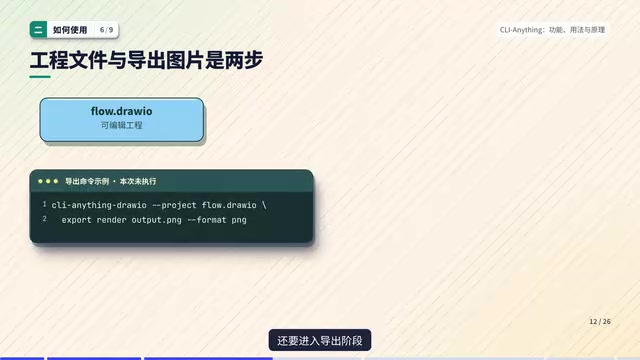
The actual execution path varies by software: some adaptations write native project formats, some call scripting interfaces, and some access service APIs. Taking DrawIO export as an example, the code locates the desktop program, assembles the Export and Format parameters, then launches a subprocess — the final rendering is still handed to the original software. This is also what distinguishes it from merely generating a similar-looking diagram.
Testing should have at least two layers: unit tests check parameters, state, and file structure; end-to-end tests invoke real software as much as possible to check artifacts. You should also see clearly which tests are skipped — when the desktop program is missing, image export tests may not have run at all. So don't just look at the pass count; look at the tasks covered, external dependencies, and whether the final files can actually be opened and have correct content.
Having "anything" in the name doesn't mean any software can be integrated unconditionally. Whether there is source code, an SDK, a file format, or a callable backend determines how far you can go; complex interactions in graphical interfaces can't necessarily all be mapped to commands. A more realistic approach is to start with a specific task, confirm the inputs and outputs, and then gradually expand coverage. Login credentials, service permissions, licenses, and platform dependencies still need to be prepared separately; steps that can only be completed through the interface may still require human assistance or UI automation.
CLI-Anything's value lies in organizing software capabilities into command-based interfaces that Agents can more easily discover, invoke, and check. When evaluating in practice, start with a small workflow: create a project, add elements, query state, verify export — break it into steps and check which commands are already covered, which dependencies are still missing, and whether errors can be identified. Once the small workflow can be repeated reliably, then expand to batch tasks — that's when it becomes easier to judge whether it's worth the investment.
One-line Summary
CLI-Anything wraps software operations into command-line interfaces, making them invocable and checkable for AI Agents.
Paragraph Summary
CLI-Anything is an open-source project aimed at solving the problem of AI Agents struggling to operate professional software that only offers a graphical interface. It uses a three-layer architecture: the generator lets a coding Agent analyze the target software's interfaces and automatically write command-line tools, the generated tools are responsible for actually executing tasks, and CLI Hub is used to discover, install, and manage ready-made adaptations. When using it, prefer installing existing tools through CLI Hub, and only take the generator route when an adaptation is missing; the refine command can fill in workflows. Its principle is the separation of generation and execution — commands are independent programs that can be tested individually, and the Agent advances precisely to the next step based on structured JSON return values. The article emphasizes that the command line doesn't bypass the software's own limitations: login credentials, permissions, platform dependencies, and complex GUI interactions still need to be handled separately. Evaluation should start from a specific small workflow, verify at two layers — unit tests and end-to-end tests — and pay attention to skipped tests and the quality of real artifacts.
Related articles

AI New Grad Resume Diagnosis: How to Stand Out for ML/CV Roles?
How can AI/ML new grads optimize their resumes to get interviews? Based on a real Reddit case, this article analyzes project selection, depth display, and structure for ML/CV roles, with actionable revision advice.

OpenAI Opens Up Decision Models as Competition with Jev Heats Up
OpenAI makes its decision model widely available, directly challenging first mover Jev. We analyze the impact on the decision model competitive landscape and key considerations for developers and enterprises.

Startup Growth Secrets: Early Sales Are Not the Key
At Disrupt, experts from Lovable, Polska, and Theory Ventures said early startup growth depends not on early sales but on a repeatable sales process, a clear ICP, team development, and data-driven iteration.