Cline Desktop Nightly Update: System Certificate Support Added on Backend Launch

Cline Desktop nightly fixes passing --use-system-ca when launching the backend to trust system certificates
Cline Desktop released a nightly build whose core change is passing the `--use-system-ca` flag when launching the backend — an environment adaptation fix. Previously, the backend didn't start with this system certificate flag, causing TLS handshakes to fail in enterprise intranet, proxy, or self-signed certificate environments because only built-in CA bundles were trusted — leading to situations where the browser could connect but Cline couldn't. This flag makes the backend read the operating system's certificate store, restoring normal connections. The commit includes a GitHub-verified signature, the assets contain 2 build artifacts, and the nightly tag carries a timestamp, reflecting its daily build cadence. Users on the stable version need not act; those on nightly who have hit certificate errors should pull the update, while those with normal networks need not switch.
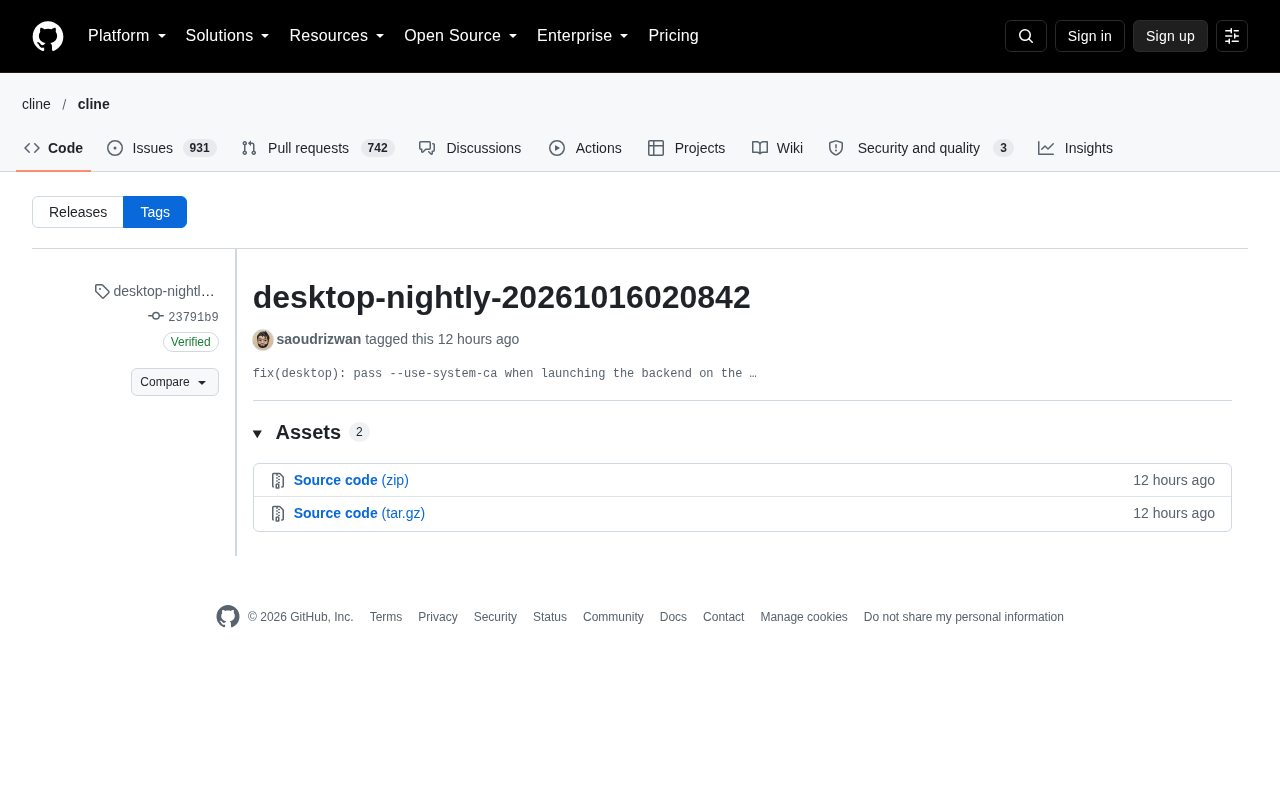
Cline Desktop has released a nightly build, tagged by developer saoudrizwan. The core change is highly focused: passing the --use-system-ca flag when launching the backend.
What Changed This Time
Based on the commit information, this nightly's commit hash is 23791b9, a GitHub-verified signed commit (GPG key ID: B5690EEEBB952194). The change comes with a one-line description: fix(desktop): pass --use-system-ca when launching the backend on the … (the description is truncated, but the intent is clear).
This change is a "fix" rather than a "new feature," meaning that previously the desktop app wasn't passing the system certificate-related flag to the backend process when launching it.
Why System Certificates Matter
For AI coding tools that rely on network requests, TLS certificate verification is an unavoidable concern. In enterprise intranets, proxy environments, and self-signed certificate scenarios, if a tool only trusts a built-in CA bundle rather than the operating system's certificate store, it can run into rejected requests and connection failures.
Cline's desktop app uses a frontend-backend separation architecture — the UI and backend service run separately, with the backend handling actual model calls and file operations. If the backend doesn't start with instructions to use system CAs, users in managed network environments may find that the browser can connect but Cline cannot. The --use-system-ca flag makes the backend read the operating system's certificate store when establishing TLS connections.
This is a typical "environment adaptation" fix. The affected user group isn't large, but for those on enterprise networks or using proxy tools, it's a matter of whether the tool works at all.
To understand the value of --use-system-ca, it helps to first clarify the difference between the operating system certificate store and a built-in CA bundle. A CA (Certificate Authority) certificate is a trust anchor used to verify server identity. Most runtime environments (such as Node.js) only load a small set of built-in root certificates by default — a list maintained upstream that lags behind updates and can never cover an enterprise's self-built CA. The operating system certificate store, by contrast, is a local, centrally managed trust collection where enterprises inject internal CA and proxy interception tool (such as mitmproxy, Zscaler, Charles) root certificates via group policy, MDM, or manual installation. When an application enables "use system CA," the TLS handshake includes these extra certificates in the trust chain, allowing internal services and proxy-intercepted connections to pass verification. Conversely, applications that ignore the system certificate store will throw errors like UNABLE_TO_VERIFY_LEAF_SIGNATURE or self signed certificate in these environments.
It's worth noting that Node.js didn't provide a flag like --use-system-ca until relatively recent versions. Before that, the community commonly appended custom certificates by setting the NODE_EXTRA_CA_CERTS environment variable — but this requires users to manually specify the certificate path, which isn't friendly to non-technical users and can't automatically pick up updates to the system certificate store. Using --use-system-ca hands this work to the runtime, making it a more thorough and worry-free solution.
Cline's Iteration Style Seen Through Its Nightly Release Cadence
This release went through the nightly channel, and the tag name desktop-nightly-20261016020842 carries an obvious timestamp, indicating that Cline Desktop maintains a daily build cadence. Nightly versions typically target users willing to try new things, help discover issues, and give feedback — stability isn't guaranteed, but fixes arrive fastest.
A detail worth mentioning: this commit comes with a GitHub-verified signature, and the asset list shows 2 build artifacts. For a development tool that needs to read and write local code and execute commands, the integrity of the signature verification chain is part of supply chain security.
When participating in nightly testing, there are a few things worth knowing in advance. Nightly builds typically come straight from the day's main branch code, without full regression testing, so they may introduce new crashes or feature regressions. A safe approach is to keep a stable version installer on hand, or install nightly in an isolated environment or config directory to avoid polluting your regular workspace. Also, nightly auto-updates may overwrite older versions; if you need to roll back, manually install an older official build. When reporting issues, including the specific commit hash (like this one's 23791b9) and full logs can significantly speed up diagnosis. For issues that only reproduce on the stable version, don't bother re-verifying on nightly, since the two branches' code states may have already diverged.
Practical Advice for Users
If you're currently on the stable version, you don't need to do anything for this change — fixes like this typically get merged into a future official release.
If you're already on the nightly version and have previously hit network request failures or certificate errors, this update is worth pulling. Conversely, if your network environment is fine, there's no need to switch to nightly for a single fix.
A more general reminder: when using AI coding tools in managed networks, certificate trust issues are often a hidden troubleshooting blind spot. When a tool reports connection errors but the browser works fine, prioritize checking whether the tool is reading the system certificate store.
(This article is limited in scope, based only on a single commit record; if more complete changelogs become available later, further details can be added.)
One-line Summary
Cline Desktop nightly fixes passing --use-system-ca when launching the backend to trust system certificates
Paragraph Summary
Cline Desktop released a nightly build whose core change is passing the --use-system-ca flag when launching the backend — an environment adaptation fix. Previously, the backend didn't start with this system certificate flag, causing TLS handshakes to fail in enterprise intranet, proxy, or self-signed certificate environments because only built-in CA bundles were trusted — leading to situations where the browser could connect but Cline couldn't. This flag makes the backend read the operating system's certificate store, restoring normal connections. The commit includes a GitHub-verified signature, the assets contain 2 build artifacts, and the nightly tag carries a timestamp, reflecting its daily build cadence. Users on the stable version need not act; those on nightly who have hit certificate errors should pull the update, while those with normal networks need not switch.
Related articles

Chain of Thought Isn't Just for AI: How Humans Can Use CoT to Improve Thinking Quality
Chain of Thought isn't just a prompt trick for large models. Starting from a Hacker News discussion, this article analyzes why CoT works for human thinking too, breaks down actionable ways to transfer it, and highlights the key differences between human CoT and machine CoT.
Cloudflare Teams Up with OpenAI: Closi…
Cloudflare Teams Up with OpenAI: Closing the Loop from Vulnerability Discovery to Defense with AI
Cloudflare uses OpenAI Daybreak to investigate security vulnerabilities and generate reviewable remediation plans, while developers use Codex to boost coding efficiency and quality.

Orca Multi-Agent Orchestration in Practice: A Guide to Parallel Collaboration with Claude and Codex
Orca is Stable AI's free open-source agent workbench supporting 34 agents like Claude Code and Codex in parallel. Learn its Git worktree isolation, multi-model orchestration, and mobile management.