Cline Desktop v0.0.46 Update: Conversation Outline and Skill Discovery Go Live

Cline Desktop v0.0.46 focuses on long-session navigation and stability fixes for plugins, scheduled tasks, and context estimation.
Cline Desktop v0.0.46 is primarily an experience-patching update. On navigation, a new outline bar on the left of the conversation lists each prompt, supporting hover preview and click-to-jump, solving the problem of locating key questions in long sessions; conversation titles also sync to the app after renaming on the Web. On stability, plugin loading or runtime failures are no longer silently removed, but instead show the erroring plugin name and error content in chat; skill installation prompts for Git dependency and fixes, and `.claude/skills` directory and symlinked rule files are now supported. At the model level, the ability to disable reasoning covers all providers, Gemini models that only support level no longer error on thinking-budget, the model catalog adds three providers and adjusts default models for several. It also fixes scheduled task queuing stalls, failures not being marked, catching up on all missed tasks after downtime, and premature auto-compaction triggered by inflated image token estimates.
Cline Desktop has released version v0.0.46, with this update focusing on navigation experience and plugin stability. The newly added conversation outline on the left makes long sessions easier to navigate, and plugin loading failures have gone from silently disappearing to explicitly reporting errors. Here are the main changes in this update.
Conversation Outline and Navigation Improvements
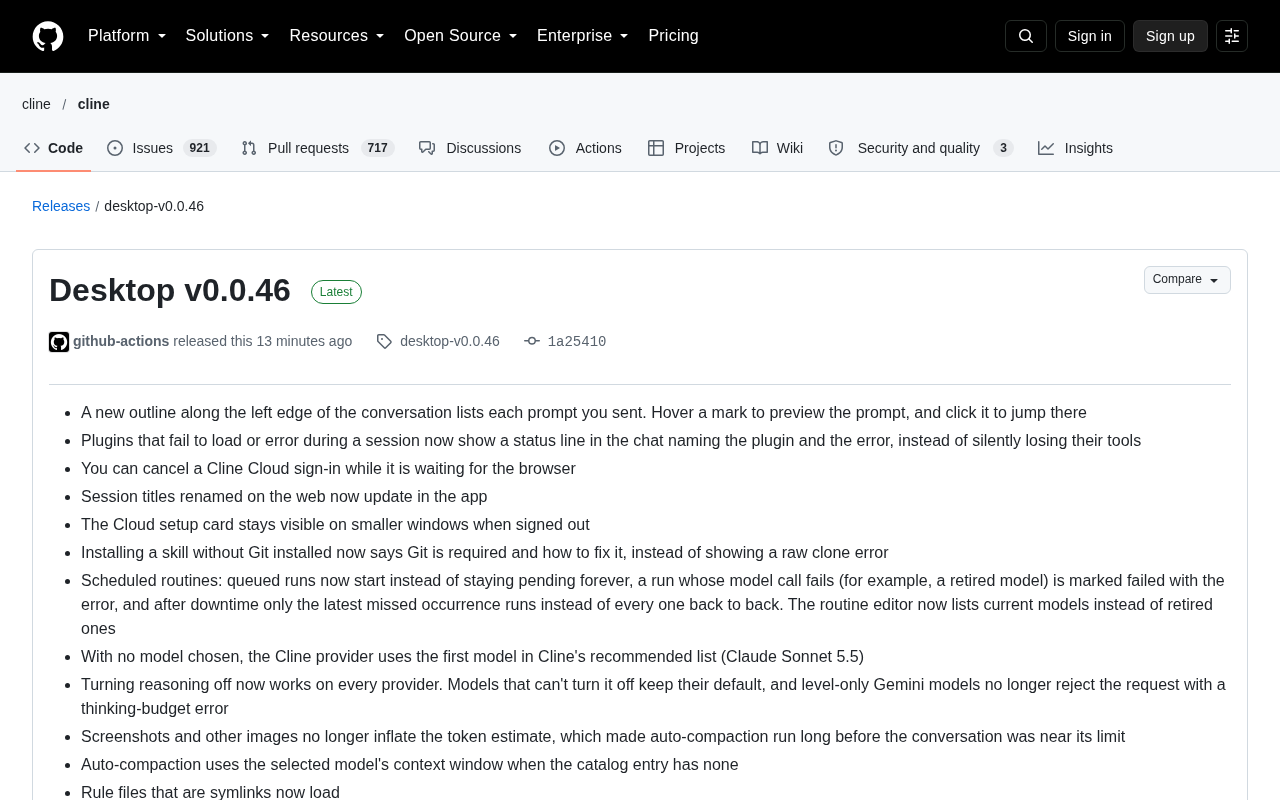
The new version adds an outline bar along the left edge of the conversation, listing every prompt you've sent. Hovering over an outline marker previews the prompt content, and clicking jumps to the corresponding position.
For programming sessions that easily span dozens of turns, this change has real practical value. The previous pain point was having to manually scroll or search to get back to a key question; now it's a single click. Conversation titles renamed on the Web end also sync to the app, so there's no title inconsistency when using it across platforms.
Prompt refers to a piece of input text a user submits to an AI model; in large model applications, it usually means the message the user sends in a single turn of conversation. A complete session in a programming AI tool often consists of dozens of prompts alternating with corresponding model replies, where each prompt might be a code modification request, a snippet of error logs, or a follow-up question. Because these messages are arranged linearly in chronological order in the interface, once a session gets long, users trying to get back to a key question from a certain turn can only rely on scrolling or keyword search to locate it. A conversation outline is essentially extracting "user-side messages" separately into an index, keeping only the content and position of the questions, thereby downgrading linear browsing into catalog-style jumping. It's similar to a table of contents generated from headings in a document editor, except the granularity of entries is a turn of questioning rather than a chapter.
More Transparent Error Handling for Plugins and Skills
Plugin failure handling is another focus of this update. Previously, when a plugin failed to load or errored during operation, the tool would be silently removed, and users often didn't know what happened. Now a status line appears in the chat, clearly indicating which plugin errored and the error content.
Skill-related experience has also been patched:
- Installing skills in an environment without Git installed now prompts that Git is required and how to fix it, instead of throwing a raw clone error
- Skills under the
.claude/skillsdirectory can now be discovered - Symlinked rule files can now load properly
These changes point in the same direction: making failure reasons visible and actionable.
Skill in these tools generally refers to encapsulated, reusable capability units, such as best-practice rules for a language or a scaffolding generation process for a framework. They exist as files or directories, placed in designated paths by convention for the app to auto-discover. A common distribution method is cloning from a Git repository to a local directory, such as the conventional path .claude/skills. Therefore, a skill's normal operation depends on two prerequisites: a Git client installed in the environment, and skill files located in a directory the app scans. When Git is missing or the path isn't recognized, if the app only throws a low-level clone error, it's hard for users to tell which link in the chain went wrong. A symlink is a special file pointing to another file or directory, often used to mount skills or rule files into conventional directories without copying the actual content; whether such files can be correctly resolved is also part of the skill loading chain.
Reasoning Toggle and Model Catalog Refresh
There are several noteworthy adjustments at the model level. The ability to disable reasoning now covers all providers; models that can't disable reasoning retain default behavior, and Gemini models that only support level no longer reject requests due to thinking-budget errors.
The model catalog has been synchronized and refreshed, adding three new providers: AI/ML API, LowRouter, and Prime Inference. v0 provider now only offers the default model v0-1.5-md, OpenCode Go has switched to the new endpoint https://opencode.ai/inference/go/v1, and Step 5 Preview has been added to Cline's free list. Default models for multiple providers have changed, including 302.AI, CrossModel, Cortecs, DigitalOcean, NEAR AI Cloud, Ofox (Claude Haiku 5.5), DevPass, LLM Gateway, Meta (Muse Wonder 1.0), Aixy (GPT-6.1 Sol), CloudFerro Sherlock, Moark (GLM 5.3), Ambient, NanoGPT, Neuralwatt, and Novita AI.
One detail worth mentioning separately: when no model is selected, the Cline provider uses the first model in the recommended list (Claude Sonnet 5.5), reducing confusion for newcomers facing an empty model list.
Reasoning refers to a model outputting an internal thought process before giving its final answer, commonly seen in models that explicitly expose chain-of-thought capabilities. Enabling reasoning usually improves success rates on complex tasks, but at the cost of more output tokens, slower responses, and higher cost, so on simple tasks or when low latency is needed, users want to turn it off. Different providers have inconsistent interfaces for controlling reasoning: some use a boolean switch, some use numeric parameters like thinking budget, and some Gemini models only accept quantifiable level tiers. When a client sends a budget parameter to a model that only supports level, the request gets rejected due to invalid parameters. Abstracting "disabling reasoning" into a unified layer of capability, and falling back to default behavior when the model doesn't support it, is a common approach to shielding these provider differences.
Scheduled Task and Context Estimation Fixes
Scheduled routines have fixed several long-standing issues:
- Queued runs now actually start, instead of staying in pending state forever
- Runs where the model call fails (e.g., the model has been discontinued) are marked as failed with error information
- After downtime, only the most recent missed task runs, instead of catching up on all missed during the period
- The routine editor lists currently available models, no longer showing retired models
There's a significant fix in context management: screenshots and other images are no longer counted in token estimation. Previously, images inflated token counts, causing auto-compaction to trigger prematurely when the conversation was far from the limit. Now auto-compaction uses the selected model's context window, and falls back correctly even when the catalog entry doesn't provide it.
There's also a fix for the editor tool: some models previously passed null for text positions that needed replacement, and this issue has been resolved. Additionally, Cline Cloud login can now be canceled while waiting for the browser.
Context window refers to the maximum total tokens a model can receive in a single request; input history messages, system prompts, attachments, and output all consume its quota. A token is the smallest unit a model processes text in; an English word typically corresponds to one or two tokens, while images in most multimodal models are converted into a large number of tokens, with consumption depending on resolution and encoding method. When a conversation accumulates close to the window limit, the app triggers auto-compaction, summarizing earlier conversation to free up space. If an image's token count is estimated on the high side, compaction will trigger prematurely when the conversation is still far from the limit, wasting historical details. The compaction threshold should be based on the actual declared window size of the selected model, and when the model catalog doesn't provide that field, a reasonable fallback value is needed.
Summary
v0.0.46 isn't a big feature-leap update, but several fixed issues are quite critical—silent plugin failures, stuck scheduled tasks, and premature compaction caused by images are all problems that genuinely affect daily use. The addition of the conversation outline fills the gap in long-session navigation. Full changes can be found in the changelog from v0.0.45 to v0.0.46.
Related articles

How Big Can Stars Really Get? The Physical Limits of the Largest Stars
Red supergiants are the largest stars by volume, with radii up to 2,000 times the Sun, engulfing the inner solar system. But there is no precise upper limit on stellar size—models predict up to 15,000 solar radii. The most massive blue stars are far smaller than red supergiants—biggest and heaviest are two different things.

Apple HomeView Smart Display Full Feature Breakdown: Wall-Mount or Desktop, $299
Apple launches HomeView, a $299 smart display with wall-mount and desktop options, 12MP camera for facial recognition, smart home control, music playback, and recipe step-by-step cooking. Full breakdown of watch faces, apps, privacy, and cooking integration.

Where Did the Promised New Studio Go? Craft Computing Answers After Five Years
Craft Computing's host responds to viewer questions: the new studio promised five years ago was shelved as construction costs soared from $30,000 to $75,000, and was replaced by a 168-square-foot garage conversion.