Cline Hands-On Review: Can This Free Open-Source AI Coding Assistant Replace Copilot?

Hands-on review of Cline: a free, open-source AI coding agent for VS Code that rivals paid tools like Copilot.
This article provides a detailed hands-on review of Cline, a free open-source AI coding agent for VS Code. It covers the full setup process including connecting Google's free Gemini API, demonstrates building a complete to-do app with a single natural language prompt, and objectively compares Cline's agent-based approach against paid tools like GitHub Copilot and Cursor.
GitHub Copilot costs $10/month, Cursor costs $20/month—for individual developers and beginners, that's a significant ongoing expense. But few people realize that the VS Code ecosystem actually has a completely free, open-source AI coding agent tool hiding in plain sight: Cline. No subscription required, no credit card needed—pair it with a free AI model and you can write genuinely runnable code within minutes.
This article walks through a hands-on demonstration, covering Cline's installation and configuration process, and analyzes the core differences between it and mainstream paid tools like Copilot and Cursor.
What Is Cline: An AI Coding Agent, Not Autocomplete
Cline's greatest value isn't the "free" label—it's the positioning. It's an AI coding agent, which is fundamentally different from traditional code autocomplete tools.
This distinction is critical. Early Copilot primarily "predicted what you'd write next"—passive inline completion. Cline, on the other hand, can read your entire project folder, understand the context, then proactively create files, write code, and iterate continuously until it accomplishes the goal you've assigned.
From a technical architecture perspective, an AI coding agent is an intelligent system capable of autonomously planning, executing, and iterating on tasks. Code completion tools are essentially conditional probability generators—given the code snippet before the cursor, they predict the most likely subsequent token sequence. Agent architecture, however, introduces a "plan-execute-feedback" loop: it first understands the user's high-level goal, decomposes it into executable subtasks, executes them step by step, and adjusts strategy based on intermediate results. This architecture stems from reinforcement learning and the BDI (Belief-Desire-Intention) model in cognitive science, and has been widely validated in recent projects like AutoGPT and MetaGPT. In programming scenarios, an Agent can not only generate code but also perform file system operations, run terminal commands, analyze error outputs, and automatically fix issues—forming a closed-loop automated development workflow.
In other words, you give it a "task," not a "piece of code to complete." This paradigm shift from completion to agency is the mainstream direction of current AI coding tool evolution—Cursor's Composer and Copilot's Agent mode are both moving in this direction. What makes Cline special is that it's open-source, free, and embedded directly in the VS Code environment you're already familiar with.
Get Started in Five Minutes: Full Installation and Configuration Walkthrough
Step 1: Install the Cline Extension
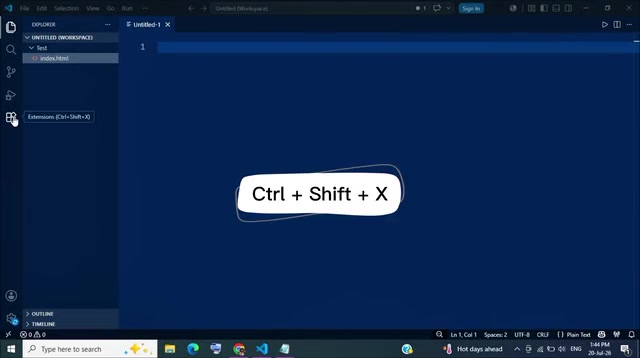
Installation is straightforward. In VS Code, press Ctrl + Shift + X to open the Extensions panel (or click the square icon in the left sidebar), type "Cline" in the search bar, and click install on the official version at the top. The whole process takes about 5 seconds.
It's worth noting that VS Code (Visual Studio Code) is an open-source code editor released by Microsoft in 2015, commanding over 70% of the developer editor market share as of 2024. One of its core competitive advantages is its Extension ecosystem—VS Code Marketplace hosts over 50,000 extensions covering language support, debugging tools, themes, AI assistance, and more. Extensions integrate deeply with the editor through VS Code's Extension API, accessing core capabilities like the file system, terminal, and editor views. Cline leverages this open architecture to embed itself in VS Code as an extension, requiring no tool switching or new interface paradigms. This is also a structural advantage over Cursor's standalone IDE approach—users don't need to abandon their existing VS Code configurations, keyboard shortcuts, and other extensions.
After installation, Cline's icon appears in the sidebar. Click it to open the operation panel. On first launch, Cline prompts you to connect an API provider—this is the key step, because Cline itself doesn't contain an AI model. It needs a large language model connected as its "brain."
Step 2: Connect the Free Gemini API
This demonstration uses Google Gemini because it offers free quota without requiring a credit card—the lowest barrier to entry.
Google AI Studio is Google DeepMind's platform for developers to access large models. Its Free Tier allows developers to call Gemini series models without binding a paid account. Taking Gemini 2.0 Flash as an example, the free tier typically provides 15 requests per minute and 1,500 requests per day, with no charges for input or output tokens. This strategy is an important move by Google to compete with OpenAI and Anthropic in the LLM API market—attracting developer ecosystems by lowering entry barriers. Note that free tier data may be used for model improvement (depending on Google's latest terms of service), so users sensitive about data should carefully read the relevant privacy policies.
Here are the specific steps:
- Open Google AI Studio in your browser and sign in with your Google account;
- Click the key icon in the lower left, then select "Create API Key";
- Select an existing project or create a new one;
- Copy the generated API key (Note: the key is only displayed once—make sure to paste and save it to a secure location first).
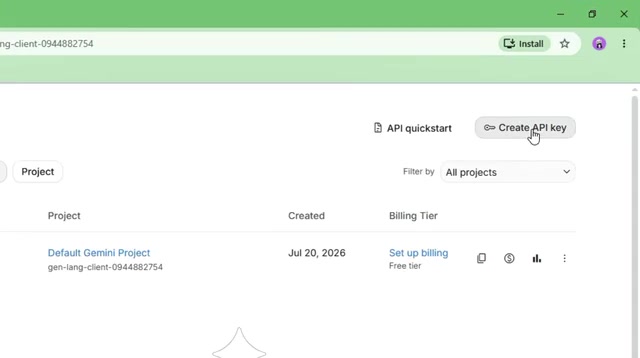
With the key in hand, return to VS Code, open Cline settings, select "Google Gemini" from the API provider dropdown, paste the key, choose a fast and free version from the Gemini model series, and click save. At this point, Cline is successfully connected to the free AI model—configuration complete.
Hands-On Demo: Building a To-Do App from Scratch with One Sentence
With configuration complete, the real test begins. The demo opens an empty project folder with the goal of having Cline build a to-do application from scratch with HTML, CSS, and JavaScript.
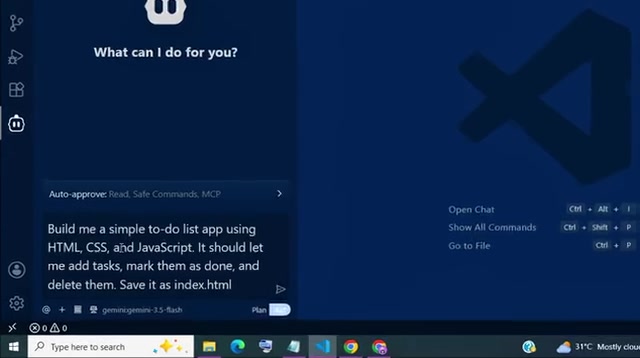
The entire process requires only one natural language instruction in plain English—no code written, no commands typed, just a description of the desired functionality. What happens next clearly illustrates the difference between an agent tool and a completion tool:
- Cline first reads the project folder, building an understanding of the current project context;
- Then it starts writing code directly into files, and you can clearly see what it's doing at each step;
- It sequentially creates an HTML file for page structure, writes CSS styles, and implements JavaScript interaction logic, completing the entire application in one go.
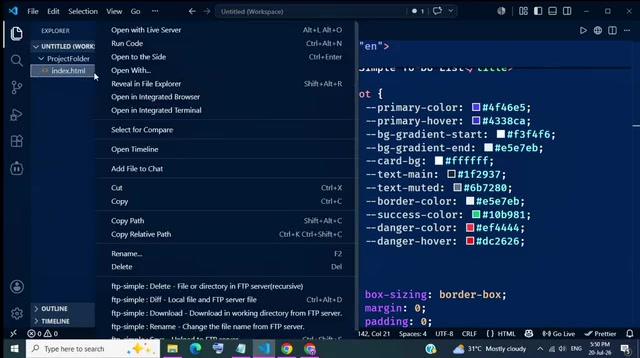
Opening it in the browser reveals a fully functional to-do app: you can add tasks, mark them complete, and delete tasks. All of this was built with just one sentence, at zero cost.
Continuous Conversational Iteration
What better demonstrates the agent capability is the subsequent iteration phase. Since Cline is an intelligent agent rather than a one-shot generation tool, you can continue the conversation to progressively refine the application. In the demo, it was asked to "redesign the UI: dark mode, rounded cards, modern layout," and the transformation was completed within seconds.
This is the core advantage of AI coding agents—it doesn't just complete a line of code, but understands your overall goal and keeps working until it's achieved. For programming beginners, this "chat and iterate" approach virtually eliminates the technical barrier between an idea and a finished product.
Objective Assessment: Advantages and Limitations of the Free Approach
While Cline performed impressively in the demo, rational technology selection requires noting several practical factors:
Model Capability Depends on the Connected API
Cline itself is the "shell"—actual coding quality is determined by the underlying LLM. While Gemini's free quota is generous, the free tier typically has rate limits (requests per minute or per day), which may constrain heavy usage. Additionally, there may be performance differences between free tier model versions and paid Pro versions—paid versions usually perform better on complex code reasoning tasks.
Agent Mode Consumes Large Amounts of Tokens
Because Cline needs to read the entire project context and perform multiple iteration rounds, even with free models, larger projects may quickly hit quota limits.
Understanding the token consumption mechanism is important here: Tokens are the basic units LLMs use to process text—typically one English word corresponds to 1-2 tokens, and one Chinese character to 1-3 tokens. In AI coding agent scenarios, token consumption is far higher than in regular conversations because each interaction requires the Agent to send the relevant file contents of the entire project as context to the model. For example, a project with 10 files totaling 3,000 lines of code might consume 15,000-20,000 tokens just for context; adding the Agent's Chain-of-Thought reasoning and generated code output, a single complete task execution might consume 50,000-100,000 tokens. This is why million-token context windows from models like Gemini are especially important for Agent scenarios—they can "see" more project files at once, reducing information loss.
At that point, you may need to connect a paid API (like Claude, GPT-4, etc.) for the best experience—at which point "free" is no longer absolute.
Open Source Brings Transparency and Control
Compared to the closed-source Copilot and Cursor, Cline's open-source nature lets developers clearly see every operation it performs—code changes are fully visible before and after. This is a clear advantage in terms of security and auditability, especially suitable for teams and individuals with data privacy requirements.
The security advantage of open-source software follows "Linus's Law"—"given enough eyeballs, all bugs are shallow." For AI coding tools, this principle is particularly critical because such tools need access to users' complete codebases. With closed-source tools, data flow paths are opaque to users: Is the code uploaded to remote servers? Is it used for model training? These questions can only be answered by relying on the vendor's privacy policy promises. As an open-source project (MIT License), Cline's source code is fully public on GitHub, allowing anyone to audit its data handling logic—confirming whether code leaves the local machine and what content is transmitted in API calls. For enterprise developers and teams handling sensitive business code, this auditability is an important consideration during tool selection.
Conclusion: Who Should Use Cline
For budget-constrained individual developers, students, and programming beginners, Cline offers an extremely cost-effective path: get agent-level AI coding capabilities at zero cost within the familiar VS Code environment. It may not fully replace Copilot or Cursor in every scenario, but the combination of "open-source + free + connectable to any model" makes it a choice that shouldn't be overlooked.
If you're still hesitating over monthly AI coding subscription fees, take five minutes to install Cline and let it write your first application for you.
Related articles

Chain of Thought Isn't Just for AI: How Humans Can Use CoT to Improve Thinking Quality
Chain of Thought isn't just a prompt trick for large models. Starting from a Hacker News discussion, this article analyzes why CoT works for human thinking too, breaks down actionable ways to transfer it, and highlights the key differences between human CoT and machine CoT.
Cloudflare Teams Up with OpenAI: Closi…
Cloudflare Teams Up with OpenAI: Closing the Loop from Vulnerability Discovery to Defense with AI
Cloudflare uses OpenAI Daybreak to investigate security vulnerabilities and generate reviewable remediation plans, while developers use Codex to boost coding efficiency and quality.

Orca Multi-Agent Orchestration in Practice: A Guide to Parallel Collaboration with Claude and Codex
Orca is Stable AI's free open-source agent workbench supporting 34 agents like Claude Code and Codex in parallel. Learn its Git worktree isolation, multi-model orchestration, and mobile management.